Instant Real Estate Lead Response with Gmail and Google Sheets
📋 HOW IT WORKS • Any website form (WordPress, Webflow, Typeform, Jotform, Zapier…) posts the enquiry to the webhook • The lead is normalized (any field names), validated and scored 0-100: phone, timeline, budget, property reference, financing keywords • It is saved in Google Sheets; repeat enquiries update the same row (stable Lead ID) • The lead instantly receives a personalized email for buying, selling (valuation offer) or renting, with your booking link • Hot leads trigger an alert to you; the form receives a JSON answer (invalid posts get HTTP 422) ⚙️ SETUP STEPS • About 10 minutes: create a Google Sheet with a "Leads" tab (columns below), import the workflow, connect Google Sheets and Gmail, fill the Config node (Sheet ID, agency, email, booking link), publish and paste the webhook URL into your form • Requires n8n 2.x (Cloud or self-hosted) and a Google account. No community nodes, no API keys ℹ️ ADDITIONAL INFORMATION • "Leads" tab header row: Lead ID,Last Enquiry At,Name,Email,Phone,Intent,Property Ref,Budget,Timeline,Preferred Areas,Min Bedrooms,Property Type,Message,Source,Score,Temperature,Status,Follow-up Step,Last Contact At,Next Follow-up At,Notes • Sticky-note documentation inside the workflow; email texts and scoring weights are easy to edit in one Code node • No credentials or personal data inside • Tested on n8n 2.41 with an automated test suite and a live run on real Google Sheets and Gmail • Part of the Real Estate Automation Kit (5 workflows) by the same seller
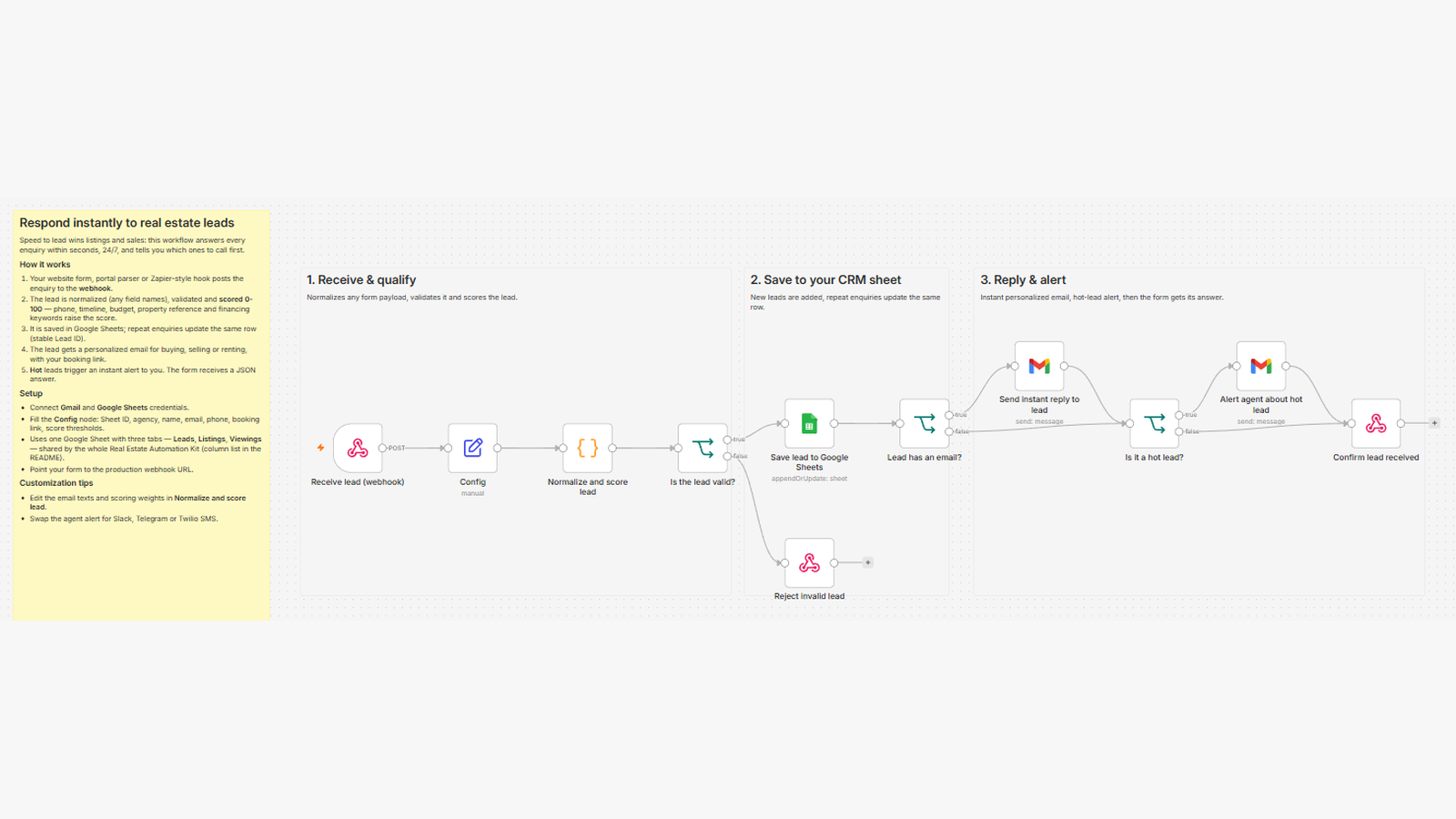
📋 HOW IT WORKS • Any website form (WordPress, Webflow, Typeform, Jotform, Zapier…) posts the enquiry to the webhook • The lead is normalized (any field names), validated and scored 0-100: phone, timeline, budget, property reference, financing keywords • It is saved in Google Sheets; repeat enquiries update the same row (stable Lead ID) • The lead instantly receives a personalized email for buying, selling (valuation offer) or renting, with your booking link • Hot leads trigger an alert to you; the form receives a JSON answer (invalid posts get HTTP 422)
⚙️ SETUP STEPS • About 10 minutes: create a Google Sheet with a "Leads" tab (columns below), import the workflow, connect Google Sheets and Gmail, fill the Config node (Sheet ID, agency, email, booking link), publish and paste the webhook URL into your form • Requires n8n 2.x (Cloud or self-hosted) and a Google account. No community nodes, no API keys
ℹ️ ADDITIONAL INFORMATION • "Leads" tab header row: Lead ID,Last Enquiry At,Name,Email,Phone,Intent,Property Ref,Budget,Timeline,Preferred Areas,Min Bedrooms,Property Type,Message,Source,Score,Temperature,Status,Follow-up Step,Last Contact At,Next Follow-up At,Notes • Sticky-note documentation inside the workflow; email texts and scoring weights are easy to edit in one Code node • No credentials or personal data inside • Tested on n8n 2.41 with an automated test suite and a live run on real Google Sheets and Gmail • Part of the Real Estate Automation Kit (5 workflows) by the same seller
New buyers can create an account from the cart to unlock a controlled $10 first-purchase credit on eligible orders of $25+.
Related bundle
WhatsApp Business Automation
7 hand-picked workflows for $39.00.
That is $5.57 each, vs $29.00 for this one alone.
View bundleSecure checkout powered by Stripe
Support
How to import this workflow into n8n
- 1Purchase or download the workflow to get the n8n workflow JSON file.
- 2In your n8n instance, open Workflows and choose "Import from File" (or paste the JSON with Ctrl+V on the canvas).
- 3Open each node marked with a credential warning and connect your own accounts and API keys.
- 4Run the workflow once manually to verify the data flow, then toggle it to Active.
Related workflows
- Automate Personal Life Management with Telegram and Google Services$14.99
- Launch Your First AI-Powered Chatbot with Actionable Tools$9.99
- Automate Multilingual Customer Support with AI Voice Agent and Calendar Integration$9.99
- Nutrition Tracker & Meal Logger with Telegram, Gemini AI, and Google Sheets$24.99
- Automate AI Video Creation and Social Media Publishing$24.99
- Automate AI-Generated Virtual Try-On Images for WooCommerce$14.99
More from Community
Need this deployed? We'll set it up for you.
Our automation experts deploy this workflow in your stack, connect your accounts, and verify it works — or build a custom solution from scratch.