Seamless Bitrix24 Chatbot Integration with Webhook Automation
This workflow automates the integration of a Bitrix24 chatbot using webhooks, enhancing communication efficiency.
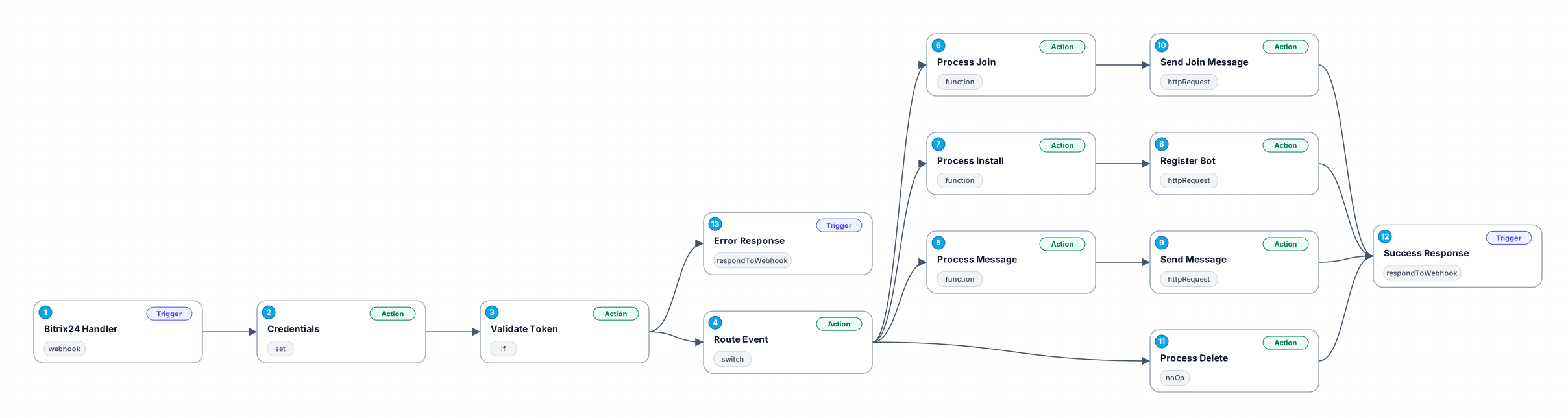
The Bitrix24 Chatbot Application Workflow with Webhook Integration is designed to streamline the interaction between users and the Bitrix24 platform. By utilizing webhooks, this workflow allows for real-time data exchange, making it easier for businesses to manage their customer communication effectively. With this automation, users can set up a chatbot that responds instantly to inquiries, ensuring that no message goes unanswered.
This workflow is particularly beneficial for organizations looking to enhance their customer support and engagement strategies. By automating responses through the chatbot, businesses can provide 24/7 support, reducing the need for constant human oversight. Moreover, it allows for the collection of valuable data from customer interactions, which can be used to refine services and improve user satisfaction.
In addition to customer support, the Bitrix24 chatbot can be employed for various use cases, including lead generation, appointment scheduling, and feedback collection. This versatility makes it an invaluable tool for any organization aiming to improve operational efficiency and customer experiences. The integration of webhooks simplifies the setup process, allowing users to focus on optimizing their chatbot's functionality rather than dealing with complex configurations.
By implementing this workflow, businesses can enjoy a significant reduction in response times and an increase in customer engagement, ultimately leading to higher conversion rates and enhanced customer loyalty.
New buyers can create an account from the cart to unlock a controlled $10 first-purchase credit on eligible orders of $25+.
Related bundle
YouTube Creator Pipeline
8 hand-picked workflows for $39.00.
That is $4.88 each, vs $10.57 for this one alone.
View bundleSecure checkout powered by Stripe
Support
How to import this workflow into n8n
- 1Purchase or download the workflow to get the n8n workflow JSON file.
- 2In your n8n instance, open Workflows and choose "Import from File" (or paste the JSON with Ctrl+V on the canvas).
- 3Open each node marked with a credential warning and connect your own accounts and API keys.
- 4Run the workflow once manually to verify the data flow, then toggle it to Active.
Related Personal workflows
- SEO Data Analyst Workflow for E-commerce Insights$24.99
- Automated User Management and Data Processing Workflow$15.04
- AI Agent for Intelligent File Interaction in Supabase and Google Drive$19.99
- Automated Meditation Music Video Creation$19.99
- Instagram Reels Automation: Streamlined Content Creation & Publishing$19.99
- AI Powered Company Research Assistant for Competitive Analysis$19.99
More from Zainab Nair
Need this deployed? We'll set it up for you.
Our automation experts deploy this workflow in your stack, connect your accounts, and verify it works — or build a custom solution from scratch.