Automatically Sync New Service Provider Pro Clients to GetResponse Contacts
Effortlessly keep your contact lists up-to-date by automatically adding new clients from Service Provider Pro to GetResponse as contacts.
make
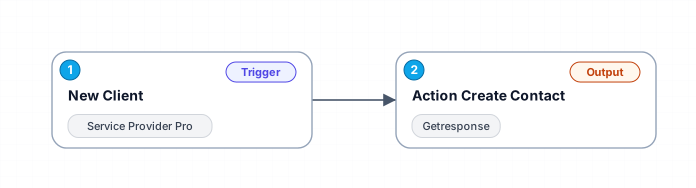
This workflow streamlines client management by ensuring that every new client added to Service Provider Pro is automatically synced to GetResponse as a contact. This eliminates the need for manual data entry, reduces errors, and ensures that your marketing campaigns reach the latest clients without delay.
Free
Last updated August 22, 2026
30-day money-back guarantee
Instant download
Lifetime updates included
Secure checkout powered by Stripe
Support
How to import this workflow into Make
- 1Purchase or download the workflow to get the Make blueprint JSON file.
- 2In Make, create a new scenario, click the three-dots menu, and choose "Import Blueprint".
- 3Reconnect each module to your own app connections when prompted.
- 4Run the scenario once to verify it, then set your schedule and turn it on.
Related Other workflows
- Build your first AI agent$9.99
- Automate Daily Lead Outreach from Google Sheets via Outlook$9.99
- Automate Lead Generation by Scraping Emails from Google Maps to Google Sheets$14.99
- Real-time crypto market analysis with GPT-4o-mini and CoinMarketCap APIs via Telegram$2.99
- Automate Comprehensive Jira Project Setup with AI and Form Integration$24.99
- Book and manage appointments with Google Calendar and Gmail$14.99
More from Pierre Nguyen
Need this deployed? We'll set it up for you.
Our automation experts deploy this workflow in your stack, connect your accounts, and verify it works — or build a custom solution from scratch.