
Hermes Tag: Bounded Context Selection for Hermes Agent on Feishu, Slack, and DingTalk
Bounded context selection for Hermes agent on Feishu, Slack, and DingTalk.
- Author
- DanielLi202
- Stars
- 3
- Language
- Python
- License
- MIT
- Upstream updated
- 2026-07-09

Hermes Tag is a context-selection layer for the Hermes agent runtime on Feishu/Lark, Slack, and DingTalk. Once wired up, an agent can retrieve specific images, notes, and relevant replies when @-mentioned, providing bounded evidence without processing entire chat histories.
What It Does
Hermes Tag brings Claude-Tag-style capability to Hermes on Feishu/Lark, Slack, and DingTalk. It overrides Hermes's built-in Feishu platform; it is not a new platform. Each enabled chat gets one shared agent identity, and it answers only when @-mentioned.
- Late @, full context. You can scatter context before you ever invoke it: images, a note, other people's replies. When you finally @-mention it, it reconstructs the right bounded evidence across time and media: the images' originals, your note, and the relevant discussion. Not just your trigger message; not the whole transcript.
- Per-chat memory, by design. Long-term memory is built only from @-mention interactions and stays scoped to that chat. One chat's memory never leaks into another, and never becomes your whole account history. There is no cross-channel "workspace memory"; that isolation is the privacy promise.
- Auditable, and it never stores your message bodies.
/tag admin auditreturns redacted events (scope, time, counts, never message text)./tag admin clear|disableremoves a chat's retained data. Theenabled_chatsallowlist is the only storage and processing boundary.
The ContextSelector chooses bounded evidence with focused_reply, thread, deictic_recent, and plain scopes instead of dumping the transcript. That means no full-history RAG and no ambient auto-answering.
Shipped now: bounded multimodal evidence, Tier-0/Tier-1 memory, per-chat isolation, admin lifecycle, and redacted audit on Feishu/Lark and Slack. DingTalk is also supported, but with reduced capability: DingTalk bots only receive messages that @-mention them in groups (no equivalent of Feishu's im:message.group_msg), so ambient group context (Tier-0) is not available there. Roadmap: deeper connector/source-binding parity. The Claude-Tag comparison is the goal the project measures against, not a claim that every Claude-Tag feature already ships.
Setup
Prerequisites
Before installing Hermes Tag, ensure your environment meets these requirements:
| Item | Requirement |
|---|---|
| hermes-agent | v2026.6.19 |
| lark-oapi | 1.6.9 |
| Python | >=3.11 |
| Required env | FEISHU_APP_ID + FEISHU_APP_SECRET |
These pins are a project convention; Hermes has no enforced compatibility mechanism.
Installation
Install the plugin using the Hermes CLI:
hermes plugins install DanielLi202/hermes-tag
If you are installing with an AI agent, point it at llms.txt and AGENTS.md. Those files are written for agent-driven install and configuration. This README is for humans.
Configuration
After installation, configure the plugin in your Hermes configuration file. The following YAML block shows the required structure:
plugins:
  enabled:
    - hermes-tag
platforms:
  feishu:
    require_mention: false   # so unmentioned group messages reach the adapter for Tier-0 context
    extra:
      feishu_tag:
        enabled: true
        enabled_chats: [oc_xxx_pilot_chat]
        bot_open_id: ou_xxx_bot_open_id
        granted_scopes: [im:message.group_msg]
        admins: [ou_xxx_admin_open_id]
        encryption_posture: plaintext-db-on-local-disk
bot_open_id and admins must be Feishu open_id values (ou_...). This plugin does not need contact:user.employee_id:readonly; it normalizes sender identity to open_id even when that scope is granted.
On first use, Hermes Tag live-verifies granted_scopes against the Feishu app and DMs configured admins if the config claims im:message.group_msg but the app does not actually hold it. That catches the silent failure mode where non-@ group messages are never delivered, so Tier-0 group context stays @-only.
Full onboarding and live verification details are in after-install.md. Slack setup is documented in docs/slack-setup.md. DingTalk setup and its capability limits are in docs/dingtalk.md. If something looks broken, check docs/known-limits.md. It maps common symptoms to Feishu-platform or hermes-core limits that this plugin cannot fix.
Configuration Reference
Plugin Configuration Fields
| Field | Description | Default |
|---|---|---|
enabled | Whether the feishu_tag extra is active. | false |
enabled_chats | List of chat IDs (e.g., oc_xxx_pilot_chat) where the plugin is active. | [] |
bot_open_id | The Feishu open_id of the bot (must be ou_... format). | (required) |
granted_scopes | List of Feishu event scopes the app has been granted. Must include im:message.group_msg for Tier-0 group context. | [] |
admins | List of Feishu open_ids for users who can run admin /tag commands (must be ou_... format). | [] |
encryption_posture | Declares how data is stored. The only documented value is plaintext-db-on-local-disk. | plaintext-db-on-local-disk |
Context Scopes
The ContextSelector uses these scopes to choose bounded evidence:
| Context scope | Meaning |
|---|---|
focused_reply | Explicit reply: narrow to that parent as evidence. |
thread | Real thread without explicit reply: narrow to that thread as evidence. |
deictic_recent | "上面那张图" / "the image above": nearest recent media. |
plain | Bounded recent text. |
Memory Tiers
| Memory tier | Behavior |
|---|---|
Tier-0 | Short-term per-chat buffer, TTL/count evicted. |
Tier-1 | Long-term, @-derived, consolidated, tombstoned on delete. |
How It Works
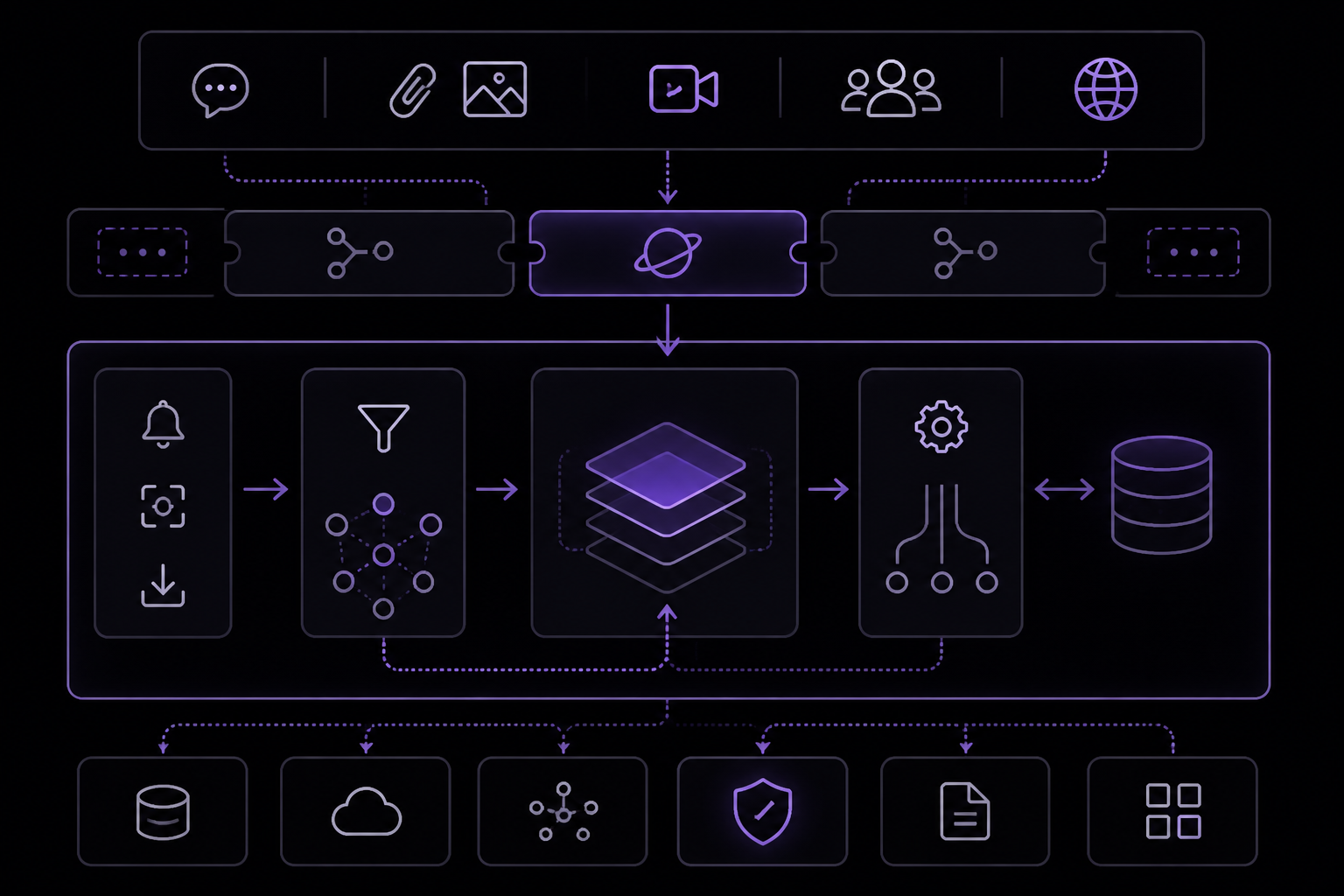
Hermes Tag is a context-selection layer that overrides Hermes's built-in Feishu platform. It is not a new platform. The architecture is built around a platform-agnostic base with a narrow seam for each supported chat platform.
Project Structure
The key modules are:
src/hermes_tag/core.py, config, sqlite store, TagEngine, PlatformSeam.src/hermes_tag/context.py, ContextSelector: the bounded-evidence selector.src/hermes_tag/base.py, TagAdapterMixin: the platform-agnostic orchestration.src/hermes_tag/platforms/feishu.py, Feishu binding: mention detection, media fetch/download, registration.src/hermes_tag/platforms/slack.py, Slack binding: mention detection, media buffering, registration.src/hermes_tag/platforms/dingtalk.py, DingTalk binding:is_in_at_listmention detection, registration (reduced capability).src/hermes_tag/i18n.py, locale strings.src/hermes_tag/adapter.py, back-compat re-export shim.
The platform-agnostic base plus a narrow seam means each platform is a thin add; the generic policy is written once for all of them.
Data Flow
- Messages arrive in an enabled chat. Because
require_mentionis set tofalsein the Feishu platform config, unmentioned group messages also reach the adapter for Tier-0 short-term context. - When a user @-mentions the bot, the platform binding detects the mention and triggers the
TagEngine. - The
ContextSelectorevaluates the available context scopes (focused_reply,thread,deictic_recent,plain) to build a bounded evidence set. - The evidence set includes the original images, the user's note, and relevant replies. It does not include the full chat history.
- The agent responds based on that bounded evidence.
- Only @-mention interactions create Tier-1 long-term memory, which is stored in a local SQLite database and scoped to that specific chat.
Security Model
- The
enabled_chatsallowlist is the storage and processing boundary. - All messages in enabled chats may be buffered locally as Tier-0 short-term context.
- Only @-mention interactions create Tier-1 long-term memory.
- The declared
encryption_postureisplaintext-db-on-local-disk. - Admins can run
/tag admin clearor/tag admin disableto remove retained plugin data for a chat, and/tag admin auditto inspect redacted activity. - Audit events record startup, storage, admin, standing-job, and lifecycle actions, never message bodies.
Requirements and Limitations
Requirements
- hermes-agent
v2026.6.19 - lark-oapi
1.6.9 - Python
>=3.11 - Environment variables
FEISHU_APP_IDandFEISHU_APP_SECRETmust be set.
Limitations
- DingTalk reduced capability: DingTalk bots only receive messages that @-mention them in groups. There is no equivalent of Feishu's
im:message.group_msg, so ambient group context (Tier-0) is not available on DingTalk. - No cross-channel memory: Per-chat memory isolation means there is no cross-channel "workspace memory." That isolation is the privacy promise.
- Not a full Claude-Tag clone: The Claude-Tag comparison is the goal the project measures against, not a claim that every Claude-Tag feature already ships. Roadmap items include deeper connector/source-binding parity.
- Plaintext storage: The declared
encryption_postureisplaintext-db-on-local-disk. This is a security consideration for any deployment handling sensitive data. - No enforced compatibility: The version pins for hermes-agent and lark-oapi are a project convention; Hermes has no enforced compatibility mechanism.
Troubleshooting
Silent Failure: Non-@ Group Messages Not Delivered
Symptom: Tier-0 group context stays @-only even though the config claims im:message.group_msg.
Fix: On first use, Hermes Tag live-verifies granted_scopes against the Feishu app and DMs configured admins if the config claims im:message.group_msg but the app does not actually hold it. Ensure the Feishu app has been granted the im:message.group_msg scope in the Feishu developer console. The live verification catches this silent failure mode.
Plugin Not Responding
Symptom: The bot does not respond to @-mentions.
Fix: Check that require_mention is set to false in the Feishu platform config. If it is true, unmentioned group messages will not reach the adapter, and the plugin may not receive the context it needs. Also verify that enabled_chats includes the correct chat ID and that bot_open_id is a valid Feishu open_id.
Unknown Errors
Symptom: Something looks broken but the error is not obvious.
Fix: Check docs/known-limits.md. It maps common symptoms to Feishu-platform or hermes-core limits that this plugin cannot fix. The documentation is designed to help you distinguish between a plugin bug and a platform limitation.
Admin Commands Not Working
Symptom: /tag status or other admin commands return no output or an error.
Fix: Ensure the user running the command is listed in the admins configuration field. Admin commands require @-mention in groups. Verify that the user's open_id is correctly formatted (ou_...).
Sources & References
This page was researched from 2 independent sources, combined and verified for completeness.
- 1.DanielLi202/hermes-tagBlog · primary source
- 2.DanielLi202/hermes-tag READMEOfficial documentation
The #1 AI Newsletter
The most important ai updates, guides, and fixes — one weekly email.
No spam, unsubscribe anytime. Privacy policy