
HyperNatt Terminal: BTC Decision Context for Hermes Agent via MCP
Connect Hermes Agent to live BTC/USDC decision context from a Hyperliquid vault via MCP.
- Author
- DIALLOUBE-RESEARCH
- Stars
- 3
- Language
- JavaScript
- License
- MIT
- Upstream updated
- 2026-07-17

What It Does
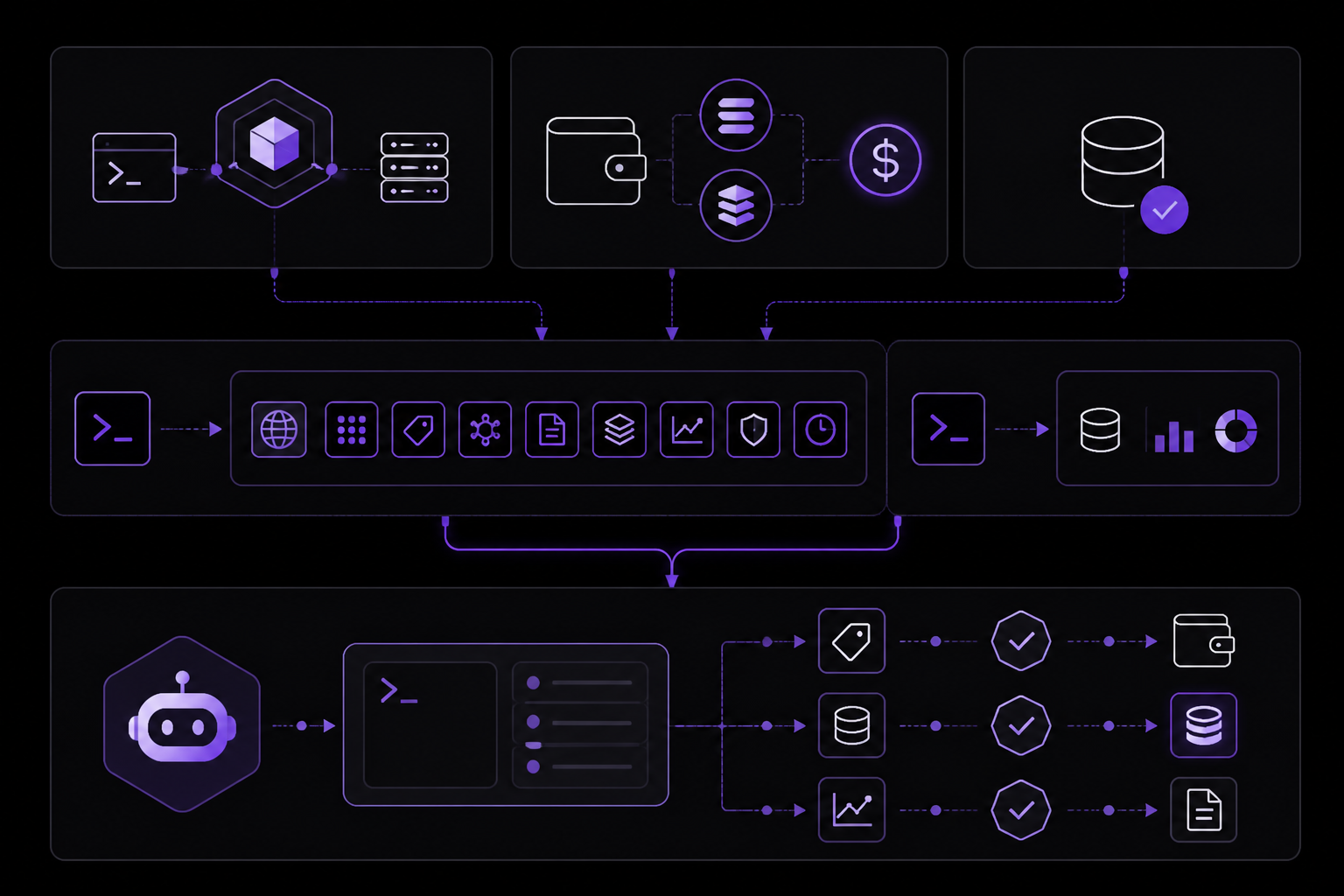
HyperNatt Terminal connects a Hermes Agent to live, read-only BTC/USDC decision context sourced from a production Hyperliquid vault (the Mimo stack). Once wired up, the agent can call nine tools that provide market-making trap/sweep/reclaim state, hunt scores, cycle signals, regime similarity data, liquidation radar, signed vault proofs, and cross-chain swap quotes routed through Li.Fi. The terminal is an MCP (Model Context Protocol) server, so any MCP-capable client, including Hermes Agent, can use it.
Concrete capabilities from the sources:
- Read-only BTC/USDC decision context from a live Hyperliquid vault.
- Nine tools total, including vault proofs and cross-chain swap functionality via Li.Fi.
- Signed vault proofs that can be verified on-chain.
- MM trap/sweep/reclaim state detection.
- Hunt score, cycle signal, and regime similarity measurements.
- Liquidation radar data.
- Cross-chain swap quoting and execution (user signs own transaction; 0.5% fee).
- Streamable HTTP transport (v2.5.11).
- Pricing via x402 micropayments at $0.001 per call (USDC on Base and Solana).
According to the official documentation, HyperNatt Terminal is "not a generic market-data wrapper" and provides "read-only BTC/USDC context, not trade advice." It explicitly states "no custody, no key access, read-only Decision Core, x402 you control, public code."
Setup
Prerequisites
- A Hermes Agent instance (or any MCP-compatible client).
- For paid tools: a wallet capable of sending USDC on Base or Solana for x402 micropayments.
- No wallet is needed for the free tools (manifest, signed vault proof, swap quotes).
Quick Test Without Installation
Both sources provide a way to test the terminal with zero setup. Run these curl commands from any terminal:
curl -s https://hypernatt.com/api/m2m/agent/manifest      # full catalog, free
curl -s https://hypernatt.com/api/m2m/proof-of-edge       # live vault data; edge measurement preliminary, verify on-chain
The first call returns the full catalog of nine tools, their prices, and ecosystem links. The second returns live vault data. Both are free and require no authentication.
Connecting from Hermes Agent
To connect a Hermes Agent to HyperNatt Terminal, you need to configure the agent to use the MCP protocol endpoint. The sources do not provide a Hermes-specific configuration file, but they describe the general MCP connection pattern:
- Point your MCP client to the MCP URL on the domain
https://hypernatt.com/mcp/protocol. - Call
get_agent_manifestfirst. The sources state: "Call get_agent_manifest first." - After the manifest is returned, the agent can call any of the nine tools.
For a human using Claude as a test, the sources show this path: "Claude → Settings → Integrations → Add connector → MCP URL on the domain above (/mcp/protocol), then ask: 'Call get_vault_proof, then get_mm_trap_state, is the MM trapping?'" The same MCP URL works for Hermes Agent.
Running a Local Python Example
Both sources include a runnable Python example that uses only the standard library and requires no wallet:
python examples/btc_trap_aware_min.py
This script is part of the repository at examples/btc_trap_aware_min.py. It demonstrates how to call the terminal's tools programmatically.
Authentication and Payments
Paid tools use the x402 protocol for micropayments. According to the sources, "Pricing: flat $0.001 per call via x402 (USDC on Base + Solana) - no subscription required." The five Decision Core tools cost $0.001 each. The first call per tool is free (intro). The HOLD on get_btc_usdc_signal is not charged. There is no daily credit pool.
Free tools include: manifest, signed vault proof, and swap quotes. Cross-chain swaps route through Li.Fi, and the user signs their own transaction. Li.Fi charges a 0.5% fee.
For heavy use, the sources mention two alternatives: "swap-earned quota or the $5/mo Agent Pass (~15,000 Decision Core credits, ~67% below paygo)."
Configuration Reference
The sources document the following configuration points:
| Option | Description | Default / Notes |
|---|---|---|
| MCP URL | The endpoint for MCP protocol communication | https://hypernatt.com/mcp/protocol |
| x402 payment | Per-call micropayment in USDC on Base or Solana | $0.001 per call; first call per tool free |
| Agent Pass | Monthly subscription for heavy use | $5/mo, ~15,000 Decision Core credits |
| Li.Fi swap fee | Fee for cross-chain swaps | 0.5% |
| Streamable HTTP | Transport protocol version | v2.5.11 |
get_agent_manifest | First call required to get tool catalog | Free |
get_vault_proof | Signed vault proof tool | Free |
get_mm_trap_state | MM trap/sweep/reclaim state tool | Paid (Decision Core) |
get_btc_usdc_signal | BTC/USDC signal tool | HOLD not charged |
How It Works
HyperNatt Terminal operates as an MCP server using Streamable HTTP transport (version 2.5.11). The sources describe it as "one agent-facing brick" in the larger HyperNatt platform, which includes a vault, assistant, and ecosystem at https://hypernatt.com.
The data flow works as follows:
- The agent (Hermes or any MCP client) sends a request to the MCP URL.
- The terminal responds with tool definitions or tool results.
- For paid tools, the x402 protocol handles micropayment authorization before the response is returned.
- The terminal reads data from the live Hyperliquid vault (Mimo production stack) and returns it to the agent.
- For cross-chain swaps, the terminal provides a quote via Li.Fi, and the user signs the transaction themselves. The terminal does not hold custody.
The sources emphasize that the terminal is "read-only" and provides "decision context," not trade execution. The vault proof can be verified on-chain at the Hyperliquid vault address: 0x04e2eb302fe9ff23a9d1f2455084af624737a6d8. The public track record is available at https://hypernatt.com/stats.
Requirements and Limitations
Requirements
- An MCP-compatible client (Hermes Agent, Claude, Cursor, or any framework listed in the integrations documentation).
- For paid tools: a wallet with USDC on Base or Solana for x402 payments.
- No wallet needed for free tools.
Limitations
- The terminal provides read-only context only. It does not execute trades or hold custody of funds.
- The sources state: "Not a generic market-data wrapper, read-only BTC/USDC context, not trade advice."
- The edge measurement from
proof-of-edgeis described as "preliminary, verify on-chain." - The terminal is focused on BTC/USDC pairs only. It does not provide data for other trading pairs.
- The sources do not mention support for WebSocket transport; only Streamable HTTP is documented.
- The terminal is at version 2.5.11, and the sources do not specify backward compatibility guarantees.
Troubleshooting
Both sources mention a security model that can help diagnose issues: "no custody, no key access, read-only Decision Core, x402 you control, public code, verify yourself (SECURITY.md)." If a tool call fails, verify that:
- The MCP URL is correct:
https://hypernatt.com/mcp/protocol. - The first call is
get_agent_manifestas required. - For paid tools, the x402 payment is properly authorized. The sources note that the first call per tool is free, so test with that first.
- The vault proof can be independently verified on-chain at
https://app.hyperliquid.xyz/vaults/0x04e2eb302fe9ff23a9d1f2455084af624737a6d8.
If the agent receives unexpected results, the sources recommend checking the example responses at docs/example-responses.md in the repository and the full technical reference at docs/reference.md for manifest sections, REST API details, Docker setup, and pricing tables.
For swap-related issues, the sources point to docs/swap-agentkit.md (quote → sign → register flow) and docs/agent-swap-demo.md (wallet-first walkthrough). The example script swap_after_signal.py in the examples/ directory demonstrates a complete stdlib trap-to-swap flow.
If the terminal appears unresponsive, check the uptime badge from x402-list.com shown in the README. The sources include a badge URL: https://x402-list.com/services/hypernatt-terminal?utm_source=badge&utm_medium=referral&utm_campaign=embed.
Sources & References
This page was researched from 2 independent sources, combined and verified for completeness.
- 1.DIALLOUBE-RESEARCH/hypernatt-terminalBlog · primary source
- 2.DIALLOUBE-RESEARCH/hypernatt-terminal READMEOfficial documentation
The #1 AI Newsletter
The most important ai updates, guides, and fixes — one weekly email.
No spam, unsubscribe anytime. Privacy policy