
Back to Blog devchallenge
 githubcopilot
 agents
 githubcopilot
 agents
 jetson
 ai
ai
NotebookLM Enhancer - UPDATE ✨
Cesar Castillo February 4, 2026
0 views
This is a submission for the GitHub Copilot CLI Challenge Author: Cesar Castillo Repository:...
*This is a submission for the [GitHub Copilot CLI Challenge](https://dev.to/challenges/github-2026-01-21)*
**Author:** Cesar Castillo
**Repository:** https://github.com/CGCM070/NotebookLM_Enhancer
---
## From Chaos to Order ##
**🎉 UPDATE :** Just released **Smart Batch Delete** : delete multiple notes with one click! No more 60+ clicks to clean up 20 notes. Check out the new feature section below! 👇
- Building a Chrome Extension That Finally Organizes NotebookLM
## What I Built
A Chrome extension that transforms NotebookLM's chaotic sidebar into a beautifully organized folder system, because 47 research notes shouldn't look like a pile of digital laundry.
### The Problem That Drove Me Crazy
If you've used [NotebookLM](https://notebooklm.google.com), you know it's *magical* for research. Upload PDFs, paste URLs, ask questions it's like having a research assistant that never sleeps.
But there's one maddening catch: **the sidebar becomes a nightmare when you have more than 10 notes.**
Imagine:
- 15 research papers on Spring Framework
- 8 articles about microservices
- 12 random bookmarks you saved "for later"
- All. In. One. Giant. List.
No folders. No organization. Just... chaos.
### The Solution: NotebookLM Enhancer
I built a Chrome extension that injects a complete folder management system directly into NotebookLM's sidebar.
### Key Features
**🗂️ Smart Folder Organization**
- Create folders and subfolders (1 level deep keeping it simple!)
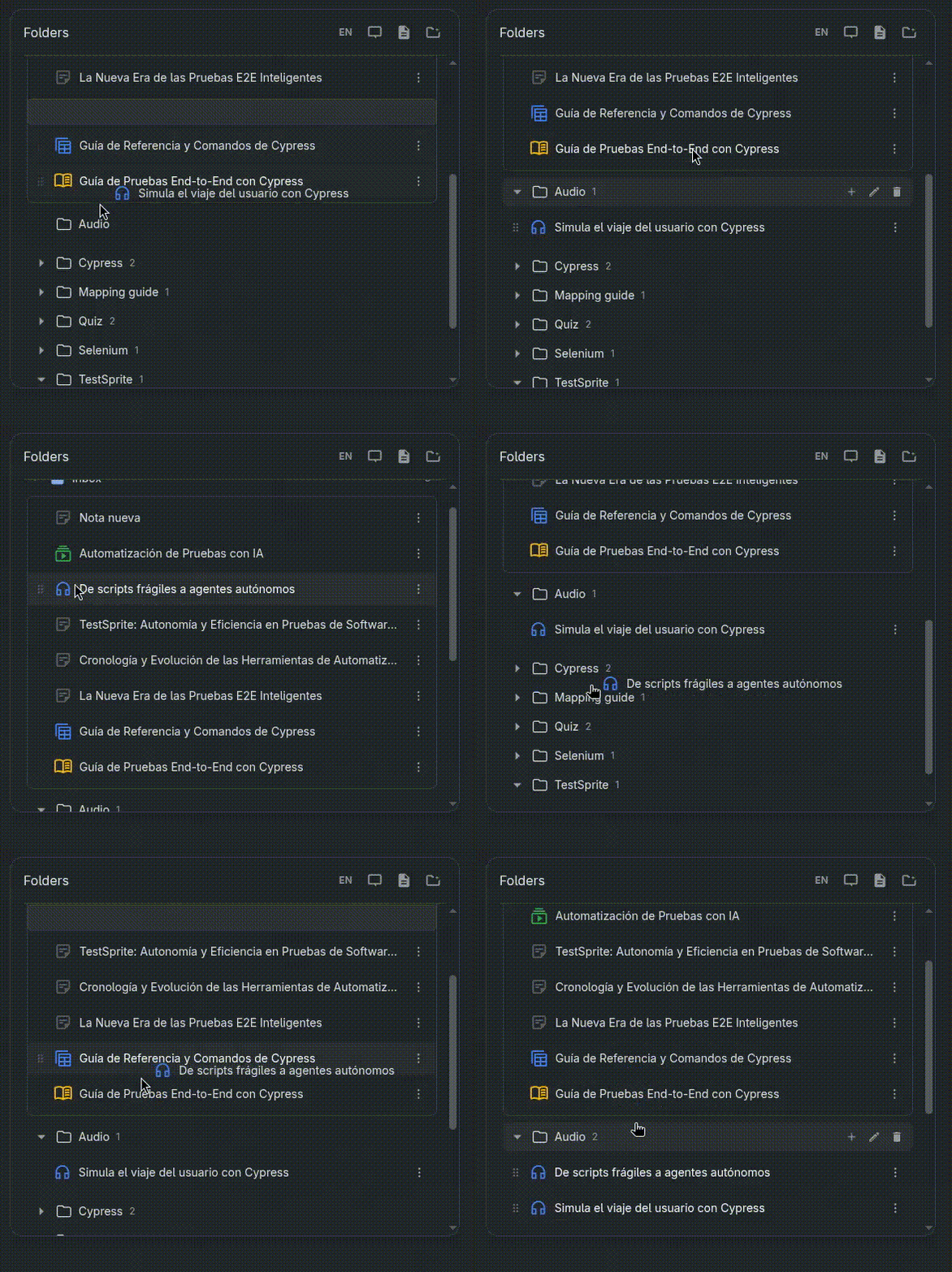
- Drag & drop notes between folders with smooth animations
- "Inbox" view for unassigned notes
- Each notebook project has isolated folders (no cross-contamination!)
**🧑🎨 Polished UI That Matches NotebookLM**
- Built with Angular + Tailwind CSS
- Dark/light/system theme toggle
- Minimalist design that feels native
- Smooth expand/collapse animations
**🌎Internationalization**
- Full i18n support (English/Spanish currently)
- One-click language switcher
- All UI text translatable
**💭Intelligent Integrations**
- Click any note → opens native NotebookLM
- Click 3-dots menu → native menu appears aligned to the right (matching native position)
- Drag notes from native sidebar → drops into our folders
- Add new notes button that triggers native NotebookLM
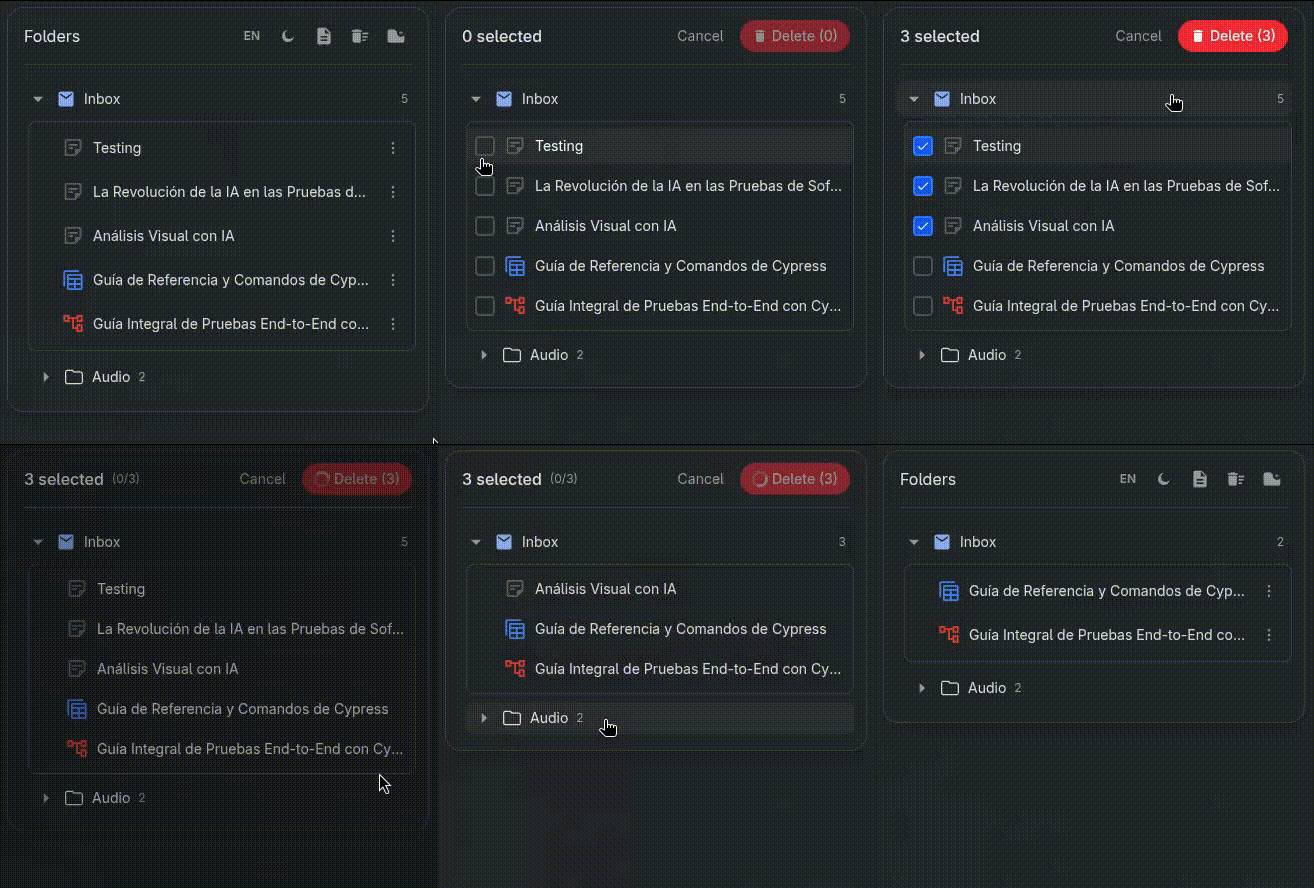
**🗑️ Batch Delete** *NEW!*
- Select multiple notes at once with checkboxes
- "Selection Mode" toggle with icon in header
- Click any row to toggle selection
- ESC key to cancel selection mode
- **Automatic confirmation** of NotebookLM's native delete modal - no manual interaction needed
**Robust Architecture**
- Chrome Extension MV3 (latest manifest version)
- Content Scripts + Shadow DOM for style isolation
- Iframe-based Angular app for the UI
- PostMessage bridge for iframe ↔ page communication
- chrome.storage.sync for persistence across devices
### Architecture Deep Dive
This isn't a simple content script that adds a few buttons. It's a full micro-frontend architecture:
```
┌─────────────────────────────────────────────────────────┐
│ NotebookLM Page │
│ ┌──────────────────────────────────────────────────┐ │
│ │ Native Sidebar (hidden but functional) │ │
│ │ • Still handles clicks & menus │ │
│ │ • We extract data from it │ │
│ └──────────────────────────────────────────────────┘ │
│ ↓ │
│ ┌──────────────────────────────────────────────────┐ │
│ │ Our Injected Host (Shadow DOM) │ │
│ │ ┌───────────────────────────────────────────┐ │ │
│ │ │ Iframe (Angular App) │ │ │
│ │ │ • Folder tree │ │ │
│ │ │ • Drag & drop (Angular CDK) │ │ │
│ │ │ • Theme toggle │ │ │
│ │ │ • Note add. folder add... │ │ │
│ │ │ • i18n │ │ │
│ │ └───────────────────────────────────────────┘ │ │
│ └──────────────────────────────────────────────────┘ │
└─────────────────────────────────────────────────────────┘
```
**Why an iframe inside Shadow DOM?**
- **Isolation:** NotebookLM uses Angular Material with global styles our iframe keeps our Tailwind styles pristine
- **Security:** Content scripts can't easily access iframe internals (and vice versa)
- **Performance:** Angular app runs independently without polluting the main page
**Communication Flow:**
1. Content script reads native DOM → extracts notebook data
2. PostMessage to iframe → Angular displays organized folders
3. User drags note to folder → PostMessage back to content script
4. Content script updates chrome.storage.sync
### Technical Decisions
**1. Storage V3 with Notebook Isolation**
Instead of one global folder structure, each NotebookLM project gets its own isolated state:
```typescript
// StorageStateV3
{
byNotebook: {
"uuid-abc-123": {
folders: [...],
notebookFolderByKey: {...}
},
"uuid-def-456": {
folders: [...],
notebookFolderByKey: {...}
}
}
}
```
This means your "Work" folder structure doesn't leak into your "Personal" research. Clean separation.
**2. Handling MV3 Service Worker Sleep**
Chrome MV3 Service Workers sleep after 30 seconds of inactivity. This breaks `chrome.runtime` calls.
Instead of fighting it with "keep-alive" hacks, we:
- Detect context invalidation gracefully
- Silently retry on the next frame
- Log to our own `NLE.log()` instead of spamming console.warn
**3. Native Drag Bridge**
Making the native NotebookLM sidebar items draggable was tricky. We:
- Hook `dragstart` on native items
- Create an invisible overlay above our iframe during drag
- Calculate drop target using `elementFromPoint()` with coordinates
- Result: Native notes can be dropped into our folders seamlessly
**4. One-Click Batch Delete**
Deleting notes in NotebookLM means:
1. Click 3-dots menu on a note
2. Click "Delete" option
3. Confirm in the modal
4. **Repeat for every single note** :(
With 20 notes to clean up? That's 60+ clicks
**Our Solution: One-Click Batch Delete**
- **Automatic Modal Handling**: Content script detects NotebookLM's confirmation dialog and clicks "Delete" automatically
- **Index Adjustment**: When notes are deleted, indexes shift - we compensate by tracking deletion count
- **RxJS State Management**: `BatchSelectionService` with `BehaviorSubjects` for reactive UI updates
**5. Auto-Focus Input in Modals**
Small UX detail that makes a huge difference:
- Create folder → input already focused, ready to type
- Rename folder → text is pre-selected, just type to replace
- No extra clicks needed
---
### 📸 Screenshots
**Before:**
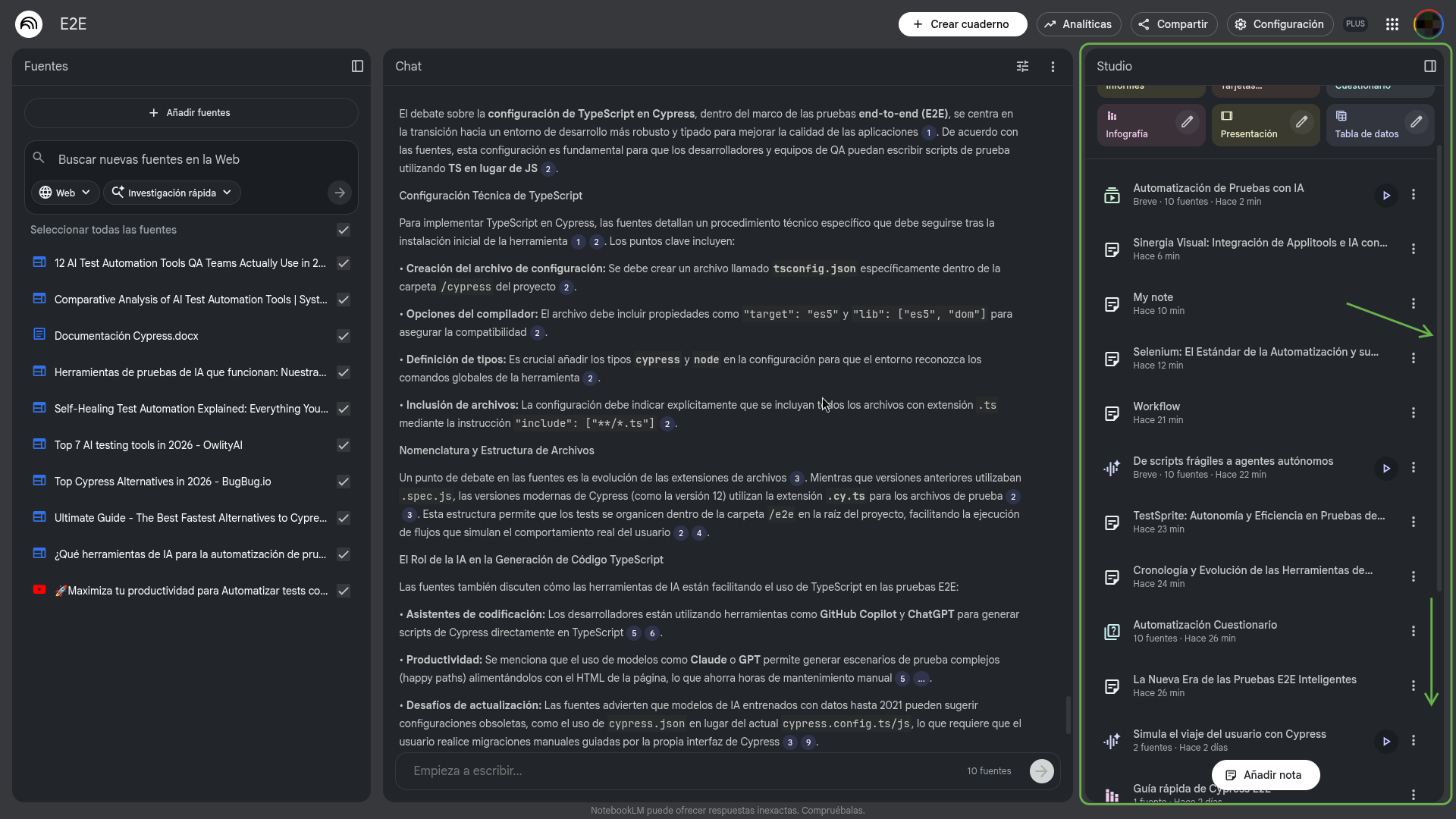
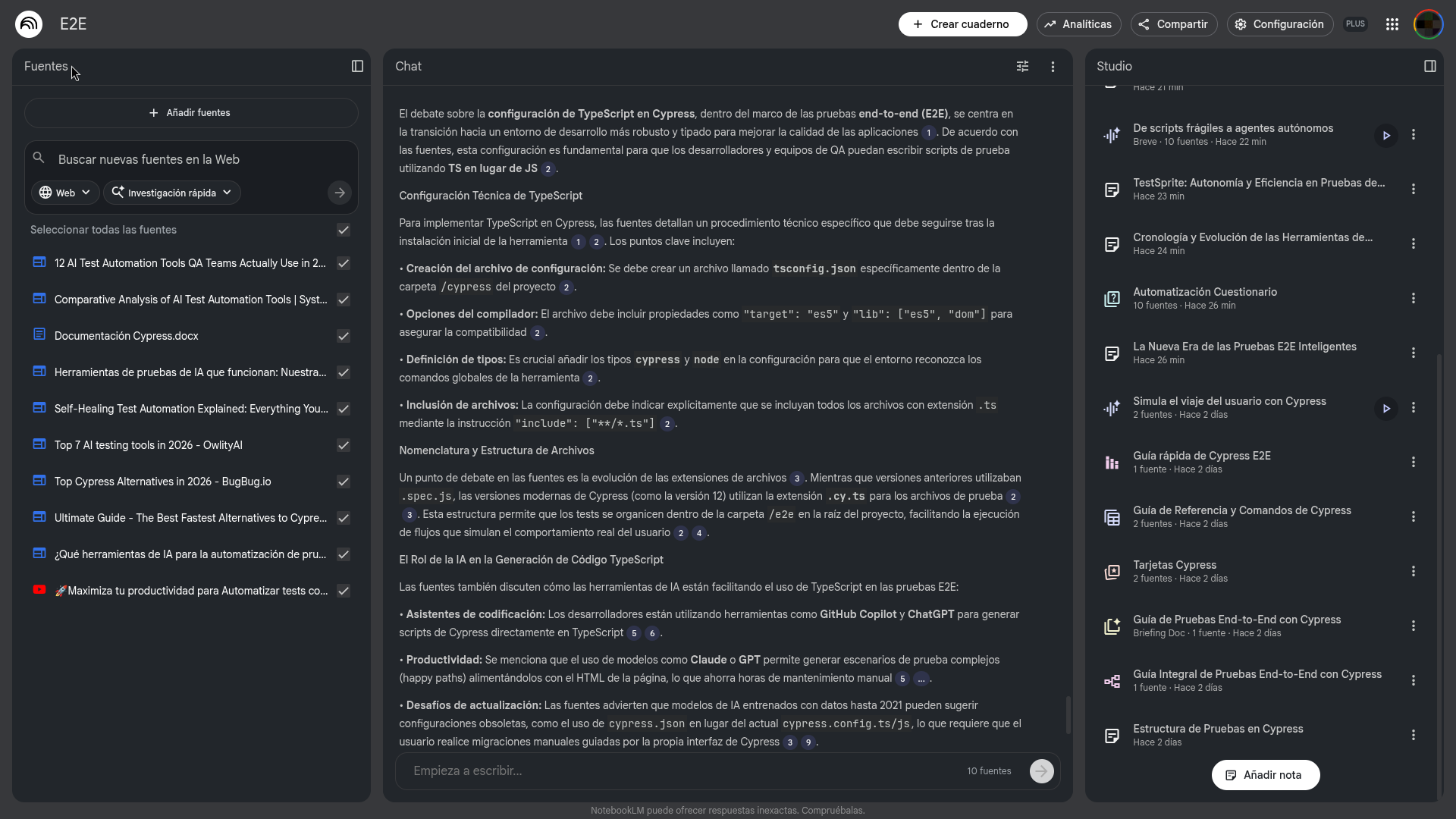
**After:**
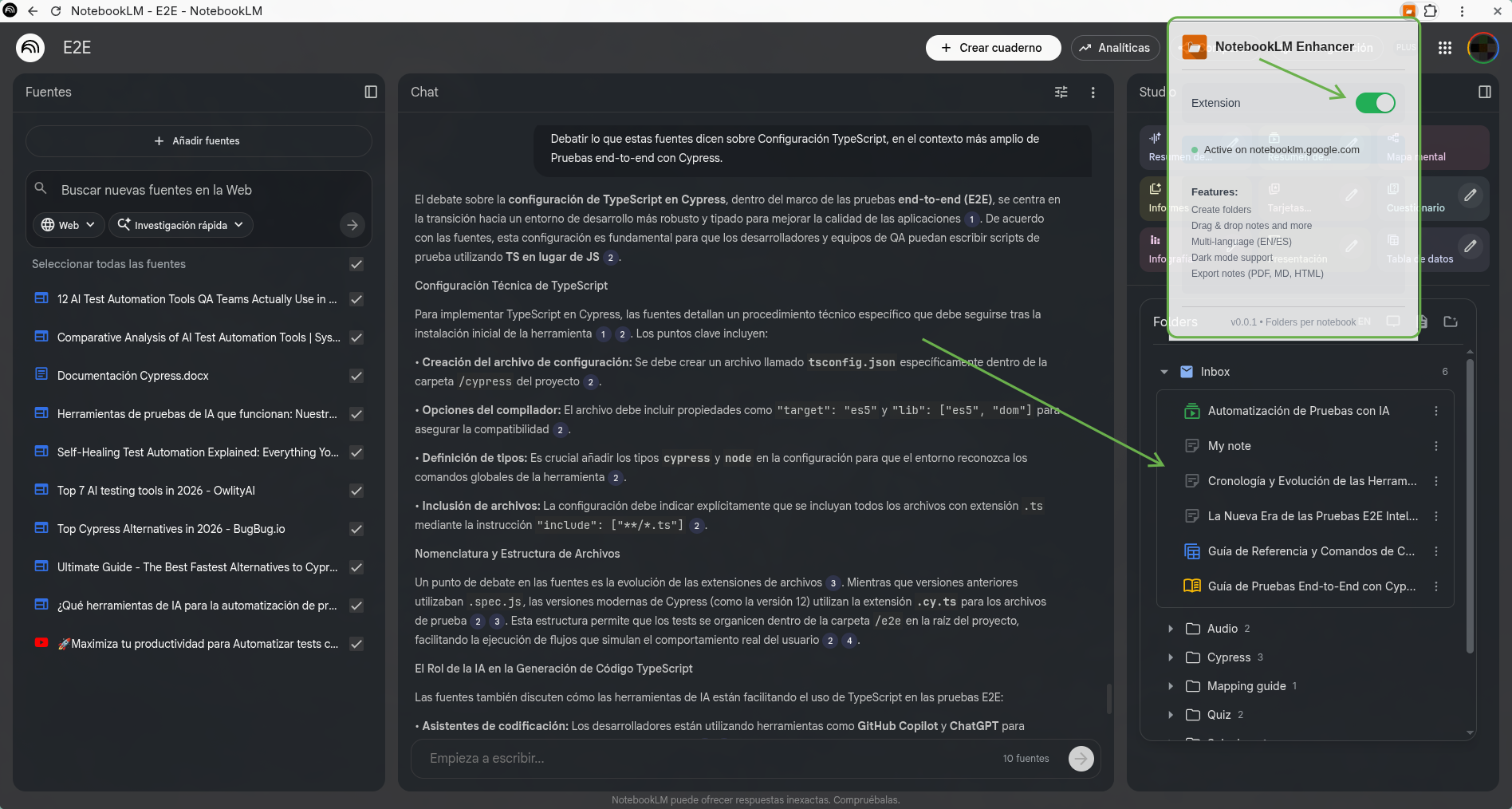
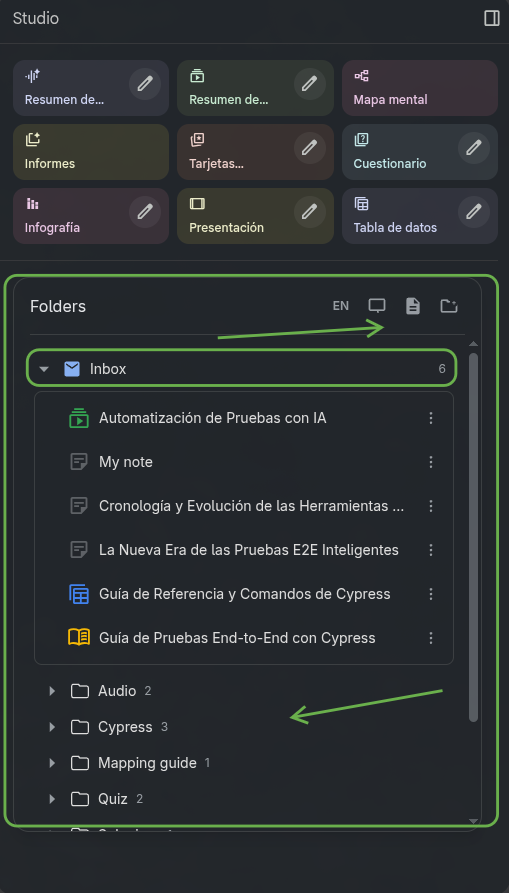
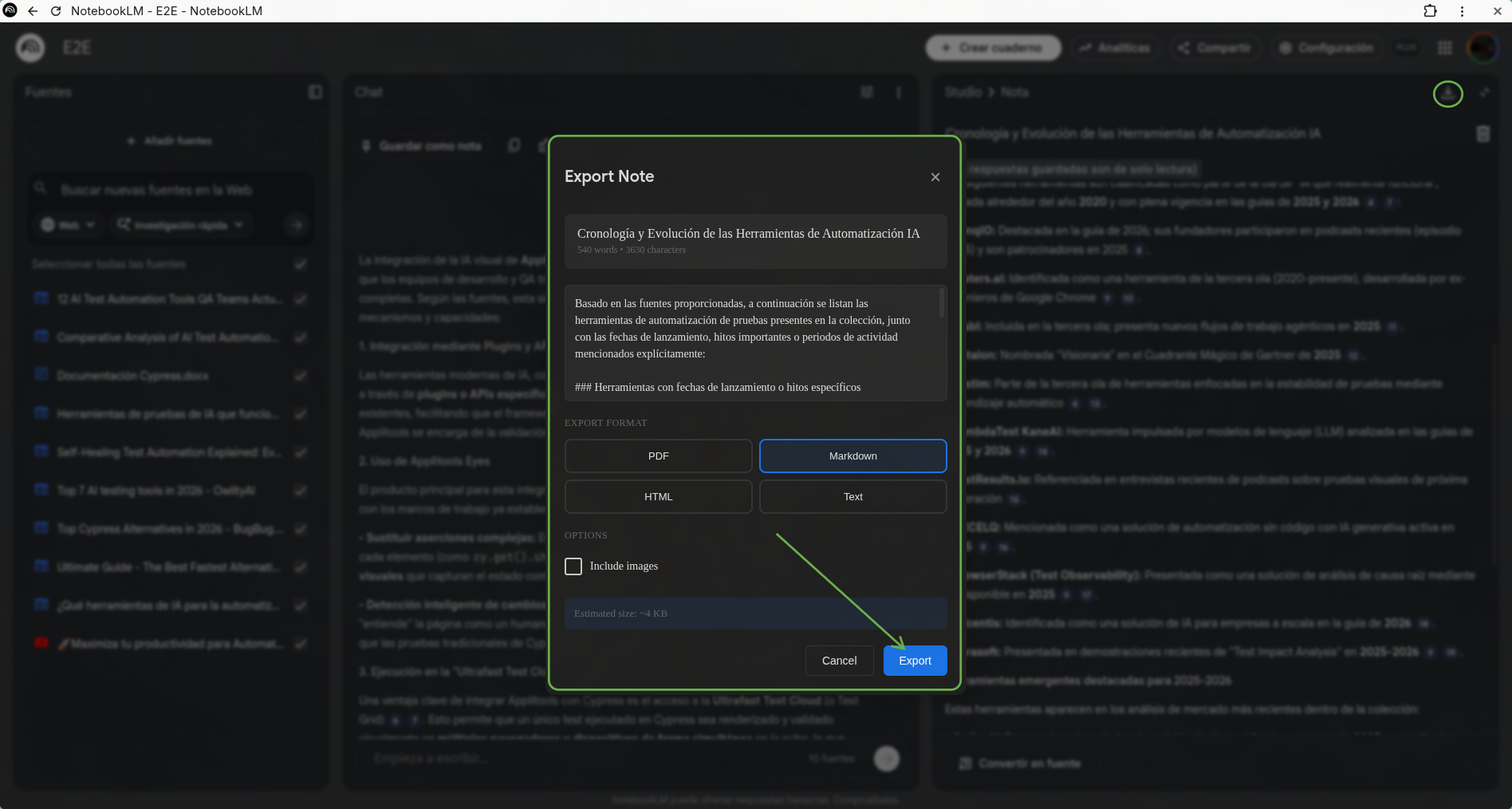
**Export your notes :**
**Drag & Drop:**
**🗑️ Batch Delete** *NEW!*
**Full video**
https://www.youtube.com/watch?v=KpqXmjq_oow
---
## My Experience with GitHub Copilot CLI
This project was built almost entirely through GitHub Copilot CLI interactions turning natural language into production-ready code.
### How I Used Copilot CLI
**1. Architecture Decisions**
```bash
# Asked Copilot: "Best way to inject UI into an existing Angular Material page?"
# Copilot suggested: Shadow DOM + iframe for isolation
# Result: Zero style conflicts with NotebookLM's Material Design
```
**2. Content Script Structure**
```bash
# Asked: "How to structure 8 content scripts that share state?"
# Copilot proposed: Module pattern with window.__NLE__ namespace
# Result: Clean separation, no global pollution
```
**3. Drag & Drop Implementation**
```bash
# Asked: "Bridge native HTML5 drag with Angular CDK drop?"
# Copilot designed: Overlay system with coordinate translation
# Result: Seamless drag from native sidebar to our folders
```
**4. Debugging Context Invalidation**
```bash
# Asked: "Chrome MV3 extension context invalidated errors?"
# Copilot implemented: Graceful detection + silent retry logic
# Result: No console spam, smooth recovery
```
**5. i18n System**
```bash
# Asked: "Lightweight i18n without ngx-translate bloat?"
# Copilot built: Custom TranslationService with lazy loading
# Result: ~3KB vs ~50KB, full interpolation support
```
### Wins
**Speed:** What would have taken weeks took days. Complex features like the drag bridge were implemented in hours, not days.
**Architecture:** Copilot suggested patterns I wouldn't have considered (like the iframe-in-shadow approach) that solved isolation problems elegantly.
**Edge Cases:** MV3 quirks, Material Design menu positioning, SPA navigation detection Copilot handled these gracefully.
**Learning:** Every interaction was a learning moment :) . I now understand Chrome Extension architecture, Angular standalone components, and Tailwind customization.
---
## What's Next?
1. **Chrome Web Store Launch** - Polish, package, publish
2. **More Languages** - French, German, Portuguese (easy with our i18n system)
3. **Search & Filter** - Find notes within folders instantly
6. **Keyboard Shortcuts** - Power-user features (Ctrl+Shift+N for new folder)
**🤝 Open Source**
This project will be open-sourced. Want to contribute?
- PRs welcome
- Good first issues: translations, themes, documentation
---
## Credits & Thanks
- **Google** for NotebookLM an incredible research tool
- **GitHub Copilot CLI** for turning ideas into code faster than ever <3
- **Tailwind CSS** for making dark mode trivial
- **DEV.to** for hosting this challenge and bringing the community together
---
- [GitHub Repository](https://github.com/CGCM070/NotebookLM_Enhancer)
*Built with ❤️, and a lot of help from GitHub Copilot CLI.*
***devchallenge***
***githubchallenge***
***cli***
***githubcopilot***
Comments
More Blog
View allgithubcopilotSteer GitHub Copilot CLI Sessions Remotely from Any Device
Start a Copilot CLI session on your workstation, then monitor and steer it from the browser or your phone.
M
Marcel.LagentsThe Rise of the Fleet: Scaling My Engineering Workflow with Github Copilot Agents
In this post, I’ll walk you through how I use Copilot and my personal preferences for different...
I
Ivelin (Ivo)githubcopilotGet started with GitHub Copilot SDK, part 1
This article explains what GitHub Copilot SDK is and why use it
C
Chris NoringagentsI Run a Solo Company with AI Agent Departments
I built 8 AI agent departments using GitHub Copilot custom agents — CEO, CFO, COO, Lawyer, Accountant, Marketing, CTO, and an Improver. They share memory, consult each other, and self-improve. Here's how it works.
J
João Pedro Silva SetasjetsonHow GPU-Powered Coding Agents Can Assist in Development of GPU-Accelerated Software
This blog post chronicles how VS Code equipped with GitHub Copilot powered by Claude Opus 4.6 was used to port the open-source whisper-asr-webservice project to NVIDIA Jetson hardware with full GPU acceleration — navigating over 15 build iterations, compiling CTranslate2 from source for aarch64 CUDA, working around Poetry resolver conflicts and pip wheel priority bugs, creating runtime compatibility shims for torchaudio, torch.load, and huggingface_hub API changes, testing all three ASR engines with self-generated speech audio, and ultimately forking the repo, opening a detailed pull request, and pushing a pre-built container image to Docker Hub — all driven by natural-language prompts — demonstrating how GPU-powered AI coding agents can come full circle by building GPU-accelerated software for edge devices like the Jetson Orin, unlocking practical automations such as automatic subtitle generation for Plex media libraries via Bazarr integration.
P
Paul DeCarloai38 Issues: Code Review Agent Showdown between BugBot, Copilot and Claude
AI code review tools promise to catch what human reviewers miss. But which one actually delivers? I...
T
Terence Tham