
Back to Blog githubchallenge
 githubcopilot
 agents
 githubcopilot
 agents
 jetson
 ai
ai
I Built a TUI That Makes Rust Code Inspection Feel Like Magic ✨
Yash Kumar Saini February 15, 2026
0 views
This is a submission for the GitHub Copilot CLI Challenge The "Why Did I Build This?"...
*This is a submission for the [GitHub Copilot CLI Challenge](https://dev.to/challenges/github-2026-01-21)*
## The "Why Did I Build This?" Moment
Okay so here's the thing. I was working on this Rust project at 2 AM (as you do), trying to figure out where the hell `DeserializeOwned` was actually implemented. The codebase had like 50,000 lines, and there were these 17 different `impl` blocks just... everywhere. Scattered across 8 files like someone playing hide and seek with code.
And I'm sitting there thinking about my options:
- Fire up VSCode? My SSH connection was lagging harder than my reaction time on Monday mornings
- Use `grep`? Sure, if I wanted to scroll through 400 lines of garbage output
- Try `ripgrep` with regex? I'd rather debug segfaults than write another regex at 2 AM
- Make coffee and pretend the problem doesn't exist? Tempting...
But you know what? I got frustrated enough to actually do something about it.
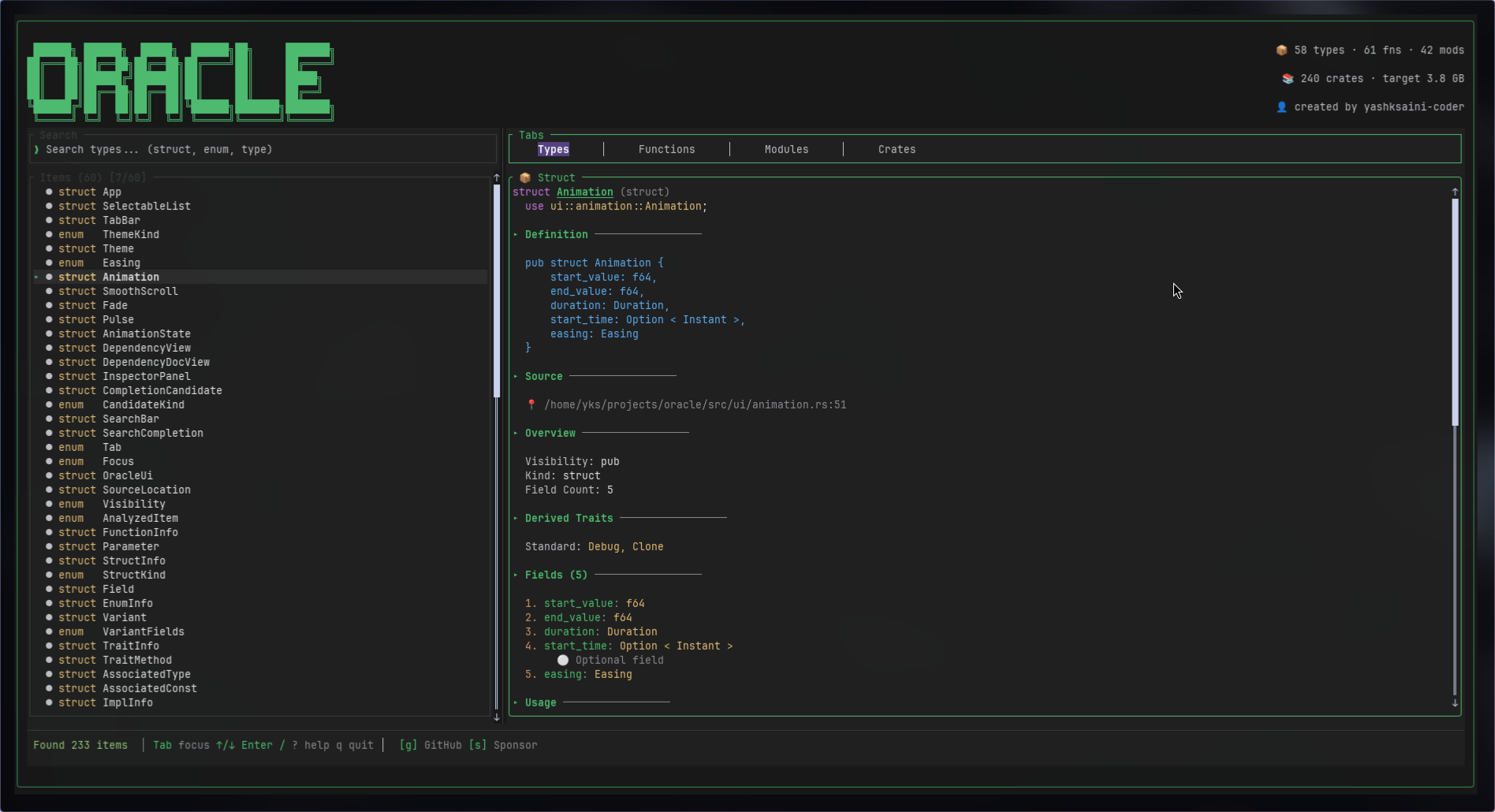
So I built **Oracle** — basically a code inspector that lives in your terminal and actually doesn't suck to use. And to flex it more, Github Copilot helped me build, review, clean, optimize and vibe code all of this in just under 3 days.
<img width="100%" style="width:100%" src="https://dev-to-uploads.s3.amazonaws.com/uploads/articles/d2qfilxnaz467yhot78w.gif">
---
## What I Built
So 🔮 **[Oracle](https://crates.io/crates/oracle-tui)** is basically a terminal-based code inspector for Rust projects. Think of it like... if `grep` and VSCode had a baby, and that baby grew up to be really good at understanding Rust code. No GUI bloat, no browser tabs eating your RAM, just your terminal doing cool stuff.
Here's what it does:
### 📦 Deep Code Analysis
Look, it parses everything. And I mean *everything*:
- Functions (with those fancy async/const/unsafe badges, plus all the parameters and return types)
- Structs (every field, every derive, all the generics — no more squinting at code trying to figure out field types)
- Enums (it shows you ALL the variants with their field types spelled out)
- Traits (methods, associated types, supertraits, the works)
- Impl blocks (both the regular ones and trait implementations)
- Modules, type aliases, constants, statics... basically if Rust can define it, Oracle can show it
### 🔍 Intelligent Search
The search is actually pretty smart (if I do say so myself):
- Fuzzy matching that updates as you type (using `fuzzy-matcher` under the hood)
- Context-aware, so when you're in the Functions tab, it only searches functions (no more wading through noise)
- You can search for functions like and will get fully qualified paths like `serde::de::Deserialize` and it just works
- Filter stuff by visibility (public/private/crate-level)
### 📋 Dependency Inspector
This part's kinda cool — it reads your `Cargo.toml` and shows you:
- Your entire dependency tree visualized nicely
- Live info from crates.io (descriptions, GitHub stars, license info)
- All the crates installed in your `~/.cargo/registry` folder
- Press `o` to open docs.rs, press `c` to open crates.io — boom, instant browser tabs
### 🎨 Beautiful Themes
Because apparently I care about aesthetics even in my terminal:
- Default Dark (clean and professional-ish)
- Nord (if you like cool blues)
- Catppuccin Mocha (cozy vibes)
- Dracula (for the dramatic folks)
- Just press `t` to cycle through them
### ⚡ Smooth Animations
Yeah I added animations to a CLI tool. Fight me.
- Selection highlights that fade in smoothly
- Tab transitions that don't feel jarring
- Scrolling with momentum (it feels buttery smooth)
- Real-time syntax highlighting
Honestly, I spent way too much time on the animations, but they make it feel really nice to use.
---
## Demo
**GitHub Repository:** [github.com/yashksaini-coder/oracle](https://github.com/yashksaini-coder/oracle)
### Quick Start
```bash
# Install from source
git clone https://github.com/yashksaini-coder/oracle.git
cd oracle
cargo install --path .
# Run on any Rust project
oracle /path/to/rust/project
# Or analyze current directory
oracle
```
### Sample Usage
```bash
# Inspect a famous crate
cargo new test_project
cd test_project
cargo add tokio
# Launch Oracle
oracle
# Now press:
# - Tab 4 times to get to Crates tab
# - Navigate to "tokio"
# - Press Enter
# - Search for "copy" with /
# - Browse copy methods and implementations
```
---
## My Experience with GitHub Copilot CLI
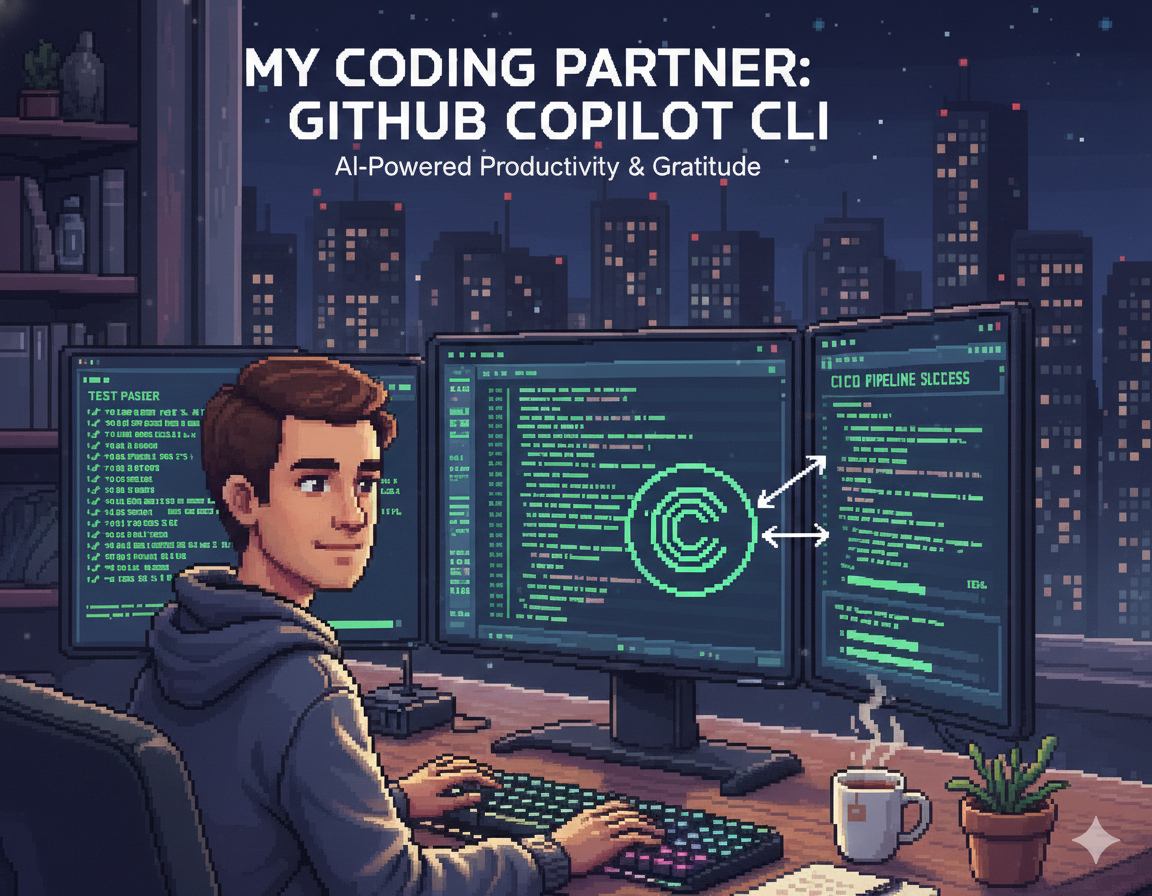
Alright, confession time: This was my first serious Rust project that involved terminal UI stuff. I'd never touched Ratatui before, barely understood how `syn` worked, and was basically figuring everything out as I went.
GitHub Copilot CLI basically became my rubber duck, my Stack Overflow, and my patient senior developer all rolled into one. And the best part? I never had to leave my terminal.
### 🎯 How Copilot Saved My Sanity
#### **1. Wrestling with the `syn` Crate**
So Rust's `syn` crate is *amazing* for parsing Rust code, but holy hell the learning curve is steep. I needed to extract function signatures, struct fields, enum variants, all the trait bounds... basically everything.
I was staring at the docs feeling like I was reading ancient Greek, so I just asked Copilot:
`gh copilot suggest "parse rust struct with syn crate extract all fields and visibility"`
And it straight up gave me this:
```rust
use syn::{ItemStruct, Fields};
fn analyze_struct(st: &ItemStruct) -> Vec<Field> {
match &st.fields {
Fields::Named(named) => {
named.named.iter().map(|f| Field {
name: f.ident.as_ref().unwrap().to_string(),
ty: quote!(#ty).to_string(),
visibility: parse_visibility(&f.vis),
}).collect()
}
// ... Tuple and Unit variants
}
}
```
Like, it just *worked*. This became the foundation for parsing everything else — enums, traits, impl blocks, you name it. I just extended this pattern to handle all the other Rust item types.
Honestly? Saved me probably 8-10 hours of banging my head against the `syn` docs. Worth it.
---
#### **2. Making the TUI Not Look Like Garbage**
I wanted something that looked good. Not just functional, but actually pleasant to use. Panels, borders, smooth scrolling, the whole nine yards.
Problem: Ratatui's layout system made my brain hurt. How do you even compose these things?
Asked Copilot: `gh copilot explain "ratatui layout constraints horizontal vertical split"`
It explained that layouts are basically Lego blocks — you can compose them with `Constraint::Percentage` and `Constraint::Length`, and nest them for complex UIs. That made it click.
Then I was like: `gh copilot suggest "ratatui scrollable panel with borders and title"`
Got this back:
```rust
let block = Block::default()
.borders(Borders::ALL)
.title(" Inspector ");
let paragraph = Paragraph::new(lines)
.block(block)
.scroll((scroll_offset as u16, 0));
```
Beautiful. That became the core of my inspector panel. Later on I added the animations by interpolating the `scroll_offset` with some easing functions (because I'm extra like that).
---
#### **3. Making Search Feel Snappy**
I wanted the search to feel like VSCode's Ctrl+P — you know, where you just start typing and boom, instant results. No lag, no BS.
Asked Copilot: `gh copilot suggest "rust fuzzy search crate with scoring"`
It recommended `fuzzy-matcher` with `SkimMatcherV2`. Here's what I ended up with:
```rust
use fuzzy_matcher::skim::SkimMatcherV2;
let matcher = SkimMatcherV2::default();
let scored: Vec<_> = items
.iter()
.filter_map(|item| {
matcher.fuzzy_match(&item.name, query)
.map(|score| (item, score))
})
.collect();
scored.sort_by(|a, b| b.1.cmp(&a.1)); // Highest score first
```
And guess what? It worked perfectly on the first try. No debugging, no tweaking, just... worked. Those moments are rare in programming and should be celebrated.
---
#### **4. Parsing Cargo.toml Without Crying**
Dependencies and Cargo.toml can get complex real fast, especially with workspaces and transitive deps. I needed to parse all of that and build a proper dependency tree.
I was dreading this part until I asked: `gh copilot explain "cargo metadata crate rust get all dependencies"`
Turns out there's a crate called `cargo_metadata` (who knew?) that gives you structured JSON output. Copilot showed me:
- How to get the root package
- How to traverse the dependency tree
- How to detect direct vs transitive dependencies
- How to handle workspace crates
Here's what came out of it:
```rust
use cargo_metadata::MetadataCommand;
let metadata = MetadataCommand::new()
.manifest_path(&manifest_path)
.exec()?;
let root = metadata.root_package();
let dependencies = root.dependencies.iter()
.filter(|d| d.kind == DependencyKind::Normal)
.collect();
```
Simple, clean, and it actually works. Love it when code is like that.
---
#### **5. Fetching Live Crate Info**
I wanted to show real crate info when someone's browsing dependencies — descriptions, GitHub stars, license info, all that good stuff. Which meant hitting the crates.io API.
Me, having zero experience with async HTTP in Rust: `gh copilot suggest "rust async http request to crates.io api"`
Copilot pointed me to `reqwest` and showed me the blocking client pattern for background threads:
```rust
use reqwest::blocking::Client;
fn fetch_crate_docs(name: &str) -> Option<CrateDoc> {
let client = Client::new();
let url = format!("https://crates.io/api/v1/crates/{}", name);
let response = client.get(&url).send().ok()?;
let json: serde_json::Value = response.json().ok()?;
Some(CrateDoc {
name: json["crate"]["name"].as_str()?.to_string(),
description: json["crate"]["description"].as_str().map(String::from),
// ...
})
}
```
Then I needed GitHub repo stats too, so I asked how to parse GitHub URLs and hit their API. Got that working too.
The whole crates.io + GitHub integration took one evening instead of... I don't know, a week of reading API docs?
---
#### **6. Cross-Platform Path Hell**
You know what's annoying? File paths. Windows uses backslashes, Unix uses forward slashes, and I needed to convert file paths to module paths (`src/analyzer/parser.rs` → `["analyzer", "parser"]`).
Asked: `gh copilot suggest "rust strip src directory from pathbuf get module path"`
Got this beauty:
```rust
fn derive_module_path(path: &Path) -> Vec<String> {
path.iter()
.skip_while(|c| c != &"src")
.skip(1) // Skip "src" itself
.map(|c| c.to_string_lossy().to_string())
.collect()
}
```
Works on Windows, macOS, Linux. No `#[cfg]` needed. Just works everywhere.
---
#### **7. Making Animations Not Suck**
Okay so this is where I got a bit carried away. I wanted smooth scrolling with momentum, not that janky jump-scroll thing most TUIs have.
Asked Copilot: `gh copilot suggest "rust easing functions ease in out cubic"`
It gave me the classic easing formulas:
```rust
pub fn ease_out(t: f64) -> f64 {
1.0 - (1.0 - t).powi(3)
}
pub fn ease_in_out(t: f64) -> f64 {
if t < 0.5 {
4.0 * t * t * t
} else {
1.0 - (-2.0 * t + 2.0).powi(3) / 2.0
}
}
```
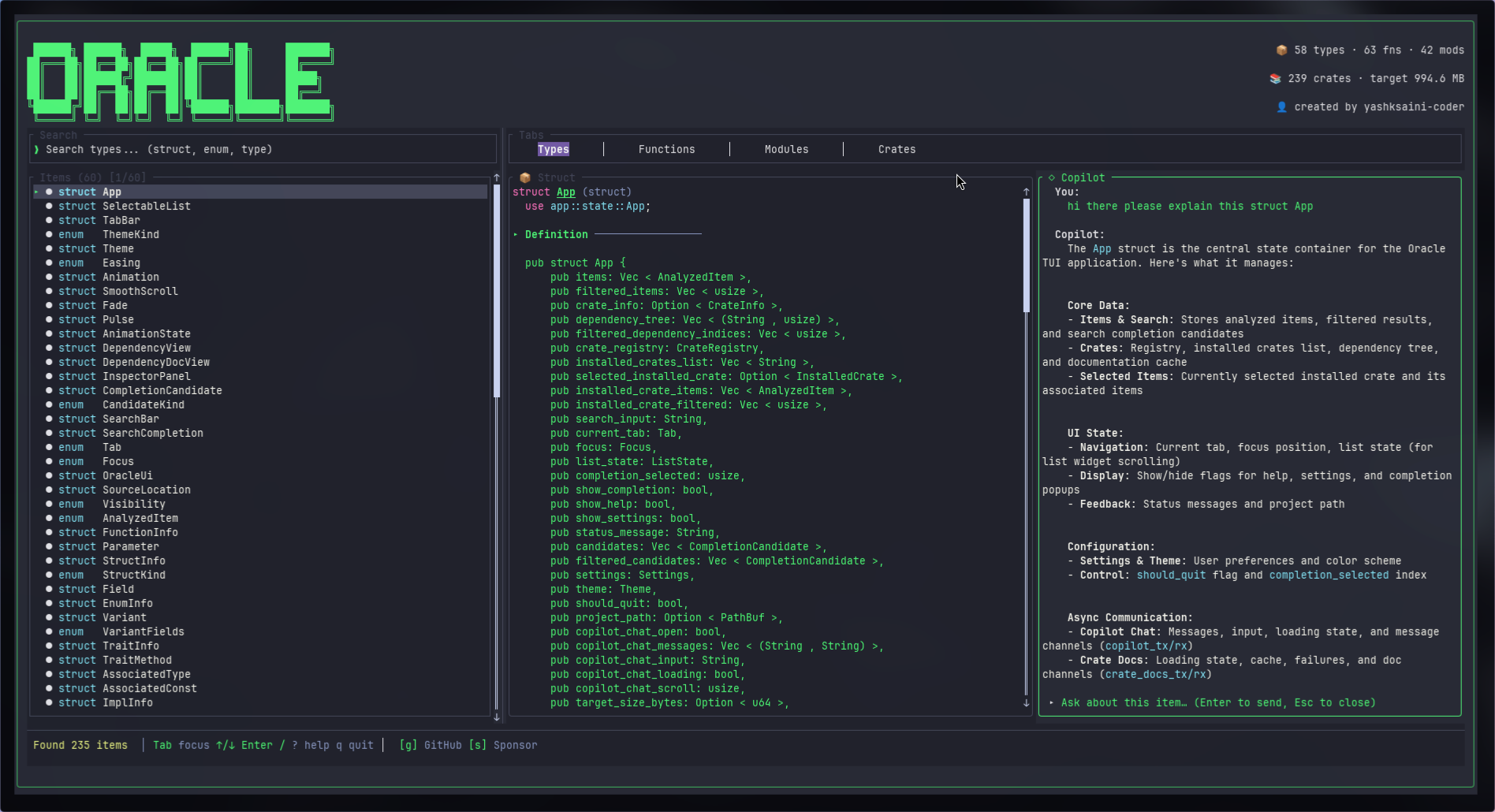
#### **8. Integrating Copilot within itself**
At this point I was just too deep into the rabbit hole and wanted to see how far I can reach, and so decided to give it a AI chat interface area, completely powered by Copilot and guess what ....
It Actually Works, it was mind blowing telling copilot to build and integrate yourself within my tool.
Applied these to scroll offset interpolation and boom — butter-smooth 60fps scrolling. Completely unnecessary for a CLI tool? Yes. Did I do it anyway? Also yes.
---
## The Stuff That Almost Broke Me

### Challenge 1: Not Freezing the Terminal When Parsing Big Projects
**The Problem:** So I tried running Oracle on the `tokio` codebase (which has like 200+ files), and my terminal just... froze. For a solid 10 seconds. Completely unresponsive. Not great.
**The Solution:**
I moved all the parsing to background threads so the UI could stay responsive. Added a splash screen with this little wave animation (because if users have to wait, at least make it pretty). Also pre-computed search indices so that wouldn't lag either.
Copilot helped me figure out the threading patterns and how to show progress without blocking the UI. Game changer.
---
### Challenge 2: Making Search Feel Instant (Even When It's Not)
**The Problem:** When you have 10,000+ items to search through, every keystroke was taking like 100ms. That's noticeable lag, and it felt janky.
**The Solution:**
- Only search within the active tab (if you're in Functions, only search functions)
- Limit results to top 50 (nobody scrolls past that anyway)
- Used `fuzzy-matcher`'s batch scoring (it's faster than one-by-one)
- Cached search results for repeated queries
- Only rendered visible items on screen
Result? Search now takes < 16ms per keystroke. That's 60fps territory. Smooth.
---
### Challenge 3: GitHub Rate Limits Are Real
**The Problem:** The GitHub API rate-limits unauthenticated requests to 60 per hour. I was hitting that limit basically immediately when testing the crates.io features.
**The Solution:**
- Added support for `GITHUB_TOKEN` environment variable (gives you 5000/hour when authenticated)
- Cached responses per crate so we don't re-fetch
- Graceful fallback when rate-limited (just show "rate limited" instead of crashing)
- Added a hint to users: "Set GITHUB_TOKEN for more requests"
Copilot helped explain the GitHub API auth flow and how to parse rate limit headers. Much better now.
---
### Challenge 4: Scrollable Content That Doesn't Suck
**The Problem:** When you select an item, the inspector panel shows all its details. But what if the docs are really long? It just got cut off. Not ideal.
**The Solution:**
Had to track scroll offset per selected item, bind `j/k` and arrow keys to scroll up/down, show a scrollbar indicator when content overflows, and reset scroll position when switching items.
Copilot showed me Ratatui's `Scrollbar` widget and how to manage scroll state properly. Works great now.
---
## Why You Might Actually Want to Use This
### 🚀 It's Fast (Like, Really Fast)
- Parses 200+ files in under 2 seconds
- Search responds instantly (< 16ms per keystroke)
- 60fps animations (yes, in a terminal)
- Zero network calls for local analysis (your code never leaves your machine)
### 🎨 It Doesn't Look Like Hot Garbage
- 4 hand-crafted themes (Nord is chef's kiss)
- Smooth scrolling with easing (because I have standards)
- Context-aware UI (functions show parameter hints, structs show field types)
- Professional documentation formatting
### 🔧 Actually Designed for Terminal Use
- Works perfectly over SSH (no GUI needed, no X forwarding BS)
- Vim-style keybindings (`j/k` for life)
- One command: `oracle` — that's it
- Installable via `cargo install` (once I publish it to crates.io)
### 📚 It Actually Understands Rust
Most code search tools are just fancy grep. Oracle:
- Analyzes ALL Rust item types (functions, structs, enums, traits, impls, modules)
- Shows qualified paths (`serde::de::Deserialize` works perfectly)
- Handles visibility modifiers properly
- Understands generics, lifetimes, trait bounds, async, const, unsafe — all of it
Basically, it doesn't just *search* your code, it *understands* it.
---
## How I Actually Use This Thing
### Before Oracle:
```bash
# Trying to find all trait implementations
rg "impl.*for" | less # Scroll through 200 lines of noise
# Trying to understand a struct
rg "struct Config" -A 20 | grep "pub" # Miss half the fields
# Finding function signatures
rg "pub fn connect" # Get incomplete matches without parameters
```
### With Oracle:
```bash
oracle
# Tab to Functions, type "connect", press Enter
# See:
# - Full signature with all parameters and types
# - Complete documentation
# - Return type with error handling
# - Source location (file + line number)
# Press 'o' to open in your editor
```
It's just... so much faster. And less annoying.
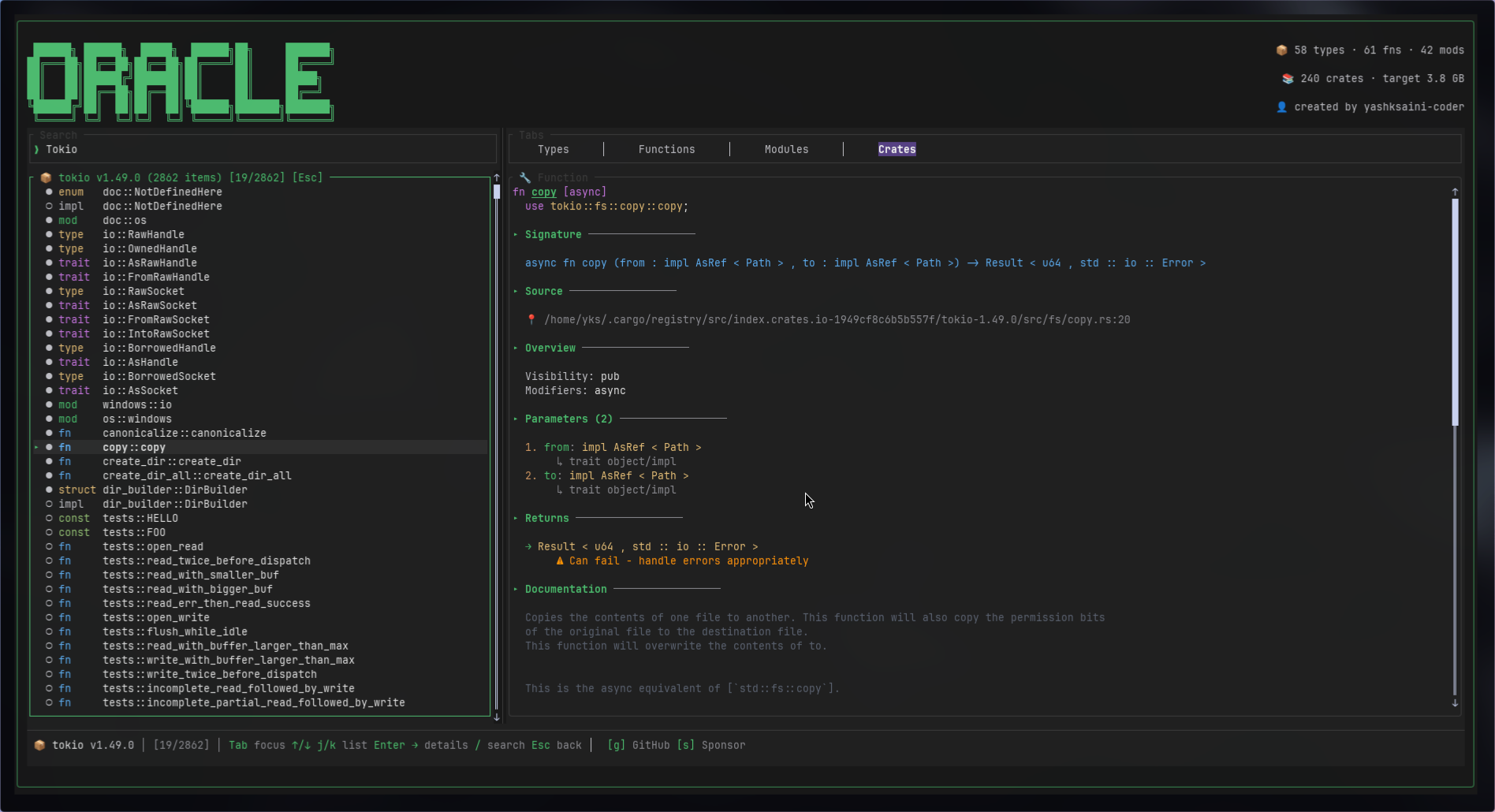
Another example: You add `tokio` to your project and want to understand how `spawn` works.
**Old way:**
1. Clone the tokio repo
2. grep for "pub fn spawn"
3. Get 47 matches
4. Try to figure out which one is the right one
5. Give up and read the docs instead
**With Oracle:**
```bash
oracle ~/.cargo/registry/src/*/tokio-*
# Press 4 for Crates tab
# Navigate to "tokio", press Enter
# Type "spawn" in search
# See signature, docs, parameters, trait bounds
# Press 'o' for docs.rs if you want more details
```
Time saved: Like 5 minutes every single time.
---
## Installation & Usage
### Install
```bash
# From source (recommended for now)
git clone https://github.com/yashksaini-coder/oracle.git
cd oracle
cargo install --path .
# Or use cargo directly (once published)
cargo install oracle-tui
```
### Usage
```bash
# Analyze current directory
oracle
# Analyze specific project
oracle ~/code/my-rust-project
# Set GitHub token for better crate.io API limits
export GITHUB_TOKEN=ghp_yourtoken
oracle
```
---
## What's Next (If People Actually Use This)
Got some ideas for future versions:
- **Symbol references:** Show where a function/type is actually being used (would be super helpful)
- **Jump to definition:** Press a key, open the source file at the exact line
- **Macro expansion viewer:** See what those cryptic macros expand to
- **Call graph visualization:** Show which functions call which (could get messy but cool)
- **Git integration:** Show recent changes per item, like "this function was modified 3 days ago"
- **Export to JSON/HTML:** Generate static docs from your codebase
- **LSP integration:** Hook into rust-analyzer for even deeper analysis
No promises on timeline though. This is still a side project I hacked together because I was annoyed.
---
## Why Rust?
**Performance:** Parsing is CPU-bound. Rust's zero-cost abstractions mean fast parsing without GC pauses.
**Safety:** No segfaults when traversing complex ASTs. The borrow checker caught 20+ bugs during development.
**Ecosystem:** `syn` is the gold standard for Rust parsing. `ratatui` makes TUIs actually fun to build.
**Cross-platform:** One binary works on Linux, macOS, Windows — no Python/Node runtime needed.
---
## Lessons Learned
### 1. **TUI State Management is Hard**
Managing focus, scroll positions, search state, animations — all simultaneously — is trickier than React state. Had to build a small state machine.
### 2. **Parsing is Expensive**
Even with `syn`'s fast parser, analyzing 200+ files takes time. Had to optimize with:
- Lazy loading (only parse visible items)
- Caching parsed results
- Background threads for heavy work
### 3. **Terminal Rendering is Delicate**
Drawing too frequently causes flicker. Drawing too infrequently feels laggy. Found the sweet spot: 60fps when animating, 10fps when idle.
### 4. **Copilot CLI is a Force Multiplier**
Seriously. Having an AI explain `syn` patterns, Ratatui layouts, async patterns, easing formulas — all without leaving the terminal — was incredible.
---
## Wrapping Up
So yeah, that's Oracle. Built it because I was frustrated with existing tools, learned a ton about Rust, TUIs, and parsing along the way.
GitHub Copilot CLI was honestly a lifesaver. Having an AI that could explain `syn` patterns, show me Ratatui layouts, help with async patterns, and even provide easing formulas — all without leaving my terminal — was incredible. Saved me probably 30+ hours of reading docs and Stack Overflow.
The result is a tool I actually use every day now. Every time I clone a new Rust project, I run `oracle` first to get the lay of the land. It's just become part of my workflow.
If you work with Rust, give it a shot. Worst case, you wasted 2 minutes installing it. Best case, it changes how you explore code.
---
**Links:**
- **Yash Saini** - [@yashksaini-coder](https://github.com/yashksaini-coder)
- **X:** [0xcrackedDev](https://x.com/0xcrackedDev)
- **GitHub:** [github.com/yashksaini-coder/oracle](https://github.com/yashksaini-coder/oracle)
- **Crates:** [oracle-tui](https://crates.io/crates/oracle-tui)
- **Latest Release:** [Latest releases](https://github.com/yashksaini-coder/oracle/releases)
Got feedback? Found a bug? Want a feature? Open an issue or drop a comment. I actually read them.
---
*Built with way too much coffee, Rust, Ratatui, and GitHub Copilot CLI being an absolute legend.*
{% cta link https://github.com/yashksaini-coder/vizier %} Star Oracle {% endcta %}
*If you liked this, consider giving the repo a star. It makes me feel good about my life choices.* ⭐
#devchallenge #githubchallenge #cli #rust #tui #opensource
Comments
More Blog
View allgithubcopilotSteer GitHub Copilot CLI Sessions Remotely from Any Device
Start a Copilot CLI session on your workstation, then monitor and steer it from the browser or your phone.
M
Marcel.LagentsThe Rise of the Fleet: Scaling My Engineering Workflow with Github Copilot Agents
In this post, I’ll walk you through how I use Copilot and my personal preferences for different...
I
Ivelin (Ivo)githubcopilotGet started with GitHub Copilot SDK, part 1
This article explains what GitHub Copilot SDK is and why use it
C
Chris NoringagentsI Run a Solo Company with AI Agent Departments
I built 8 AI agent departments using GitHub Copilot custom agents — CEO, CFO, COO, Lawyer, Accountant, Marketing, CTO, and an Improver. They share memory, consult each other, and self-improve. Here's how it works.
J
João Pedro Silva SetasjetsonHow GPU-Powered Coding Agents Can Assist in Development of GPU-Accelerated Software
This blog post chronicles how VS Code equipped with GitHub Copilot powered by Claude Opus 4.6 was used to port the open-source whisper-asr-webservice project to NVIDIA Jetson hardware with full GPU acceleration — navigating over 15 build iterations, compiling CTranslate2 from source for aarch64 CUDA, working around Poetry resolver conflicts and pip wheel priority bugs, creating runtime compatibility shims for torchaudio, torch.load, and huggingface_hub API changes, testing all three ASR engines with self-generated speech audio, and ultimately forking the repo, opening a detailed pull request, and pushing a pre-built container image to Docker Hub — all driven by natural-language prompts — demonstrating how GPU-powered AI coding agents can come full circle by building GPU-accelerated software for edge devices like the Jetson Orin, unlocking practical automations such as automatic subtitle generation for Plex media libraries via Bazarr integration.
P
Paul DeCarloai38 Issues: Code Review Agent Showdown between BugBot, Copilot and Claude
AI code review tools promise to catch what human reviewers miss. But which one actually delivers? I...
T
Terence Tham