
Back to Blog angular
The Windows
 ai
ai googlecloud
 discuss
 agents
 agenticarchitect
 ai
ai
I got tired of copy-pasting the same table code, so I built a library
Zonaib Bokhari April 20, 2026
0 views
Every Angular project I've worked on has a table. Usually more than one. And every single time I end...
Every Angular project I've worked on has a table. Usually more than one. And every single time I end up writing the same setup — wire up MatSort, wire up MatPaginator, build a SelectionModel for checkboxes, manage filter state somewhere, figure out export again from scratch.
It's not hard, it's just tedious. And when you do it enough times across enough projects, slightly differently each time, you start to wonder why you haven't just extracted it.
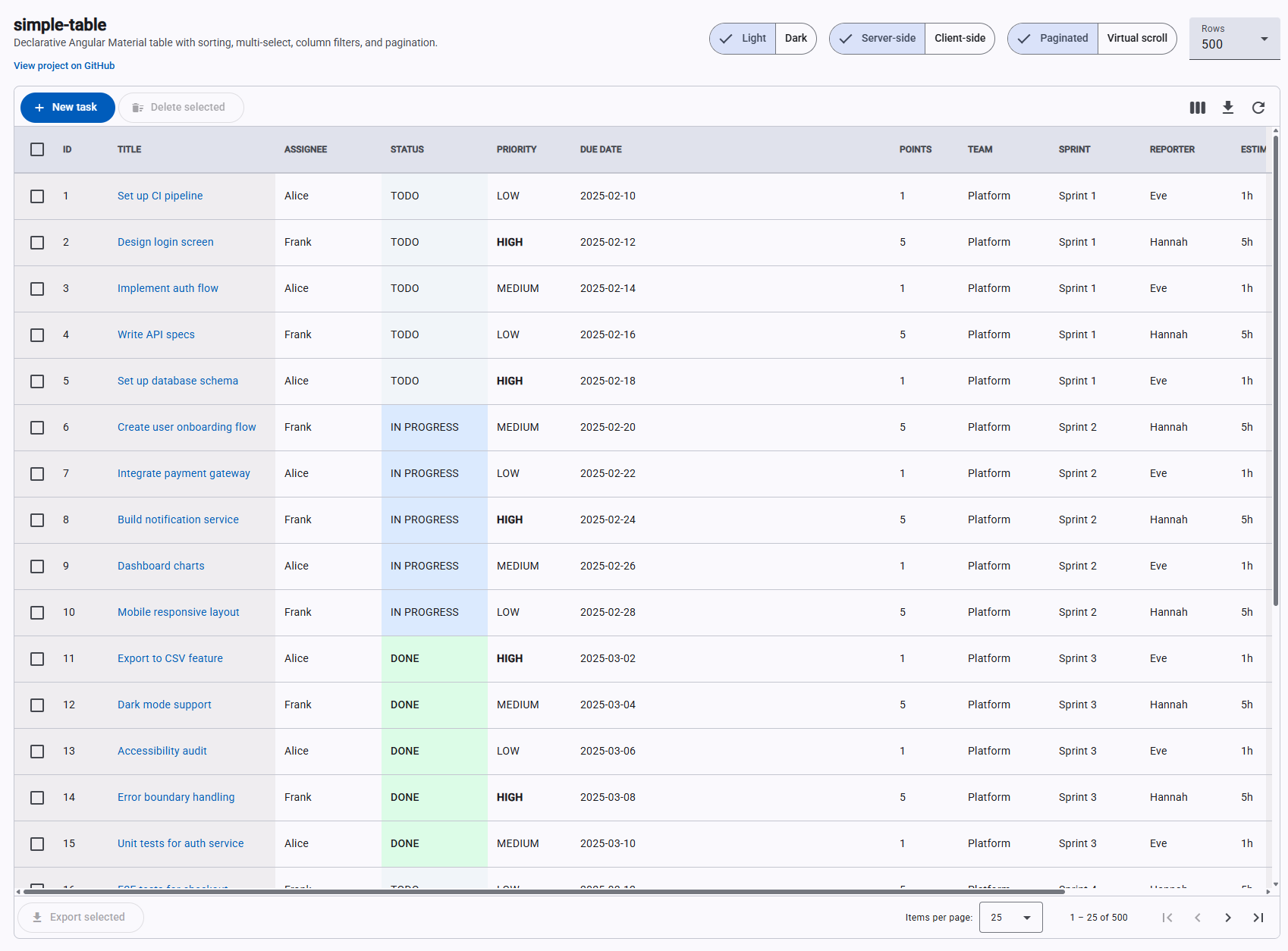
So I did. ngx-mat-simple-table — an Angular Material table component that takes a column config and data, and handles the rest.
The core idea
I wanted to go from this (the usual boilerplate situation) to this:
<simple-table
  [tableColumns]="columns"
  [dataSource]="rows"
  [tableConfig]="config"
  (sortChange)="onSort($event)"
  (filterChange)="onFilter($event)"
  (selectionChange)="onSelect($event)"
>
  <st-export filename="tasks" format="xlsx" [allDataProvider]="getAllForExport" />
</simple-table>
Column config is a plain array:
readonly columns: ColumnDef[] = [
  { key: 'select' },
  { key: 'title',    label: 'Title',    hasColumnFilters: true },
  { key: 'assignee', label: 'Assignee', hasColumnFilters: true, filterType: FilterType.DropDown },
  { key: 'status',   label: 'Status',   hasColumnFilters: true, filterType: FilterType.DropDown,
    displayValue: v => String(v).replace(/-/g, ' ').toUpperCase() },
  { key: 'dueDate',  label: 'Due Date' },
];
Fully paginated, sortable, filterable, exportable table. That's the whole host component.
Signals from the start
I built this after Angular 17 shipped, so I went all-in on the signals API. No @Input(), no EventEmitter, no ChangeDetectorRef. Everything is input(), output(), computed(), effect().
I wasn't sure how it would feel at first but honestly it's made the component much easier to reason about. I've never once had to think about change detection. Would not go back.
The Windows file: reference trap
This one annoyed me more than it should have.
When developing a library locally you need the demo app to consume the built output. I used "ngx-mat-simple-table": "file:./dist/ngx-mat-simple-table" in the root package.json. On macOS this works fine. On Windows, npm install with a file: reference copies the files at install time — so running build:lib:watch updates dist/ but node_modules/ stays completely stale. I kept seeing old code after rebuilds and couldn't figure out why for longer than I'd like to admit.
The fix is tsconfig.json paths instead:
"paths": {
  "ngx-mat-simple-table": ["./dist/ngx-mat-simple-table"]
}
Angular's build system watches files resolved through paths, so incremental rebuilds are picked up immediately. Should have just done this from the start.
CDK drag-reorder was a puzzle
Column drag-reorder uses Angular CDK. My first attempt put cdkDropList and cdkDrag on the same <th> element. CDK silently reported previousContainer === container on every drop, so the column order never actually changed. Body cells stayed out of sync with headers. No error, just nothing happening.
The fix: <th> is the CdkDropList, a wrapper <div> inside it carries CdkDrag. Separate elements. Also — and this surprised me — Angular's @for block doesn't work here. CDK needs to traverse the view tree to find connected drop lists, and @for uses a different internal structure than *ngFor. Switching to *ngFor on the column blocks fixed it.
Don't install SheetJS without checking if it actually does what you need
I needed styled Excel headers. I installed SheetJS (xlsx), the most popular option. Spent a while getting it set up, wrote the header styling code, tested it — headers were completely plain. No error, styling just silently had no effect.
Turns out cell styles in SheetJS community edition are a Pro-only feature. It's in the docs if you look for it, but it's not exactly front and centre.
Switched to ExcelJS (MIT, actually free) and it worked immediately. The API is clean and it supports full cell styling. To match the exported header to the rendered grid I just read styles from the DOM at export time:
const el = hostEl.querySelector('th.mat-mdc-header-cell') as HTMLElement;
const cs = window.getComputedStyle(el);
const bg = this._cssColorToArgb(cs.backgroundColor); // → ARGB hex for ExcelJS
const bold = parseInt(cs.fontWeight) >= 600;
Whatever theme or custom CSS the host applies, the Excel header automatically matches it.
Export should export everything, not just what's on screen
The first version of export grabbed whatever rows were rendered — so if you were on page 3 of 10, you'd export 10 rows. Obviously wrong in hindsight.
Client-side mode was easy to fix: export MatTableDataSource.filteredData, which has all filtered rows regardless of page.
Server-side mode needed a different approach. The <st-export> directive accepts an allDataProvider callback — the host provides a function that fetches everything from the API without pagination params:
readonly getAllForExport = (): Promise<Task[]> => {
  return firstValueFrom(
    this._http.get<TasksResponse>('/api/tasks', { params: this.activeFilterParams() })
      .pipe(map(r => r.data))
  );
};
<st-export filename="tasks" [allDataProvider]="getAllForExport" />
Active filters are forwarded so the export reflects exactly what the user sees — just without the page limit.
Vercel 404 after deploy
After one release the demo started returning 404 on every route. Angular 17+'s esbuild builder outputs to dist/<project>/browser/ — Vercel was pointed at dist/<project>/ and finding no index.html.
Fixed with a vercel.json:
{
  "buildCommand": "npm run build:lib && npm install && npm run build",
  "outputDirectory": "dist/Demo-table/browser",
  "rewrites": [{ "source": "/(.*)", "destination": "/index.html" }]
}
The rewrites rule matters too. Without it, refreshing any route other than / returns 404 because Vercel looks for a file at that path instead of letting Angular's router handle it.
Where it is now
- npm:
ngx-mat-simple-table - Demo: ng-simple-table.vercel.app
- GitHub: github.com/xonaib/ng-simple-table
It has pagination, sorting, multi-select, dropdown filters, column chooser, drag-reorder, column resize, sticky columns, Excel export with full header styling, user settings persistence, and virtual scroll. Client-side and server-side data modes.
If you're building data-heavy Angular apps, hopefully it saves you some of the boilerplate.
What's new in v1.2
Since the original post the library has grown quite a bit. Here's what landed in v1.2:
- Sticky columns —
ColumnDef.sticky: 'left' | 'right'pins columns to either edge during horizontal scroll. Drag-reorder is automatically disabled for sticky columns so users can't accidentally break the layout. - Dark mode — all colour tokens alias Angular Material 3 system tokens, so flipping
body { color-scheme: dark }adapts the entire table with zero extra CSS. Use the CSSlight-dark()function for any custom cell colours and they adapt too. cellClasscallback — return a CSS class from(value, row)for conditional cell styling — colour-coded status badges, priority indicators — without needing a full custom template.fillContainermode — setTableConfig.fillContainer: trueand the table stretches to fill its parent height. Toolbar and paginator stay pinned; only the rows scroll.- 22 CSS custom properties — every visual surface now has a
--st-*token covering header, borders, row backgrounds, hover, sticky cells, cell text, scrollbar, filter popup, and column chooser. Override any of them on the element or any ancestor. - State persistence fix — new columns added after a saved state are now correctly appended rather than silently dropped.
What's new in v1.3
v1.3 ships virtual scroll.
Pagination works, but some UIs just want to scroll. Flip one flag and the paginator disappears and CDK virtual scroll takes over — only the rows in the viewport are in the DOM.
Client-side is a one-liner config change:
<simple-table
  [dataSource]="allRows"
  [columns]="columns"
  [config]="{ virtual: true, virtualRowHeight: 48 }"
/>
Pass your full array. The component handles everything internally.
Server-side is where it gets more interesting. Instead of fetching everything upfront, the table emits a virtualRangeChange event as the user scrolls, telling you which rows are in view. You fetch just that window:
<simple-table
  [dataSource]="currentWindow"
  [columns]="columns"
  [config]="{ virtual: true, virtualRowHeight: 48 }"
  [virtualOffset]="windowStart"
  [totalLength]="totalRecords"
  (virtualRangeChange)="onRangeChange($event)"
/>
onRangeChange({ start, end }: VirtualRange) {
  this.windowStart = start;
  this.http.get(`/api/items?offset=${start}&limit=${end - start}`)
    .subscribe(data => this.currentWindow = data);
}
virtualOffset tells the table where in the full dataset your loaded window starts. totalLength sizes the scroll track correctly so the scrollbar reflects the real dataset. You never load more than what's on screen.
One thing that took longer than expected: CDK virtual scroll normally positions loaded content by applying transform: translateY() to the content wrapper. That creates a CSS stacking context, which breaks position: sticky on the table header — the header scrolls away with the content instead of staying fixed. The fix is to no-op that transform entirely and use margin-top instead. Same visual positioning, no stacking context, sticky headers stay sticky. Not obvious until you hit it.
Comments
More Blog
View allaiContext bankruptcy: The case for strategic forgetting for AI Agents
Most of us have seen a coding agent fail to complete a task we know it can do. We just don't...
J
James O'ReillygooglecloudParallel Compliance Engine: Drive-to-Sheets Multi-Agent Orchestration
When building Generative AI applications, developers often encounter a massive bottleneck: sequential...
A
Aryan IranidiscussIs It Ethical to Post and Ask About Circuits on Dev.to?
I’ve been thinking about sharing some electronic circuit posts on Dev.to — small circuits, DIY...
C
codebunny20agentsThe One-Click Exporter: AI Studio Antigravity, Probed to Its Limits
What nobody tells you about exporting your multi-agent prototype to a local workspace. Every...
L
leslysandraagenticarchitectGuarding the till while autonomous data agents do the digging
Autonomous agents are genuinely good at answering messy business questions. Give one an LLM and a set...
S
Sireesha PulipatiaiReturn on Attention: Why AI Code Reviews Are Wearing Us Out
PR volume went up, ticket quality didn't, and the gap got filled with LLMs on both sides of the review: bots reviewing, bots replying, bots occasionally arguing with bots about priorities that only existed in a teammate's head. Our CEO named the actual problem, and it's bigger than code review.
C
christineReady-made automations for this
Workflows from the Neura Market marketplace related to this Stable Diffusion resource
- Automate Library Installation with N8N Workflown8n · $9.99 · Related topic
- Automate Your Google Books Library: Create and Manage Bookshelves Effortlesslyn8n · $8.92 · Related topic
- Dynamic Media Library: On-Demand Downloads for Radarr/Sonarr & Plexn8n · $24.99 · Related topic
- Scrape & Analyze Meta Ad Library Image Ads with Apify & OpenAIn8n · $24.99 · Related topic