
Back to Blog sideprojects
 ai
ai googlecloud
 discuss
 agents
 agenticarchitect
 ai
ai
I built a quiz app with my 8-year-old to fix homework — and accidentally a family ritual
Rahul Devaskar May 14, 2026
0 views
How a year 3 NAPLAN cram session turned into a tool that grandparents now use to send quizzes over WhatsApp.
title: "I built a quiz app with my 8-year-old to fix homework — and accidentally a family ritual" published: true description: "How a year 3 NAPLAN cram session turned into a tool that grandparents now use to send quizzes over WhatsApp." tags: sideproject, webdev, ux, react canonical_url: https://quizzy.earth/blog/quizzy-origin-story
The homework problem
It started in December 2025.
My son was about to start Year 3, and Year 3 in Australia means NAPLAN — the standardised test that suddenly turns "reading at bedtime" into "structured practice." I had a stack of worksheets, a pile of flashcards, and a kid who had zero interest in any of it.
The problem wasn't that he couldn't do the questions. He could. The problem was that being asked the questions felt like a chore. The format was the friction. A worksheet says: here is work. A timer on a phone says: here is a game.
So one evening I sat down with him and we made a deal: I'll build a thing that turns your homework into a quiz game, and you tell me what makes it fun.
That deal is what eventually became quizzy.earth.
What an 8-year-old taught me about UX
Here is the thing nobody tells you about designing for kids: they have zero patience for your onboarding flow.
I tried existing tools first. They all had the same shape:
- Sign up
- Verify your email
- Create an account name
- Click through a tutorial
- Now you can make a question
By step 2 my son had wandered off to find his ipad.
He wasn't being difficult. He was telling me something true that adults have learned to tolerate: most software treats the act of starting as a tax you pay before the fun begins. For a kid, there is no "before the fun begins." There is just fun, or there isn't.
So the first rule wrote itself: no sign ups. Open the page, type a question, press play. If a Year 3 kid can't make a quiz in under a minute, the product has failed.
The second rule came from watching him try to type. He could read fluently, but typing a multiple-choice question with four options and marking the right one is a lot of fiddly UI. Every dropdown, every modal, every "are you sure?" was a place he would stall. So we ripped them all out. One screen. One question at a time. Big buttons. The kind of UI where you don't have to read the labels to know what to press.
The third rule was the hardest, and I didn't see it until later.
"Can we play the toy quiz again?"
Once the prototype worked for homework, something unexpected happened.
We had family over for dinner. My son — who two weeks earlier hated structured anything — opened the laptop and announced he was going to host a quiz about his soft toys. He'd made it that afternoon. Without telling me.
The first question was "What is the name of the brown and white teddy?" — and four adults around a dinner table started arguing about a teddy bear's name like it was trivia night at the pub.
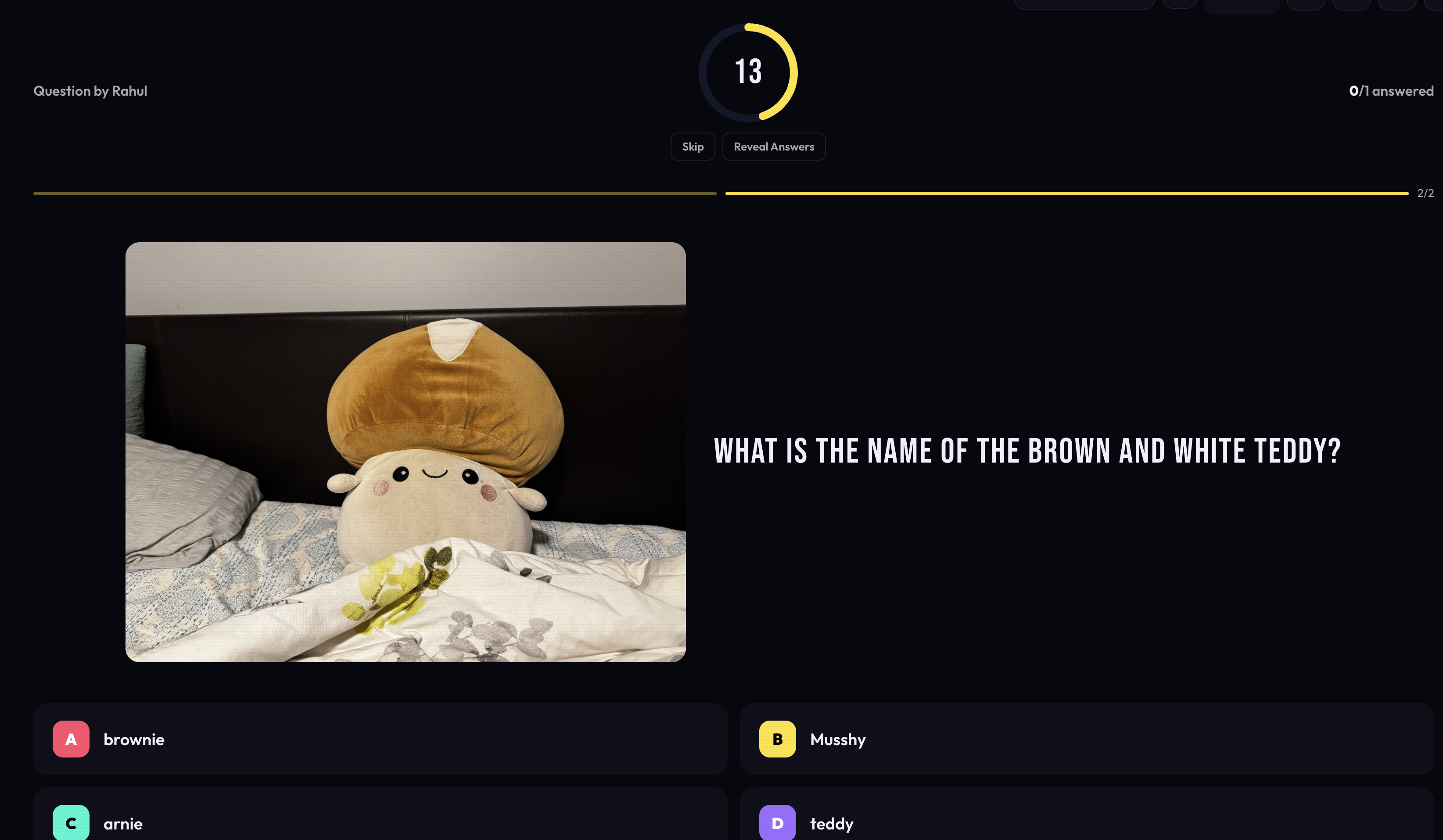
That was the moment I realised the thing I'd built wasn't a homework tool. It was a tool for shared attention. Homework was just the excuse.
The problem it actually solved had nothing to do with NAPLAN. It was: how do you get a group of people — kids and adults, different ages, different attention spans — to look at the same thing and laugh together for ten minutes?
Most "family games" require somebody to read instructions out loud, deal cards, keep score, and referee disputes. By the time you've set it up, the four-year-old has lost interest. A quiz on a screen, hosted by a kid, sidesteps all of that. The kid is in charge. The adults are players. The screen does the scoring. The friction is gone.
The grandparents problem
The next wedge came from a phone call.
My parents — the grandparents — had been hearing about the dinner quizzes. They wanted to play. But they live overseas, and the "everyone in the same room" format obviously doesn't work over a video call with lag and three time zones.
What they wanted was something different: a quiz they could play alone, at their own pace, when they had a quiet moment.
This was a real shift. The original product was synchronous — one host, many players, one room. What they were asking for was asynchronous — make a quiz, send a link, the other person plays whenever, you see how they did later.
And the delivery channel wasn't an app. It wasn't email. It was WhatsApp. Because that's where the family already was.
This is the part I keep coming back to when I think about building things: users don't show up where you want them to show up. You go to them. The grandparents weren't going to download an app, create an account, or learn a new interface. They were going to tap a link in WhatsApp and play. If you can't meet them there, you don't have a product for them.
So we built that mode too. Same engine, different shape: make a quiz, get a shareable link, send it through whichever group chat your family lives in, and the recipient plays solo. The host gets to see the results. No accounts. No friction.
The thread
If I zoom out, every version of the product has been solving the same underlying problem in different clothes:
- Homework: how do I get a kid to engage with content that feels like work?
- Dinner table: how do I get a mixed-age group to share attention for ten minutes?
- Grandparents over WhatsApp: how do I share a small moment of play with someone who isn't in the room?
The answer in all three cases turned out to be the same: strip the friction until the activity itself is the only thing left.
No accounts. No tutorials. No app store. No "set up your profile." Just: here is a question, here are the answers, press the one you think is right.
It sounds obvious written down. It was not obvious while I was building it. Every time I added a feature, my son would find a way to get stuck on it, and I'd take it back out. He was, without knowing it, the most ruthless product reviewer I've ever worked with.
What I'd tell someone starting a side project
Three things, in order of how badly I wish I'd known them earlier:
1. Find a user who can't be polite to you. Adults will tell you your product is "interesting" and never open it again. An eight-year-old will tell you it's boring and walk away mid-sentence. The second kind of feedback is worth ten times more.
2. The problem you start with is not the problem you end up solving. I started with homework. I ended up with a thing my parents use to send their grandkids quizzes from the other side of the world. The interesting product was hiding inside the obvious one.
3. Friction is the feature. Or rather, the absence of it is. Every screen you remove, every account step you delete, every "are you sure?" you cut — those aren't simplifications. Those are the product.
If you want to try it, it's at quizzy.earth. No sign up. Make a quiz in a minute. Send it to whoever you want to laugh with.
And if you have a kid in Year 3 staring down a stack of worksheets — open it, hand them the keyboard, and see what they make. They'll surprise you.
Comments
More Blog
View allaiContext bankruptcy: The case for strategic forgetting for AI Agents
Most of us have seen a coding agent fail to complete a task we know it can do. We just don't...
J
James O'ReillygooglecloudParallel Compliance Engine: Drive-to-Sheets Multi-Agent Orchestration
When building Generative AI applications, developers often encounter a massive bottleneck: sequential...
A
Aryan IranidiscussIs It Ethical to Post and Ask About Circuits on Dev.to?
I’ve been thinking about sharing some electronic circuit posts on Dev.to — small circuits, DIY...
C
codebunny20agentsThe One-Click Exporter: AI Studio Antigravity, Probed to Its Limits
What nobody tells you about exporting your multi-agent prototype to a local workspace. Every...
L
leslysandraagenticarchitectGuarding the till while autonomous data agents do the digging
Autonomous agents are genuinely good at answering messy business questions. Give one an LLM and a set...
S
Sireesha PulipatiaiReturn on Attention: Why AI Code Reviews Are Wearing Us Out
PR volume went up, ticket quality didn't, and the gap got filled with LLMs on both sides of the review: bots reviewing, bots replying, bots occasionally arguing with bots about priorities that only existed in a teammate's head. Our CEO named the actual problem, and it's bigger than code review.
C
christineReady-made automations for this
Workflows from the Neura Market marketplace related to this Stable Diffusion resource
- Auto-Categorize Outlook Emails into Color Categories with GP-40n8n · Free · Related topic
- Create a WHOIS API Interface for AI Agents with 8 Domain Management Operationsn8n · Free · Related topic
- Document Q&A Chatbot with Gemini AI and Supabase Vector Search for Telegramn8n · Free · Related topic
- Generate & Email Personalized Jokes with GPT-4 Mini and Gmailn8n · Free · Related topic