
Back to Blog html
html ai
ai googlecloud
 discuss
 agents
 agenticarchitect
 ai
ai
Coding an Extension that Summarises Web Pages with HTML, CSS, and JS
Helitha Rupasinghe June 22, 2026
0 views
In this post, I will show you how you can create a Google Chrome extension that instantly summarises...
In this post, I will show you how you can create a Google Chrome extension that instantly summarises the current web page. We are going to build TLDR Master, a minimal, privacy-friendly extension that runs entirely in your browser.
The best part? No API keys or external services are required. We will write a lightweight TF-IDF algorithm in pure JavaScript to extract the most important sentences from any article.
Creating the project
First, let's set up our project structure. Create a new folder named TLDR-Master and add the following files:
TLDR-Master
  |- assets
    |- css
      |- popup.css
    |- images
      |- logo16.png
      |- logo48.png
      |- logo128.png
  |- manifest.json
  |- popup.html
  |- popup.js
Part 1: modifying our HTML file.
Our extension will use a popup UI that appears when the user clicks the extension icon. Open popup.html and set up the basic structure.
We need a header with our logo and a theme toggle button. We'll also add a section to display the word count and reading time, a control group to let users choose how many bullet points they want (3, 5, or 7), and a main button to trigger the summarisation.
<!DOCTYPE html>
<html lang="en">
<head>
  <meta charset="UTF-8">
  <link rel="stylesheet" href="assets/css/popup.css">
</head>
<body>
  <div class="container">
    <div class="header">
      <img src="assets/images/logo128.png" alt="Logo" class="logo">
      <div class="header-text">
        <h2>TL;DR</h2>
        <span class="subtitle">Page Summary</span>
      </div>
      <button id="theme-btn" title="Toggle dark / light mode">
        <!-- SVG Icons for Sun/Moon -->
      </button>
    </div>

    <div id="page-meta" class="page-meta hidden">
      <span id="word-count"></span>
      <span class="dot">·</span>
      <span id="read-time"></span>
    </div>

    <div class="controls">
      <span class="control-label">Bullets</span>
      <div class="pill-group" id="bullet-count">
        <button class="pill" data-value="3">3</button>
        <button class="pill active" data-value="5">5</button>
        <button class="pill" data-value="7">7</button>
      </div>
    </div>

    <div id="loading" class="loading hidden">
      <div class="spinner"></div>
      <span>Analysing page…</span>
    </div>

    <div id="output" class="hidden">
      <div class="summary-header">
        <span class="summary-label">Summary</span>
        <button id="copy-btn" class="icon-btn" title="Copy to clipboard">
          <!-- Copy Icon -->
        </button>
      </div>
      <ul id="summary-list"></ul>
    </div>

    <button id="summarize-btn" class="primary-btn">Summarise Page</button>
  </div>
  <script src="popup.js"></script>
</body>
</html>
Part 2: modifying our CSS file.
Let's make our popup look clean and modern. Open assets/css/popup.css.
We will use CSS variables to easily implement a light and dark mode. We can toggle this by adding a data-theme="dark" attribute to the HTML. We also style the "pill" buttons for the bullet count and a nice spinner for when the extension is analysing the page.
/* ── Design tokens — light mode ── */
:root {
  --bg:          #ffffff;
  --surface:     #f4f4f8;
  --text:        #1a1a2e;
  --accent:      #0076ff;
  --accent-hover:#0062d6;
}

/* ── Dark mode tokens ── */
html[data-theme="dark"] {
  --bg:          #141420;
  --surface:     #1e1e30;
  --text:        #e2e2f0;
  --accent:      #3385ff;
  --accent-hover:#1a6fe8;
}

body {
  font-family: -apple-system, BlinkMacSystemFont, "Segoe UI", Roboto, sans-serif;
  width: 360px;
  margin: 0;
  background: var(--bg);
  color: var(--text);
  transition: background 0.2s, color 0.2s;
}

.primary-btn {
  background: var(--accent);
  color: #fff;
  border: none;
  border-radius: 8px;
  padding: 11px 16px;
  font-size: 14px;
  font-weight: 600;
  cursor: pointer;
  width: 100%;
  transition: background 0.15s;
}

.primary-btn:hover {
  background: var(--accent-hover);
}
Part 3: modifying our JS file.
This is where the magic happens! Open popup.js.
Because we want to keep everything local and private, we aren't sending the page text to an external AI. Instead, we inject a script directly into the active tab to extract the text and score it.
First, let's handle the UI logic, like the theme toggle and the bullet count selection:
// ── Theme toggle ───────────────────────────────────────────────────────────
document.getElementById('theme-btn').addEventListener('click', () => {
  const isDark = document.documentElement.getAttribute('data-theme') === 'dark';
  const next = isDark ? 'light' : 'dark';

  if (next === 'dark') {
    document.documentElement.setAttribute('data-theme', 'dark');
  } else {
    document.documentElement.removeAttribute('data-theme');
  }
  chrome.storage.local.set({ theme: next });
});

// ── Bullet-count pill toggle ───────────────────────────────────────────────
let bulletCount = 5;
document.querySelectorAll('.pill').forEach(btn => {
  btn.addEventListener('click', () => {
    document.querySelectorAll('.pill').forEach(b => b.classList.remove('active'));
    btn.classList.add('active');
    bulletCount = parseInt(btn.dataset.value, 10);
  });
});
Finally, we return the top N sentences to the popup, sorted by their original order in the document, and display them as a bulleted list!
Part 4: modifying our Manifest.Json file.
Finally, we need to tell Chrome about our extension. Open manifest.json. We are using Manifest V3 and we need a few specific permissions:
activeTab: To access the currently open tab.scripting: To inject our extraction script into the page.clipboardWrite: So users can copy the summary.storage: To save their preferred theme (light or dark).
{
  "manifest_version": 3,
  "name": "TLDR Web Summariser",
  "version": "1.2",
  "description": "Summarises the current web page instantly without API keys or external dependencies.",
  "permissions": [
    "activeTab",
    "scripting",
    "clipboardWrite",
    "storage"
  ],
  "action": {
    "default_popup": "popup.html",
    "default_icon": {
      "16": "assets/images/logo16.png",
      "48": "assets/images/logo48.png",
      "128": "assets/images/logo128.png"
    }
  },
  "icons": {
    "16": "assets/images/logo16.png",
    "48": "assets/images/logo48.png",
    "128": "assets/images/logo128.png"
  }
}
Deployment
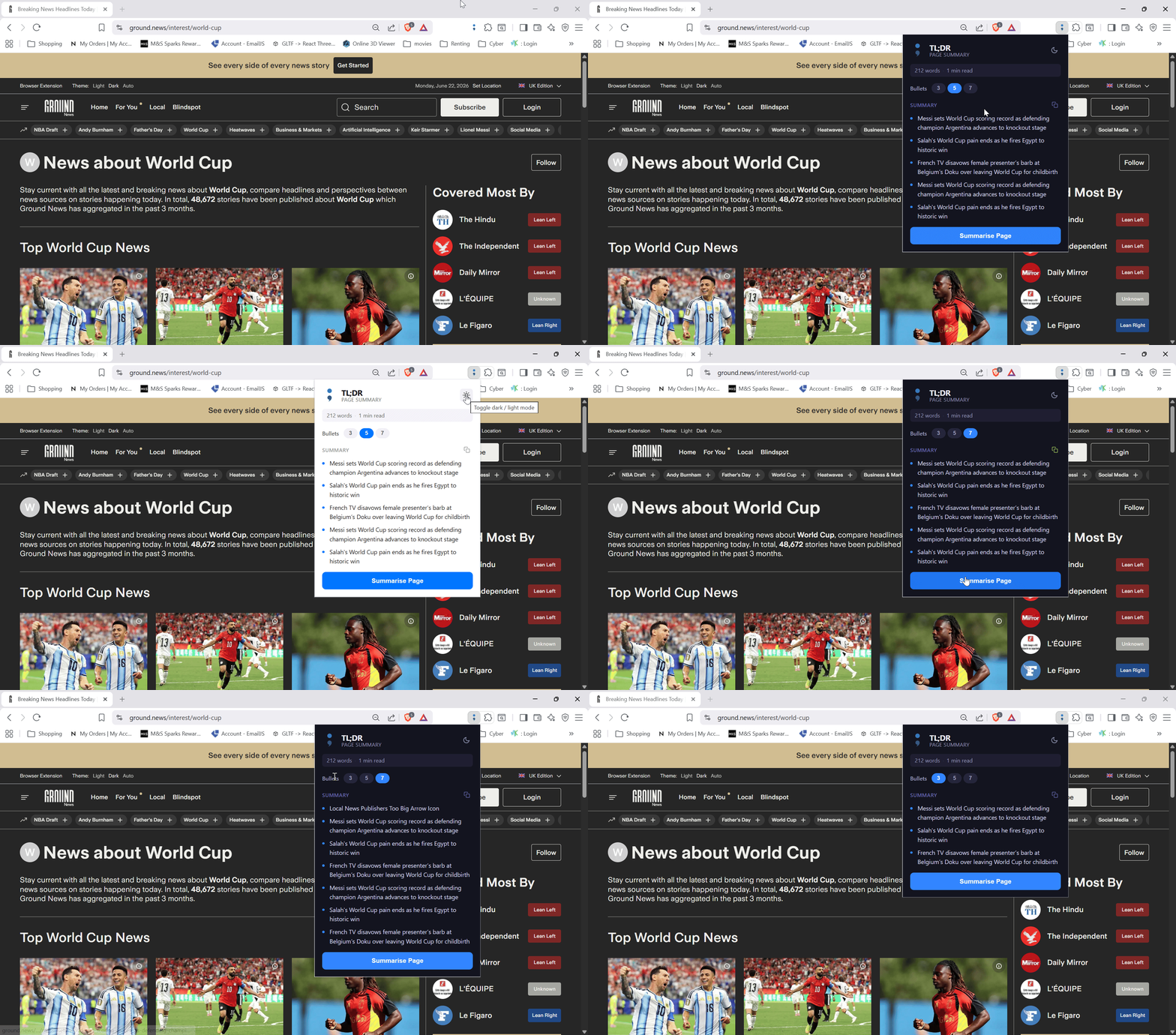
To test your new extension:
- Open Chrome and navigate to
chrome://extensions/. - Enable "Developer mode" in the top right corner.
- Click "Load unpacked" and select your
TLDR-Masterfolder. - Click the extension icon in your browser toolbar while on any article, and hit "Summarise Page"!
Conclusion
You've just built a fully functional, offline web summariser using only HTML, CSS, and vanilla JavaScript! By leveraging the chrome.scripting API and a classic NLP algorithm, you can provide immense value without relying on paid APIs or compromising user privacy.
Check out the full source code and contribute on GitHub: TLDR Master.
Comments
More Blog
View allaiContext bankruptcy: The case for strategic forgetting for AI Agents
Most of us have seen a coding agent fail to complete a task we know it can do. We just don't...
J
James O'ReillygooglecloudParallel Compliance Engine: Drive-to-Sheets Multi-Agent Orchestration
When building Generative AI applications, developers often encounter a massive bottleneck: sequential...
A
Aryan IranidiscussIs It Ethical to Post and Ask About Circuits on Dev.to?
I’ve been thinking about sharing some electronic circuit posts on Dev.to — small circuits, DIY...
C
codebunny20agentsThe One-Click Exporter: AI Studio Antigravity, Probed to Its Limits
What nobody tells you about exporting your multi-agent prototype to a local workspace. Every...
L
leslysandraagenticarchitectGuarding the till while autonomous data agents do the digging
Autonomous agents are genuinely good at answering messy business questions. Give one an LLM and a set...
S
Sireesha PulipatiaiReturn on Attention: Why AI Code Reviews Are Wearing Us Out
PR volume went up, ticket quality didn't, and the gap got filled with LLMs on both sides of the review: bots reviewing, bots replying, bots occasionally arguing with bots about priorities that only existed in a teammate's head. Our CEO named the actual problem, and it's bigger than code review.
C
christineReady-made automations for this
Workflows from the Neura Market marketplace related to this Stable Diffusion resource
- LinkedIn Chrome Extensions Limit Code Automationn8n · $15.99 · Related topic
- Seamless HubSpot to Instantly Sync Automationn8n · $14.99 · Related topic
- Automate ABM Research to Outreach with Octave, AI & Instantly.ain8n · $24.99 · Related topic
- Auto-Reply to Positive Cold Emails with GPT-4 & Instantly.ain8n · $19.99 · Related topic