
Back to Blog agenticarchitect
 ai
ai googlecloud
 discuss
 agents
 agenticarchitect
 ai
ai
gke-scout, your AI On-Call SRE for Google Kubernetes Engine
Nguyen Hai Truong June 25, 2026
0 views
I built gke-scout, a CLI tool that acts as an AI on-call SRE for GKE. Point it at a broken workload,...
I built gke-scout, a CLI tool that acts as an AI on-call SRE for GKE. Point it at a broken workload, and it investigates read-only through a safety guardrail, then writes an evidence-cited root-cause report. It uses Gemini (via the Antigravity CLI) and the GKE MCP server under the hood, but never mutates your cluster.
Google Cloud credits are provided for this project. Thank Google :)
TL;DR
The full source is at https://github.com/truongnh1992/gke-sre-ai-agent. MIT licensed.
git clone https://github.com/truongnh1992/gke-sre-ai-agent.git
cd gke-sre-ai-agent
uv tool install .
gke-scout init
gke-scout diagnose <your-deployment>
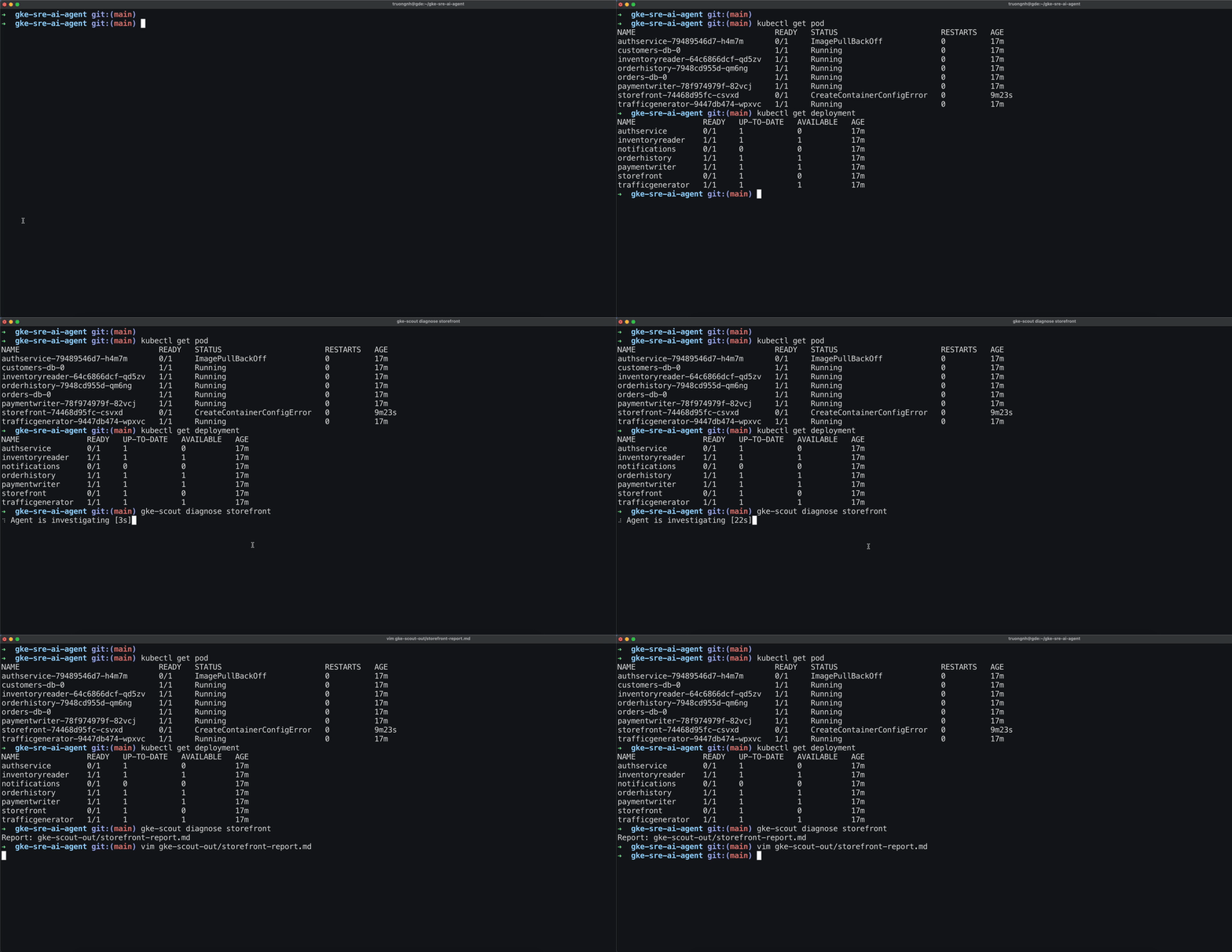
In this post, I'll walk through the architecture, the safety model, and the interesting engineering challenges I ran into.
The Problem
When you're paged at 3 AM for a failing GKE workload, the first 10 minutes are usually the same: kubectl get pods, kubectl describe pod, kubectl logs, kubectl get events — a mechanical checklist before you even start thinking about root causes. An AI agent can do this faster, but the hard part isn't the investigation — it's trusting an agent near production.
What if the agent accidentally runs kubectl delete pod? What if it leaks a Secret value to a model provider? What if it hangs and you're stuck watching a spinner for 20 minutes?
gke-scout is my answer: a local CLI that wraps an AI reasoning engine in a read-only safety guardrail, redacts secrets before they reach the model, logs every tool call for auditability, and produces a structured Markdown report.
Architecture
Here's the end-to-end flow when you run gke-scout diagnose
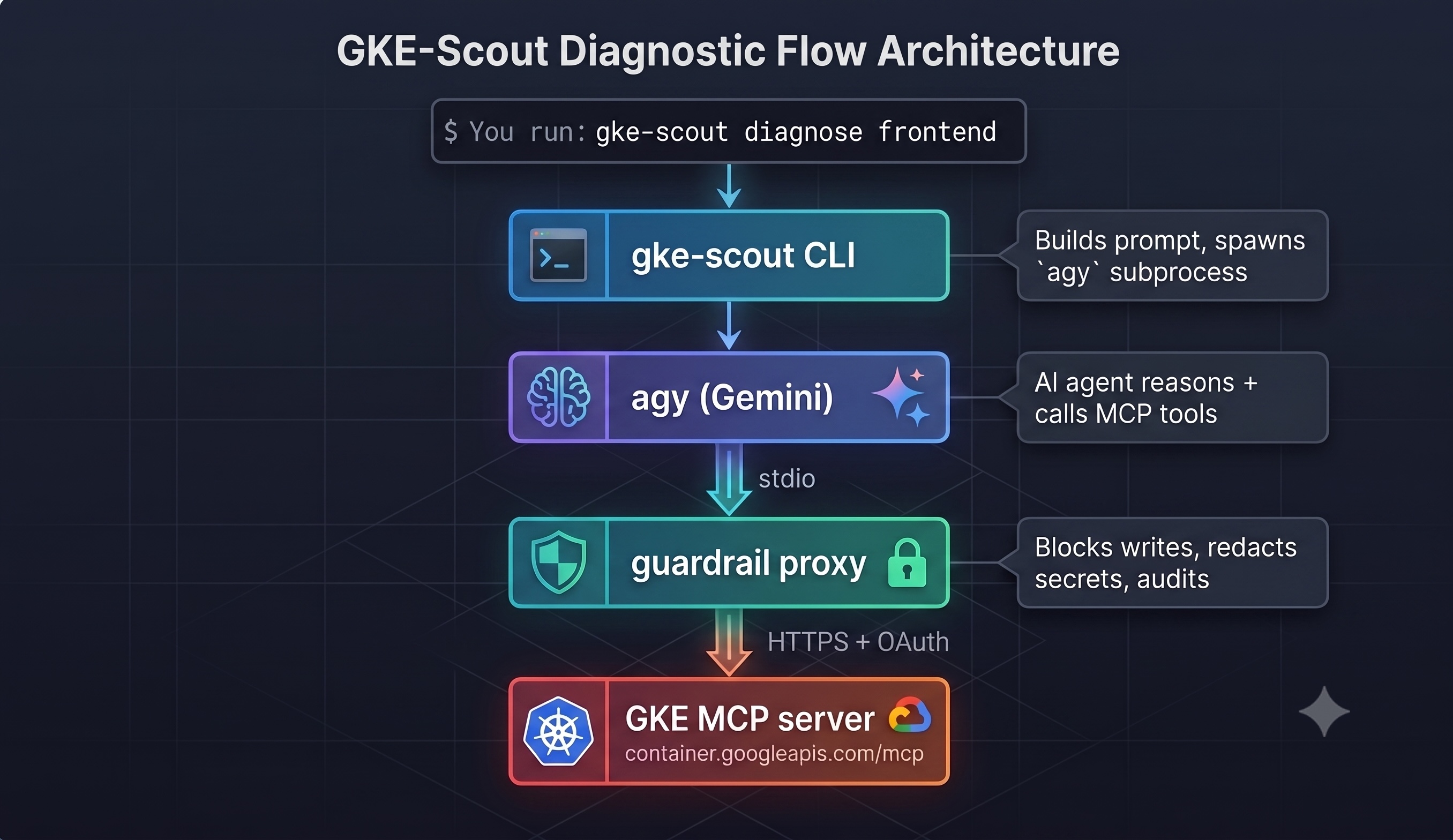
Three Google AI products power this:
- Gemini — the LLM that reasons about the cluster state, decides which tools to call, and generates the diagnosis.
- Antigravity CLI (
agy) — Google's agent runtime that manages the multi-turn tool-calling conversation with Gemini. - GKE MCP server — a Google Cloud API endpoint that exposes Kubernetes operations (
get pods,describe resource,read logs,list events) as Model Context Protocol tools.
The guardrail proxy sits between the AI agent and the GKE MCP server. It's a local stdio MCP server that the Antigravity CLI launches as a subprocess. From the agent's perspective, it looks identical to the upstream server — same tools, same schemas. But every call passes through three safety layers before reaching the cluster.
The Safety Model
The guardrail implements defense-in-depth with three layers: policy enforcement, secret redaction, and audit logging.
Layer 1: Read-Only Policy (Default-Deny)
Every tool call name is tokenized and checked against two sets:
MUTATING_TOKENS = frozenset({
    "apply", "create", "update", "patch", "delete", "remove",
    "scale", "restart", "exec", "drain", "cordon", "edit", ...
})

READ_TOKENS = frozenset({
    "list", "get", "read", "describe", "logs", "events", "watch", ...
})
The evaluation logic is deliberately strict:
- If any mutating token is present → blocked (even
get_exec_sessionis caught byexec) - Else if a read token is present → allowed
- Else → blocked (default-deny for unknown tools)
This handles all naming conventions: delete_pod, deletePod, delete-pod all get tokenized the same way. The default-deny means that if Google adds a new MCP tool tomorrow, it's blocked until explicitly recognized as read-only.
Layer 2: Secret Redaction
Before any API response reaches the AI agent, sensitive data is scrubbed:
- Kubernetes Secrets: All
datavalues in Secret objects are replaced with***REDACTED*** - Sensitive keys: Any key matching
password,token,api_key,credential,bearer, etc. has its value redacted — recursively through nested dicts and lists - Text patterns: Bearer tokens and key-value pairs with sensitive names are regex-scrubbed from string content
This runs on both the tool response (what the agent sees) and the audit log arguments (what hits disk). The redaction is pure — it deep-copies the input and never mutates the original.
Layer 3: Append-Only Audit Log
Every tool call — allowed or blocked — is written to ~/.gke-scout/audit.jsonl:
{
  "ts": "2026-06-23T16:14:49.649628+00:00",
  "tool": "get_k8s_resource",
  "args": {"namespace": "default", "parent": "projects/.../clusters/...", "resourceType": "pod"},
  "allowed": true,
  "reason": "read-only call permitted"
}
Arguments are redacted before logging, so secrets never appear in the audit trail. This gives you a complete record of everything the agent did (and tried to do) during an investigation.
The Prompt Engineering
The agent follows a structured investigation playbook defined in SKILL.md, which is inlined directly into the prompt for the Antigravity engine:
Investigate workload 'frontend' in namespace 'default'.

Cluster context (skip discovery, use these directly):
  project: my-project
  location: us-central1
  cluster: my-cluster
  parent: projects/my-project/locations/us-central1/clusters/my-cluster

IMPORTANT: Use ONLY the MCP tools from the gke-scout-guardrail server...

Follow these instructions exactly:
<full SKILL.md content>
Two key optimizations:
1. Cluster context injection: The CLI parses kubectl config current-context to extract the project, location, and cluster name, then injects them directly into the prompt. Without this, the agent would waste 2-3 MCP calls running list_clusters and get_cluster just to discover what it's connected to.
2. Tool call minimization: The skill explicitly forbids calling discovery tools (get_k8s_version, list_k8s_api_resources, get_k8s_cluster_info) and instructs the agent to emit a STRUCTURED_RESULT immediately once it has a diagnosis -- no unnecessary follow-up investigations.
What I Learned
The guardrail is more important than the agent. Most of the engineering effort went into the safety layer, not the AI prompt. Getting the policy right (default-deny, tokenized matching), the redaction right (deep recursive, regex for text), and the error handling right (fail-closed, no leaked errors) — that's what makes this safe to run against production clusters.
MCP is a good abstraction. The Model Context Protocol let me insert a transparent proxy between the agent and the API without the agent knowing. Same tool list, same schemas, just filtered. The agent doesn't need to be "aware" of the guardrail.
LLM agents are slow for simple problems. A CreateContainerConfigError that takes 2 seconds with kubectl describe pod takes 3-5 minutes with an AI agent doing multiple MCP calls. The value is in complex, multi-service failures where a human would spend 15-30 minutes doing the same checklist.
Comments
More Blog
View allaiContext bankruptcy: The case for strategic forgetting for AI Agents
Most of us have seen a coding agent fail to complete a task we know it can do. We just don't...
J
James O'ReillygooglecloudParallel Compliance Engine: Drive-to-Sheets Multi-Agent Orchestration
When building Generative AI applications, developers often encounter a massive bottleneck: sequential...
A
Aryan IranidiscussIs It Ethical to Post and Ask About Circuits on Dev.to?
I’ve been thinking about sharing some electronic circuit posts on Dev.to — small circuits, DIY...
C
codebunny20agentsThe One-Click Exporter: AI Studio Antigravity, Probed to Its Limits
What nobody tells you about exporting your multi-agent prototype to a local workspace. Every...
L
leslysandraagenticarchitectGuarding the till while autonomous data agents do the digging
Autonomous agents are genuinely good at answering messy business questions. Give one an LLM and a set...
S
Sireesha PulipatiaiReturn on Attention: Why AI Code Reviews Are Wearing Us Out
PR volume went up, ticket quality didn't, and the gap got filled with LLMs on both sides of the review: bots reviewing, bots replying, bots occasionally arguing with bots about priorities that only existed in a teammate's head. Our CEO named the actual problem, and it's bigger than code review.
C
christineReady-made automations for this
Workflows from the Neura Market marketplace related to this Stable Diffusion resource
- Talk to Your Google Sheets Using ChatGPT-5n8n · Free · Related topic
- Automate Call Scheduling with Voice AI Receptionist Using Twilio, Google Calendar & Airtablen8n · Free · Related topic
- Auto-translate Blog Articles with Google Translate and Airtable Storagen8n · Free · Related topic
- AI-Generated LinkedIn Posts with OpenAI, Google Sheets, & Email Approval Workflown8n · Free · Related topic