Automate Daily GBP Exchange Rate Email Notifications
This workflow retrieves the latest GBP exchange rates and sends them via email in a formatted HTML table. It also logs the data in a Google Sheets document for record-keeping.
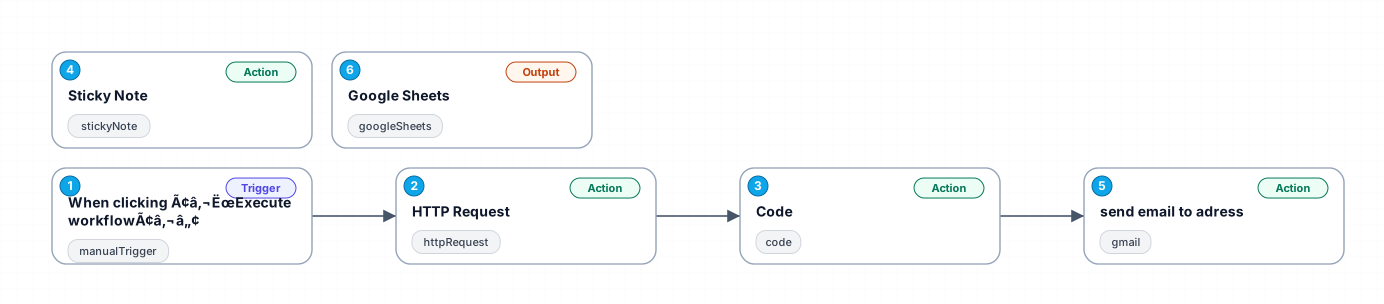
The workflow is triggered manually and begins by fetching the latest exchange rates for GBP against USD, AUD, and CAD using the Fixer API. The data is then formatted into an HTML table using a code node. This table is emailed to a specified address using Gmail. Additionally, the exchange rate data is appended to a Google Sheets document for tracking and analysis.
New buyers can create an account from the cart to unlock a controlled $10 first-purchase credit on eligible orders of $25+.
Secure checkout powered by Stripe
Support
How to import this workflow into n8n
- 1Purchase or download the workflow to get the n8n workflow JSON file.
- 2In your n8n instance, open Workflows and choose "Import from File" (or paste the JSON with Ctrl+V on the canvas).
- 3Open each node marked with a credential warning and connect your own accounts and API keys.
- 4Run the workflow once manually to verify the data flow, then toggle it to Active.
Related Communication workflows
- Automate Outbound Calls with Ultravox AI and Twilio$4.99
- Automate Intelligent Email Classification with AI in Gmail$4.99
- Generate AI videos and carousels with Blotato for Instagram and TikTok$9.99
- Automating WhatsApp Replies Using GoHighLevel with Redis and Anthropic$24.99
- Automate Gmail Email Labeling with AI for Enhanced Organization$14.99
- Automate Email Summarization and Logging with AI and Google Sheets$9.99
More from Theo van der Berg
Need this deployed? We'll set it up for you.
Our automation experts deploy this workflow in your stack, connect your accounts, and verify it works — or build a custom solution from scratch.