Automate Email to Notion Page Creation Based on Labels
Automatically transfer labeled emails to a Notion database, creating a new page for each email with specific details. This ensures organized email tracking and task management within Notion.
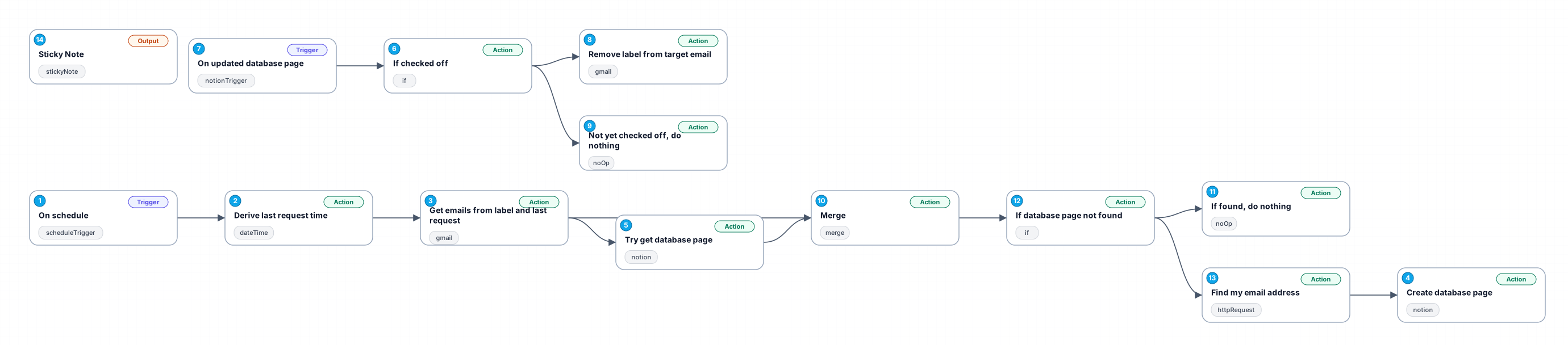
This workflow automates the process of transferring emails labeled with a specific tag from Gmail to a Notion database. It runs on a scheduled interval, checking for new emails with the designated label. If an email is not already recorded in the Notion database, it creates a new page with the email's subject as the title, a snippet of the body as the content, and a link to the email. Once a task in Notion is marked complete, the label is removed from the corresponding email in Gmail, streamlining task management and reducing manual tracking.
New buyers can create an account from the cart to unlock a controlled $10 first-purchase credit on eligible orders of $25+.
Related bundle
Customer Support Automation Suite
8 hand-picked workflows for $39.00.
That is $4.88 each, vs $9.99 for this one alone.
View bundleSecure checkout powered by Stripe
Support
How to import this workflow into n8n
- 1Purchase or download the workflow to get the n8n workflow JSON file.
- 2In your n8n instance, open Workflows and choose "Import from File" (or paste the JSON with Ctrl+V on the canvas).
- 3Open each node marked with a credential warning and connect your own accounts and API keys.
- 4Run the workflow once manually to verify the data flow, then toggle it to Active.
Related Communication workflows
- Automate Intelligent Email Classification with AI in Gmail$4.99
- Automate Outbound Calls with Ultravox AI and Twilio$4.99
- Generate AI videos and carousels with Blotato for Instagram and TikTok$9.99
- Automating WhatsApp Replies Using GoHighLevel with Redis and Anthropic$24.99
- Automate Gmail Email Labeling with AI for Enhanced Organization$14.99
- Automate Email Summarization and Logging with AI and Google Sheets$9.99
More from Luca Esposito
Need this deployed? We'll set it up for you.
Our automation experts deploy this workflow in your stack, connect your accounts, and verify it works — or build a custom solution from scratch.