Automate SMS Notifications for Mautic Form Submissions - n8n Workflow | Neura Market

    Automate SMS Notifications for Mautic Form Submissions

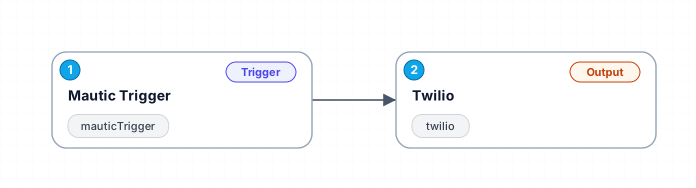
    Automatically send an SMS notification via Twilio whenever a form is submitted in Mautic, ensuring timely communication with your audience.

    Platform
    n8n
    Category
    Communication
    Price
    Free
    Creator
    Zoe Mitchell
    • twilio
    • mauticTrigger
    Back to MarketplaceMore n8n Workflows
    Neura Market
    Neura Market
    Marketplace
    Directories
    Resources

    Marketplace

    • Prompts
    • Workflows
    • Agents Store
    • Workflow Packs
    • Categories
    • Marketplace

    Directories

    • AI Tools Directory
    • ChatGPT
    • Claude
    • Gemini
    • Cursor
    • Grok
    • DeepSeek
    • Perplexity
    • CoPilot
    • Midjourney
    • Stable Diffusion
    • MCP Servers
    • .md Directory
    • All Directories

    Free Tools

    • AI Text Humanizer
    • AI Content Detector
    • Workflow Generator
    • Model Comparison
    • AI Pricing Calculator
    • AI Benchmarks
    • ROI Calculator
    • All Free Tools

    Resources

    • AI News
    • Blog
    • AI Models
    • Integrations
    • Alternatives
    • n8n vs Zapier
    • Make vs Zapier
    • n8n vs Make
    • Resource Library
    • Documentation

    Community

    • AI Jobs
    • AI Events
    • AI Companies
    • Start Selling
    • Sell n8n Workflows
    • Sell AI Agents
    • Sell Prompts
    • Creator Guide
    • Advertise
    • Affiliates

    Company

    • About
    • Contact
    • Help
    • Careers
    • Pricing
    • Terms
    • Privacy
    • License
    • DMCA

    Stay Updated

    Get the latest AI tools and insights delivered to your inbox.

    Neura Market Logoneuramarket

    © 2026 Neura Market. All rights reserved.

    How to import this workflow into n8n

    1. 1Purchase or download the workflow to get the n8n workflow JSON file.
    2. 2In your n8n instance, open Workflows and choose "Import from File" (or paste the JSON with Ctrl+V on the canvas).
    3. 3Open each node marked with a credential warning and connect your own accounts and API keys.
    4. 4Run the workflow once manually to verify the data flow, then toggle it to Active.

    Related Communication workflows

    • Automate Outbound Calls with Ultravox AI and TwilioFree
    • Automate Intelligent Email Classification with AI in GmailFree
    • Generate AI videos and carousels with Blotato for Instagram and TikTokFree
    • Automating WhatsApp Replies Using GoHighLevel with Redis and AnthropicFree
    • Automate Gmail Email Labeling with AI for Enhanced OrganizationFree
    • Automate Email Summarization and Logging with AI and Google SheetsFree

    More from Zoe Mitchell

    • Automate Lead Nurturing from YouTube to WhatsApp with WordPress and FluentCRM
    • Automate Cold Outreach: Scrape Leads and Initiate Calls with Dumpling AI and Vapi
    • Automate Multimodal File Analysis with Google Gemini and Qwen LLM
    All Communication workflows →All n8n workflows →

    Need help customizing this workflow?

    Our automation experts adapt it to your exact stack, data, and process — or build one from scratch.

    Get a Custom Build