Deploy a Seven Tool MCP Server for AI Integration
Set up a complete MCP server with pre-configured operations for SMS and voice conversion, enabling seamless AI agent integration with zero configuration.
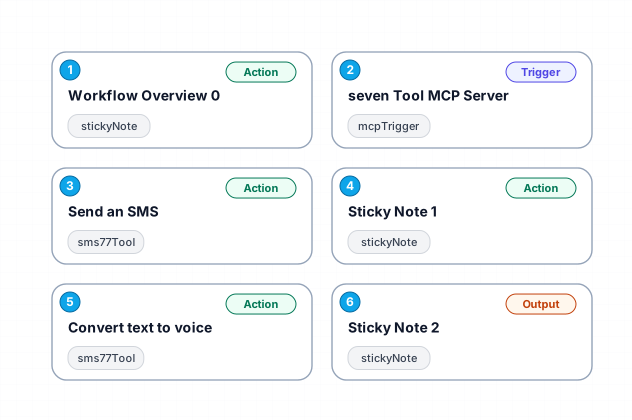
This workflow establishes a Seven Tool MCP Server that supports two primary operations: sending SMS messages and converting text to voice. It leverages n8n's capabilities to create a robust endpoint for AI agents, automatically handling parameters with built-in $fromAI() expressions. The server is designed for ease of use, requiring no additional setup beyond importing and activating the workflow. It provides native error handling and response formatting, ensuring reliable communication with AI agents.
New buyers can create an account from the cart to unlock a controlled $10 first-purchase credit on eligible orders of $25+.
Secure checkout powered by Stripe
Support
How to import this workflow into n8n
- 1Purchase or download the workflow to get the n8n workflow JSON file.
- 2In your n8n instance, open Workflows and choose "Import from File" (or paste the JSON with Ctrl+V on the canvas).
- 3Open each node marked with a credential warning and connect your own accounts and API keys.
- 4Run the workflow once manually to verify the data flow, then toggle it to Active.
Related Communication workflows
- Automate Outbound Calls with Ultravox AI and Twilio$4.99
- Automate Intelligent Email Classification with AI in Gmail$4.99
- Generate AI videos and carousels with Blotato for Instagram and TikTok$9.99
- Automating WhatsApp Replies Using GoHighLevel with Redis and Anthropic$24.99
- Automate Gmail Email Labeling with AI for Enhanced Organization$14.99
- Automate Email Summarization and Logging with AI and Google Sheets$9.99
More from Zara Khan
Need this deployed? We'll set it up for you.
Our automation experts deploy this workflow in your stack, connect your accounts, and verify it works — or build a custom solution from scratch.