Run Apache Airflow DAG and Retrieve XCom Value
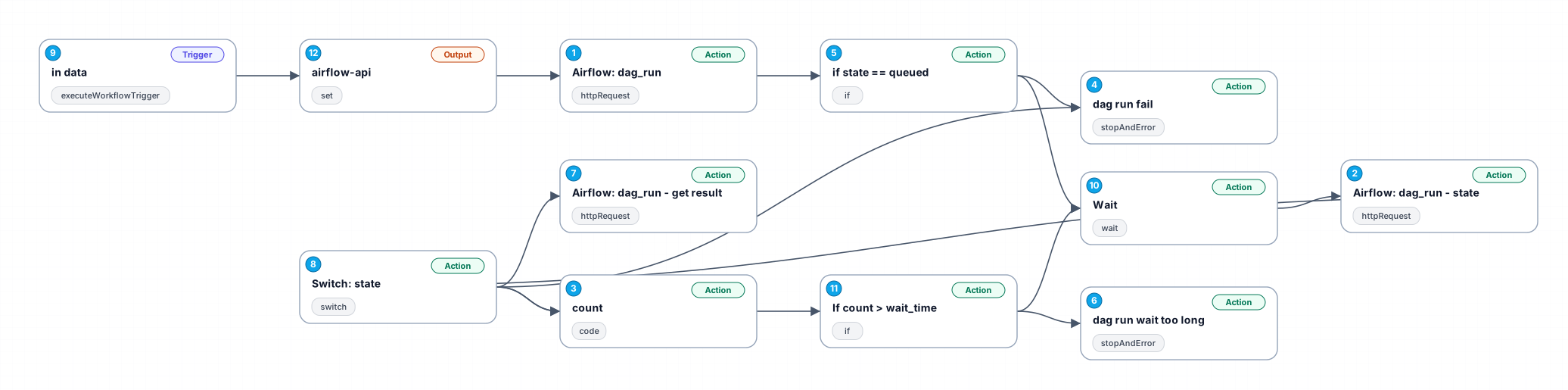
# Run Apache Airflow DAG and Retrieve XCom Value ## What this workflow does This workflow integrates the Apache Airflow API [DAGRun](https://airflow.apache.org/docs/apache-airflow/2.10.5/stable-rest-api-ref.html#tag/DAGRun) and [XCom](https://airflow.apache.org/docs/apache-airflow/2.10.5/stable-rest-api-ref.html#tag/XCom). It enables n8n to trigger Airflow DAGs and retrieve the execution results. ## Preparation: 1. **Update Airflow API Link Prefix** - Navigate to the `airflow-api` node. - Update the prefix of the Airflow API link in the format: `http(s)://ip:port`. - Example: `https://airflow.example.com` 2. **Configure Authentication** - Go to the `Airflow: dag_run` node. - Update the `Basic Auth` credentials with your Airflow username and password. - Repeat this step for `Airflow: dag_run - state` and `Airflow: dag_run - get result` nodes. **Security Note:** Using Basic Authentication requires storing credentials in plaintext. If possible, consider using API Keys or tokens for enhanced security. - An example is setting Airflow's [API Authentication](https://airflow.apache.org/docs/apache-airflow-providers-fab/stable/auth-manager/api-authentication.html) to [basic_auth](https://airflow.apache.org/docs/apache-airflow-providers-fab/stable/auth-manager/api-authentication.html#basic-authentication). Choose other authentication methods if needed. - Ensure the user account has the following permissions: `can create on DAG Runs`, `can read on DAG Runs`, `can read on XComs`, `can edit on DAGs`, and `can read on DAGs`. ## How to Use: To execute this workflow, use the **Execute Sub-workflow** node with the following input parameters: - **dag_id**: The DAG ID (name) in Airflow that you want to trigger. - **task_id**: The task ID (name) from which you want to retrieve the XCom return_value. - **conf**: Input data for the Airflow DAG run. - **wait**: Delay (in seconds) between each `Airflow: dag_run - state` check. - **wait_time**: The maximum time (in seconds) to wait for `Airflow: dag_run - state` before returning an error. ## Output: - The workflow returns the XCom result from `Airflow: dag_run - get result`. - The XCom `return_value` is stored in the `value` field.
New buyers can create an account from the cart to unlock a controlled $10 first-purchase credit on eligible orders of $25+.
Related bundle
Web Scraping & Research Engine
8 hand-picked workflows for $59.00.
That is $7.38 each, vs $9.99 for this one alone.
View bundleSecure checkout powered by Stripe
Support
How to import this workflow into n8n
- 1Purchase or download the workflow to get the n8n workflow JSON file.
- 2In your n8n instance, open Workflows and choose "Import from File" (or paste the JSON with Ctrl+V on the canvas).
- 3Open each node marked with a credential warning and connect your own accounts and API keys.
- 4Run the workflow once manually to verify the data flow, then toggle it to Active.
Related Data & Analytics workflows
- Generate AI viral videos with VEO 3 and upload to TikTok$14.99
- Generate a daily multi-asset market report with TwelveData, Groq and Google Sheets$14.99
- Build an OpenAI RAG system with document upload, semantic search and caching$24.99
- Automate Website Content Scraping and SEO Keyword Extraction with GPT-4o-mini and Airtable$14.99
- Process Contact Form Submissions with Validation and MongoDB Storage$14.99
- Add webhook data to a Google Sheet$2.99
Need this deployed? We'll set it up for you.
Our automation experts deploy this workflow in your stack, connect your accounts, and verify it works — or build a custom solution from scratch.