
Evaluating Agent Skill Output Quality with Eval-Driven Iteration

You have written a skill, tried it on a prompt, and it seemed to work. But does it work reliably across varied prompts, in edge cases, and better than no skill at all? Running structured evaluations (evals) answers these questions and gives you a feedback loop for improving the skill systematically.
What it does
Eval-driven iteration is a process for testing whether your skill produces good outputs. Instead of relying on a single manual test, you define a set of test cases, run them with and without the skill, grade the results against objective assertions, and use the signal to improve the skill. The goal is to move from "it worked once" to "it works reliably."
Before you start
You need a skill directory with a SKILL.md file. You will create a evals/ subdirectory inside it. You also need an agent environment that can load a skill from a path and run tasks with clean context. Claude Code with subagent support is one such environment. You should be comfortable with JSON files and basic shell commands.
Designing test cases
A test case has three parts:
- Prompt: a realistic user message, the kind of thing someone would actually type.
- Expected output: a human-readable description of what success looks like.
- Input files (optional): files the skill needs to work with.
Store test cases in evals/evals.json inside your skill directory:
{
  "skill_name": "csv-analyzer",
  "evals": [
    {
      "id": 1,
      "prompt": "I have a CSV of monthly sales data in data/sales_2025.csv. Can you find the top 3 months by revenue and make a bar chart?",
      "expected_output": "A bar chart image showing the top 3 months by revenue, with labeled axes and values.",
      "files": ["evals/files/sales_2025.csv"]
    },
    {
      "id": 2,
      "prompt": "there's a csv in my downloads called customers.csv, some rows have missing emails — can you clean it up and tell me how many were missing?",
      "expected_output": "A cleaned CSV with missing emails handled, plus a count of how many were missing.",
      "files": ["evals/files/customers.csv"]
    }
  ]
}
Tips for writing good test prompts:
- Start with 2-3 test cases. Don't over-invest before you've seen your first round of results. You can expand the set later.
- Vary the prompts. Use different phrasings, levels of detail, and formality. Some prompts should be casual ("hey can you clean up this csv"), others precise ("Parse the CSV at data/input.csv, drop rows where column B is null, and write the result to data/output.csv").
- Cover edge cases. Include at least one prompt that tests a boundary condition, a malformed input, an unusual request, or a case where the skill's instructions might be ambiguous.
- Use realistic context. Real users mention file paths, column names, and personal context. Prompts like "process this data" are too vague to test anything useful.
Don't worry about defining specific pass/fail checks yet, just the prompts and expected outputs. You will add detailed checks (called assertions) after you see what the first run produces.
Running evals
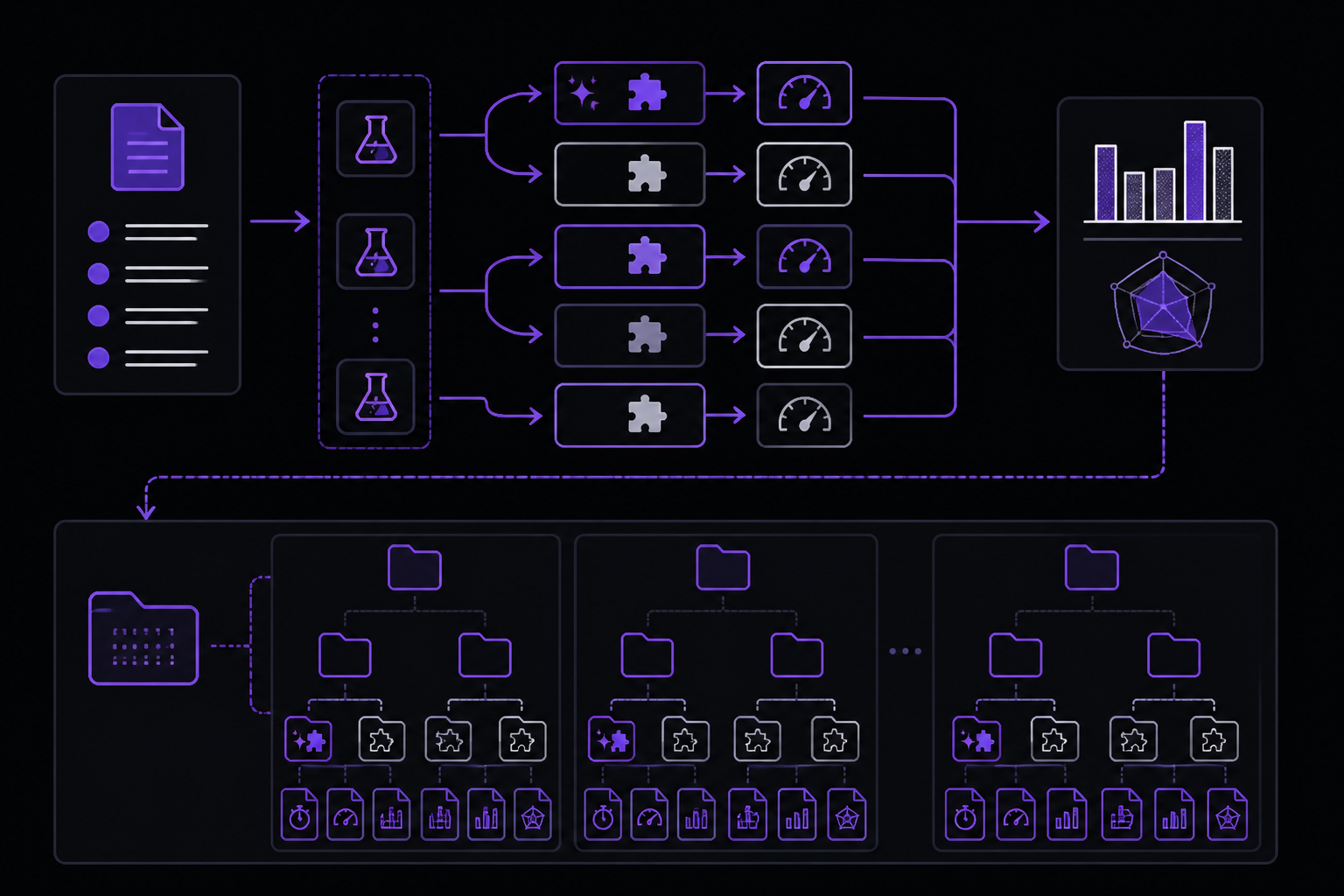
The core pattern is to run each test case twice: once with the skill and once without it (or with a previous version). This gives you a baseline to compare against.
Workspace structure
Organize eval results in a workspace directory alongside your skill directory. Each pass through the full eval loop gets its own iteration-N/ directory. Within that, each test case gets an eval directory with with_skill/ and without_skill/ subdirectories:
csv-analyzer/
├── SKILL.md
└── evals/
    └── evals.json
csv-analyzer-workspace/
└── iteration-1/
    ├── eval-top-months-chart/
    │   ├── with_skill/
    │   │   ├── outputs/       # Files produced by the run
    │   │   ├── timing.json    # Tokens and duration
    │   │   └── grading.json   # Assertion results
    │   └── without_skill/
    │       ├── outputs/
    │       ├── timing.json
    │       └── grading.json
    ├── eval-clean-missing-emails/
    │   ├── with_skill/
    │   │   ├── outputs/
    │   │   ├── timing.json
    │   │   └── grading.json
    │   └── without_skill/
    │       ├── outputs/
    │       ├── timing.json
    │       └── grading.json
    └── benchmark.json         # Aggregated statistics
The main file you author by hand is evals/evals.json. The other JSON files (grading.json, timing.json, benchmark.json) are produced during the eval process, by the agent, by scripts, or by you.
Spawning runs
Each eval run should start with a clean context, no leftover state from previous runs or from the skill development process. This ensures the agent follows only what the SKILL.md tells it. In environments that support subagents (Claude Code, for example), this isolation comes naturally: each child task starts fresh. Without subagents, use a separate session for each run.
For each run, provide:
- The skill path (or no skill for the baseline)
- The test prompt
- Any input files
- The output directory
Here is an example of the instructions you would give the agent for a single with-skill run:
Execute this task:
- Skill path: /path/to/csv-analyzer
- Task: I have a CSV of monthly sales data in data/sales_2025.csv.
  Can you find the top 3 months by revenue and make a bar chart?
- Input files: evals/files/sales_2025.csv
- Save outputs to: csv-analyzer-workspace/iteration-1/eval-top-months-chart/with_skill/outputs/
For the baseline, use the same prompt but without the skill path, saving to without_skill/outputs/.
When improving an existing skill, use the previous version as your baseline. Snapshot it before editing (cp -r <skill-path> <workspace>/skill-snapshot/), point the baseline run at the snapshot, and save to old_skill/outputs/ instead of without_skill/.
Capturing timing data
Timing data lets you compare how much time and tokens the skill costs relative to the baseline. A skill that dramatically improves output quality but triples token usage is a different trade-off than one that is both better and cheaper. When each run completes, record the token count and duration:
{
  "total_tokens": 84852,
  "duration_ms": 23332
}
In Claude Code, when a subagent task finishes, the task completion notification includes total_tokens and duration_ms. Save these values immediately, they are not persisted anywhere else.
Writing assertions
Assertions are verifiable statements about what the output should contain or achieve. Add them after you see your first round of outputs, because you often do not know what "good" looks like until the skill has run.
Good assertions:
"The output file is valid JSON", programmatically verifiable."The bar chart has labeled axes", specific and observable."The report includes at least 3 recommendations", countable.
Weak assertions:
"The output is good", too vague to grade."The output uses exactly the phrase 'Total Revenue: $X'", too brittle; correct output with different wording would fail.
Not everything needs an assertion. Some qualities, like writing style, visual design, or whether the output "feels right," are hard to decompose into pass/fail checks. These are better caught during human review. Reserve assertions for things that can be checked objectively.
Add assertions to each test case in evals/evals.json:
{
  "skill_name": "csv-analyzer",
  "evals": [
    {
      "id": 1,
      "prompt": "I have a CSV of monthly sales data in data/sales_2025.csv. Can you find the top 3 months by revenue and make a bar chart?",
      "expected_output": "A bar chart image showing the top 3 months by revenue, with labeled axes and values.",
      "files": ["evals/files/sales_2025.csv"],
      "assertions": [
        "The output includes a bar chart image file",
        "The chart shows exactly 3 months",
        "Both axes are labeled",
        "The chart title or caption mentions revenue"
      ]
    }
  ]
}
Grading outputs
Grading means evaluating each assertion against the actual outputs and recording PASS or FAIL with specific evidence. The evidence should quote or reference the output, not just state an opinion.
The simplest approach is to give the outputs and assertions to an LLM and ask it to evaluate each one. For assertions that can be checked by code (valid JSON, correct row count, file exists with expected dimensions), use a verification script. Scripts are more reliable than LLM judgment for mechanical checks and reusable across iterations.
{
  "assertion_results": [
    {
      "text": "The output includes a bar chart image file",
      "passed": true,
      "evidence": "Found chart.png (45KB) in outputs directory"
    },
    {
      "text": "The chart shows exactly 3 months",
      "passed": true,
      "evidence": "Chart displays bars for March, July, and November"
    },
    {
      "text": "Both axes are labeled",
      "passed": false,
      "evidence": "Y-axis is labeled 'Revenue ($)' but X-axis has no label"
    },
    {
      "text": "The chart title or caption mentions revenue",
      "passed": true,
      "evidence": "Chart title reads 'Top 3 Months by Revenue'"
    }
  ],
  "summary": {
    "passed": 3,
    "failed": 1,
    "total": 4,
    "pass_rate": 0.75
  }
}
Grading principles
-
Require concrete evidence for a PASS. Don't give the benefit of the doubt. If an assertion says "includes a summary" and the output has a section titled "Summary" with one vague sentence, that is a FAIL. The label is there but the substance is not.
-
Review the assertions themselves, not just the results. While grading, notice when assertions are too easy (always pass regardless of skill quality), too hard (always fail even when the output is good), or unverifiable (cannot be checked from the output alone). Fix these for the next iteration.
For comparing two skill versions, try blind comparison: present both outputs to an LLM judge without revealing which came from which version. The judge scores holistic qualities, like organization, formatting, usability, and polish, on its own rubric, free from bias about which version "should" be better. This complements assertion grading: two outputs might both pass all assertions but differ significantly in overall quality.
Aggregating results
Once every run in the iteration is graded, compute summary statistics per configuration and save them to benchmark.json alongside the eval directories (e.g., csv-analyzer-workspace/iteration-1/benchmark.json):
{
  "run_summary": {
    "with_skill": {
      "pass_rate": { "mean": 0.83, "stddev": 0.06 },
      "time_seconds": { "mean": 45.0, "stddev": 12.0 },
      "tokens": { "mean": 3800, "stddev": 400 }
    },
    "without_skill": {
      "pass_rate": { "mean": 0.33, "stddev": 0.10 },
      "time_seconds": { "mean": 32.0, "stddev": 8.0 },
      "tokens": { "mean": 2100, "stddev": 300 }
    },
    "delta": {
      "pass_rate": 0.50,
      "time_seconds": 13.0,
      "tokens": 1700
    }
  }
}
The delta tells you what the skill costs (more time, more tokens) and what it buys (higher pass rate). A skill that adds 13 seconds but improves pass rate by 50 percentage points is probably worth it. A skill that doubles token usage for a 2-point improvement might not be.
Standard deviation (stddev) is only meaningful with multiple runs per eval. In early iterations with just 2-3 test cases and single runs, focus on the raw pass counts and the delta. The statistical measures become useful as you expand the test set and run each eval multiple times.
Analyzing patterns
Aggregate statistics can hide important patterns. After computing the benchmarks:
- Remove or replace assertions that always pass in both configurations. These do not tell you anything useful. The model handles them fine without the skill. They inflate the with-skill pass rate without reflecting actual skill value.
- Investigate assertions that always fail in both configurations. Either the assertion is broken (asking for something the model cannot do), the test case is too hard, or the assertion is checking for the wrong thing. Fix these before the next iteration.
- Study assertions that pass with the skill but fail without. This is where the skill is clearly adding value. Understand why, which instructions or scripts made the difference.
- Tighten instructions when results are inconsistent across runs. If the same eval passes sometimes and fails others (reflected as high
stddevin the benchmark), the eval may be flaky (sensitive to model randomness), or the skill's instructions may be ambiguous enough that the model interprets them differently each time. Add examples or more specific guidance to reduce ambiguity. - Check time and token outliers. If one eval takes 3x longer than the others, read its execution transcript (the full log of what the model did during the run) to find the bottleneck.
Reviewing results with a human
Assertion grading and pattern analysis catch a lot, but they only check what you thought to write assertions for. A human reviewer brings a fresh perspective, catching issues you did not anticipate, noticing when the output is technically correct but misses the point, or spotting problems that are hard to express as pass/fail checks. For each test case, review the actual outputs alongside the grades.
Record specific feedback for each test case and save it in the workspace (e.g., as a feedback.json alongside the eval directories):
{
  "eval-top-months-chart": "The chart is missing axis labels and the months are in alphabetical order instead of chronological.",
  "eval-clean-missing-emails": ""
}
"The chart is missing axis labels" is actionable; "looks bad" is not. Empty feedback means the output looked fine, that test case passed your review. During the iteration step, focus your improvements on the test cases where you had specific complaints.
Iterating on the skill
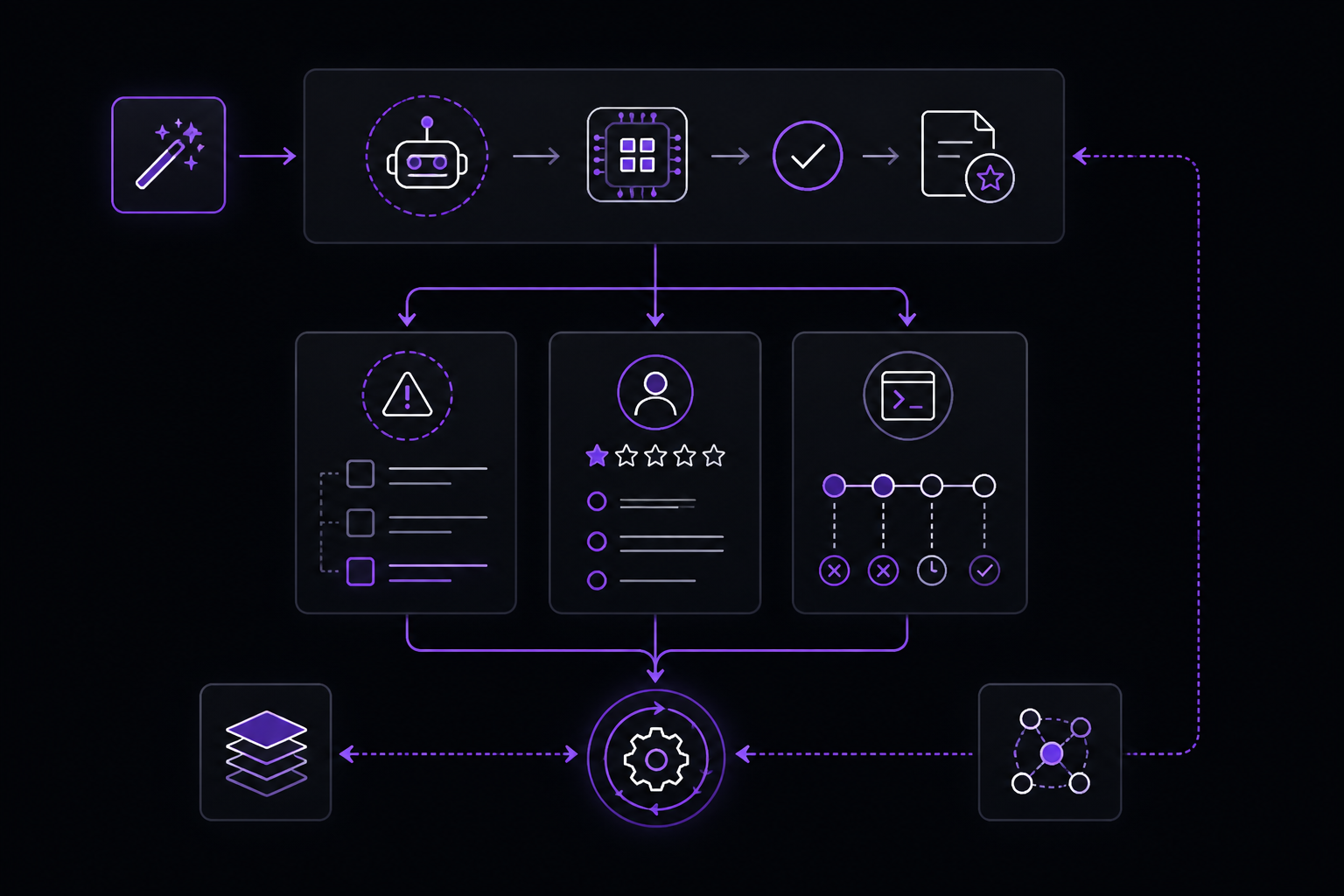
After grading and reviewing, you have three sources of signal:
- Failed assertions point to specific gaps, a missing step, an unclear instruction, or a case the skill does not handle.
- Human feedback points to broader quality issues, the approach was wrong, the output was poorly structured, or the skill produced a technically correct but unhelpful result.
- Execution transcripts reveal why things went wrong. If the agent ignored an instruction, the instruction may be ambiguous. If the agent spent time on unproductive steps, those instructions may need to be simplified or removed.
The most effective way to turn these signals into skill improvements is to give all three, along with the current SKILL.md, to an LLM and ask it to propose changes. The LLM can synthesize patterns across failed assertions, reviewer complaints, and transcript behavior that would be tedious to connect manually. When prompting the LLM, include these guidelines:
- Generalize from feedback. The skill will be used across many different prompts, not just the test cases. Fixes should address underlying issues broadly rather than adding narrow patches for specific examples.
- Keep the skill lean. Fewer, better instructions often outperform exhaustive rules. If transcripts show wasted work (unnecessary validation, unneeded intermediate outputs), remove those instructions. If pass rates plateau despite adding more rules, the skill may be over-constrained. Try removing instructions and see if results hold or improve.
- Explain the why. Reasoning-based instructions ("Do X because Y tends to cause Z") work better than rigid directives ("ALWAYS do X, NEVER do Y"). Models follow instructions more reliably when they understand the purpose.
- Bundle repeated work. If every test run independently wrote a similar helper script (a chart builder, a data parser), that is a signal to bundle the script into the skill's
scripts/directory. See Using scripts for how to do this.
The loop
- Give the eval signals and current
SKILL.mdto an LLM and ask it to propose improvements. - Review and apply the changes.
- Rerun all test cases in a new
iteration-<N+1>/directory. - Grade and aggregate the new results.
- Review with a human. Repeat.
Stop when you are satisfied with the results, feedback is consistently empty, or you are no longer seeing meaningful improvement between iterations.
The skill-creator Skill automates much of this workflow, running evals, grading assertions, aggregating benchmarks, and presenting results for human review.
When not to use it
If you only need to verify a skill works once, or if the skill is trivial (a single instruction with no branching), a full eval loop is overkill. The process is designed for skills where reliability across varied inputs matters and where the cost of a failure is high enough to justify the setup time.
Limits and gotchas
- The
evals/evals.jsonfile is the only file you author by hand. The other JSON files are produced during the eval process, not by you. - Standard deviation is only meaningful with multiple runs per eval. In early iterations with just 2-3 test cases and single runs, focus on raw pass counts and the delta.
- Assertions that always pass or always fail in both configurations are noise. Remove or fix them.
- Human review catches things assertions miss, but the feedback must be specific to be actionable.
What pairs with this
- Using scripts for bundling repeated work into the skill's
scripts/directory. - The
skill-creatorSkill automates much of this workflow.
The #1 AI Newsletter
The most important ai updates, guides, and fixes — one weekly email.
No spam, unsubscribe anytime. Privacy policy