
The Complete Claude Code Guide: Setup, Configuration, Hooks, MCP, and Subagents
This guide covers everything you need to use Claude Code effectively: installation, authentication, the permission system, hooks, MCP (Model Context Protocol), subagents, skills, plugins, and advanced patterns. It is written for developers who want to move beyond basic chat and use Claude Code as a force multiplier in their daily workflow.
What You Need
Before you start, make sure you have the following:
- A supported operating system: macOS 13+, Ubuntu 20.04+/Debian 10+, or Windows 10+ (native, WSL 1, or WSL 2). Alpine Linux requires extra packages (see below).
- 4 GB RAM minimum and an active internet connection.
- A shell: Bash, Zsh, or Fish work best. For Windows, WSL 2 is recommended; Git Bash also works.
- A subscription or API key: You need a Claude Pro, Max, Team, or Enterprise subscription, or a pay-per-token Anthropic API key from the Console (platform.claude.com).
- Node.js 18+ (only if using the legacy npm path): The recommended native installer has no Node dependency.
For Alpine Linux and other musl-based systems, you must install additional packages and set an environment variable before running Claude Code:
apk add libgcc libstdc++ ripgrep
export USE_BUILTIN_RIPGREP=0
How Claude Code Works: The Mental Model
Claude Code is an agentic CLI, not a chat interface with programming knowledge. It reads your codebase, executes commands, modifies files, manages git workflows, connects to external services via MCP, and delegates complex tasks to specialized subagents. Everything flows through a command-line interface that integrates into how developers actually work.
The system operates in three layers:
- Core Layer: Your main conversation. Every message, file read, and tool output consumes context from a shared window (200K tokens standard, 1M tokens with Opus 4.6 or extended context models). When context fills, Claude loses track of earlier decisions and quality degrades. This layer costs money per token.
- Delegation Layer: Subagents spawn with clean contexts, do focused work, and return summaries. The exploration results do not bloat your main conversation; only the conclusions return. Route subagents to cheaper model tiers for exploration, or use your primary model throughout if quality matters more than cost.
- Extension Layer: MCP connects external services (databases, GitHub, Sentry). Hooks guarantee execution of shell commands regardless of model behavior. Skills encode domain expertise that Claude applies automatically. Plugins package all of these for distribution.
The key insight: Most users work entirely in the Core Layer, watching context bloat and costs climb. Power users push exploration and specialized work to the Delegation Layer, keep the Extension Layer configured for their workflow, and use the Core Layer only for orchestration and final decisions.
Installation
System Requirements
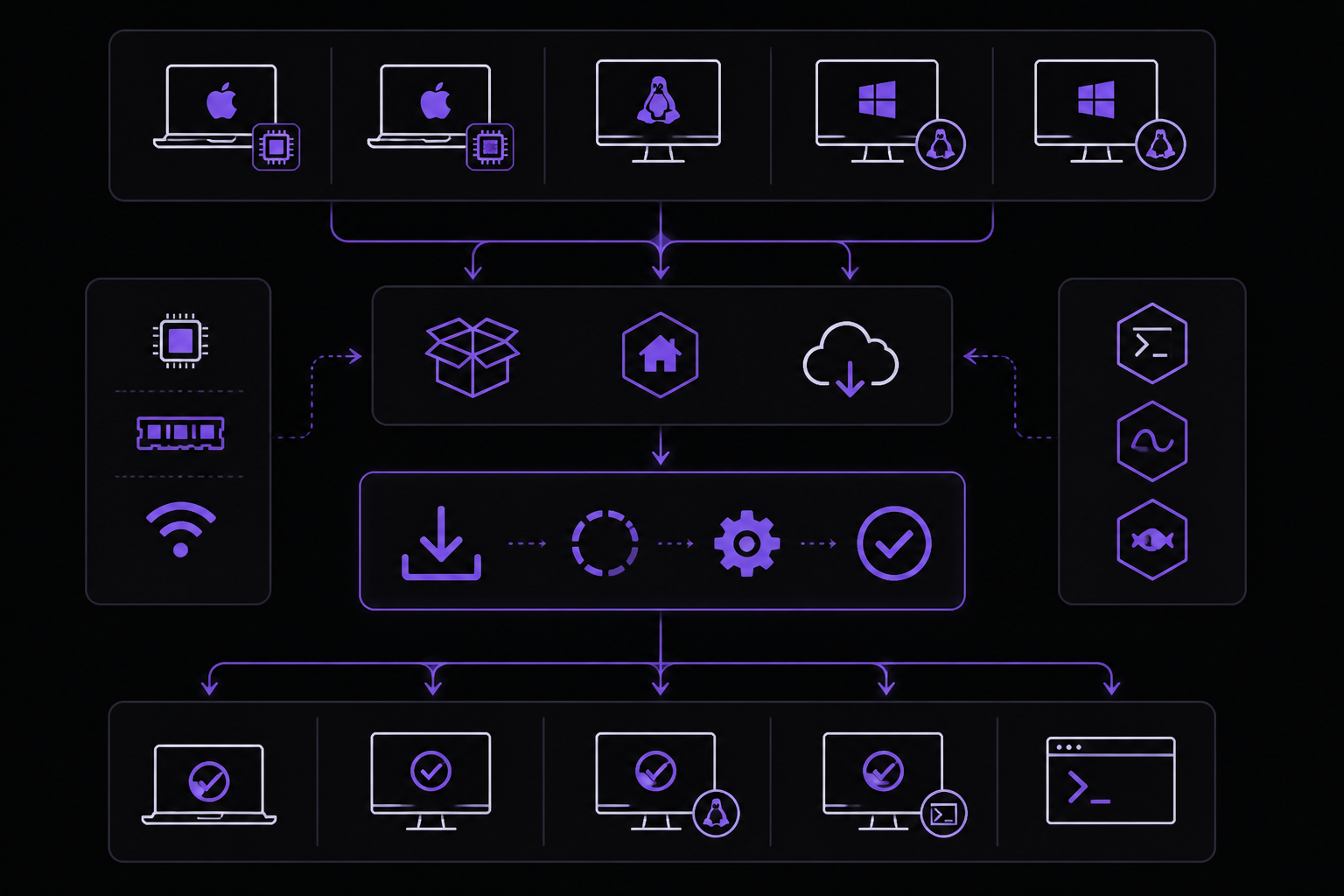
Claude Code runs on macOS 13+, Ubuntu 20.04+/Debian 10+, and Windows 10+ (native or WSL). The system requires 4 GB RAM minimum and an active internet connection. Shell compatibility works best with Bash, Zsh, or Fish. For Windows, both WSL 1 and WSL 2 work. Git Bash also works if you prefer native Windows.
Platform Support Matrix
| Platform | Supported | Preferred install | Known caveats |
|---|---|---|---|
| macOS 13+ (Intel) | Yes | Native installer or Homebrew | None |
| macOS 13+ (Apple Silicon) | Yes | Native installer or Homebrew | Rosetta 2 not required; native arm64 binary ships from v2.1.113 |
| Ubuntu 20.04+ | Yes | Native installer | v2.1.50 fixed native-module loading on systems with glibc < 2.30 |
| Debian 10+ | Yes | Native installer | Same glibc-compat note as Ubuntu |
| Fedora / RHEL 8+ | Best-effort (not an official target) | Native installer | Relies on the same glibc-compat fix from v2.1.50; RHEL 7 not a tested target |
| Alpine / musl | Yes (with extra packages) | Native installer | Custom ripgrep required because the bundled build is glibc-only |
| Windows 10+ (x64, native) | Yes | Native installer (PowerShell) or winget | PowerShell tool requires CLAUDE_CODE_USE_POWERSHELL_TOOL=1 env var (v2.1.111+) |
| Windows 10+ (ARM64, native) | Yes | Native installer | Added in v2.1.41 |
| Windows 10+ (WSL 1) | Yes | Native installer inside WSL | Prefer WSL 2 when possible |
| Windows 10+ (WSL 2) | Yes | Native installer inside WSL | Recommended Windows path for parity with Linux |
| Windows 10+ (Git Bash) | Yes | Native installer | Set CLAUDE_CODE_GIT_BASH_PATH if auto-detection fails (v2.1.98+) |
| Docker sandbox | Yes (experimental) | docker sandbox run claude | See install matrix row above; container-level isolation |
Install, Update, Uninstall at a Glance
| Method | Install | Update | Uninstall | Version check |
|---|---|---|---|---|
| Native installer (macOS / Linux / WSL) | `curl -fsSL https://claude.ai/install.sh | bash` | claude update (or auto-update; see DISABLE_AUTOUPDATER) | rm -f ~/.local/bin/claude && rm -rf ~/.local/share/claude |
| Native installer (Windows PowerShell) | `irm https://claude.ai/install.ps1 | iex` | claude update | Remove-Item -Path "$env:USERPROFILE\.local\bin\claude.exe" -Force; Remove-Item -Path "$env:USERPROFILE\.local\share\claude" -Recurse -Force |
| Native installer (Windows CMD) | curl -fsSL https://claude.ai/install.cmd -o install.cmd && install.cmd && del install.cmd | claude update | See PowerShell row | claude --version |
| Homebrew (macOS / Linux, stable) | brew install --cask claude-code | brew upgrade --cask claude-code | brew uninstall --cask claude-code | claude --version |
| Homebrew (macOS / Linux, latest channel) | brew install --cask claude-code@latest | brew upgrade --cask claude-code@latest | brew uninstall --cask claude-code@latest | claude --version |
| winget (Windows) | winget install Anthropic.ClaudeCode | winget upgrade Anthropic.ClaudeCode | winget uninstall Anthropic.ClaudeCode | claude --version |
| npm (legacy, deprecated since v2.1.15) | npm install -g @anthropic-ai/claude-code | npm install -g @anthropic-ai/claude-code@latest | npm uninstall -g @anthropic-ai/claude-code | claude --version |
| Docker sandbox (experimental) | docker sandbox run claude | per the docker sandbox run CLI reference; the Claude Code sandbox quickstart shows the equivalent sbx run claude shorthand | Pull the latest image tag | Check image tag |
Since v2.1.113, the canonical CLI spawns a native Claude Code binary via a per-platform optional dependency instead of bundled JavaScript. Use the native installer for the tested distribution. The npm path still works but receives the deprecation notice first added back in v2.1.15.
Installation Methods
Native installation (recommended)
The native binary provides the cleanest experience with no Node.js dependency:
# macOS and Linux
curl -fsSL https://claude.ai/install.sh | bash

# Homebrew alternative
brew install --cask claude-code

# Windows PowerShell
irm https://claude.ai/install.ps1 | iex

# Windows CMD
curl -fsSL https://claude.ai/install.cmd -o install.cmd && install.cmd && del install.cmd
For version-specific installation:
# Install specific version
curl -fsSL https://claude.ai/install.sh | bash -s 1.0.58

# Install latest explicitly
curl -fsSL https://claude.ai/install.sh | bash -s latest

# Windows PowerShell - specific version
& ([scriptblock]::Create((irm https://claude.ai/install.ps1))) 1.0.58
NPM installation (deprecated)
As of v2.1.15, npm installations show a deprecation notice. The native binary is now the recommended installation method. Migrate with claude install. For legacy environments where npm is still needed:
npm install -g @anthropic-ai/claude-code
Never use sudo with npm installation. It creates permission issues that complicate everything downstream.
Migration from existing installation
If you have an older npm-based installation, migrate to the native binary:
claude install
Authentication Options
Claude Code supports three authentication paths, each with different tradeoffs:
- Claude Console (API billing): Connect to Anthropic's API directly through platform.claude.com (previously console.anthropic.com). Create an account, set up billing, and authenticate through the CLI. The Console provides usage-based billing with full API access. A dedicated "Claude Code" workspace is created automatically; you cannot create API keys for this workspace, but you can monitor usage.
- Claude Pro or Max subscription: Use your claude.ai account credentials. The subscription covers both the web interface and CLI usage under a single monthly plan. The subscription simplifies billing for individual users who want predictable costs.
- Enterprise platforms: AWS Bedrock, Google Vertex AI, and Microsoft Foundry each provide enterprise-grade access with existing cloud billing relationships.
For enterprise deployments behind proxies or through LLM gateways:
# Corporate proxy
export HTTPS_PROXY='https://proxy.example.com:8080'

# LLM gateway (skip native auth)
export CLAUDE_CODE_USE_BEDROCK=1
export ANTHROPIC_BEDROCK_BASE_URL='https://your-gateway.com/bedrock'
export CLAUDE_CODE_SKIP_BEDROCK_AUTH=1
Verification
claude doctor
The command reports installation type, version, system configuration, and any detected issues.
Authentication Management (v2.1.41+)
Manage authentication without entering the REPL:
claude auth login      # Log in or switch accounts
claude auth status     # Check current auth state (account, plan, expiry)
claude auth logout     # Clear stored credentials
Common workflow for switching between accounts or organizations:
claude auth logout && claude auth login
Updates
Claude Code auto-updates by default, checking at startup and periodically during sessions. Updates download in the background and apply on next launch. Disable auto-updates:
export DISABLE_AUTOUPDATER=1
Or in settings.json:
{
  "env": {
    "DISABLE_AUTOUPDATER": "1"
  }
}
Manual update:
claude update
Quick Start: Your First Session
If you just want to run Claude Code and see output, do this in order:
# 1. Install (pick one)
npm install -g @anthropic-ai/claude-code   # npm users
brew install anthropic/claude/claude       # macOS + Homebrew
curl -sL claude.ai/install.sh | sh         # native installer

# 2. Launch in any project directory
cd ~/your-project && claude

# 3. Authenticate (browser opens automatically on first run)
/login

# 4. Ask your first question
> What does this repo do? Read the key files and summarize.
That is it. Everything below this section expands on the install options, configures permissions and hooks, wires up MCP servers, and covers enterprise deployment, but none of it is required to get started.
Core Interaction Modes
Claude Code operates in several interaction modes:
- Interactive REPL: The default mode. You type prompts and see responses in real time.
- Non-interactive mode: Pass a prompt directly on the command line with
claude -p "your prompt". Useful for scripting and CI/CD. - Pipe mode: Pipe content into Claude Code with
cat file.txt | claude. The piped content becomes part of the context. - Background agents: Spawn agents that work in the background and notify you when done. Use
claude agentsor the/backgroundslash command.
Configuration System Deep Dive
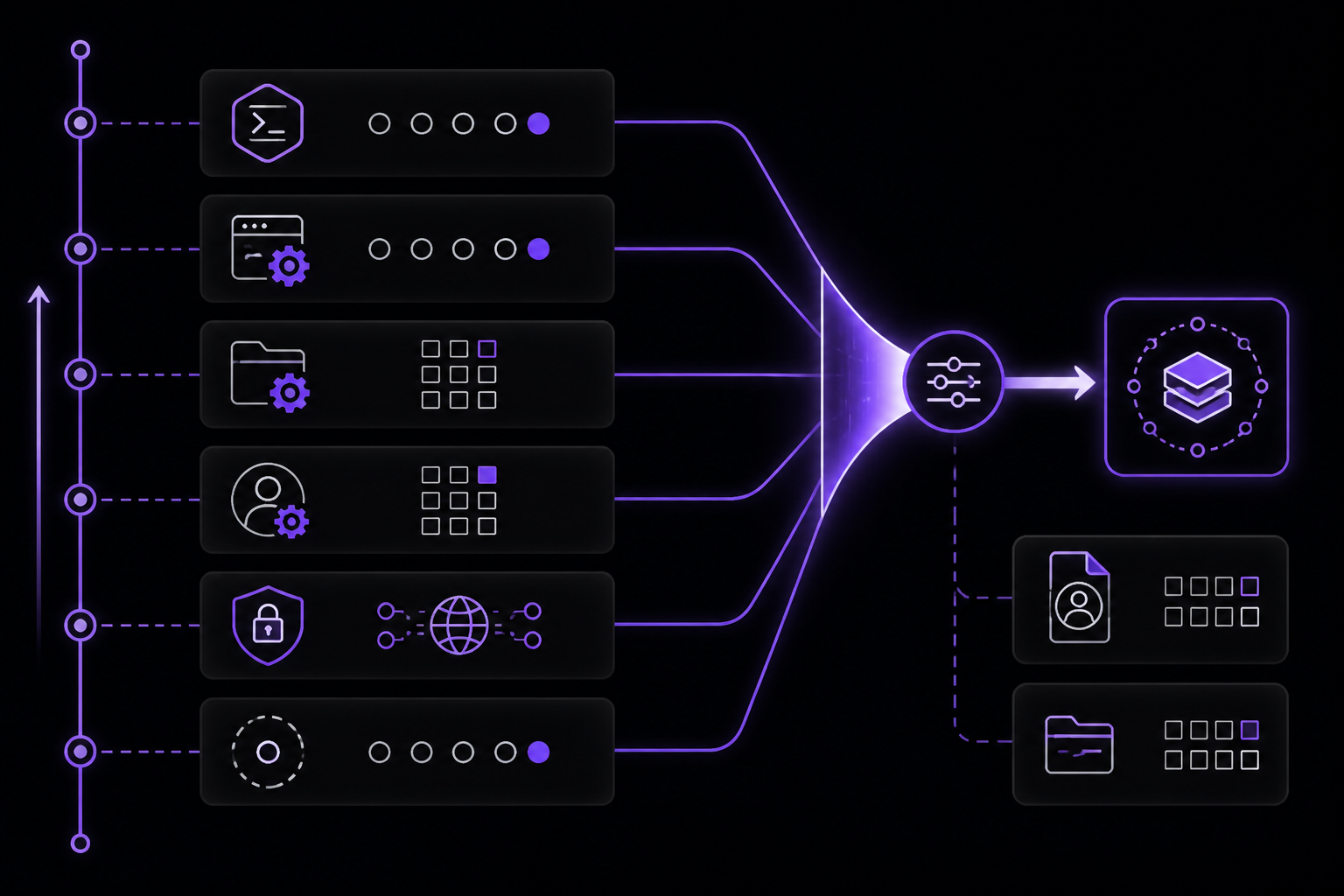
Claude Code uses a layered configuration system. Settings are resolved from multiple sources in order of precedence (highest wins):
- CLI flags:
--flagvalues passed at launch. - Environment variables:
CLAUDE_CODE_*and other env vars. - Project settings:
.claude/settings.jsonin the project directory. - User settings:
~/.claude/settings.json. - Global settings: Managed settings pushed by enterprise administrators.
- Defaults: Built-in defaults.
Key Configuration Files
~/.claude/settings.json: User-level settings applied to all projects..claude/settings.json: Project-level settings, checked into version control..claude/CLAUDE.md: Project-level instructions file that Claude reads automatically.
Important Settings
model: The default model to use. Can be overridden with/model.maxTokens: Maximum tokens in the response.temperature: Controls randomness (0.0 to 1.0).systemPrompt: Additional system-level instructions.permissionMode: Controls how Claude Code handles file operations (Manual, Auto, or Plan).hooks: Configuration for hook scripts.mcpServers: Configuration for MCP server connections.skills: Configuration for skills.plugins: Configuration for plugins.env: Environment variables to set for the session.disableBundledSkills: Hides the built-in skills and slash commands from the model.fallbackModel: Chains up to three backup models when the primary is overloaded.availableModels: Allowlist that constrains which models can be used.enforceAvailableModels: Managed setting that prevents user/project settings from widening a managed list.language: Pins the session title language.footerLinksRegexes: Custom footer link patterns.wheelScrollAccelerationEnabled: Enables wheel scroll acceleration in the IDE.skipLfs: Skips LFS files in plugin marketplaces.pluginSuggestionMarketplaces: Managed setting for plugin suggestions.
Dynamic Workflow Size
As of v2.1.202, a "Dynamic workflow size" /config control lets you adjust how many agents a workflow can spawn. This is useful for balancing thoroughness against cost and context usage.
Which Model Should I Choose?
Claude Code supports multiple model tiers, each suited to different tasks:
- Opus: Best for complex reasoning, architectural decisions, and high-quality code generation. Use Opus for tasks that require deep understanding and careful planning.
- Sonnet: The default model as of v2.1.197 (Claude Sonnet 5). Good for general work, refactoring, and most day-to-day tasks. Balances quality and speed. Native 1M context, with promotional pricing through August 31.
- Haiku: Fast and cheap. Ideal for quick exploration, simple edits, and tasks where speed matters more than depth.
- Fable 5: A new model tier above Opus, selectable via
/model fableafterclaude update. Supports the fulllowtomaxeffort scale but cannot have thinking disabled.
Switch models mid-session with the /model command. Press s to save the model as the default for future sessions, or use it without s for session-only changes.
Model Tiering Strategy
Route subagent exploration to cheaper models (Haiku or Sonnet) and reserve Opus for genuine architectural reasoning. Or standardize on Opus if quality is your only variable. The key is to match the model to the task complexity.
What Does Claude Code Cost?
Costs depend on the model tier and usage volume. Claude Pro and Max subscriptions provide predictable monthly pricing. API billing through the Console is usage-based. Enterprise platforms (Bedrock, Vertex AI, Foundry) bill through existing cloud contracts. As of the latest updates, promotional pricing for Sonnet 5 is $2/$10 through August 31.
How Does the Permission System Work?
The permission system gates operations that Claude Code can perform. It has three modes:
- Manual mode (default): Claude Code asks for permission before executing every file operation, command, or network request. This is the safest mode for new users.
- Auto mode: Claude Code executes approved operations automatically without asking. Useful for trusted workflows and CI/CD.
- Plan mode: Claude Code plans operations and presents them for approval before executing. Good for complex multi-step tasks.
As of v2.1.200, the default permission mode was renamed to "Manual" across the CLI, --help, VS Code, and JetBrains. The config value is unchanged, and manual is accepted as an alias.
Permission Configuration
Set the permission mode in settings.json:
{
  "permissionMode": "auto"
}
Or via environment variable:
export CLAUDE_CODE_PERMISSION_MODE=auto
Safe Mode
As of v2.1.169, --safe-mode (and CLAUDE_CODE_SAFE_MODE) launches a clean session with every customization disabled for troubleshooting. This disables hooks, MCP servers, skills, plugins, and any custom settings.
How Do Hooks Work?
Hooks are shell scripts that execute at specific points in the Claude Code lifecycle. They guarantee execution regardless of model behavior, making them ideal for linting, formatting, security checks, and other deterministic automation.
Hook Events
Hooks fire on specific events:
PreToolUse: Before a tool is used. Can block or modify the tool call.PostToolUse: After a tool returns. Can inspect or modify the result.MessageDisplay: When a message is displayed to the user.SessionStart: When a session starts. Can outputreloadSkillsandsessionTitle.Notification: For background sessions. Events includeagent_needs_inputandagent_completed.
Hook Configuration
Hooks are configured in settings.json:
{
  "hooks": {
    "PreToolUse": {
      "command": "path/to/hook.sh",
      "timeout": 5000,
      "if": {
        "tool": "Read",
        "path": "src/**/*.ts"
      }
    },
    "PostToolUse": {
      "command": "path/to/another-hook.sh",
      "timeout": 3000
    }
  }
}
Each hook can specify:
command: The shell command to execute.timeout: Maximum execution time in milliseconds.if: Conditions that must be met for the hook to fire. Can matchRead,Edit,Writepath patterns.env: Additional environment variables for the hook.
Hook Exit Codes
Hooks communicate results through exit codes:
0: Success. Execution continues.1: Warning. Execution continues but the event is logged.2: Error. Execution is blocked.3+: Custom behavior defined by the hook.
Why Hooks Matter
Hooks guarantee execution; prompts do not. Use hooks for linting, formatting, and security checks that must run every time regardless of model behavior. This is especially important in CI/CD pipelines and enterprise deployments.
What Is MCP (Model Context Protocol)?
MCP is a protocol that connects Claude Code to external services and tools. It extends Claude beyond file reading and bash commands to interact with databases, GitHub, Sentry, and 3,000+ integrations.
MCP Server Configuration
MCP servers are configured in settings.json:
{
  "mcpServers": {
    "github": {
      "type": "stdio",
      "command": "npx",
      "args": ["-y", "@modelcontextprotocol/server-github"],
      "env": {
        "GITHUB_TOKEN": "your-token"
      }
    },
    "database": {
      "type": "sse",
      "url": "https://your-mcp-server.com/sse"
    }
  }
}
MCP servers receive CLAUDE_CODE_SESSION_ID and CLAUDECODE=1 in their environment when started via stdio.
MCP Deny Rules
As of v2.1.166, glob "*" works in MCP deny rules, allowing you to block all MCP operations from a specific server or tool.
Streaming Tool Execution
As of v2.1.154, streaming tool execution is always enabled. This means tool results stream back to the client as they are produced, reducing latency for long-running operations.
What Are Subagents?
Subagents are child processes that Claude Code spawns to handle complex multi-step tasks. They have clean contexts, do focused work, and return summaries. This prevents context bloat in the main conversation.
Subagent Configuration
Subagents are configured through settings and environment variables:
CLAUDE_CODE_MAX_SUBAGENT_SPAWN_DEPTH: Controls how deep subagents can spawn their own subagents. As of v2.1.217, this defaults to 0 (subagents no longer spawn their own subagents by default). Set to a positive integer to opt back in.CLAUDE_CODE_MAX_CONCURRENT_SUBAGENTS: Maximum number of subagents that can run concurrently. Defaults to 20 as of v2.1.217.--max-budget-usd: Halts background subagents once the cap is reached.
Subagent Behavior
As of v2.1.198, subagents run in the background by default. They can commit, push, and open a draft PR when they finish worktree code. Background agents fire the Notification hook (agent_needs_input/agent_completed) for background sessions.
Subagent Use Cases
- Exploration: Spawn a subagent to explore a codebase and return a summary.
- Planning: Spawn a subagent to plan a complex refactor.
- Testing: Spawn a subagent to run tests and report results.
- Code review: Spawn a subagent to review a pull request.
Subagent Model Tiering
Route subagent exploration to cheaper models (Haiku or Sonnet) and reserve Opus for genuine architectural reasoning. This saves cost without sacrificing quality.
What Is Extended Thinking Mode?
Extended thinking mode allows Claude to spend more time reasoning before responding. This is useful for complex tasks that require deep analysis.
Configuration
Set the thinking effort level with /effort:
low: Minimal thinking. Fast responses.medium: Moderate thinking. Good for most tasks.high: Significant thinking. Use for complex reasoning.xhigh: Maximum thinking. Available on Opus 4.8.max: Maximum thinking. Available on Fable 5.
You can also set MAX_THINKING_TOKENS=0 or --thinking disabled to fully turn off thinking on think-by-default models (v2.1.166+).
Output Styles
Claude Code supports multiple output styles:
- Default: Standard terminal output with syntax highlighting.
- Verbose: Detailed output showing tool calls and intermediate steps.
- Quiet: Minimal output, useful for scripting.
- JSON: Machine-readable JSON output.
Slash Commands
Slash commands are shortcuts for common actions. They start with /. Key slash commands include:
/model: Switch models./effort: Set thinking effort./config: View or change configuration./doctor: Run diagnostics (alias:/checkup)./login: Authenticate./logout: Clear credentials./status: Show session status./cd: Change working directory without breaking the prompt cache./review: Fast single-pass review./code-review: Multi-agent code review./simplify: Cleanup-only review./workflows: Orchestrate dynamic workflows./background: Spawn a background agent./reload-skills: Reload skills./plugin: Open the plugin marketplace./usage: Show usage attribution (VS Code).
As of v2.1.199, up to 5 stacked slash-skill invocations are loaded.
How Do Skills Work?
Skills are packaged domain expertise that Claude applies automatically. They can include instructions, prompts, and even tools.
Skill Configuration
Skills are configured in settings.json:
{
  "skills": [
    {
      "name": "my-skill",
      "description": "Does something useful",
      "prompt": "When you see X, do Y",
      "tools": ["read", "edit"],
      "disallowed-tools": ["bash"]
    }
  ]
}
Bundled Skills
Claude Code ships with built-in skills. Use disableBundledSkills to hide them.
Skill Frontmatter
Skills can include frontmatter with metadata:
---
name: my-skill
description: Does something useful
disallowed-tools:
  - bash
---
Plugin System
Plugins package MCP servers, hooks, skills, and configuration into a distributable unit.
Plugin Configuration
{
  "plugins": [
    {
      "name": "my-plugin",
      "version": "1.0.0",
      "marketplace": "https://marketplace.example.com"
    }
  ]
}
Plugins can declare defaultEnabled: false (v2.1.154+).
How Does Memory Work?
Claude Code has a memory system that persists information across sessions. This includes:
- Session memory: Information remembered within a single session.
- Project memory: Information persisted across sessions in a project.
- User memory: Information persisted across all sessions for a user.
Memory is stored in the .claude/ directory.
Image and Multimodal Input
Claude Code supports image input. You can paste images or provide image paths, and Claude will analyze them. This is useful for UI screenshots, diagrams, and other visual context.
Voice Mode
Voice mode allows you to interact with Claude Code using speech. This is available in supported environments.
How Does Git Integration Work?
Claude Code has deep git integration:
- Automatic commits: Claude can create commits with meaningful messages.
- Branch management: Claude can create, switch, and merge branches.
- Pull request creation: Background agents can open draft PRs.
- Diff awareness: Claude understands what has changed and can work with staged/unstaged changes.
How Do I Use Claude Code in My IDE?
Claude Code integrates with VS Code and JetBrains IDEs. The IDE integration provides:
- Inline code suggestions: Get suggestions as you type.
- File-level operations: Apply changes to specific files.
- Project-wide refactoring: Refactor across multiple files.
- Debugging assistance: Get help with debugging.
Advanced Usage Patterns
Dynamic Workflows
As of v2.1.154, dynamic workflows orchestrate tens to hundreds of agents in the background via /workflows. This is useful for large-scale refactoring, codebase analysis, and parallel task execution.
Background Agents
Background agents work asynchronously. They can commit, push, and open draft PRs. Use /background or claude agents to spawn them.
Remote Agents
As of v2.1.198, background agents can run remotely. They fire Notification hooks for agent_needs_input and agent_completed events.
Claude in Chrome
As of v2.1.198, Claude in Chrome goes to general availability. This allows Claude to interact with web pages.
Claude Code in Slack
Claude Code integrates with Slack (research preview). You can interact with Claude through Slack messages.
Claude Code on the Web
Claude Code is available on the web (research preview). This provides a browser-based interface.
Performance Optimization
Context Management
- Use subagents to prevent context bloat.
- Use
/cdto change directories without breaking the prompt cache. - Use
--safe-modefor troubleshooting.
Model Selection
- Use Haiku for fast exploration.
- Use Sonnet for general work.
- Use Opus for complex reasoning.
- Use Fable 5 for the highest quality.
Cost Management
- Set
--max-budget-usdto cap spending. - Route subagent exploration to cheaper models.
- Use
fallbackModelto handle overload gracefully.
How Do I Debug Issues?
Common Debugging Steps
- Run
claude doctorto check installation and configuration. - Use
--safe-modeto disable all customizations. - Check logs in
~/.claude/logs/. - Verify authentication with
claude auth status. - Check network connectivity and proxy settings.
Troubleshooting Authentication Failures
- Ensure your subscription or API key is active.
- Check that environment variables for enterprise platforms are set correctly.
- Use
claude auth logout && claude auth loginto re-authenticate. - For Bedrock, run the setup wizard on the login screen.
- For Vertex AI, run the matching wizard.
Troubleshooting Hook Failures
- Check hook exit codes.
- Verify hook scripts are executable.
- Check hook timeouts.
- Use
ifconditions to narrow hook scope.
Troubleshooting MCP Failures
- Verify MCP server is running.
- Check server logs.
- Ensure environment variables are set correctly.
- Use deny rules to block problematic tools.
Troubleshooting Subagent Failures
- Check
CLAUDE_CODE_MAX_CONCURRENT_SUBAGENTS. - Check
CLAUDE_CODE_MAX_SUBAGENT_SPAWN_DEPTH. - Use
--max-budget-usdto cap spending. - Check background agent notifications.
Enterprise Deployment
Managed Settings
Enterprise administrators can push managed settings that users cannot override:
enforceAvailableModels: Prevents users from using models outside the allowlist.pluginSuggestionMarketplaces: Controls which marketplaces suggest plugins.availableModels: Defines the allowlist of models.
Proxy and Gateway Configuration
For enterprise deployments behind proxies or through LLM gateways:
# Corporate proxy
export HTTPS_PROXY='https://proxy.example.com:8080'

# LLM gateway (skip native auth)
export CLAUDE_CODE_USE_BEDROCK=1
export ANTHROPIC_BEDROCK_BASE_URL='https://your-gateway.com/bedrock'
export CLAUDE_CODE_SKIP_BEDROCK_AUTH=1
Certificate Trust
As of v2.1.101+, enterprise TLS proxies work by default. Claude Code trusts the OS certificate store. Set CLAUDE_CODE_CERT_STORE=bundled to use only bundled CAs.
Compliance and Auditing
- Transcript files are tamper-blocked as of v2.1.203.
- Background-task notifications state that no human input occurred.
rm -rfon an unresolvable variable asks first.
Keyboard Shortcuts Reference
Ctrl+C: Cancel current operation.Ctrl+D: Exit the REPL.Ctrl+L: Clear the screen.Up/Down: Navigate command history.Tab: Autocomplete commands and paths.Ctrl+R: Search command history.
Best Practices
- Use hooks for deterministic automation: Hooks guarantee execution; prompts do not.
- Push work to the Delegation Layer: Subagents prevent context bloat.
- Model tiering saves cost: Route subagent exploration to cheaper models.
- Use MCP to connect your toolchain: Extend Claude beyond file reading and bash.
- Start with Manual permission mode: Switch to Auto only when you trust the workflow.
- Use
--safe-modefor troubleshooting: Disable all customizations to isolate issues. - Set
--max-budget-usd: Cap spending to avoid surprises. - Use
/cdto change directories: Preserves the prompt cache. - Use
/modelto switch models mid-session: Presssto save the default. - Use
/effortto control thinking depth: Match effort to task complexity.
Workflow Recipes
Code Review Workflow
- Run
/reviewfor a fast single-pass review. - Run
/code-reviewfor a multi-agent pass. - Run
/code-review --fixto apply findings to the working tree. - Run
/simplifyfor cleanup-only review.
Refactoring Workflow
- Use a subagent to explore the codebase and create a plan.
- Use
/workflowsto orchestrate parallel refactoring agents. - Review changes with
/code-review. - Run tests and fix issues.
- Commit and push.
CI/CD Workflow
- Use non-interactive mode:
claude -p "run tests and report". - Use background agents for long-running tasks.
- Use hooks for linting and formatting checks.
- Use MCP to connect to CI/CD tools.
Migration Guide
Migrating from npm to Native Installer
claude install
Migrating from Another AI Coding Tool
- GitHub Copilot: Claude Code provides deeper codebase understanding and agentic capabilities.
- Cursor: Claude Code offers more control over model selection and configuration.
- Codeium: Claude Code has a richer extension system with MCP and hooks.
Audience-Specific Guidance
For Individual Developers
- Start with the Quick Start guide.
- Use Claude Pro or Max subscription for predictable costs.
- Experiment with different models to find what works for your workflow.
For Teams
- Use project-level settings in
.claude/settings.json. - Share hooks and MCP configurations via version control.
- Use plugins to distribute custom extensions.
For Enterprise
- Use managed settings to enforce policies.
- Deploy behind proxies with certificate trust.
- Use enterprise platforms (Bedrock, Vertex AI, Foundry) for billing and compliance.
Quick Reference Card
| Command | Description |
|---|---|
claude | Launch interactive REPL |
claude -p "prompt" | Non-interactive mode |
claude --version | Show version |
claude update | Update Claude Code |
claude doctor | Run diagnostics |
claude auth login | Log in |
claude auth status | Check auth status |
claude auth logout | Log out |
claude install | Migrate to native installer |
/model | Switch models |
/effort | Set thinking effort |
/config | View/change configuration |
/doctor | Run diagnostics |
/login | Authenticate |
/logout | Clear credentials |
/status | Show session status |
/cd | Change directory |
/review | Fast single-pass review |
/code-review | Multi-agent code review |
/simplify | Cleanup-only review |
/workflows | Orchestrate dynamic workflows |
/background | Spawn background agent |
/reload-skills | Reload skills |
/plugin | Open plugin marketplace |
/usage | Show usage attribution |
Changelog Highlights
- v2.1.217 (July 21, 2026): Subagents no longer spawn their own subagents by default. Max 20 concurrent subagents.
--max-budget-usdhalts background subagents. - v2.1.200 (July 3, 2026):
defaultpermission mode renamed to "Manual".AskUserQuestiondialogs no longer auto-continue. - v2.1.198 (July 1, 2026): Subagents run in background by default. Claude in Chrome goes GA. Background agents can commit, push, and open draft PRs.
- v2.1.197 (June 30, 2026): Claude Sonnet 5 is the default model. Native 1M context, promotional pricing.
- v2.1.170 (June 9, 2026): Claude Fable 5 model tier above Opus.
- v2.1.169 (June 8, 2026):
--safe-modefor troubleshooting./cdcommand.disableBundledSkills. - v2.1.166 (June 6, 2026):
fallbackModelsetting. Glob in MCP deny rules.MAX_THINKING_TOKENS=0. - v2.1.154 (May 28, 2026): Opus 4.8 default. Dynamic workflows.
/effort xhigh. Streaming tool execution always enabled. - v2.1.153:
skipLfsin plugin marketplaces./modelsaves as default. - v2.1.152:
/code-review --fix.disallowed-toolsin skill frontmatter./reload-skills.MessageDisplayhook event. - v2.1.113: Native binary is the default. npm path deprecated.
- v2.1.50: Fixed native-module loading on systems with glibc < 2.30.
- v2.1.15: npm installation shows deprecation notice.
Going Further
To deepen your Claude Code expertise, explore these topics:
- Hooks as an orchestration layer: Read "Anatomy of a Claw: 84 Hooks as an Orchestration Layer" for advanced hook patterns.
- Claude Code as production infrastructure: Read "Claude Code as Infrastructure" for enterprise deployment patterns.
- Autonomous agent architecture: Read "Ralph Agent Architecture" for insights into autonomous agent design.
- iOS agentic patterns: Read the "iOS Agent Development guide and the Apple Ecosystem Series" for Apple-platform patterns.
- XcodeBuildMCP integration: Read "Two MCP Servers, One Xcode Project" for iOS project integration.
- Source internals: Read "What the Claude Code Source Leak Reveals" for deep insights into auto mode, bash security, and caching.
- Hook system patterns: Read "Claude Code Hooks Tutorial" for practical hook examples.
.pbxproj-protection hooks: Read "Hooks for Apple Development" for iOS-specific hook patterns.
These resources are referenced in the official documentation and provide the next level of detail for mastering Claude Code.
The #1 AI Newsletter
The most important ai updates, guides, and fixes — one weekly email.
No spam, unsubscribe anytime. Privacy policy