
The Complete OpenAI Codex CLI Guide: Setup, Sandbox, AGENTS.md, and MCP
This guide covers everything you need to install, configure, and master OpenAI Codex CLI v0.144.5+, the multi-surface coding agent that reads your codebase, runs commands in an OS-level sandbox, patches files, and delegates tasks to the cloud. It is written for developers who want to move from casual use to effective daily workflows, whether you are new to Codex or migrating from another AI coding tool.
What You Need
Before you start, ensure you have the following:
- Operating System: macOS (Apple Silicon or Intel, with full sandbox support via Seatbelt), Linux (x86_64 or arm64, with sandbox via Landlock + seccomp), or Windows (native sandbox with restricted tokens, promoted from experimental in v0.100.0; WSL is also supported).
- Package Manager: npm (recommended), Homebrew (macOS), or winget (Windows). Alternatively, you can use the direct install script or download platform-specific binaries from GitHub Releases.
- OpenAI Account: A ChatGPT Plus, Pro, Team, Business, Edu, or Enterprise subscription for full feature access including cloud tasks. Alternatively, you can use an API key, though some features (like cloud threads) may be unavailable.
- Git: Any Git repository works as a project context. Codex reads your project structure automatically.
- Shell: Bash, Zsh, or Fish for shell completions (optional but recommended).
Installation
Package Managers
# npm (recommended)
npm install -g @openai/codex

# Homebrew (macOS)
brew install --cask codex

# winget (Windows)
winget install OpenAI.Codex

# Upgrade to latest
npm install -g @openai/codex@latest
Direct Install Script (v0.106.0+)
For macOS and Linux, a one-line install script is available as a GitHub release asset:
curl -fsSL https://github.com/openai/codex/releases/latest/download/install.sh | sh
The script auto-detects your platform and architecture, downloads the correct binary, and places it on your PATH.
Binary Downloads
For environments without npm or Homebrew, download platform-specific binaries from GitHub Releases:
| Platform | Binary |
|---|---|
| macOS Apple Silicon | codex-aarch64-apple-darwin.tar.gz |
| macOS x86_64 | codex-x86_64-apple-darwin.tar.gz |
| Linux x86_64 | codex-x86_64-unknown-linux-musl.tar.gz |
| Linux arm64 | codex-aarch64-unknown-linux-musl.tar.gz |
Authentication
codex login                     # Interactive OAuth (recommended)
codex login --device-auth       # OAuth device code flow (headless)
codex login --with-api-key      # API key from stdin
codex login status               # Check auth state (exit 0 = logged in)
codex logout                     # Clear stored credentials
Two authentication paths exist:
- ChatGPT Account (recommended): Sign in with your existing Plus, Pro, Team, Business, Edu, or Enterprise subscription. Full feature access including cloud tasks.
- API Key: Set via
CODEX_API_KEYenvironment variable orcodex login --with-api-key. Some features (cloud threads) may be unavailable.
Expert tip: Credential storage is configurable via cli_auth_credentials_store in config.toml. Options: file (default), keyring (OS keychain), or auto (keyring if available, file fallback).
As of v0.145.0 (experimental), teams whose model access runs through Amazon Bedrock get an experimental login path with custom endpoint and authentication support, alongside the existing managed API-key authentication (v0.140.0+) and the AWS credential chain. GPT-5.6 Sol is the default Bedrock model.
Shell Completions
# Generate completions for your shell
codex completion bash > /etc/bash_completion.d/codex
codex completion zsh > ~/.zsh/completions/_codex
codex completion fish > ~/.config/fish/completions/codex.fish
Verify Installation
codex --version
# codex-cli 0.133.0
Quick Start: Your First Session
Get from zero to productive in 5 minutes.
- Install and authenticate:
npm i -g @openai/codex
codex login
- Navigate to a project:
cd ~/my-project # Any git repo works
- Start Codex:
codex
You will see the interactive TUI. Codex reads your project structure automatically.
- Ask a question:
> What does this project do? Summarize the architecture.
Codex reads key files and explains the codebase. No changes are made in the default suggest mode.
- Make a change:
> Add input validation to the login endpoint
Codex proposes edits as a diff. Review and approve with y, or reject with n.
- Use a slash command:
> /plan Refactor the database layer to use connection pooling
Codex creates a plan without executing. Review the plan, then approve to begin execution.
- Check your work:
> /diff
See all changes Codex has made in the current session.
What is next:
- Set up
AGENTS.mdwith project instructions. - Configure a profile for your workflow.
- Try
codex execfor non-interactive automation.
Core Interaction Surfaces
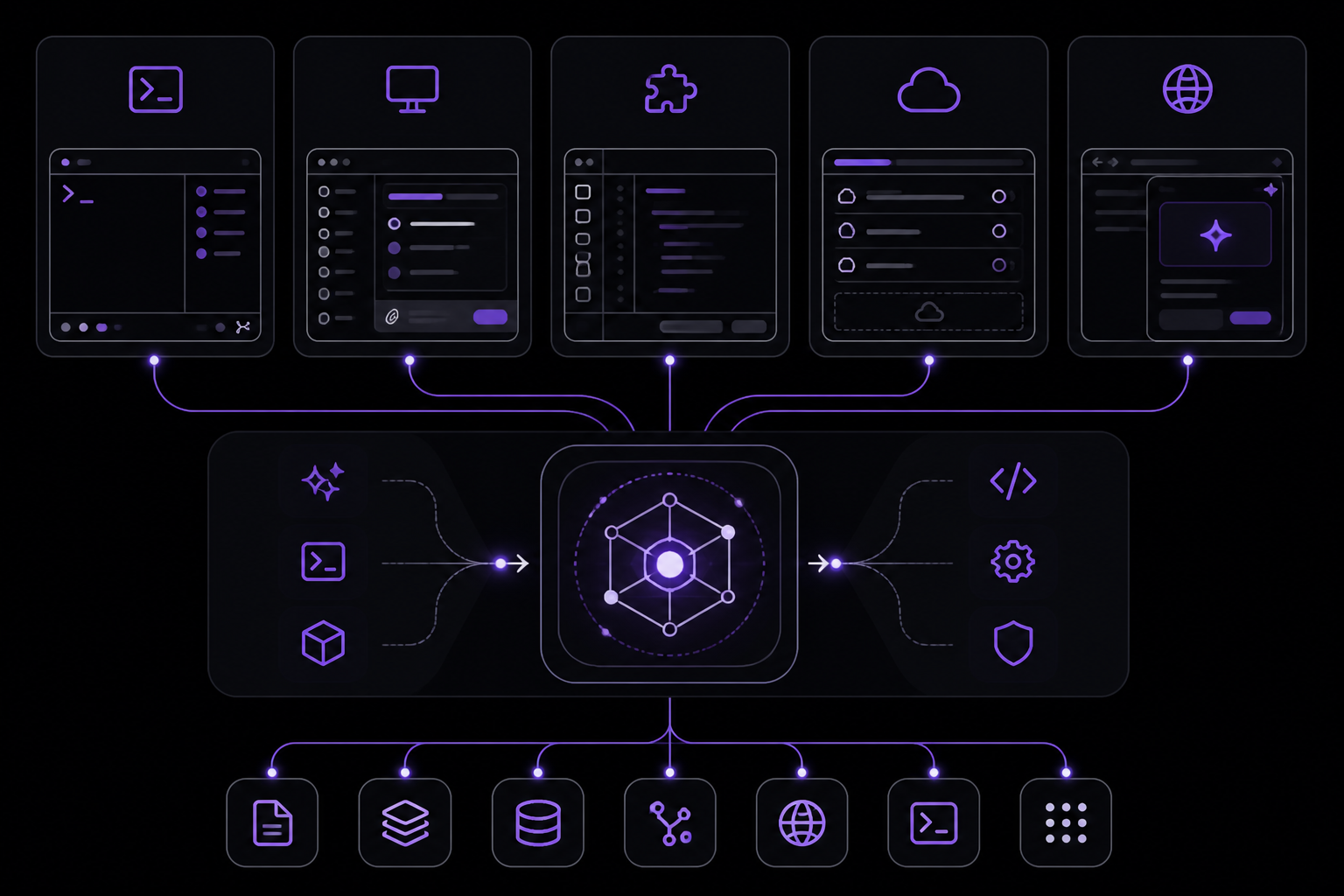
Codex provides five distinct interfaces backed by the same GPT-5.x-Codex intelligence: CLI, desktop app, IDE extension, cloud tasks, and the new Chrome extension. Each surface optimizes for a different workflow pattern.
1. Interactive CLI (Terminal UI)
codex                                    # Launch TUI
codex "fix the failing tests"            # Launch with initial prompt
codex -m gpt-5.5                         # Specify model
codex --sandbox workspace-write --ask-for-approval on-request
The terminal UI is a full-screen application with:
- Composer: Type prompts, attach files with
@, run shell commands with!prefix. - Output pane: Streaming model responses, tool calls, and command output.
- Status bar: Model, token usage, git branch, sandbox mode.
Key TUI shortcuts:
| Shortcut | Action |
|---|---|
@ | Fuzzy file search (attach to context) |
!command | Run shell command directly |
Ctrl+G | Open external editor ($VISUAL / $EDITOR) |
Ctrl+R | Reverse history search (v0.121.0+) |
Enter (while running) | Inject new instructions mid-turn |
Esc twice | Edit previous messages |
| Arrow keys | Navigate draft history |
Status line change (v0.121.0): The old context-window meter in the status line has been replaced by a context-percent indicator showing how full your context window is. If you have scripts or hooks parsing the status line, check for this format change.
Codex will also surface a CLI update announcement when a new version is available.
Slash commands available in the TUI:
| Command | Description |
|---|---|
/quit or /exit | Exit the CLI |
/new | Start new conversation in same session |
/resume | Resume a saved conversation |
/fork | Fork current conversation into new thread |
/model | Switch model and reasoning effort |
/compact | Summarize conversation to free tokens |
/diff | Show git diff including untracked files |
/review | Code review of working tree |
/plan | Enter plan mode |
/goal | Create, pause, resume, or clear persisted work goals (v0.128.0+) |
/vim | Toggle modal Vim editing in the composer (v0.129.0+) |
/hooks | Browse and toggle lifecycle hooks from the TUI (v0.129.0+) |
/mention | Attach file to conversation |
/init | Generate AGENTS.md scaffold |
/status | Session config and token usage |
/usage | Daily, weekly, and cumulative account token activity (v0.140.0+) |
/import | Selectively import setup, project configuration, and recent chats from Claude Code (v0.140.0+) |
/delete | Permanently delete the current session (v0.140.0+) |
/permissions | Set approval policy |
/personality | Communication style (friendly/pragmatic/none) |
/mcp | List configured MCP tools |
/apps | Browse ChatGPT connectors |
/ps | Show background terminals |
/skills | Access and invoke skills |
/plugins | Browse and manage installed plugins (v0.117.0+) |
/title | Set terminal window title (v0.117.0+) |
/config | Print effective config values and sources |
/statusline | Configure TUI footer; v0.129.0 adds an optional theme-aware status line with PR + branch-change summaries |
/feedback | Send logs to Codex maintainers |
/logout | Sign out |
Workflow picker redesign (v0.129.0): Resume and fork are now easier to reach from a redesigned picker, and a new raw scrollback mode lets you scroll through the unrendered transcript when you need to copy commands or model output verbatim. Useful when triaging a long debugging session or piping output to another tool.
Unified @ mentions menu (v0.140.0): Typing @ in the composer now opens a single mentions menu spanning files, plugins, and skills by default, replacing the file-only attach flow.
2. Codex Desktop App (macOS + Windows)
codex app # Launch desktop app (auto-installs if missing)
The desktop app adds capabilities the CLI does not have:
- Multi-tasking: Run multiple parallel agents across different projects simultaneously.
- Git worktree isolation: Each thread works on an isolated copy of your repo.
- Inline diff review: Stage, revert, and commit changes without leaving the app.
- Integrated terminal: Per-thread terminal for running commands.
- Conversation forking: Branch conversations to explore alternatives.
- Floating pop-out windows: Detach conversations into portable windows.
- Automations: Schedule recurring tasks (issue triage, CI monitoring, alert response).
3. IDE Extension
The IDE extension provides editor-native inline edits, edit-compile-test loops, and tight integration with your development environment. It shares the same intelligence as the CLI and desktop app.
4. Cloud Tasks
Cloud tasks are long-running, async operations that run independently of your local machine. You can delegate a task to the cloud and check on it later. This is useful for heavy refactoring, batch processing, or any operation that would tie up your local terminal.
5. Chrome Extension (New)
The Chrome extension runs Codex in your browser without taking it over. It allows you to interact with Codex while browsing, useful for quick code lookups, documentation generation, or debugging without switching contexts.
Configuration System Deep Dive
The configuration system controls Codex behavior via config.toml. This file is typically located at ~/.config/codex/config.toml on macOS/Linux or %APPDATA%\Codex\config.toml on Windows.
Profiles
Profiles save context-switching overhead. Define named config presets (fast, careful, auto) and switch between them with --profile.
Example profile definition in config.toml:
[profile.fast]
sandbox = "workspace-read"
ask_for_approval = "never"
model = "gpt-5.5"

[profile.careful]
sandbox = "workspace-write"
ask_for_approval = "always"
model = "gpt-5.4"

[profile.auto]
sandbox = "workspace-write"
ask_for_approval = "on-request"
model = "gpt-5.5"
Switch profiles at launch:
codex --profile fast
codex --profile careful
As of v0.134.0, --profile is the primary profile selector across CLI, TUI permissions, and sandbox flows. Legacy profile configs are rejected with migration guidance.
Key Configuration Options
| Option | Description | Values |
|---|---|---|
sandbox | Sandbox mode | workspace-read, workspace-write, off |
ask_for_approval | Approval policy | always, never, on-request |
model | Default model | gpt-5.5, gpt-5.4, gpt-5.3-codex, etc. |
cli_auth_credentials_store | Credential storage | file, keyring, auto |
reasoning_effort | Reasoning level | low, medium, high |
Viewing Effective Config
Use /config in the TUI to print effective config values and their sources (file, environment variable, command-line flag).
Which Model Should I Choose?
As of April 23, 2026, gpt-5.5 is the recommended default model when available. It provides:
- 400K context window in Codex (1M in the API)
- 82.7% Terminal-Bench 2.0 SOTA
- $5 per million input tokens, $30 per million output tokens
gpt-5.4 remains the fallback default during rollout with 1M context and native computer use.
For lower-latency subagent work, v0.145.0 migrates the bundled GPT-5.4 selections to the GPT-5.6 Terra and Luna variants (272K context each). GPT-5.3-Codex provides 272K input.
Use /compact, focused prompts, and @file references to manage token budgets proactively.
What Does Codex Cost?
Codex costs tokens. The pricing is based on the model used:
- GPT-5.5: $5 per million input tokens, $30 per million output tokens.
- GPT-5.4: Pricing varies; check OpenAI pricing page.
- GPT-5.6 Terra/Luna: Pricing varies; check OpenAI pricing page.
Token usage is tracked per session. Use /usage (v0.140.0+) to see daily, weekly, and cumulative account token activity. v0.142.0 also shows and redeems earned usage-limit reset credits, with confirmation, retry, and refreshed availability states. v0.144.0 adds reset credit type and expiration display, and the redemption picker lets you choose which credit to redeem.
Decision Frameworks
When to Use Each Surface
| Surface | Best For |
|---|---|
| CLI | Terminal power users, automation, deterministic repo operations |
| Desktop App | Multi-threaded project management, planning, coordination |
| IDE Extension | Tight coding loops, edit-compile-test cycles |
| Cloud Tasks | Long-running, async operations that run independently |
| Chrome Extension | Quick code lookups, documentation generation, browsing workflows |
When to Use Each Profile
| Profile | Best For |
|---|---|
fast | Quick experiments, read-only operations, trusted codebases |
careful | Production codebases, sensitive operations, learning |
auto | General development, balanced safety and speed |
How Does the Sandbox and Approval System Work?
Codex enforces filesystem and network restrictions at the kernel level (Seatbelt on macOS, Landlock + seccomp on Linux), not inside containers. The sandbox operates at the OS level, providing stronger isolation than container-based approaches.
Sandbox Modes
| Mode | Description |
|---|---|
workspace-read | Codex can read files in the workspace but cannot write. Safe for exploration. |
workspace-write | Codex can read and write files in the workspace. Required for making changes. |
off | No sandbox restrictions. Use with extreme caution. |
Set the sandbox mode via command-line flag:
codex --sandbox workspace-write
codex --sandbox workspace-read
Approval Policies
| Policy | Description |
|---|---|
always | Codex asks for approval before every action. Maximum safety. |
never | Codex acts autonomously without asking. Maximum speed. |
on-request | Codex asks for approval only when it determines it is necessary (e.g., destructive operations). |
Set the approval policy via command-line flag:
codex --ask-for-approval always
codex --ask-for-approval never
codex --ask-for-approval on-request
Permission Profiles (v0.133.0+)
As of v0.133.0, permission profiles are a first-class managed surface. They gain list APIs, inheritance, managed requirements.toml, runtime refresh, and stronger Windows sandbox integration. Use /permissions in the TUI to set the approval policy and view custom permission profiles.
Legacy --full-auto
The legacy --full-auto flag remains deprecated as of v0.132.0. Continue to prefer explicit sandbox/approval flags or permission profiles over --full-auto.
How Does AGENTS.md Work?
AGENTS.md is a project-level file that defines operating contracts for AI coding agents. It works across Codex, Cursor, Copilot, Amp, Jules, Gemini CLI, Windsurf, Cline, Aider, Zed, and 60,000+ open source projects. Write once, use everywhere.
Creating AGENTS.md
Use /init in the TUI to generate an AGENTS.md scaffold:
> /init
This creates a template file in your project root. Edit it to include:
- Project overview and architecture
- Coding standards and conventions
- Testing requirements
- Deployment instructions
- Any other context the agent should know
Example AGENTS.md
# Project: MyApp

## Overview
MyApp is a REST API for managing user accounts.

## Architecture
- Express.js backend with PostgreSQL database
- React frontend with TypeScript
- Redis for caching

## Coding Standards
- Use async/await for all asynchronous operations
- Follow ESLint configuration in .eslintrc.js
- Write unit tests for all new functions

## Testing
- Run `npm test` before committing
- Maintain 80% code coverage

## Deployment
- Deploy to AWS ECS via GitHub Actions
- Run database migrations with `npm run migrate`
Best Practices
- Keep AGENTS.md concise and focused on what the agent needs to know.
- Update it as the project evolves.
- Use it to enforce team conventions without manual code reviews.
Hooks
Hooks allow you to run custom scripts at various points in the Codex lifecycle. They are defined in config.toml or per-project.
Available Hook Points
| Hook | Trigger |
|---|---|
pre_turn | Before each turn (prompt + response cycle) |
post_turn | After each turn completes |
pre_tool | Before a tool is executed |
post_tool | After a tool completes |
pre_approval | Before an approval prompt is shown |
post_approval | After approval is granted or denied |
Example Hook Configuration
[hooks.pre_turn]
command = "echo 'Starting turn'"

[hooks.post_turn]
command = "echo 'Turn completed'"
Use /hooks in the TUI (v0.129.0+) to browse and toggle lifecycle hooks without leaving the session.
What Is MCP (Model Context Protocol)?
MCP (Model Context Protocol) extends Codex capabilities to external services. It allows Codex to interact with APIs, databases, and other tools through a standardized protocol.
Configuring MCP Servers
MCP servers are configured in config.toml:
[mcp.servers.github]
command = "npx"
args = ["-y", "@modelcontextprotocol/server-github"]
env = { GITHUB_TOKEN = "your_token" }

[mcp.servers.figma]
command = "npx"
args = ["-y", "@modelcontextprotocol/server-figma"]
env = { FIGMA_ACCESS_TOKEN = "your_token" }

[mcp.servers.sentry]
command = "npx"
args = ["-y", "@modelcontextprotocol/server-sentry"]
env = { SENTRY_AUTH_TOKEN = "your_token" }
Using MCP Tools
Once configured, MCP tools are available in the TUI. Use /mcp to list configured MCP tools. Codex can then invoke these tools during conversations.
MCP Improvements (v0.134.0+)
As of v0.134.0, MCP setup improved with per-server environment targeting and OAuth options for streamable HTTP servers. Connector tool schemas are more reliable by preserving local $ref/$defs and compacting oversized schemas. Read-only MCP tools can run concurrently when they advertise readOnlyHint.
Code Mode
Code mode is a specialized mode for focused coding tasks. It can call standalone web search directly (including from nested JavaScript tool calls) and receive plaintext results (v0.139.0+). Code mode remains experimental or under development as of v0.133.0.
JavaScript REPL Runtime
The JavaScript REPL runtime (js_repl) was removed as of v0.132.0. Use the shell or other tools for interactive JavaScript execution.
What Are Skills?
Skills package reusable domain expertise that Codex loads on demand. They allow you to encapsulate common workflows, patterns, and knowledge into shareable units.
Creating a Skill
Skills are defined in a directory structure:
~/.codex/skills/my-skill/
  skill.toml
  instructions.md
  examples/
Example skill.toml:
[skill]
name = "my-skill"
description = "Domain expertise for my project"
version = "1.0.0"

[instructions]
file = "instructions.md"
Using Skills
Use /skills in the TUI to access and invoke skills. Codex loads the skill instructions and applies them to the current context.
Skills System Improvements (v0.137.0+)
v0.137.0 shipped a v1 skills extension with per-turn catalog resolution, making skills more responsive and easier to manage.
Plugins
Plugins extend Codex functionality. They are managed through the plugin marketplace.
Plugin Marketplace Commands (v0.117.0+)
codex plugin marketplace list
codex plugin marketplace list --json   # v0.139.0+: exposes sources with faster cached-catalog listing
codex plugin install <name>
codex plugin uninstall <name>
Managing Plugins
Use /plugins in the TUI to browse and manage installed plugins. v0.129.0 adds workspace sharing and marketplace operations.
Plugin discovery (v0.133.0+) shows installed versions, marketplace roots, and remote collections.
Plan Mode and Collaboration
Plan mode allows Codex to create a plan without executing. This is useful for reviewing proposed changes before they are applied.
Entering Plan Mode
> /plan Refactor the database layer to use connection pooling
Codex creates a plan as a structured document. Review the plan, then approve to begin execution.
Collaboration Features
- Conversation forking: Branch conversations to explore alternatives without losing context.
- Goal mode (v0.128.0+): Create, pause, resume, or clear persisted work goals. As of v0.133.0, goals are enabled by default, backed by dedicated storage, and track progress across active turns.
- Memory system: Codex can remember preferences and context across sessions.
Memory System
Codex includes a memory system that allows it to remember preferences and context across sessions. This is managed through the /import command (v0.140.0+) which can selectively import setup, project configuration, and recent chats from Claude Code. v0.145.0 expands this to migrate from Cursor as well, including settings, MCP servers, plugins, sessions, commands, and project-scoped memories.
Session Management
Saving and Resuming Sessions
> /resume          # Resume a saved conversation
> /fork             # Fork current conversation into new thread
> /new              # Start new conversation in same session
Deleting Sessions
codex delete <session-id> # Permanently delete a session (v0.140.0+)
Or use /delete in the TUI. Both have confirmation safeguards.
Session History Search (v0.134.0+)
Search across local conversation history with case-insensitive content matches and result previews.
Non-Interactive Mode (codex exec)
codex exec allows you to run Codex in non-interactive mode, suitable for automation and CI/CD pipelines.
Basic Usage
codex exec "fix the failing tests"
codex exec --output-schema json   # v0.132.0+: richer TurnResult
Resume with Output Schema (v0.132.0+)
codex exec resume --output-schema json
This allows you to resume a previous execution with structured output.
Codex Cloud and Background Tasks
Codex Cloud allows you to delegate long-running tasks to the cloud. This is useful for heavy refactoring, batch processing, or any operation that would tie up your local terminal.
Submitting a Cloud Task
codex cloud submit "Refactor the entire database layer"
Checking Task Status
codex cloud status <task-id>
Cloud tasks remain experimental or under development as of v0.133.0.
The Codex Desktop App
Launching
codex app # Launch desktop app (auto-installs if missing)
Key Features
- Multi-tasking: Run multiple parallel agents across different projects simultaneously.
- Git worktree isolation: Each thread works on an isolated copy of your repo.
- Inline diff review: Stage, revert, and commit changes without leaving the app.
- Integrated terminal: Per-thread terminal for running commands.
- Conversation forking: Branch conversations to explore alternatives.
- Floating pop-out windows: Detach conversations into portable windows.
- Automations: Schedule recurring tasks (issue triage, CI monitoring, alert response).
- Appshots (v0.133.0+): Capture frontmost Mac windows for context.
GitHub Action and CI/CD
Codex can be integrated into GitHub Actions for automated code review, testing, and deployment.
Example GitHub Action
name: Codex Review
on: [pull_request]
jobs:
  review:
    runs-on: ubuntu-latest
    steps:
      - uses: actions/checkout@v4
      - name: Codex Review
        run: |
          npm install -g @openai/codex
          codex login --with-api-key <<< "${{ secrets.CODEX_API_KEY }}"
          codex exec "Review the changes in this PR"
Codex SDK
The Codex SDK (Python) provides programmatic access to Codex functionality.
Python SDK Features (v0.132.0+)
- First-class auth
- Simpler text-only turn APIs
- Richer
TurnResult - Friendly
Sandboxpresets for thread and turn APIs (v0.135.0+)
Example Python SDK Usage
from codex import Codex

client = Codex()
result = client.turn("What does this project do?")
print(result.text)
Performance Optimization
Context Management
- Use
/compactto summarize conversation and free tokens. - Use focused prompts to stay within context limits.
- Use
@filereferences to attach specific files instead of entire directories.
Model Selection
- Use
gpt-5.5for most tasks (400K context, SOTA performance). - Use
gpt-5.6 Terra/Lunafor lower-latency subagent work (272K context). - Use
gpt-5.3-codexfor tasks that fit within 272K context.
Profile Selection
- Use
fastprofile for quick, read-only operations. - Use
carefulprofile for production codebases. - Use
autoprofile for general development.
How Do I Debug Issues?
Codex Doctor (v0.131.0+)
codex doctor
This command reports richer environment, Git, terminal, app-server, and thread inventory (v0.135.0+). v0.139.0 adds editor and pager environment details (redacting sensitive values in JSON).
Common Issues and Solutions
| Issue | Solution |
|---|---|
| Authentication failure | Run codex login again or check CODEX_API_KEY environment variable |
| Sandbox restrictions | Use --sandbox off (with caution) or adjust sandbox mode |
| Context window full | Use /compact or start a new session |
| Model not available | Check your subscription tier; some models require Plus/Pro |
| Slow performance | Use a faster model like gpt-5.6 Terra/Luna or reduce context size |
Logs and Feedback
Use /feedback in the TUI to send logs to Codex maintainers for debugging.
Enterprise Deployment
Configuration Management
- Use
config.tomlfor global settings. - Use per-project
AGENTS.mdfor project-specific instructions. - Use profiles for team-wide configurations.
Security Considerations
- Enforce sandbox mode at the organizational level.
- Use API keys with restricted permissions for CI/CD.
- Audit token usage with
/usage.
Amazon Bedrock Integration (v0.145.0, Experimental)
Teams whose model access runs through Amazon Bedrock get an experimental login path with custom endpoint and authentication support. GPT-5.6 Sol is the default Bedrock model.
Best Practices and Anti-Patterns
Do
- Write clear, specific prompts.
- Use
AGENTS.mdto define project conventions. - Use profiles to match your workflow.
- Use
/compactto manage context windows. - Review diffs before approving changes.
- Use plan mode for complex changes.
Do Not
- Use
--full-auto(deprecated). - Run with
--sandbox offin production. - Ignore context window limits.
- Skip approval prompts on critical codebases.
- Use Codex for tasks better suited to other tools (e.g., simple text editing).
Workflow Recipes
Recipe 1: Daily Development
- Start Codex in the project directory.
- Use
/planto outline the day's tasks. - Execute tasks with approval prompts.
- Use
/diffto review changes. - Commit and push.
Recipe 2: Code Review
- Start Codex in the PR branch.
- Use
/reviewto get a code review of the working tree. - Address issues.
- Use
/diffto verify changes.
Recipe 3: Debugging
- Start Codex in the project directory.
- Describe the bug.
- Use
@fileto attach relevant files. - Let Codex analyze and propose fixes.
- Review and apply fixes.
Migration Guide
Migrating from Claude Code
Use /import (v0.140.0+) to selectively import setup, project configuration, and recent chats from Claude Code. v0.145.0 expands this to migrate from Cursor as well, including settings, MCP servers, plugins, sessions, commands, and project-scoped memories.
Migrating from Cursor
Use /import (v0.145.0+) to migrate settings, MCP servers, plugins, sessions, commands, and project-scoped memories from Cursor.
Migrating from Other Tools
- GitHub Copilot: Set up
AGENTS.mdfor project instructions. - Aider: Configure MCP servers for external services.
- Windsurf: Use profiles to match your workflow.
Quick Reference Card
Installation
npm install -g @openai/codex
codex login
Basic Commands
codex                    # Launch TUI
codex exec "prompt"     # Non-interactive mode
codex app                # Launch desktop app
codex doctor             # Debug issues
codex --version          # Check version
TUI Shortcuts
| Shortcut | Action |
|---|---|
@ | Attach file |
!command | Run shell command |
Ctrl+G | Open external editor |
Ctrl+R | Reverse history search |
Key Slash Commands
| Command | Description |
|---|---|
/plan | Enter plan mode |
/diff | Show changes |
/compact | Free tokens |
/model | Switch model |
/usage | Token usage |
/import | Import from other tools |
Changelog Highlights
- v0.145.0 (July 21, 2026):
/importmigrates from Cursor; voice returns as streaming realtime V3; multi-agent v2 stabilized; experimental Amazon Bedrock login; GPT-5.6 Terra/Luna variants. - v0.144.6 (July 18, 2026): Corrected GPT-5.6 Sol/Terra/Luna context windows to 272,000 tokens.
- v0.140.0 (June 15, 2026):
/usageshows token activity;/deletefor session deletion;/importfrom Claude Code; unified@mentions menu; Amazon Bedrock API-key authentication. - v0.139.0 (June 9, 2026): Code mode web search; tool schema improvements;
codex doctorenhancements; plugin marketplace JSON output. - v0.138.0 (June 8, 2026):
/appfor desktop handoff; local image paths; reasoning-effort flexibility; encrypted sub-agent task text. - v0.137.0 (June 4, 2026): Multi-agent v2; F13-F24 keybindings; v1 skills extension.
- v0.135.0 (May 28, 2026):
codex doctorimprovements; vim mode enhancements; Python SDK Sandbox presets. - v0.134.0 (May 26, 2026): Session history search;
--profileas primary selector; MCP improvements; read-only MCP tool concurrency. - v0.133.0 (May 21, 2026): Goals enabled by default; permission profiles; plugin discovery; extension improvements.
- v0.132.0 (May 20, 2026): Python SDK auth; text-only turn APIs;
codex exec resume --output-schema;js_replremoved. - v0.131.0:
codex doctor; unified@mention search; marketplace CLI commands; daemon-managed remote-control. - v0.129.0: Vim mode; hooks TUI; workflow picker redesign; raw scrollback mode.
- v0.128.0: Goal mode.
- v0.121.0: Reverse history search; context-percent indicator.
- v0.117.0: Plugin management;
/titlecommand. - v0.106.0: Direct install script.
- v0.100.0: Windows sandbox promoted from experimental.
Going Further
To deepen your Codex expertise, explore these areas from the source material:
- Multi-Agent v2: v0.137.0 shipped multi-agent v2 with runtime kept per thread, cleaner follow-up and metadata defaults, and
hide_spawn_agent_metadatadefault true. v0.145.0 stabilized the opt-in multi-agent v2 experience with configurable sub-agent models, reasoning levels, and concurrency. This allows you to delegate sub-tasks to specialized agents. - Extension System: Extensions can observe subagent start/stop, tool execution, turn metadata, and async approval/turn processing (v0.133.0+). Build custom extensions to integrate Codex into your workflow.
- Remote Control:
codex remote-control(v0.133.0+) got foreground readiness/status plus daemon-style start/stop. Useful for running Codex on a remote server. - Appshots (v0.133.0+): Capture frontmost Mac windows for context. Useful for debugging UI issues.
- Computer Use (v0.133.0+): Opt-in locked Computer Use for eligible Mac users. Allows Codex to interact with your desktop.
- Browser Annotation: In-app browser annotation improvements (v0.133.0+). Useful for web scraping and testing.
- Amazon Bedrock: For teams using AWS, explore the experimental Amazon Bedrock login path with custom endpoint and authentication support (v0.145.0).
- Open Source Community: AGENTS.md works across 60,000+ open source projects. Contribute your own AGENTS.md to projects you use.
The #1 AI Newsletter
The most important ai updates, guides, and fixes — one weekly email.
No spam, unsubscribe anytime. Privacy policy