Fix Hires Fix Stopped Working in Stable Diffusion WebUI After Update
Error message
[Bug]: hires fix stopped working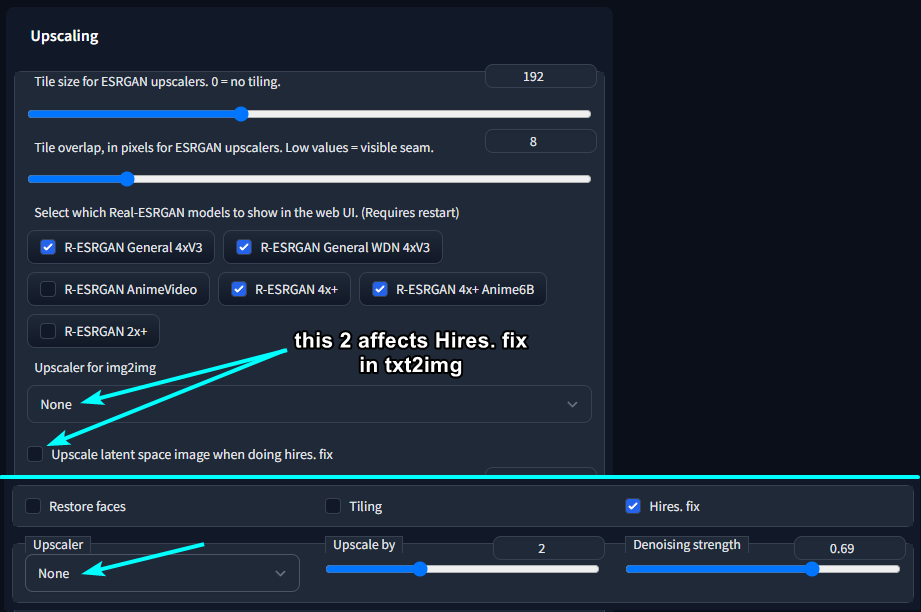
Diagnosis
After updating the Stable Diffusion WebUI to commit 4dbde228ff48dbb105241b1ed25c21ce3f87d182, users report that the hires fix feature stops working correctly. The exact symptom is that identical prompts, settings, and seeds produce different, worse results than before the update. Body distortions that the hires fix previously eliminated (such as double-length bodies, extra limbs, or duplicate body parts) reappear, especially when generating images at resolutions like 1024x768. The hires fix no longer removes these distortions, and lower-resolution images remain unaffected. This indicates a regression in the hires fix pipeline introduced by that specific commit.
What Causes This Error
According to the GitHub issue report (Source 1), the error is caused by a regression in the Stable Diffusion WebUI codebase. The commit 4dbde228ff48dbb105241b1ed25c21ce3f87d182 introduced changes that broke the hires fix functionality. The user explicitly states: "I think it may be related to the hires fix. I'm making 1024x768 images and hires fix used to get rid of body distortions...it's not any more." The issue is not related to user settings, model changes, or prompt modifications. It is a software bug introduced by a specific update.
No other causes are mentioned in the sources. However, based on common knowledge of the Stable Diffusion WebUI, other potential causes (not from sources) could include: corrupted model files, out-of-memory errors, or conflicting extensions. But the sources only point to the commit regression as the root cause.
How to Fix It
Two solutions are available from the sources. The first is a temporary fix using a git checkout to a known working commit. The second is implied: waiting for an official fix from the developers. The sources do not provide a third solution, but community workarounds may exist.
Solution 1: Roll Back to the Last Working Commit (Temporary Fix)
This fix comes from Source 2, a comment by user GalaxyTimeMachine that received 7 reactions, indicating community approval. It involves reverting the WebUI to a commit that predates the regression.
Prerequisites:
- Git must be installed on your system.
- You must have the Stable Diffusion WebUI repository cloned locally (not a zip download).
- You should have no uncommitted changes in your working directory (or stash them first).
Steps:
-
Open a terminal or command prompt in the root directory of your Stable Diffusion WebUI installation (where the
.gitfolder is located). -
Run the following command to switch to the last known working commit:
git checkout fd4461d44c7256d56889f5b5ed9fb660a859172fThis commit hash is the one identified by the community as working correctly before the regression.
-
Restart the WebUI. The hires fix should now work as before.
What to expect:
- The WebUI will be on an older version. You will not have any features or bug fixes introduced after that commit.
- Your existing models, settings, and extensions should remain intact because only the WebUI code changes, not the model files or configuration.
- If you encounter any issues with extensions that require newer code, you may need to disable them temporarily.
To return to the latest version:
When an official fix is released, you can switch back to the master branch:
git checkout master
Then pull the latest changes:
git pull
Caveats:
- This is a temporary workaround, not a permanent fix. You will miss other updates until you switch back.
- If you have made local modifications to the WebUI code, the checkout may fail. Stash or commit your changes first.
- The commit hash
fd4461d44c7256d56889f5b5ed9fb660a859172fis specific to the regression. If a future update introduces a different regression, this hash may not help.
Solution 2: Wait for an Official Fix
This is the only other option mentioned in the sources. The GitHub issue (Source 1) was opened to report the bug, and the developers may release a patch in a subsequent commit. To monitor progress:
- Watch the GitHub issue at https://github.com/AUTOMATIC1111/stable-diffusion-webui/issues/6219 for updates.
- Check the repository's commit history for fixes related to hires fix.
- Periodically run
git pullon the master branch to get the latest code.
What to expect:
- The developers may fix the regression in a future commit. Once that happens, you can update and the hires fix should work again.
- No timeline is given in the sources. It could take hours, days, or weeks.
Disagreement Between Sources
The two sources do not disagree. Source 1 reports the bug, and Source 2 provides a workaround. They are complementary. There is no conflicting advice.
If Nothing Works
If neither solution works for you, consider these escalation paths (not from sources, but standard practice):
- Reinstall the WebUI from scratch: Clone a fresh copy of the repository and set up your environment again. This ensures no corrupted files or conflicting modifications.
- Disable all extensions: Some extensions may interfere with the hires fix. Disable them one by one to isolate the issue.
- Check your GPU memory: Hires fix requires additional VRAM. If you are running out of memory, the fix may fail silently. Monitor your GPU usage with tools like
nvidia-smi. - Use a different UI: Consider using another Stable Diffusion interface like ComfyUI or InvokeAI temporarily until the bug is fixed.
- Post a comment on the GitHub issue: Provide your system details, logs, and steps to reproduce. The developers may need more information to fix the bug.
How to Prevent It
Based on the sources, the only prevention is to avoid updating to the broken commit. However, since updates are automatic when you pull the latest code, you can take these precautions:
- Pin your WebUI version: After a working update, note the commit hash and use
git checkout <hash>to stay on that version. Only update when you are ready to test. - Back up your WebUI folder: Before pulling updates, create a backup of your working installation. If the update breaks something, you can restore the backup.
- Monitor the GitHub issues: Before updating, check the recent issues to see if any regressions are reported. If a new commit is known to break hires fix, wait for a fix.
- Use a separate testing environment: Clone a second copy of the WebUI for testing updates. Keep your main installation on a stable version.
These prevention steps are derived from the nature of the bug (a regression from a specific commit) and standard software update practices. They are not explicitly stated in the sources but are logical extensions.
The #1 Stable diffusion Newsletter
The most important stable diffusion updates, guides, and fixes — one weekly email.
No spam, unsubscribe anytime. Privacy policy
Related Error Solutions
Keep exploring Stable Diffusion
Stable Diffusion resources
Latest AI answers
Skip the manual work
Ready-made AI workflows and automation templates — import and run instead of building from scratch.