Google Sheets Automation Workflows
3,636 ready-made Google Sheets workflows for n8n, Make, Zapier, Activepieces, and Pipedream. Spreadsheet-driven automations: logging, reporting, syncing rows to and from every tool in your stack.
Automated Error Alerts with Google Sheets, Telegram, and Gmail in n8n
This workflow automates error handling in n8n by logging errors to Google Sheets, notifying a Telegram channel, and sending email alerts via Gmail, ensuring prompt awareness of issues.
n8n$4.99Automate AI Image Generation and Upload with Google Sheets and Drive
Streamline the creation of AI-generated images from prompts in Google Sheets, automatically upload them to Google Drive, and log the results back into the sheet.
n8n$14.99Automate Reddit Comment Sentiment Analysis with AI and Store in Google Sheets
This workflow automates the process of analyzing Reddit comments for sentiment using AI and stores the results in Google Sheets. It helps in understanding public sentiment efficiently without manual effort.
n8n$14.99Automate Backlink Status Monitoring with Google Sheets and DataForSEO
This n8n workflow automates the process of checking the status of backlinks listed in a Google Sheet using the DataForSEO On-Page API. It verifies if backlinks are live, dofollow, or lost, and updates the status back in the Google Sheet.
n8n$9.99RSS Feed Reader That Saves the Feeds of the Last 3 Days in Google Sheets
**How it Works:** This RSS reader retrieves links from a Google Sheets file and goes through each link to retrieve the messages that are younger than 3 days, then saves them in a second Google Sheets file and then deletes all older entries in the second Google Sheets file! **The retrieval can take a while due to the Google API block prevention, depending on the number of news feeds that were retrieved!** **Detailed Description is in the sticky notes from the Workflow!**
n8n$14.99Automate Company Name Cleaning for Cold Emails Using AI and Google Sheets
Enhance your cold email campaigns by automatically cleaning and standardizing company names in Google Sheets using AI. This workflow removes unnecessary suffixes and taglines to improve personalization and engagement.
n8n$9.99Automate Multi-Broker Portfolio Tracking with Google Sheets and Telegram Alerts
Streamline your investment tracking across multiple brokers with real-time updates and alerts via Telegram. This workflow integrates Google Sheets and Telegram to provide a comprehensive view of your financial portfolio, offering scheduled and on-demand updates.
n8n$9.99Automate Email Extraction from Domains Using Apollo API and Google Sheets
Streamline the process of converting company domains into actionable contact information by integrating Google Sheets with the Apollo API. Ideal for sales, marketing, and recruitment professionals.
n8n$9.99Automate TikTok to YouTube Shorts with Google Sheets and Telegram Notifications
Effortlessly transfer TikTok videos to YouTube Shorts, log activities in Google Sheets, and receive Telegram alerts with this n8n automation workflow.
n8n$14.99Automate Restaurant Feedback Collection with Google Sheets and Email
This workflow automates the collection of restaurant customer feedback by sending personalized email forms and storing responses in Google Sheets, enabling systematic insights gathering and service improvement.
n8n$4.99Automate Resume Screening and Follow-up Emails with OpenAI, Google Sheets, and Gmail
This workflow automates the process of screening resumes using AI, logging results to Google Sheets, and sending follow-up emails via Gmail. It streamlines HR tasks by evaluating candidate qualifications and fit, then categorizing them for further action.
n8n$9.99Track Amazon Product Prices with ScrapeOps API & Google Sheets Alerts
# Amazon Product Price Tracker This workflow automatically monitors Amazon product prices, tracks price changes, and sends alerts when significant price fluctuations occur. Built with ScrapeOps structured data API, it provides a reliable, maintenance-free solution for price tracking without worrying about anti-bot measures or complex selectors. ## What This Workflow Does - Monitors multiple Amazon products simultaneously using their ASINs - Calculates both absolute and percentage price changes - Sends customizable email alerts when prices cross defined thresholds - Maintains a historical record of all price data for trend analysis - Updates a Google Sheets with the latest price information ## Prerequisites - A ScrapeOps API key (register at https://scrapeops.io) - Google account for Google Sheets integration - SMTP email configuration for alerts ## Setup Instructions 1. **Spreadsheet Setup** - Make a copy of the template spreadsheet: https://docs.google.com/spreadsheets/d/1hRv-BXrpN6rkIU65WorttNHt-IPWas_An0sF4Of39U - Add your Amazon product ASINs in the Products to Monitor sheet - Set your desired alert thresholds for price increases/decreases 2. **Workflow Configuration** - Add your ScrapeOps API key to the Setup node - Update the spreadsheet URL in the Setup node with YOUR copy - Configure your email settings for notifications - Adjust the schedule frequency as needed (default: hourly) ## How It Works The workflow reads product ASINs from your Google Sheet, fetches current pricing data via ScrapeOps Amazon Product API, calculates price changes, updates your spreadsheet, and sends alerts when price movements exceed your defined thresholds. Unlike traditional web scrapers that break when websites change, this solution uses ScrapeOps reliable API that handles all the complexity of Amazon data extraction, ensuring consistent results without maintenance. ## Additional Notes - This workflow is ideal for deal hunters, price comparison services, and e-commerce analytics - The alerting system can be extended to additional channels like Slack or Telegram - ScrapeOps handles all anti-bot measures, proxy management, and parsing complexities
n8n$14.99Analyze Amazon Purchase Trends with Bright Data, OpenAI, and Google Sheets
This workflow contains community nodes that are only compatible with the self-hosted version of n8n. This workflow automatically analyzes purchase trends and consumer behavior patterns to identify market opportunities and optimize business strategies. It saves you time by eliminating the need to manually analyze sales data and provides insights into buying patterns, seasonal trends, and customer preferences. ## Overview This workflow automatically scrapes e-commerce platforms, marketplace data, and sales analytics to extract purchase trends, product popularity, and consumer behavior insights. It uses Bright Data to access sales data and AI to intelligently analyze purchasing patterns, seasonal trends, and market opportunities. ## Tools Used - **n8n**: The automation platform that orchestrates the workflow - **Bright Data**: For scraping e-commerce and marketplace platforms without being blocked - **OpenAI**: AI agent for intelligent purchase trend analysis and forecasting - **Google Sheets**: For storing purchase trend data and analysis results ## How to Install 1. **Import the Workflow**: Download the .json file and import it into your n8n instance. 2. **Configure Bright Data**: Add your Bright Data credentials to the MCP Client node. 3. **Set Up OpenAI**: Configure your OpenAI API credentials. 4. **Configure Google Sheets**: Connect your Google Sheets account and set up your trend analysis spreadsheet. 5. **Customize**: Define target marketplaces and trend analysis parameters. ## Use Cases - **E-commerce Strategy**: Identify trending products and market opportunities. - **Product Development**: Understand consumer preferences and demand patterns. - **Marketing Planning**: Optimize campaigns based on seasonal purchase trends. - **Business Intelligence**: Make data-driven decisions using market trend insights. ## Connect with Me - **Website**: https://www.nofluff.online - **YouTube**: https://www.youtube.com/@YaronBeen/videos - **LinkedIn**: https://www.linkedin.com/in/yaronbeen/ - **Get Bright Data**: https://get.brightdata.com/1tndi4600b25 (Using this link supports my free workflows with a small commission) #n8n #automation #purchasetrends #marketanalysis #brightdata #webscraping #ecommerce #n8nworkflow #workflow #nocode #trendanalysis #consumerinsights #marketresearch #salesanalytics #businessintelligence #markettrends #customerinsights #ecommerceanalysis #salesdata #marketforecasting #consumerdata #purchaseanalysis #retailanalytics #marketinsights #demandforecasting #salestrends #consumertrends #marketintelligence #buyingpatterns #marketdemand
n8n$9.99Automate Restaurant Food Waste Forecasting with AI and Google Sheets
This n8n workflow automates daily forecasting of restaurant sales and raw material needs using AI, helping to minimize food waste and optimize inventory. Forecasts are stored in Google Sheets and emailed to staff for review.
n8n$14.99Automate LinkedIn Competitor Analysis with AI and Google Sheets
This workflow automates the analysis of competitor LinkedIn posts, extracting insights and engagement patterns to provide actionable marketing intelligence. It uses AI to analyze post data and stores the results in Google Sheets, saving time on manual analysis.
n8n$9.99Automate Business Email Extraction from Google Maps to Google Sheets
Streamline the process of extracting business emails from Google Maps search results using a keyword and save them to Google Sheets. Ideal for outreach, marketing, and research.
n8n$14.99Automate Business Lead Scraping and Data Cleaning to Google Sheets
Streamline your lead generation process by automatically scraping business leads from Scrapeless, cleaning the data, and exporting it to Google Sheets for easy access and analysis.
n8n$4.99Custom Pomodoro Tracker using Telegram and Google Sheets
**Tags**: Productivity, Pomodoro, Organization ### Context Hey! I'm Samir, a Supply Chain Engineer and Data Scientist from Paris, founder of [LogiGreen Consulting](https://logi-green.com). A significant improvement in my productivity came from following the **Pomodoro Technique**. ### What is the Pomodoro Technique? The Pomodoro Technique is a time management method that breaks your workday into 25-minute focus intervals followed by short breaks. After 4 cycles, you take a longer break to recharge. It helps maintain concentration while preventing burnout. 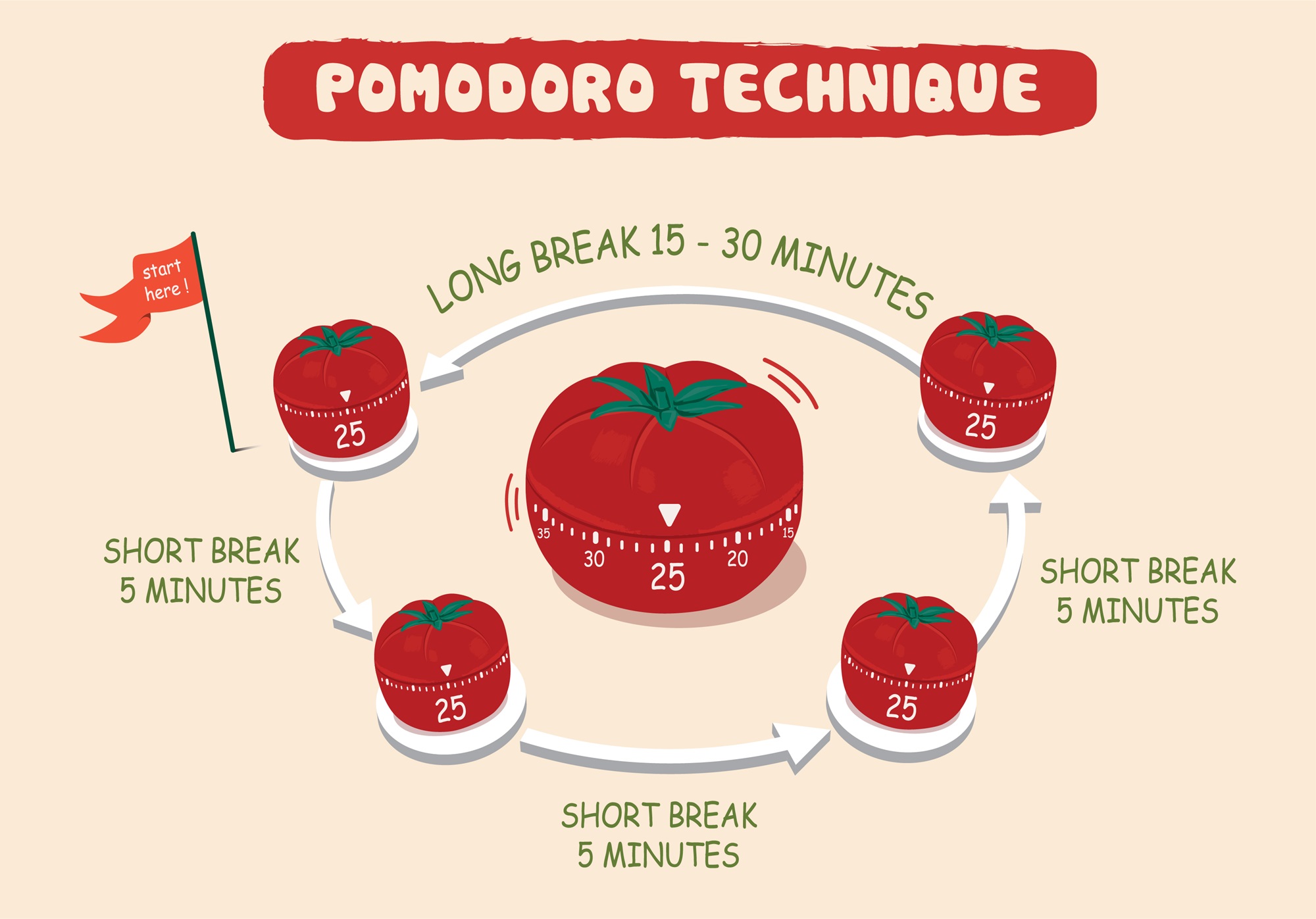 I've used this technique with web apps to receive break/work notifications. But I always wished I had a way to **track my sessions** for self-assessment. > Let's use **n8n** to boost our productivity and log our deep work sessions automatically! For business inquiries, you can add me on [Here](https://www.linkedin.com/in/samir-saci) ### Who Is This Template For? I built this workflow for creators, freelancers, students, and professionals who love the Pomodoro technique but want more than just timers - they want data. This template helps you: - Track every deep work session automatically - Store logs in Google Sheets for later analysis - Stay in control via Telegram commands - There is no need to pay for premium apps. It's all **free** and powered by **n8n**. ### How Does It Work? This Telegram bot tracks your Pomodoro sessions and sends you alerts during the process. **Here's what happens:** 1. A user sends `/start` to the bot. 2. It launches a 25-minute deep work timer. 3. After 25 minutes, the bot sends a break reminder. 4. **After four cycles**, a long break is triggered and the session is logged. 5. The session is **automatically recorded to Google Sheets** with (Date & Time, User ID, Pomodoro count, Session ID, Duration of focus and breaks) 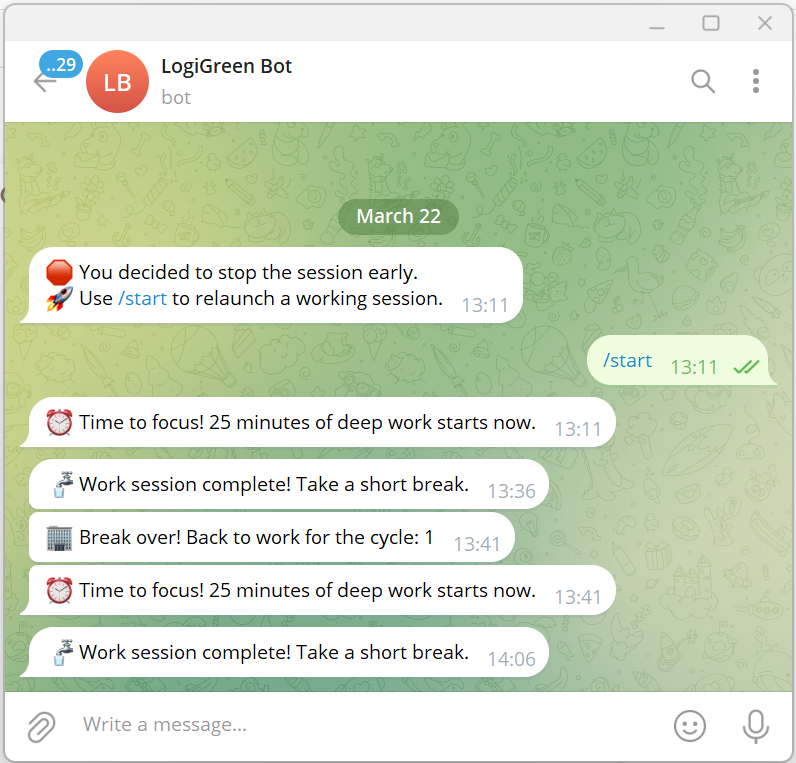 ### What Gets Tracked? | Field | Description | |-------------------|-----------------------------------| | Date & Time | When the session was logged | | User ID | Your Telegram ID | | Block Type | Deep Work or Short Break | | Pomodoro Count | Number of cycles completed | | Working Session ID| Unique ID for each session | | Focus Duration | Length of each deep work session | | Break Duration | Short or long break info | You can use this workflow as a base to bring additional features like: - Connecting with tasks from **Google Tasks** - Send automated productivity reports to monitor your activity - Link a Pomodoro with a task using **Google Calendar** ### What Do I Need to Start? This workflow is beginner-friendly - **no coding required**. - **Google Drive API** and **Google Sheets API** credentials - A Google Sheet set up to log sessions (with the columns of the table above) - API Credentials: - **Google Sheets API** (OAuth2) - **Telegram Bot Token** - Telegram app to chat with the bot > The template is plug-and-play. Just follow the sticky notes in the n8n editor to configure it. ### Next Steps Follow the sticky notes in the n8n workflow editor to: - Set your credentials - Connect your Google Sheet - Initialize the static data - Launch your first `/start` command on Telegram  [**Watch My Tutorial**](https://www.youtube.com/watch?v=ztMMrmbgGEo) Curious how n8n can supercharge **productivity and learning skills?** Let's connect on [**LinkedIn**](https://www.linkedin.com/in/samir-saci) This workflow has been created with N8N 1.82.1 Submitted: March 24th, 2025
n8n$14.99Convert Google Sheets to CSV and Share via Slack
Automatically convert Google Sheets data to a CSV file and share it in Slack when your bot is mentioned with a Google Sheets link.
n8n$4.99Automate Telegram Group Protection with Math CAPTCHA and Google Sheets
Enhance your Telegram group's security by automatically verifying new members with a simple math CAPTCHA, storing responses in Google Sheets, and banning those who fail the test.
n8n$14.99Automate Customer Satisfaction Surveys with Freshdesk and Google Sheets
Streamline your customer feedback process by automatically sending satisfaction surveys when Freshdesk tickets are resolved and storing responses in Google Sheets for analysis.
n8n$14.99Automate Cal.com Meeting Attendee Management with Google Sheets, Beehiiv, and Telegram Notifications
Streamline your meeting attendee management by automatically logging details in Google Sheets, subscribing attendees to Beehiiv, and receiving Telegram notifications.
n8n$9.99Automate Notifications for New Google Sheets Entries Every 45 Minutes
This workflow checks Google Sheets for new data every 45 minutes and sends a notification to Mattermost if new entries are found.
n8n$4.99Automate Social Media Posts with Google Sheets, OpenAI, and Facebook Pages
Transform Google Sheets data into engaging social media posts by generating images with OpenAI and publishing them on Facebook Pages automatically.
Make$4.99
More integrations
Custom AI Systems & Services
Our team of experienced AI builders will help build custom AI systems, workflows, and solutions.
Request Custom Work