Activate and Deactivate Workflows on Schedule Using Native n8n API
## How it works This workflow will activate and deactivate a selected other workflow on schedule. > ⚠️ Warning! > This approach **won't work for trial users** as it requires an n8n API that is not available to trial users. > See [https://docs.n8n.io/api/](https://docs.n8n.io/api/) for details. ## Set up steps 1. Adjust activation/deactivation **schedule** per your needs. A [Custom (cron) interval](https://docs.n8n.io/integrations/builtin/core-nodes/n8n-nodes-base.scheduletrigger/#custom-cron-interval) is a recommended approach. 2. Set the targeted **Workflow ID**. You will find it in the URL of the workflow you want to manage. 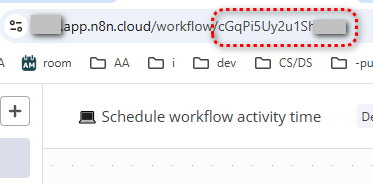 3. Set **n8n API credentials**: - Create an API key: [how to](https://docs.n8n.io/api/authentication/) - Create n8n credentials using the API key: [how to](https://docs.n8n.io/credentials/add-edit-credentials/#create-a-credential) This workflow uses the **[n8n node](https://docs.n8n.io/integrations/builtin/core-nodes/n8n-nodes-base.n8n/)**. #DevOps #workflow-management --- ## Other useful stuff Need a universal Error workflow to **catch both execution and trigger errors**? Here you go: [Error handling: Send email via Gmail on execution or trigger-level errors](https://n8n.io/workflows/3075-error-handling-send-email-via-gmail-on-execution-or-trigger-level-errors/) More stuff [by Olek](https://n8n.io/creators/olek/) and do not forget to backup your workflows often by [automating](https://n8n.io/workflows/?q=Backup).
How it works
This workflow will activate and deactivate a selected other workflow on schedule.
⚠️ Warning! This approach won't work for trial users as it requires an n8n API that is not available to trial users. See https://docs.n8n.io/api/ for details.
Set up steps
- Adjust activation/deactivation schedule per your needs. A Custom (cron) interval is a recommended approach.
- Set the targeted Workflow ID. You will find it in the URL of the workflow you want to manage.

- Set n8n API credentials:
This workflow uses the n8n node.
#DevOps #workflow-management
Other useful stuff
Need a universal Error workflow to catch both execution and trigger errors? Here you go: Error handling: Send email via Gmail on execution or trigger-level errors
More stuff by Olek and do not forget to backup your workflows often by automating.
New buyers can create an account from the cart to unlock a controlled $10 first-purchase credit on eligible orders of $25+.
Secure checkout powered by Stripe
Tags
Support
How to import this workflow into n8n
- 1Purchase or download the workflow to get the n8n workflow JSON file.
- 2In your n8n instance, open Workflows and choose "Import from File" (or paste the JSON with Ctrl+V on the canvas).
- 3Open each node marked with a credential warning and connect your own accounts and API keys.
- 4Run the workflow once manually to verify the data flow, then toggle it to Active.
Related Business Operations & ERPs workflows
- Automate Job Applications and Track Status with LinkedIn, Indeed, and Google Sheets$14.99
- Automated Stock Price Monitoring and Alerts for Indian & US Markets$9.99
- Build Custom Workflows Automatically with GPT-4o, RAG, and Web Search$24.99
- AI Chat Agent Receptionist for Clinics$150
- Automatically Archive Zoom Recordings to Google Drive and Log in Airtable$4.99
- Automate Call Scheduling with Voice AI Receptionist Using Twilio, Google Calendar & Airtable$24.99
Need this deployed? We'll set it up for you.
Our automation experts deploy this workflow in your stack, connect your accounts, and verify it works — or build a custom solution from scratch.