Automatically Create Streak Boxes from Jotform Submissions
Streamline your workflow by automatically creating new boxes in Streak whenever a Jotform form is submitted. This integration helps you efficiently manage and organize incoming data.
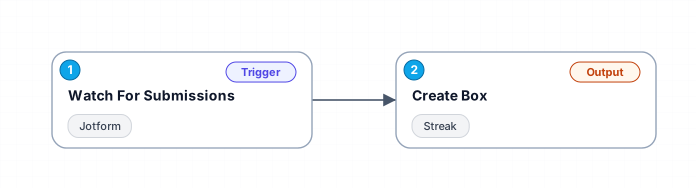
This workflow connects Jotform and Streak to automate the creation of new boxes in your Streak pipeline. When a user submits a form on Jotform, the workflow captures the submission details and uses them to create a corresponding box in Streak. This ensures that all form submissions are systematically tracked and managed within your Streak pipeline, enhancing your productivity and organization.
New buyers can create an account from the cart to unlock a controlled $10 first-purchase credit on eligible orders of $25+.
Secure checkout powered by Stripe
Support
How to import this workflow into Make
- 1Purchase or download the workflow to get the Make blueprint JSON file.
- 2In Make, create a new scenario, click the three-dots menu, and choose "Import Blueprint".
- 3Reconnect each module to your own app connections when prompted.
- 4Run the scenario once to verify it, then set your schedule and turn it on.
Related Business Operations & ERPs workflows
- Automate Job Applications and Track Status with LinkedIn, Indeed, and Google Sheets$14.99
- Automated Stock Price Monitoring and Alerts for Indian & US Markets$9.99
- Build Custom Workflows Automatically with GPT-4o, RAG, and Web Search$24.99
- AI Chat Agent Receptionist for Clinics$150
- Automatically Archive Zoom Recordings to Google Drive and Log in Airtable$4.99
- Automate Call Scheduling with Voice AI Receptionist Using Twilio, Google Calendar & Airtable$24.99
More from Karim Sharma
Need this deployed? We'll set it up for you.
Our automation experts deploy this workflow in your stack, connect your accounts, and verify it works — or build a custom solution from scratch.