Build an AI Powered Phone Agent - with Retell, Google Calendar, and RAG
This Workflow simulates an AI-powered phone agent with two main functions: 1. **Appointment Booking** - It can schedule appointments directly into Google Calendar. 2. **RAG-based Information Retrieval** - It provides answers using a Retrieval-Augmented Generation (RAG) system. For example, it can respond to questions such as store opening hours, return policies, or product details. The guide also explains **how to purchase a dedicated phone number** (with a +1 prefix) and link it to the AI agent. This setup is cost-effective, as it uses a **FREE $10 credit** to operate without additional charges in the beginning. 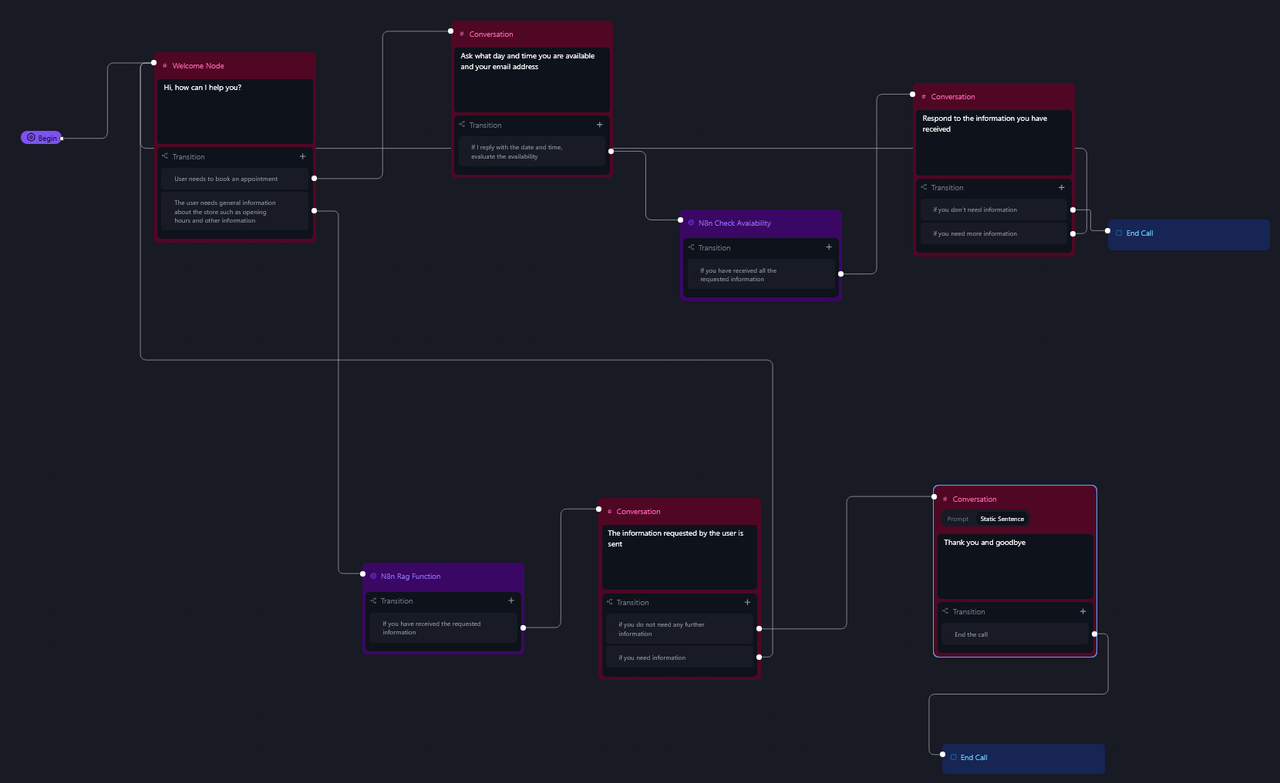 --- ### **Advantages** - **24/7 Availability** - The AI agent can answer calls and assist customers at any time. - **Automation** - It reduces the workload on human staff by handling repetitive tasks like appointment scheduling and FAQ responses. - **Easy Integration** - Built with n8n, it's flexible and customizable for various platforms and tools. - **Low-cost Setup** - Using the free credit, businesses can get started without an upfront investment. --- ### **Use Cases** - **E-commerce** - Answer common product questions or order inquiries. - **Retail Stores** - Provide store hours, address info, and return policies. - **Restaurants** - Make reservations or share menu information. - **Service Providers** - Book appointments or consultations. - **Any Local Business** - Offer phone support without needing a live operator. --- ### **How It Works** This Workflow simulates an AI-powered phone agent with two primary functions: 1. **Appointment Booking** - The workflow captures call events (e.g., `call_ended` or `call_analyzed`) and extracts key details (transcript, caller info, duration, etc.). - Using OpenAI, it summarizes the conversation and parses structured data (e.g., names, contact info, dates). - For scheduling, it converts user-provided dates into Google Calendar-compatible formats and creates events automatically. 2. **RAG-Based Information Retrieval** - When a query is received (e.g., store hours, product details), the workflow retrieves relevant information from a Qdrant vector store. - An AI agent processes the query using the retrieved data and responds via a webhook, ensuring accurate, context-aware answers. --- ### **Set Up Steps** 1. **Prepare Qdrant Vector Store** - Create/refresh a Qdrant collection (via HTTP requests). - Upload and vectorize documents (e.g., from Google Drive) using OpenAI embeddings. 2. **Configure RetellAI Agent** - Sign up for RetellAI, create an agent, and set the webhook URLs (`n8n_call` for call events, `n8n_rag_function` for RAG queries). - Purchase a Twilio phone number and link it to the agent. 3. **n8n Workflow Setup** - Connect OpenAI, Qdrant, Google Calendar, and Telegram nodes with credentials. - Customize prompts for summarization, date parsing, and RAG responses. - Test the workflow to ensure data flows from call events to processing to actions (e.g., calendar bookings, Telegram alerts). 4. **Deploy** - Trigger the workflow via RetellAI webhooks during calls. - Monitor outputs (e.g., call summaries in Telegram, calendar events). **Note**: Replace placeholders (e.g., `QDRANT_URL`, `COLLECTION`, `CHAT_ID`) with actual values. --- ### **Need help customizing?** [Contact me](mailto:info@n3w.it) for consulting and support or add me on [Linkedin](https://www.linkedin.com/in/davideboizza/).
This Workflow simulates an AI-powered phone agent with two main functions:
- Appointment Booking - It can schedule appointments directly into Google Calendar.
- RAG-based Information Retrieval - It provides answers using a Retrieval-Augmented Generation (RAG) system. For example, it can respond to questions such as store opening hours, return policies, or product details.
The guide also explains how to purchase a dedicated phone number (with a +1 prefix) and link it to the AI agent. This setup is cost-effective, as it uses a FREE $10 credit to operate without additional charges in the beginning.

Advantages
- 24/7 Availability - The AI agent can answer calls and assist customers at any time.
- Automation - It reduces the workload on human staff by handling repetitive tasks like appointment scheduling and FAQ responses.
- Easy Integration - Built with n8n, it's flexible and customizable for various platforms and tools.
- Low-cost Setup - Using the free credit, businesses can get started without an upfront investment.
Use Cases
- E-commerce - Answer common product questions or order inquiries.
- Retail Stores - Provide store hours, address info, and return policies.
- Restaurants - Make reservations or share menu information.
- Service Providers - Book appointments or consultations.
- Any Local Business - Offer phone support without needing a live operator.
How It Works
This Workflow simulates an AI-powered phone agent with two primary functions:
- Appointment Booking
- The workflow captures call events (e.g.,
call_endedorcall_analyzed) and extracts key details (transcript, caller info, duration, etc.). - Using OpenAI, it summarizes the conversation and parses structured data (e.g., names, contact info, dates).
- For scheduling, it converts user-provided dates into Google Calendar-compatible formats and creates events automatically.
- The workflow captures call events (e.g.,
- RAG-Based Information Retrieval
- When a query is received (e.g., store hours, product details), the workflow retrieves relevant information from a Qdrant vector store.
- An AI agent processes the query using the retrieved data and responds via a webhook, ensuring accurate, context-aware answers.
Set Up Steps
- Prepare Qdrant Vector Store
- Create/refresh a Qdrant collection (via HTTP requests).
- Upload and vectorize documents (e.g., from Google Drive) using OpenAI embeddings.
- Configure RetellAI Agent
- Sign up for RetellAI, create an agent, and set the webhook URLs (
n8n_callfor call events,n8n_rag_functionfor RAG queries). - Purchase a Twilio phone number and link it to the agent.
- Sign up for RetellAI, create an agent, and set the webhook URLs (
- n8n Workflow Setup
- Connect OpenAI, Qdrant, Google Calendar, and Telegram nodes with credentials.
- Customize prompts for summarization, date parsing, and RAG responses.
- Test the workflow to ensure data flows from call events to processing to actions (e.g., calendar bookings, Telegram alerts).
- Deploy
- Trigger the workflow via RetellAI webhooks during calls.
- Monitor outputs (e.g., call summaries in Telegram, calendar events).
Note: Replace placeholders (e.g., QDRANT_URL, COLLECTION, CHAT_ID) with actual values.
Need help customizing?
Contact me for consulting and support or add me on Linkedin.
New buyers can create an account from the cart to unlock a controlled $10 first-purchase credit on eligible orders of $25+.
Related bundle
Customer Support Automation Suite
8 hand-picked workflows for $39.00.
That is $4.88 each, vs $24.99 for this one alone.
View bundleSecure checkout powered by Stripe
Support
How to import this workflow into n8n
- 1Purchase or download the workflow to get the n8n workflow JSON file.
- 2In your n8n instance, open Workflows and choose "Import from File" (or paste the JSON with Ctrl+V on the canvas).
- 3Open each node marked with a credential warning and connect your own accounts and API keys.
- 4Run the workflow once manually to verify the data flow, then toggle it to Active.
Related Customer Support workflows
- Automate Multilingual Customer Support with AI Voice Agent and Calendar Integration$9.99
- Automate Multichannel Customer Support with AI in Chatwoot$9.99
- Automate Customer Support on WhatsApp Using Google Docs and AI$9.99
- Automate Daily Jira Ticket Summaries with AI and Email Delivery$14.99
- Automate Facebook Comment Responses with AI and Notion Integration$14.99
- AI Customer Support Assistant: WhatsApp Ready, Works for Any Business$9.99
More from Davide
Need this deployed? We'll set it up for you.
Our automation experts deploy this workflow in your stack, connect your accounts, and verify it works — or build a custom solution from scratch.