Customer Support Workflows
Help desk and support tools
Automate Multilingual Customer Support with AI Voice Agent and Calendar Integration
Enhance your customer support by automating voice-based interactions using GPT-5 and ElevenLabs, with seamless calendar booking and email confirmations.
n8n$9.99Automate Multichannel Customer Support with AI in Chatwoot
Integrate Chatwoot with AI to automate responses across multiple communication channels, enhancing customer support efficiency.
n8n$9.99Automate Customer Support on WhatsApp Using Google Docs and AI
Enhance your customer support by automating responses on WhatsApp using a real-time Google Docs knowledge base and AI integration.
n8n$9.99Automate Daily Jira Ticket Summaries with AI and Email Delivery
Streamline your Jira ticket management by automating the fetching, analysis, and summarization of daily tickets with AI, and deliver comprehensive reports via email.
n8n$14.99Automate Facebook Comment Responses with AI and Notion Integration
Streamline your Facebook comment management by automatically responding to comments using AI and storing interactions in Notion for tracking.
n8n$14.99AI Customer Support Assistant: WhatsApp Ready, Works for Any Business
**AI Customer-Support Assistant that auto-maps any business site, answers WhatsApp in real time, and lets you earn or save thousands by replacing pricey SaaS chat tools.** --- ### What the workflow does * **Live AI employee** - the bot crawls pages on demand (products, policies, FAQs) so you **never** upload documents or fine-tune a model. * **No-code setup** - Drop in API keys, paste your domain, publish the webhook-ready in ~15 min. * **Chat memory** - each conversation turn is written to Supabase/Postgres and automatically replayed into the next prompt, letting the assistant remember context so follow-up questions feel natural and coherent even across long sessions. * **WhatsApp ready** - Free-form replies inside the 24-hour service window, automatically switches to a template when required (recommended by Meta). --- ### Why you'll love it | Benefit | Impact | | ------------------------- | --------------------------------------------------------------------- | | **Zero content training** | Point the AI Agent at any domain – go live. | | **Save or earn money** | Replace pricey SaaS chat tools or sell white-label bots to clients. | | **Channel-agnostic** | Ships with WhatsApp; swap one node for Telegram, Slack, or web chat. | | **Flexible voice** | Adjust tone & language by editing one prompt line. | --- ### Prerequisites (all free-tier friendly) * OpenAI key * Meta WhatsApp Cloud API number + permanent token (easy setup) * Supabase (or Postgres) URL for chat memory (easy setup) --- ### 5-step setup 1. Import the template into n8n. 2. Add credentials for OpenAI, WhatsApp, and Supabase. 3. Enter your root domain in the *root_url* variable. 4. Point Meta's Webhook to the n8n URL. 5. Hit **Execute Trigger** and send "Hi" from WhatsApp-watch the bot answer with live data. --- ### Easy to extend * **Voice & language** - change wording in the System Prompt. * **Escalation** - add an "If fallback" branch – Zendesk, email, live agents. * **Extra channels** - duplicate the reply node for Telegram or Slack. * **Commerce API hooks** - plug in Shopify, Woo, Stripe for order status or payments. --- ### Monetization ideas * **Replace costly SaaS seats.** Deploy the bot on your own server and stop paying $300-$500 every month for third-party "AI support" platforms. * **Sell it as a service.** Spin up a branded instance for local shops, clinics, or e-commerce stores and **charge each client $300-$500 per month**-setup time is under 15 minutes. * Upsell premium coverage (24/7 human hand-off) once the bot handles routine questions. * Embed product links in answers and earn affiliate or upsell revenue automatically. --- Spin it up, connect a domain and a phone number, and you—or your customers—get enterprise-grade support without code, training, or ongoing license fees.
n8n$9.99Email Support Agent with Gemini & GP Fallback Using Gmail + Google Sheets
# **Master Your First AI Email Agent with Smart Fallback!** Welcome to your hands-on guide for building a resilient, intelligent email support system in n8n! This workflow is specifically designed as an educational tool to help you understand advanced AI automation concepts in a practical, easy-to-follow way. --- ### **What You'll Learn & Build:** This powerful template enables you to create an automated email support agent that: * **Monitors Gmail** for new customer inquiries in real-time. * **Processes requests** using a primary AI model (Google Gemini) for efficiency. * **Intelligently falls back to a secondary AI model** (OpenAI GPT) if the primary model fails or for more complex queries, ensuring robust reliability. * **Generates personalized and helpful replies** automatically. * **Logs every interaction** meticulously to a Google Sheet for easy tracking and analysis. --- ### **Why a Fallback Model is Game-Changing (and Why You Should Learn It):** * **Unmatched Reliability (99.9% Uptime):** If one AI service experiences an outage or rate limits, your automation seamlessly switches to another, ensuring no customer email goes unanswered. * **Cost Optimization:** Leverage more affordable models (like Gemini) for standard queries, reserving premium models (like GPT) only when truly needed, significantly reducing your API costs. * **Superior Quality Assurance:** Get the best of both worlds - the speed of cost-effective models combined with the accuracy of more powerful ones for complex scenarios. * **Real-World Application:** This isn't just theory; it's a critical pattern for building resilient, production-ready AI systems. --- ### **Perfect for Beginners & Aspiring Automators:** * **Simple Setup:** With drag-and-drop design and pre-built integrations, you can get this workflow running with minimal configuration. Just add your API keys! * **Clear Educational Value:** Learn core concepts like AI model orchestration strategies, customer service automation best practices, and multi-model AI implementation patterns. * **Immediate Results:** See your AI agent in action, responding to emails and logging data within minutes of setup. --- ### **Getting Started Checklist:** To use this workflow, you'll need: * A **Gmail account** with API access enabled. * A **Google Sheets** document created for logging. * A **Gemini API key** (your primary AI model). * An **OpenAI API key** (your fallback AI model). * An **n8n instance** (cloud or desktop). --- **Embark on your journey to building intelligent, resilient automation systems today!**
n8n$9.99Automate Restaurant Customer Interactions via WhatsApp with AI Chatbot
Streamline restaurant customer service by automating interactions on WhatsApp using an AI-powered chatbot. This workflow handles table bookings, menu inquiries, and more, enhancing efficiency and customer satisfaction.
n8n$9.99Automate AI-Powered Knowledge Base with RAG and Supabase
Transform your company documents into an AI-driven assistant using Retrieval-Augmented Generation (RAG) with Supabase vector search, automatically updated via Google Drive.
n8n$19.99Summarize Gmail Support Emails with Geminio and Post to Slack
# Summarize Gmail Support Emails with Gemini and Post to Slack This workflow automatically checks your Gmail inbox for new support emails, summarizes them using **Google Gemini** and posts concise summaries directly into **Slack**. Instead of manually reading long support emails, your team can stay updated with short, actionable insights in real-time. ## Who's it for * **Customer Support Teams** - to stay on top of support tickets without reading lengthy emails. * **Operations Managers** - who need quick insights on issues raised by customers. * **Engineering Teams** - who want alerts and summaries of support escalations in Slack. * **Founders/Execs** - who prefer high-level summaries rather than full email threads. ## How it works 1. **Gmail Trigger - Check Support Emails** * The workflow runs every minute to detect new incoming emails in your support inbox. 2. **Forward Email to Gemini for Summarization** * Extracts the email body and prepares it for the LLM model. 3. **Gemini - Summarize Support Email** * Google Gemini condenses the email into a short, clear summary. 4. **Slack - Post Summary to Channel** * The summarized text is sent to your chosen Slack channel for instant visibility. ## How to set up 1. Connect your **Gmail account** in n8n. 2. Configure the Gmail trigger to check emails from your support inbox (or apply filters like subject = "Support" or label = "Support"). 3. Add your **Google Gemini API credentials** in n8n. 4. Configure Gemini with a summarization prompt (e.g., "Summarize this email in 3 bullet points"). 5. Connect your **Slack account** and select the target channel. 6. Save and activate the workflow. ## Requirements * **n8n instance** (self-hosted or cloud). * **Google Account** with Gmail API enabled. * **Google Gemini API access** (API key). * **Slack workspace** with a bot token and permission to post messages. ## How to customize * Change the **email filters** in the Gmail trigger (e.g., only unread emails, only with label `Support`). * Modify the **summarization style** in Gemini (bullet points, short paragraph, etc.). * Choose a different **Slack channel** for posting (e.g., #support, #alerts, #dev-team). * Add additional nodes for **logging into Google Sheets** or **creating Jira tickets**. ## Add-ons * Save original emails + summaries into **Google Sheets** for tracking. * Create **Jira or Trello tasks** automatically for high-priority issues. * Add a **translation step** if support emails arrive in multiple languages. * Integrate with **Zendesk** or **Freshdesk** if you also use those tools. * Integrate OpenAI LLM models. ## Use Case Examples * Customer sends a bug report → Gemini summarizes key points → Slack post alerts dev team instantly. * Support email with long back-and-forth conversation → condensed into a 3-line summary in Slack. * Team lead checks Slack daily instead of logging into Gmail to stay informed. ## Common Troubleshooting | **Issue** | **Possible Cause** | **Solution** | | --------- | ------------------ | ------------ | | No emails detected | Gmail trigger not configured properly | Check Gmail trigger settings and labels/filters. | | Gemini not summarizing | API key missing or invalid | Re-add Gemini API credentials in n8n. | | Slack not receiving messages | Slack auth expired or wrong channel | Reconnect Slack account and verify channel ID. | | Workflow runs but nothing posted | Summarization output empty | Adjust Gemini prompt or check email format (HTML vs plain text). | ## Need help? If you need assistance setting up or customizing this workflow, feel free to reach out to WeblineIndia. We can help you: * Configure Gmail filters. * Optimize Gemini prompts for better summaries. * Connect Slack and set up advanced alerts. * Extend the workflow with Sheets, Jira, or other integrations.
n8n$4.99AI-Powered Zendesk Support Responses with RAG, OpenAI, and Supabase Knowledge Base
How it works This workflow automates first responses to new Zendesk tickets with the help of AI and your internal knowledge base. - Webhook trigger fires whenever a new ticket is created in Zendesk. - Ticket details (subject, description, requester info) are extracted. - Knowledge base retrieval - the workflow searches a Supabase vector store (with OpenAI embeddings) for the most relevant KB articles. - AI assistant (RAG agent) drafts a professional reply using the retrieved KB and conversation memory stored in Postgres. **Decision logic:** - If no relevant KB info is found (or if it's a sensitive query like KYC, refunds, or account deletion), the workflow sends a fallback response and tags the ticket for human review. - Otherwise, it posts the AI-generated reply and tags the ticket with ai_reply. Logging & context memory ensure future ticket updates are aware of past interactions. --- **Set up steps** This workflow takes about 15-30 minutes to set up. 1. Connect credentials for Zendesk, OpenAI, Supabase, and Postgres. 2. Prepare your knowledge base: store support content in Supabase (documents table) and embed it using the provided Embeddings node. 3. Set up Postgres memory table (zendesk_ticket_histories) to store conversation history. 4. Update your Zendesk domain in the HTTP Request nodes (<YOUR_ZENDESK_DOMAIN>). 5. Deploy the webhook URL in Zendesk triggers so new tickets flow into n8n. 6. Test by creating a sample ticket and verifying: - AI replies appear in Zendesk - Correct tags (ai_reply or human_requested) are applied - Logs are written to Postgres
n8n$9.99Create a Multi-Modal Telegram Support Bot with GPT-4 and Supabase RAG
This n8n workflow transforms your Telegram bot into an intelligent, multi-modal AI assistant. It processes text, documents, images, and audio messages using OpenAI models and responds with context-aware answers. The integration with Supabase enables a Retrieval-Augmented Generation (RAG) experience by storing document embeddings and retrieving relevant information.
n8n$24.99Automate Product Data and Customer Support via WhatsApp, GPT-4, and Google Sheets
Streamline product data entry and customer support by automating processes through WhatsApp messages, leveraging GPT-4 for AI-driven insights, and storing data in Google Sheets.
n8n$14.99Automate HubSpot to Jira Ticket Classification and Routing with AI
Streamline your customer support workflow by automatically classifying and routing HubSpot tickets to Jira using AI for sentiment analysis and categorization.
n8n$14.99Build a Knowledge Base Chatbot with OpenAI, RAG, and MongoDB Vector Embeddings
### Who is this for? This template is designed for internal support teams, product specialists, and knowledge managers in technology companies who want to automate ingestion of product documentation and enable AI-driven, retrieval-augmented question answering. ### What problem is this workflow solving? Support agents often spend too much time manually searching through lengthy documentation, leading to inconsistent or delayed answers. This solution automates importing, chunking, and indexing product manuals, then uses retrieval-augmented generation (RAG) to answer user queries accurately and quickly with AI. ### What these workflows do **Workflow 1**: Document Ingestion & Indexing - Manually triggered to import product documentation from Google Docs. - Automatically splits large documents into chunks for efficient searching. - Generates vector embeddings for each chunk using OpenAI embeddings. - Inserts the embedded chunks and metadata into a MongoDB Atlas vector store, enabling fast semantic search. **Workflow 2**: AI-Powered Query & Response - Listens for incoming user questions (can be extended to webhook). - Converts questions to vector embeddings and performs similarity search on MongoDB vector store. - Uses OpenAI's GPT-4-mini model with retrieval-augmented generation to produce direct, context-aware answers. - Maintains short-term conversation context using a memory buffer node. ### Setup **Setting up vector embeddings** - Authenticate Google Docs and connect your Google Docs URL containing the product documentation you want to index. - Authenticate MongoDB Atlas and connect the collection where you want to store the vector embeddings. Create a search index on this collection to support vector similarity queries. - Ensure the index name matches the one configured in n8n (data_index). See the example MongoDB search index template below for reference. **Setting up chat** - Configure the AI system prompt in the “Knowledge Base Agent” node to reflect your company's tone, answering style, and any business rules. - Update the workflow description and instructions to help users understand the chat's purpose and capabilities. - Connect the MongoDB collection used for vector search in the chat workflow and update the vector search index if needed to match your setup. ### Make sure Both MongoDB nodes (in ingestion and chat workflows) are connected to the same collection, with: - An embedding field storing vector data, - Relevant metadata fields (e.g., document ID, source), and - The same vector index name configured (e.g., data_index). **Search Index Example:** ```json { "mappings": { "dynamic": false, "fields": { "_id": { "type": "string" }, "text": { "type": "string" }, "embedding": { "type": "knnVector", "dimensions": 1536, "similarity": "cosine" }, "source": { "type": "string" }, "doc_id": { "type": "string" } } } } ```
n8n$9.99Enhance E-commerce Support with a Multilingual GPT-5 Nano Chatbot
Deploy a multilingual chatbot powered by GPT-5 Nano to improve customer support in English, Spanish, and French for e-commerce platforms. This workflow detects customer language and provides contextual, tailored responses to enhance user experience.
n8n$9.99Build an AI Powered Phone Agent - with Retell, Google Calendar, and RAG
This Workflow simulates an AI-powered phone agent with two main functions: 1. **Appointment Booking** - It can schedule appointments directly into Google Calendar. 2. **RAG-based Information Retrieval** - It provides answers using a Retrieval-Augmented Generation (RAG) system. For example, it can respond to questions such as store opening hours, return policies, or product details. The guide also explains **how to purchase a dedicated phone number** (with a +1 prefix) and link it to the AI agent. This setup is cost-effective, as it uses a **FREE $10 credit** to operate without additional charges in the beginning. 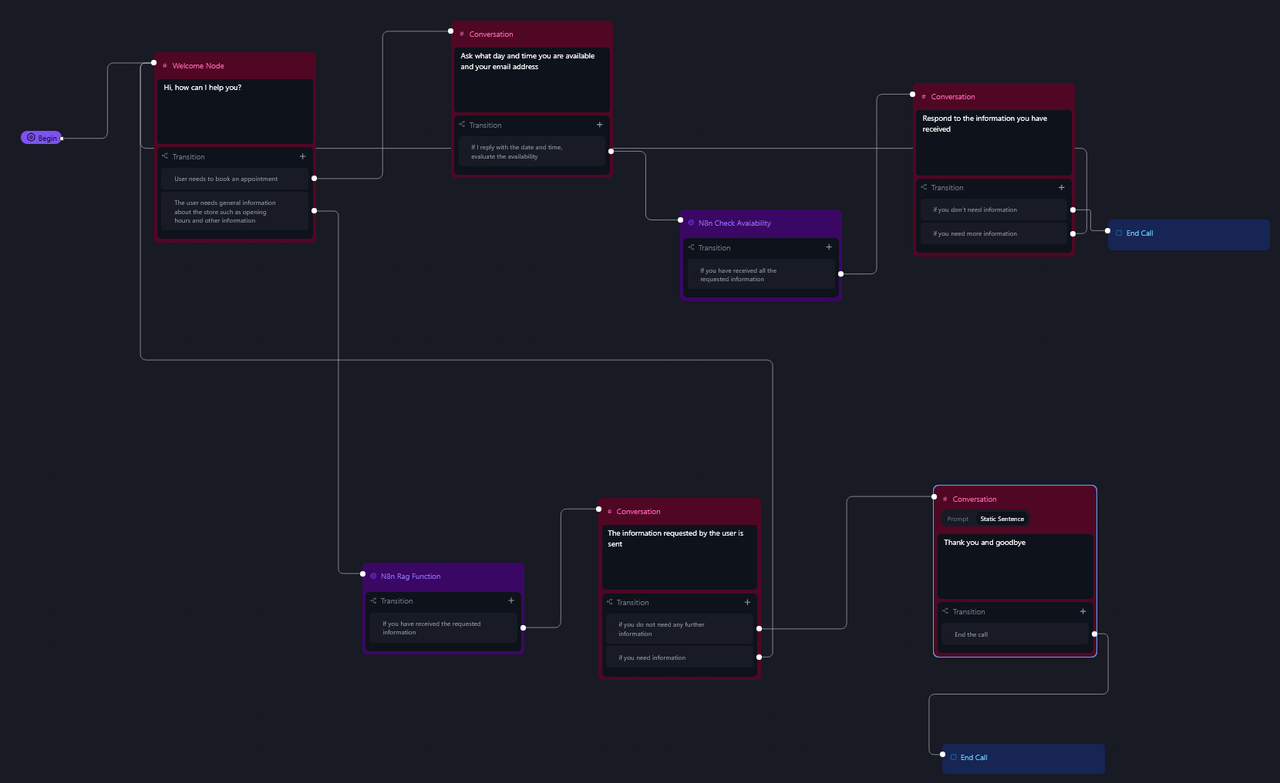 --- ### **Advantages** - **24/7 Availability** - The AI agent can answer calls and assist customers at any time. - **Automation** - It reduces the workload on human staff by handling repetitive tasks like appointment scheduling and FAQ responses. - **Easy Integration** - Built with n8n, it's flexible and customizable for various platforms and tools. - **Low-cost Setup** - Using the free credit, businesses can get started without an upfront investment. --- ### **Use Cases** - **E-commerce** - Answer common product questions or order inquiries. - **Retail Stores** - Provide store hours, address info, and return policies. - **Restaurants** - Make reservations or share menu information. - **Service Providers** - Book appointments or consultations. - **Any Local Business** - Offer phone support without needing a live operator. --- ### **How It Works** This Workflow simulates an AI-powered phone agent with two primary functions: 1. **Appointment Booking** - The workflow captures call events (e.g., `call_ended` or `call_analyzed`) and extracts key details (transcript, caller info, duration, etc.). - Using OpenAI, it summarizes the conversation and parses structured data (e.g., names, contact info, dates). - For scheduling, it converts user-provided dates into Google Calendar-compatible formats and creates events automatically. 2. **RAG-Based Information Retrieval** - When a query is received (e.g., store hours, product details), the workflow retrieves relevant information from a Qdrant vector store. - An AI agent processes the query using the retrieved data and responds via a webhook, ensuring accurate, context-aware answers. --- ### **Set Up Steps** 1. **Prepare Qdrant Vector Store** - Create/refresh a Qdrant collection (via HTTP requests). - Upload and vectorize documents (e.g., from Google Drive) using OpenAI embeddings. 2. **Configure RetellAI Agent** - Sign up for RetellAI, create an agent, and set the webhook URLs (`n8n_call` for call events, `n8n_rag_function` for RAG queries). - Purchase a Twilio phone number and link it to the agent. 3. **n8n Workflow Setup** - Connect OpenAI, Qdrant, Google Calendar, and Telegram nodes with credentials. - Customize prompts for summarization, date parsing, and RAG responses. - Test the workflow to ensure data flows from call events to processing to actions (e.g., calendar bookings, Telegram alerts). 4. **Deploy** - Trigger the workflow via RetellAI webhooks during calls. - Monitor outputs (e.g., call summaries in Telegram, calendar events). **Note**: Replace placeholders (e.g., `QDRANT_URL`, `COLLECTION`, `CHAT_ID`) with actual values. --- ### **Need help customizing?** [Contact me](mailto:info@n3w.it) for consulting and support or add me on [Linkedin](https://www.linkedin.com/in/davideboizza/).
n8n$24.99Automate E-commerce Customer Support with AI and Supabase
This workflow automates e-commerce customer support using AI to handle queries, provide product recommendations, and manage support tickets efficiently.
n8n$14.99Automate WHMCS Support Ticket Creation Using AI Chatbot
Streamline your customer support process by converting chat messages into structured WHMCS support tickets using an AI-powered chatbot.
n8n$4.99Customer Support Chatbot with RAG Using OpenAI and Pinecone
# Simple RAG Customer Support Chatbot ## Overview This intelligent customer support chatbot leverages Retrieval-Augmented Generation (RAG) to provide accurate, contextual responses by combining your knowledge base with AI capabilities. The system automatically retrieves relevant documents from your Pinecone vector store and uses them to generate informed responses through OpenAI's language models. ## Quick Setup 1. **Import Workflow** - Import this workflow template into your n8n instance. 2. **Configure Credentials** - Add the following API credentials: - OpenAI API Key: For chat completions and embeddings. - Pinecone API Key: For vector database operations. - Google Drive: For document auto ingestion. 3. **Initialize Vector Store** - Use the "Insert documents into Pinecone" workflow to populate your knowledge base. 4. **Activate Workflow** - Enable the main chat workflow to start receiving requests. ## How it Works **Main Chat Flow (Agent Workflow)** User Message → Memory Retrieval → Vector Search → Context Assembly → AI Response → Memory Update → Response **Process Flow:** - Message Reception: Webhook receives user chat messages with session management. - Memory Retrieval: Loads conversation history for context continuity. - Semantic Search: Queries Pinecone vector store for relevant documents. - Context Assembly: Combines retrieved documents with conversation history. - AI Generation: OpenAI generates contextual response using assembled context. - Memory Storage: Updates conversation memory for future interactions. - Response Delivery: Returns formatted response to user interface. **Document Ingestion Flow** Document Source → Text Extraction → Chunking → Embedding → Vector Storage **Process Flow:** - Document Trigger: Google Drive or manual file upload detection. - Content Extraction: Extracts text from various file formats (PDF, DOC, X). - Text Chunking: Splits documents into optimal chunks for embedding. - Embedding Generation: Creates vector embeddings using OpenAI. - Vector Storage: Stores embeddings in Pinecone with metadata. - Index Update: Updates search index for immediate availability.
n8n$9.99Automate AI Customer Support for Web Hosting with Google Gemini and WHMCS
Enhance your web hosting business with an AI-powered chatbot that uses Google Gemini and WHMCS to provide 24/7 customer support. This workflow integrates with Google Sheets for real-time information access and stores chat sessions for analysis.
n8n$9.99Streamline GLPI Ticket Management with a Custom n8n Interface
Enhance your GLPI system with a user-friendly web interface using n8n, simplifying ticket creation and management for technical support requests and incidents.
n8n$14.99Automate AI Responses and Alerts for Google Business Reviews
This workflow monitors Google Business Profile reviews, generates AI-driven responses, sends Slack alerts, and logs data to Google Sheets, enhancing customer engagement and feedback management.
n8n$9.99Classify Intercom Messages & Route to ClickUp or Slack with GPT-4 Mini
## How it works This workflow automates the classification and routing of incoming Intercom conversations. When a new customer message arrives, it is analyzed by AI to determine category, sentiment, urgency, and tags. Based on this classification, the workflow creates tasks in ClickUp for Support or Product requests, or sends real-time alerts to Slack for Sales inquiries. ## Step-by-step **Webhook Intake** - Triggered when Intercom sends a new conversation payload. - Captures customer details, message content, and metadata. **AI Classification** - Sends the conversation JSON to OpenAI (gpt-4-mini) with a structured prompt. - AI returns a JSON object with category (Support, Product, Sales, Other), sentiment, urgency, reasoning, and tags. **Processing & Structuring** - A Code node parses the AI output and merges it with conversation details. - Prepares formatted task fields such as title, description, customer info, and priority. **Conditional Routing** - Support requests – Task created in ClickUp with urgency and tags. - Product requests – Task created in ClickUp with structured details. - Sales inquiries – Slack alert sent to the Sales channel with context and AI reasoning. - Other – No task/action triggered. ## Benefits - Automates Intercom ticket triage and routing in real time. - Ensures consistent, AI-driven classification of all customer conversations. - Reduces manual review time for Support, Product, and Sales teams. - Creates structured tasks with enriched metadata for faster resolution. - Keeps Sales teams instantly informed with Slack alerts for urgent leads.
n8n$9.99
Related categories
Custom AI Systems & Services
Our team of experienced AI builders will help build custom AI systems, workflows, and solutions.
Request Custom Work