
Hermes Agent + n8n Integration: Workflows, Webhooks, and Agent Handoffs
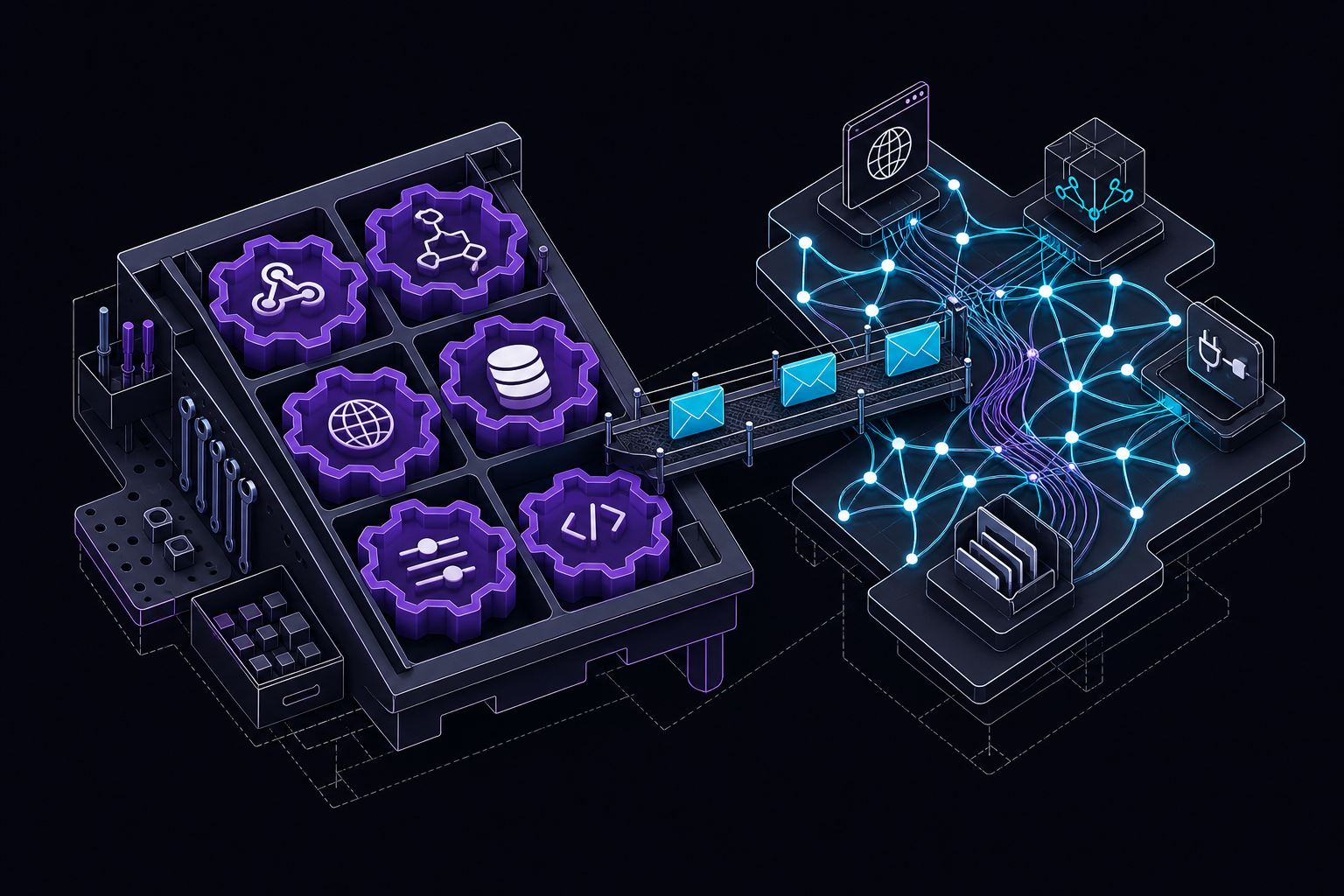
This guide covers how to connect Hermes Agent with n8n for workflow automation, covering webhook-based triggers, agent-to-n8n handoffs, and the n8n MCP catalog path. It is for operators and teams who want a practical agent workflow that combines deterministic automation steps with LLM reasoning, not just a chat demo.
What You Need
Before you start, ensure you have the following:
- A running Hermes Agent instance (self-hosted or managed cloud). The official documentation notes that self-hosted users need to understand what runs locally and what credentials are required.
- An n8n instance (self-hosted or n8n.cloud) with access to create workflows and webhooks.
- For the MCP catalog path, the n8n MCP entry must be installed and configured in Hermes. This is an optional path for managing or inspecting n8n workflows where available.
- A secret token for protecting Hermes webhook routes (recommended).
- Basic familiarity with HTTP Request nodes in n8n and webhook concepts.
Understanding the Integration: n8n vs. Hermes
The core design principle of this integration is a clear boundary between deterministic workflow steps and reasoning-heavy agent steps. According to the official documentation, n8n is excellent for predictable integrations: receive a webhook, transform fields, call an API, update a sheet, send a notification. Hermes is useful when the next step depends on interpretation: summarize the customer request, decide severity, write code, research context, or draft a reply.
Use n8n for deterministic routing and retries. Use Hermes for ambiguous tasks that require context and judgment. Keep payloads small and explicit so the agent is not guessing what the workflow meant.
What Belongs in n8n
- Receiving webhooks from external services (e.g., support forms, GitHub events)
- Field validation and data transformation
- Calling external APIs for CRUD operations
- Updating spreadsheets or databases
- Sending notifications via email, Slack, Telegram, etc.
- Orchestrating multi-step deterministic processes
What Belongs in Hermes
- Summarizing customer requests or support tickets
- Deciding severity or priority based on context
- Writing code or debugging
- Researching documentation or repository context
- Drafting replies or generating reports
- Using tools like GitHub, Linear, Notion, Telegram, Slack, or email
Setup Path: Three Integration Directions
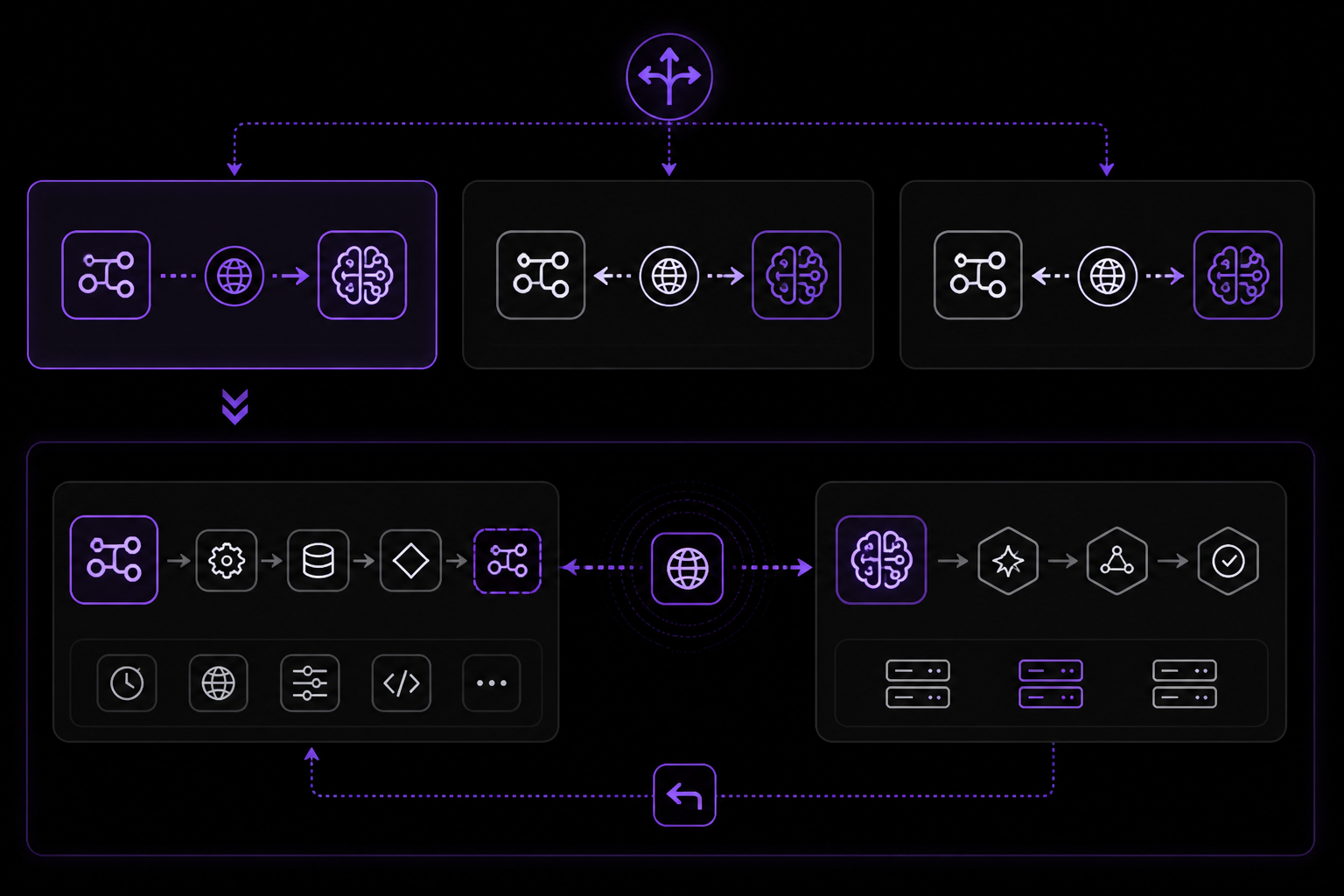
The official documentation outlines three possible directions for the integration. You can choose one or combine them based on your workflow needs.
Direction 1: n8n Triggers Hermes (Webhook Route)
This is the most common pattern. n8n acts as the automation backbone, and when it encounters a step that requires reasoning or judgment, it sends a payload to a Hermes webhook route.
Steps:
- Enable Hermes webhooks in your Hermes Agent configuration. The exact method depends on your setup (self-hosted or managed cloud).
- Create a dedicated webhook route in Hermes for the specific workflow. This route will receive the payload from n8n.
- Protect the route with a secret token. This ensures only authorized n8n workflows can trigger the agent.
- In n8n, add an HTTP Request node that POSTs the event payload to the Hermes webhook route URL. Include the secret token in the request headers (e.g.,
Authorization: Bearer your-secret). - Test with a small payload before sending production data. This helps verify the route is working and the agent processes the input correctly.
Example n8n HTTP Request Node Configuration:
{
  "method": "POST",
  "url": "https://your-hermes-instance.com/webhooks/n8n-support-triage",
  "authentication": "genericCredentialType",
  "genericAuthType": "httpHeaderAuth",
  "sendHeaders": true,
  "headerParameters": {
    "parameters": [
      {
        "name": "Authorization",
        "value": "Bearer your-secret-token"
      }
    ]
  },
  "sendBody": true,
  "bodyParameters": {
    "parameters": [
      {
        "name": "ticket_id",
        "value": "={{ $json.ticket_id }}"
      },
      {
        "name": "customer_message",
        "value": "={{ $json.customer_message }}"
      },
      {
        "name": "priority",
        "value": "={{ $json.priority }}"
      }
    ]
  },
  "options": {}
}
Explanation:
- The
urlpoints to your Hermes webhook route. Replace with your actual instance URL. - The
Authorizationheader uses a bearer token. This is the secret you defined when creating the route. - The body includes specific fields from the n8n workflow (
ticket_id,customer_message,priority). Keep the payload small and explicit so the agent is not guessing what the workflow meant.
Direction 2: Hermes Calls n8n (Agent-to-n8n Handoff)
In this direction, Hermes initiates an action that requires n8n to execute a deterministic workflow. For example, after Hermes analyzes a support ticket, it might ask n8n to update a CRM record or send a notification.
Steps:
- In n8n, create a webhook workflow that listens for incoming requests. The webhook URL will be the endpoint Hermes calls.
- Document the payload shape that n8n expects. This is critical because Hermes needs to send the correct fields.
- In Hermes, create a skill that describes the n8n webhook URL and the expected payload format. The skill acts as a tool that the agent can invoke.
- When the agent decides to use this skill, it sends an HTTP request to the n8n webhook URL with the appropriate payload.
Example Hermes Skill Definition (Conceptual):
name: update_crm_record
description: Updates a CRM record via n8n workflow. Use when you need to change a customer's status or add notes.
parameters:
  type: object
  properties:
    customer_id:
      type: string
      description: The unique ID of the customer in the CRM.
    status:
      type: string
      enum: [active, inactive, lead, churned]
      description: The new status for the customer.
    notes:
      type: string
      description: Additional notes to append to the customer record.
  required: [customer_id, status]
url: https://your-n8n-instance.com/webhook/update-crm
method: POST
headers:
  Content-Type: application/json
Explanation:
- The skill defines the parameters Hermes must collect from the user or context before calling n8n.
- The
urlis the n8n webhook endpoint. Ensure this is accessible from your Hermes instance. - The
methodis POST, and theheadersspecify JSON content type. - The agent will automatically fill the parameters based on the conversation or task.
Direction 3: Using the n8n MCP Catalog Path
If you have the n8n MCP entry installed and configured in Hermes, you can use it for managing or inspecting n8n workflows directly. This is an alternative to webhooks for certain use cases.
Steps:
- Install the n8n MCP entry in your Hermes Agent. The exact installation method depends on your Hermes setup (e.g., via the MCP catalog or manual configuration).
- Configure the MCP entry with the necessary credentials (e.g., n8n API key, instance URL).
- Select only the tools you need. The official documentation advises against exposing all n8n capabilities to the agent; instead, choose specific actions like listing workflows, getting workflow status, or triggering a workflow.
- The agent can then use these tools to inspect or control n8n workflows as part of a larger task.
When to use MCP vs. Webhooks:
According to the FAQ in the official documentation, use webhooks for event triggers (e.g., n8n triggers Hermes when a form is submitted). Use MCP when you want Hermes to inspect or operate n8n itself (e.g., check if a workflow is running, or start a workflow from a Hermes decision).
Example Workflow: Support Triage
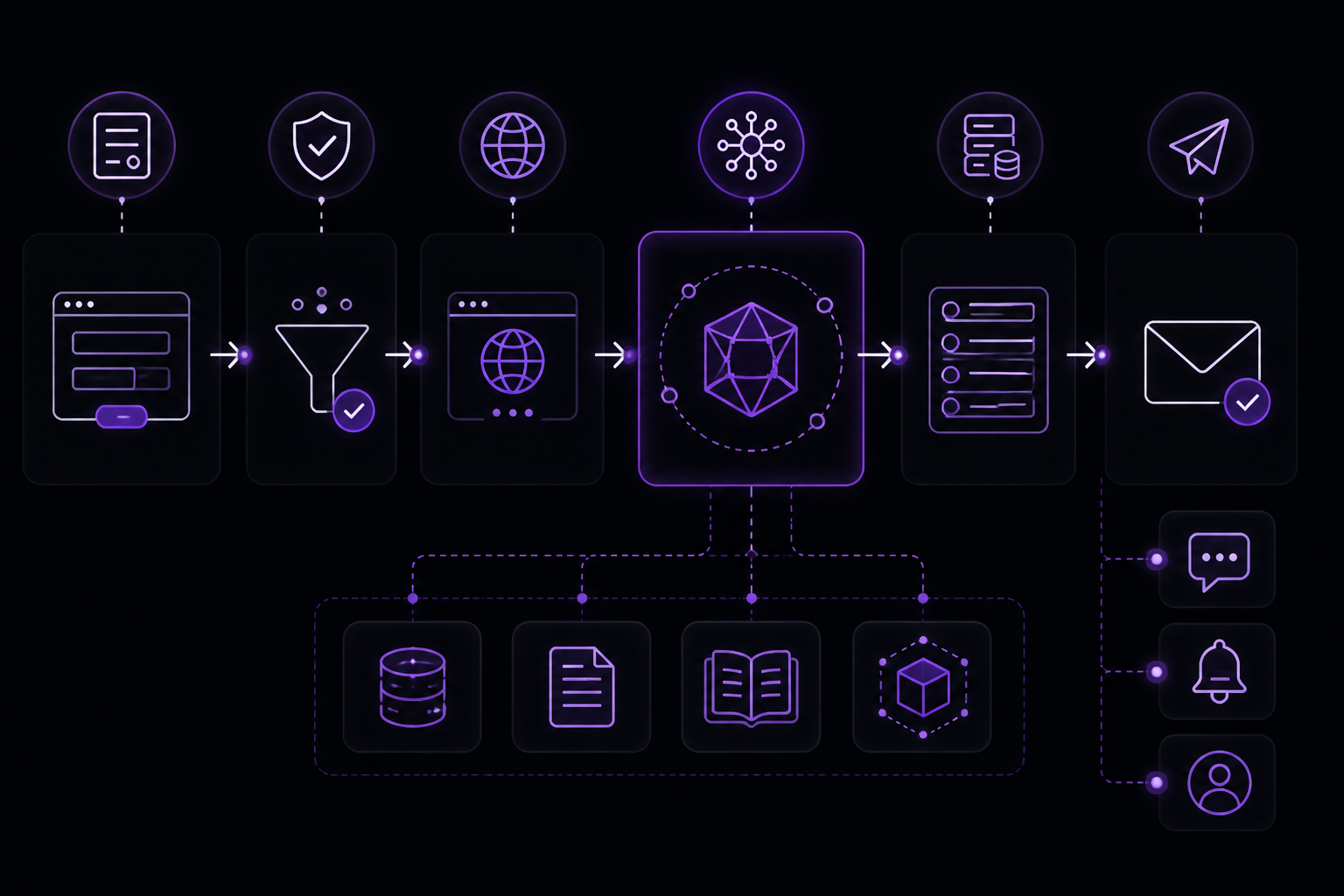
The official documentation provides a concrete example that illustrates the integration in action. This workflow combines n8n as the automation backbone with Hermes handling the reasoning-heavy middle.
Step-by-step flow:
- Form submit → A customer submits a support form. n8n receives the webhook.
- n8n field validation → n8n validates the form fields (e.g., email format, required fields present). This is a deterministic step.
- n8n HTTP Request → Hermes webhook route → n8n posts the validated payload (ticket ID, customer message, priority) to a Hermes webhook route.
- Hermes analysis → Hermes reads the customer note, checks documentation or repository context, and decides on the next steps. This might involve:
- Summarizing the issue
- Determining severity
- Searching for similar issues in GitHub or Linear
- Drafting a preliminary response
- Hermes actions → Based on its analysis, Hermes performs actions:
- Creates a Linear issue with the summary and severity
- Posts a Telegram summary to the support team channel
- Optionally, updates a GitHub issue or sends an email
- n8n remains the automation backbone → After Hermes completes its reasoning, n8n can continue with deterministic steps like logging the action, sending a confirmation email, or updating a dashboard.
Why this works:
- n8n handles the predictable parts: receiving the form, validating data, and routing.
- Hermes handles the ambiguous parts: understanding the customer's intent, researching context, and deciding on actions.
- The payload between n8n and Hermes is small and explicit, reducing the chance of misinterpretation.
Common Setup Issues and Troubleshooting
The official documentation identifies several common issues and their solutions.
Issue: Integration appears enabled but nothing happens
Solution: Restart the Hermes gateway or start a fresh Hermes session after making configuration changes. The gateway may cache the previous configuration, and a restart ensures the new webhook routes or MCP tools are loaded.
Issue: Credentials work in one shell but not in the gateway
Solution: Check the active Hermes profile and where the gateway process reads its environment. The gateway might be using a different environment file or profile than your shell. Ensure the credentials (e.g., API keys, webhook secrets) are set in the environment that the gateway process uses.
Issue: The workflow is too broad
Solution: Split the workflow into smaller routes, skills, or prompts with one expected outcome each. For example, instead of one Hermes webhook route that handles all support tickets, create separate routes for triage, escalation, and resolution. This makes debugging easier and prevents the agent from being overwhelmed with too many responsibilities.
Issue: Large payloads cause agent confusion
Solution: Avoid sending huge raw workflow payloads with no instruction. Give Hermes the specific task, relevant fields, and expected output. The official documentation warns: "Avoid sending huge raw workflow payloads with no instruction. Give Hermes the specific task, relevant fields, and expected output."
Best Practices for Payload Design
Based on the official documentation and common integration patterns, follow these guidelines when designing payloads between n8n and Hermes:
- Keep payloads small and explicit. Include only the fields the agent needs to make a decision. For example, for a support ticket, include
ticket_id,customer_message, andpriority, but not the entire raw form submission. - Provide clear instructions. In the webhook route configuration or skill definition, specify what the agent should do with the payload. For example: "Analyze this customer message and determine severity. Create a Linear issue if severity is high."
- Define expected output. Tell the agent what format the response should be in. For example: "Return a JSON object with
severity(low/medium/high),summary(string), andlinear_issue_id(string, if created)." - Use dedicated routes for different tasks. Instead of one catch-all webhook, create separate routes for triage, escalation, report generation, etc. This makes the agent's behavior more predictable.
Advanced: Combining Multiple Tools
Hermes can connect to other tools such as GitHub, Linear, Notion, Telegram, Slack, or email. The official documentation mentions these as part of the broader ecosystem. When building workflows, you can chain these tools together.
For example, after Hermes analyzes a support ticket, it might:
- Create a Linear issue for tracking.
- Post a summary to a Telegram channel for the support team.
- Update a GitHub issue if the ticket is related to a known bug.
- Send an email to the customer with a preliminary response.
The official documentation notes that Hermes can deliver final summaries to Telegram, Discord, Slack, email, or another gateway channel. This makes it a versatile hub for communication.
Going Further
Once you have the basic integration working, the official documentation suggests several next steps:
- Add tools to Hermes: Understand how tools and MCP servers become available to the agent. This includes configuring new MCP entries or creating custom skills.
- GitHub integration: Connect automation outcomes to code, pull requests, and repository reports. This is useful for development workflows where Hermes can create issues or review PRs.
- Schedule tasks with Hermes: Learn how to trigger Hermes agents on a schedule, not just via webhooks. This is useful for periodic report generation or monitoring.
- Pricing and FlyHermes: Compare self-hosting with managed cloud when uptime matters. The official documentation has a pricing page and information about FlyHermes managed cloud.
- Other integrations: Explore connecting Hermes to Telegram, Discord, Slack, WhatsApp, and Signal for broader communication capabilities.
The official documentation also links to related setup guides for email integration and adding tools to Hermes. These are natural extensions of the n8n integration.
FAQ
Do I need both MCP and webhooks for n8n?
No. Use webhooks for event triggers. Use MCP when you want Hermes to inspect or operate n8n itself. The two paths serve different purposes and can be used independently or together.
Can n8n trigger a Hermes agent run?
Yes. Create a Hermes webhook route and have an n8n HTTP Request node POST to it. This is the most common integration pattern.
What should I avoid?
Avoid sending huge raw workflow payloads with no instruction. Give Hermes the specific task, relevant fields, and expected output. Also avoid making the workflow too broad; split it into smaller, focused pieces.
The #1 AI Newsletter
The most important ai updates, guides, and fixes — one weekly email.
No spam, unsubscribe anytime. Privacy policy