Fix Claude 'compiled grammar is too large' error in structured outputs
Error message
Structured outputs: "compiled grammar is too large" error needs better documentation and higher limits for complex schemas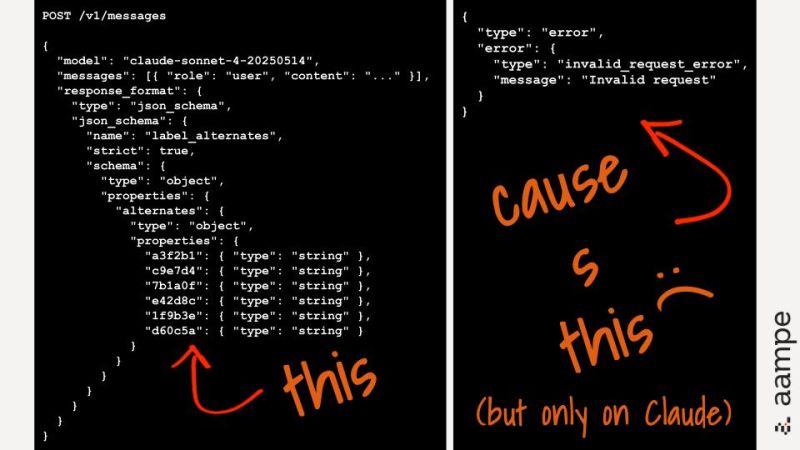
Diagnosis
When you use Anthropic's structured outputs feature (output_config.format with json_schema) and pass a complex but valid JSON schema, the API may reject it with a 400 error. The exact error message is:
400 {"type":"error","error":{"type":"invalid_request_error","message":"The compiled grammar is too large, which would cause performance issues. Simplify your tool schemas or reduce the number of strict tools."},"request_id":"req_011CYFKFQUW16kvBsXKy4JSr"}
This error means the schema you provided compiles into a finite-state automaton (the "grammar") that is too big for the API to handle efficiently. The most common cause is a schema with many nullable types, repeated sub-schemas, and deep nesting, which together cause exponential growth in the compiled grammar size.
What Causes This Error
Based on the GitHub issue discussion (source 1), three factors contribute to grammar explosion:
-
Nullable types cause grammar branching (most common). Each
type: ["number", "null"]compiles to ananyOfbranch in the finite-state automaton. With ~12 nullable fields perTypeWithSchemainstance × 4 instances per mapper, that's ~48 branching points, causing exponential state growth. -
Repeated sub-schemas without
$refdeduplication. Even though$refand$defsare listed as supported features, the grammar compiler appears to expand everything inline rather than reusing grammar rules for shared definitions. Using$defs/$refdoesn't seem to reduce compiled grammar size, according to the issue author. -
Deep nesting with complex array items. A path like
schema → mappers[] → TypeWithSchema → fields[] → TypeFieldDefinition → constraints{}creates 5 levels of nesting where each level has its own object with multiple properties, compounding the grammar complexity.
Community member xXMrNidaXx (source 2) adds that large enums also explode grammar size. If you have 100+ enum values, the grammar grows quickly because each enum value becomes a branch in the automaton.
How to Fix It
The fixes below are ordered by likelihood of success based on the sources. The first two come from the community comment (source 2) and are the most practical. The third is a workaround from the issue author (source 1).
Solution 1: Flatten your schema using $ref and definitions
Source: Community comment by xXMrNidaXx (source 2).
Instead of one massive nested schema, break it into smaller, referenced schemas. Here's the pattern they recommend:
# Instead of one massive schema
# Use $ref to compose smaller schemas
{
  "type": "object",
  "properties": {
    "section_a": {"$ref": "#/definitions/SectionA"},
    "section_b": {"$ref": "#/definitions/SectionB"}
  },
  "definitions": {...}
}
Why this works: While the issue author notes that $ref/$defs don't reduce grammar size in their testing, the community member reports that flattening into smaller referenced schemas has worked for them at RevolutionAI. The key is to reduce the depth of nesting and the number of inline repeated objects. Even if the grammar compiler expands $ref, a flatter structure with fewer repeated inline copies reduces the total number of states.
What to expect: After flattening, the API should accept the schema and return structured output. If it still fails, move to Solution 2.
Solution 2: Reduce enum cardinality and nullable types
Source: Community comment by xXMrNidaXx (source 2).
Large enums explode grammar size. If you have 100+ enum values, consider using a string with validation instead. For example, instead of:
{"type": "string", "enum": ["value1", "value2", ... 100 more]}
Use:
{"type": "string"}
And validate the value in your application code after receiving the response.
Similarly, reduce the number of nullable types. Each type: ["number", "null"] creates a branch. If you have many nullable fields, consider making them non-nullable and using a sentinel value (like -1 for numbers or "" for strings) to represent absence.
Why this works: Fewer branches in the grammar means fewer states in the automaton, so the compiled grammar stays under the size limit.
What to expect: The schema compiles and the API returns structured output. This fix is most effective when your schema has many nullable fields or large enums.
Solution 3: Use two-pass extraction
Source: Community comment by xXMrNidaXx (source 2).
For complex data, extract structure first, then details. This avoids sending the full complex schema in one request.
- Pass 1: Get top-level structure with a simpler schema.
- Pass 2: Fill in nested details per section, using a schema for just that section.
Why this works: Each request has a smaller schema, so the grammar is smaller. This trades API calls for schema simplicity.
What to expect: You'll need to make multiple API calls, but each will succeed. This is a good approach when the schema is inherently complex and can't be simplified.
Solution 4: Fall back to prompt-based JSON instructions
Source: Issue author (source 1).
If none of the above work, the current workaround is to fall back to prompt-based JSON instructions:
You MUST respond with valid JSON matching this exact schema: {...}
Why this works: This bypasses the grammar compiler entirely. The model generates JSON based on the prompt instructions, not a compiled grammar.
What to expect: This works but sacrifices the guaranteed schema compliance that structured outputs provide. The model might occasionally produce invalid JSON or deviate from the schema.
If Nothing Works
If you've tried all the fixes above and still get the error, here are your escalation paths:
- Open a GitHub issue on the Anthropic SDK repository (https://github.com/anthropics/anthropic-sdk-python/issues). The issue author (source 1) has already filed issue #1185 requesting better documentation and higher limits. Add your use case and schema complexity to that issue to increase visibility.
- Contact Anthropic support through your API dashboard. The error message includes a
request_id(e.g.,req_011CYFKFQUW16kvBsXKy4JSr) that support can use to investigate. - Check the official documentation for any updates on schema complexity limits. The issue author notes that the current documentation mentions "Schema is too complex" as a possible error but provides no guidance on actual limits.
How to Prevent It
Based on the sources, here are practices to avoid hitting this error in the first place:
- Measure schema complexity before deploying. Community member xXMrNidaXx recommends this rule of thumb:
import json
schema_size = len(json.dumps(schema))
# Rule of thumb: keep under 10KB for reliable grammar compilation
If your schema is over 10KB, simplify it before sending.
-
Avoid excessive nullable types. Each nullable type adds a branch. Use non-nullable types with sentinel values where possible.
-
Avoid large enums. Use string with validation instead of enums with 100+ values.
-
Flatten nesting. Keep nesting depth to 3 levels or less. The issue author's schema had 5 levels and failed.
-
Use
$refanddefinitionsto compose schemas. Even if the compiler expands them, a flatter structure with fewer repeated inline objects helps. -
Test schemas incrementally. Start with a minimal schema and add fields gradually to find the complexity threshold.
-
Consider two-pass extraction for inherently complex data structures, as described in Solution 3.
By following these practices, you can design schemas that compile reliably and avoid the "compiled grammar is too large" error.
The #1 Claude Newsletter
The most important claude updates, guides, and fixes — one weekly email.
No spam, unsubscribe anytime. Privacy policy
Related Error Solutions
Keep exploring Claude
Claude resources
Latest AI answers
Skip the manual work
Ready-made AI workflows and automation templates — import and run instead of building from scratch.