Building an AI Agent That Knows When Not to Guess (Qwen + MCP)
Prerequisites
- ✓ Node.js 18+
- ✓ Qwen Cloud API key
- ✓ Cloudflare account
- ✓ Alibaba Cloud account
- ✓ Telegram bot token
- ✓ Claude Code CLI
You will build an AI agent that reconciles payment transactions against open invoices using Qwen's reasoning and the Model Context Protocol (MCP). The agent is designed to know when it is uncertain and defer to a human, rather than guessing. This tutorial takes approximately 90 minutes to complete, including setup, coding, and testing.
Prerequisites
- Node.js 18 or later installed on your machine
- A Qwen Cloud API key (sign up at the Qwen Cloud console)
- A Cloudflare account (for Workers and D1)
- An Alibaba Cloud account (for SAS container deployment)
- A Telegram bot token (create one via BotFather)
- Basic familiarity with JavaScript/TypeScript and the command line
- Claude Code CLI installed (for MCP server management)
- Git installed
Step 1: Understand the Architecture
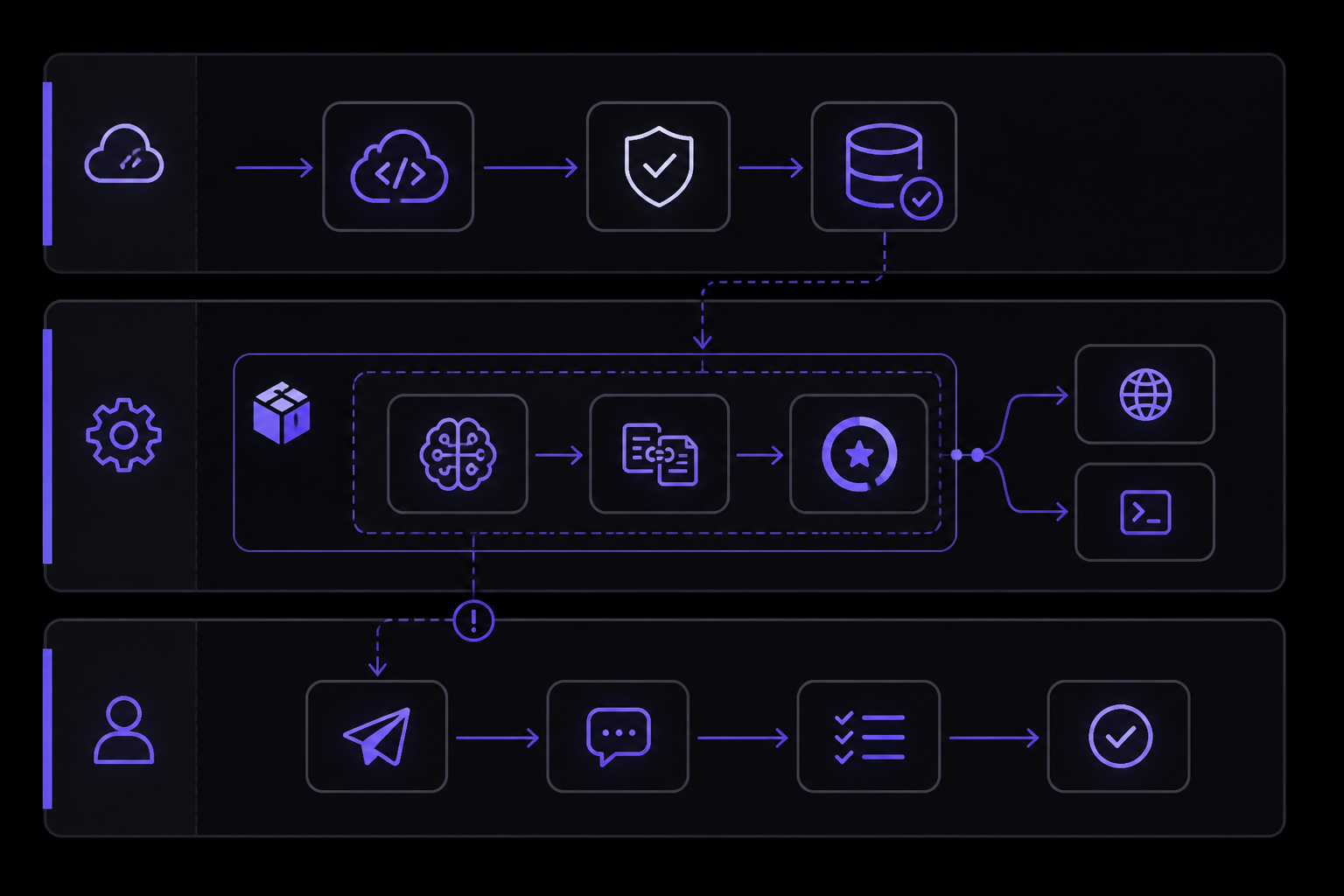
The agent, called Recona, has three layers:
- Ingestion Layer: A Cloudflare Worker that receives Paystack webhooks, verifies their signature, and stores transactions idempotently in a D1 database.
- Reconciliation Engine: A Dockerized Node.js service deployed on Alibaba Cloud SAS. It uses Qwen's API to match transactions to invoices and compute a confidence score. It exposes its matching logic as both REST endpoints and MCP tools.
- Human-in-the-Loop Surface: A Telegram bot that receives notifications when the agent's confidence is too low to auto-close an invoice.
The key design rule, as described in the Recona project, is: "the model proposes, deterministic code disposes." The LLM reads the messy input and proposes a match with a confidence score. Deterministic code then checks whether the match meets hard thresholds (exact amount, matching currency, confidence above a threshold) before auto-closing an invoice. This prevents the model from acting on a guess.
Step 2: Set Up the Project Repository
Clone the Recona repository and install dependencies:
git clone https://github.com/dannwaneri/recona.git
cd recona
npm install
The project structure includes:
workers/, Cloudflare Worker code for webhook ingestionreconciler/, Node.js service with Qwen integrationmcp/, MCP server definitionstelegram/, Telegram bot logic
Step 3: Configure Environment Variables
Create a .env file in the project root with the following variables. Replace the placeholder values with your actual credentials:
QWEN_API_KEY=your_qwen_api_key_here
PAYSTACK_SECRET_KEY=your_paystack_secret_key_here
CLOUDFLARE_ACCOUNT_ID=your_cloudflare_account_id
D1_DATABASE_ID=your_d1_database_id
TELEGRAM_BOT_TOKEN=your_telegram_bot_token
TELEGRAM_CHAT_ID=your_telegram_chat_id
These variables are read by the ingestion worker and the reconciler service. The Qwen API key is used for all LLM calls. The Paystack secret key is used to verify webhook signatures. The Telegram credentials enable the bot to send notifications when human review is needed.
Step 4: Deploy the Cloudflare Worker and D1 Database
The ingestion layer runs on Cloudflare Workers with a D1 database for storage. First, configure wrangler.toml in the workers/ directory:
name = "recon-ingest"
main = "src/index.ts"
compatibility_date = "2024-01-01"

[[d1_databases]]
binding = "DB"
database_name = "recona-db"
database_id = "your_d1_database_id"
Deploy the worker:
cd workers
npx wrangler deploy
Expected output: A URL like https://recon-ingest.your-subdomain.workers.dev. This is the endpoint where Paystack will send webhooks.
Step 5: Set Up the D1 Database Schema
The D1 database needs two tables: one for transactions and one for invoices. Run the following SQL against your D1 database using the Cloudflare dashboard or the wrangler d1 execute command:
CREATE TABLE IF NOT EXISTS transactions (
  id TEXT PRIMARY KEY,
  amount INTEGER NOT NULL,
  currency TEXT NOT NULL DEFAULT 'NGN',
  reference TEXT NOT NULL,
  customer_email TEXT,
  status TEXT NOT NULL DEFAULT 'pending',
  created_at TEXT NOT NULL DEFAULT (datetime('now')),
  invoice_id TEXT,
  confidence REAL
);

CREATE TABLE IF NOT EXISTS invoices (
  id TEXT PRIMARY KEY,
  amount INTEGER NOT NULL,
  currency TEXT NOT NULL DEFAULT 'NGN',
  customer_email TEXT,
  description TEXT,
  status TEXT NOT NULL DEFAULT 'open',
  due_date TEXT,
  created_at TEXT NOT NULL DEFAULT (datetime('now'))
);
Execute via:
npx wrangler d1 execute recona-db --file=./schema.sql
Expected output: "Executing SQL on database recona-db... Done."
Step 6: Build the Reconciliation Engine with Qwen
The core of the agent is the reconciliation engine in reconciler/. It uses Qwen's API to analyze a transaction and match it against open invoices. The engine returns a confidence score and the matched invoice ID (or null).
Create reconciler/src/index.ts:
import { QwenClient } from './qwen-client';
import { Database } from './database';

interface MatchResult {
  invoiceId: string | null;
  confidence: number;
  reasoning: string;
}

export class Reconciler {
  private qwen: QwenClient;
  private db: Database;

  constructor() {
    this.qwen = new QwenClient();
    this.db = new Database();
  }

  async matchTransaction(transaction: {
    id: string;
    amount: number;
    currency: string;
    reference: string;
    customerEmail: string;
  }): Promise<MatchResult> {
    // Fetch open invoices for this customer
    const invoices = await this.db.getOpenInvoicesByEmail(transaction.customerEmail);

    if (invoices.length === 0) {
      return {
        invoiceId: null,
        confidence: 0,
        reasoning: 'No open invoices found for this customer email.'
      };
    }

    // Prepare the prompt for Qwen
    const prompt = this.buildPrompt(transaction, invoices);

    // Call Qwen API
    const response = await this.qwen.complete(prompt);

    // Parse the response
    return this.parseResponse(response);
  }

  private buildPrompt(transaction: any, invoices: any[]): string {
    return `You are a payment reconciliation agent. Given a transaction and a list of open invoices, determine which invoice this transaction matches, or if it matches none.

Transaction:
- Amount: ${transaction.amount} ${transaction.currency}
- Reference: ${transaction.reference}
- Customer Email: ${transaction.customerEmail}

Open Invoices:
${invoices.map((inv, i) =>
  `Invoice ${i + 1}:
  - ID: ${inv.id}
  - Amount: ${inv.amount} ${inv.currency}
  - Customer Email: ${inv.customerEmail}
  - Description: ${inv.description}
  - Due Date: ${inv.dueDate}`
).join('\n\n')}

Respond with a JSON object containing:
- "invoiceId": the ID of the matched invoice, or null if no match
- "confidence": a number between 0 and 100 representing your confidence in the match
- "reasoning": a brief explanation of your decision

Only respond with the JSON object, no other text.`;
  }

  private parseResponse(response: string): MatchResult {
    try {
      const parsed = JSON.parse(response);
      return {
        invoiceId: parsed.invoiceId || null,
        confidence: parsed.confidence || 0,
        reasoning: parsed.reasoning || ''
      };
    } catch (error) {
      return {
        invoiceId: null,
        confidence: 0,
        reasoning: 'Failed to parse Qwen response.'
      };
    }
  }

  async shouldAutoClose(match: MatchResult, transaction: any, invoice: any): Promise<boolean> {
    // Deterministic checks: exact amount, matching currency, confidence threshold
    if (match.confidence < 80) {
      return false;
    }
    if (transaction.amount !== invoice.amount) {
      return false;
    }
    if (transaction.currency !== invoice.currency) {
      return false;
    }
    return true;
  }
}
The shouldAutoClose method implements the deterministic guard. It checks three conditions: confidence must be at least 80%, the transaction amount must exactly match the invoice amount, and the currencies must match. This prevents the agent from auto-closing an invoice when the model is uncertain or when the amounts don't align.
Step 7: Create the Qwen Client
Create reconciler/src/qwen-client.ts:
import axios from 'axios';

interface QwenResponse {
  choices: Array<{
    message: {
      content: string;
    };
  }>;
}

export class QwenClient {
  private apiKey: string;
  private baseUrl: string;

  constructor() {
    this.apiKey = process.env.QWEN_API_KEY || '';
    this.baseUrl = 'https://dashscope-intl.aliyuncs.com/api/v1/services/aigc/text-generation/generation';
  }

  async complete(prompt: string): Promise<string> {
    const response = await axios.post<QwenResponse>(
      this.baseUrl,
      {
        model: 'qwen-max',
        input: {
          messages: [
            { role: 'system', content: 'You are a precise payment reconciliation assistant. Always respond with valid JSON.' },
            { role: 'user', content: prompt }
          ]
        },
        parameters: {
          result_format: 'message',
          temperature: 0.1,
          top_p: 0.9
        }
      },
      {
        headers: {
          'Authorization': `Bearer ${this.apiKey}`,
          'Content-Type': 'application/json'
        }
      }
    );

    return response.data.choices[0].message.content;
  }
}
The temperature is set to 0.1 to make the model more deterministic and less likely to guess. The system prompt reinforces the requirement to respond with valid JSON.
Step 8: Expose the Matching Engine as MCP Tools
To make the reconciliation engine available to Claude Code and other MCP-compatible clients, you need to expose it as MCP tools over streamable HTTP. Create mcp/server.ts:
import { Server } from '@modelcontextprotocol/sdk/server/index.js';
import { StdioServerTransport } from '@modelcontextprotocol/sdk/server/stdio.js';
import {
  CallToolRequestSchema,
  ListToolsRequestSchema,
} from '@modelcontextprotocol/sdk/types.js';
import { Reconciler } from '../reconciler/src/index';

const reconciler = new Reconciler();

const server = new Server(
  {
    name: 'recona-reconciler',
    version: '1.0.0',
  },
  {
    capabilities: {
      tools: {},
    },
  }
);

server.setRequestHandler(ListToolsRequestSchema, async () => {
  return {
    tools: [
      {
        name: 'match_transaction_to_invoice',
        description: 'Match a payment transaction to an open invoice using Qwen AI reasoning. Returns confidence score and matched invoice ID.',
        inputSchema: {
          type: 'object',
          properties: {
            transactionId: { type: 'string', description: 'The transaction ID from Paystack' },
            amount: { type: 'number', description: 'Transaction amount in kobo (e.g., 50000 for 500 Naira)' },
            currency: { type: 'string', description: 'Currency code (e.g., NGN, USD)' },
            reference: { type: 'string', description: 'Payment reference from Paystack' },
            customerEmail: { type: 'string', description: 'Customer email address' }
          },
          required: ['transactionId', 'amount', 'currency', 'reference', 'customerEmail']
        }
      },
      {
        name: 'draft_payment_reminder',
        description: 'Draft a payment reminder message for an overdue invoice using Qwen AI.',
        inputSchema: {
          type: 'object',
          properties: {
            invoiceId: { type: 'string', description: 'The invoice ID' },
            customerName: { type: 'string', description: 'Customer name' },
            amount: { type: 'number', description: 'Amount due in kobo' },
            dueDate: { type: 'string', description: 'Original due date' },
            daysOverdue: { type: 'number', description: 'Days past due date' }
          },
          required: ['invoiceId', 'customerName', 'amount', 'dueDate', 'daysOverdue']
        }
      }
    ]
  };
});

server.setRequestHandler(CallToolRequestSchema, async (request) => {
  const { name, arguments: args } = request.params;

  if (name === 'match_transaction_to_invoice') {
    const result = await reconciler.matchTransaction({
      id: args.transactionId,
      amount: args.amount,
      currency: args.currency,
      reference: args.reference,
      customerEmail: args.customerEmail
    });
    return {
      content: [
        {
          type: 'text',
          text: JSON.stringify(result, null, 2)
        }
      ]
    };
  }

  if (name === 'draft_payment_reminder') {
    // Draft reminder logic using Qwen
    const prompt = `Draft a polite payment reminder for ${args.customerName} regarding invoice ${args.invoiceId} for ${args.amount / 100} Naira, due on ${args.dueDate}, now ${args.daysOverdue} days overdue. Keep it professional and courteous.`;
    const qwenClient = new QwenClient();
    const draft = await qwenClient.complete(prompt);
    return {
      content: [
        {
          type: 'text',
          text: draft
        }
      ]
    };
  }

  throw new Error(`Unknown tool: ${name}`);
});

async function main() {
  const transport = new StdioServerTransport();
  await server.connect(transport);
  console.error('Recona MCP server running on stdio');
}

main().catch((error) => {
  console.error('Server error:', error);
  process.exit(1);
});
This MCP server exposes two tools: match_transaction_to_invoice and draft_payment_reminder. The first tool is the core matching engine. The second tool generates payment reminder messages for overdue invoices.
Step 9: Connect the MCP Server to Claude Code
To use these tools from Claude Code, you need to add the MCP server to your Claude Code configuration. Run the following command from the project root:
claude mcp add --transport stdio recona-reconciler -- node mcp/server.js
This registers the server with Claude Code. The --transport stdio flag tells Claude Code to spawn the server as a local process. The -- separates Claude Code's own options from the server command.
Expected output: "Added MCP server 'recona-reconciler'"
Verify the server is connected:
claude mcp list
Expected output: A list that includes recona-reconciler with a status of "Connected".
Step 10: Implement the Deterministic Guard
The deterministic guard is the most important part of the system. It runs after Qwen returns a match result and decides whether to auto-close the invoice or escalate to a human. The guard is implemented in the shouldAutoClose method shown in Step 6.
The guard checks three conditions:
- Confidence threshold: The confidence score from Qwen must be 80 or higher. This is a hard threshold. If Qwen is less than 80% confident, the transaction is flagged for human review.
- Exact amount match: The transaction amount must exactly equal the invoice amount. Partial payments are not auto-closed.
- Currency match: The transaction currency must match the invoice currency.
If any condition fails, the agent sends a notification to the Telegram bot with the transaction details, the invoice ID (if Qwen identified one), and the confidence score. A human then reviews and decides.
Step 11: Set Up the Telegram Bot for Human-in-the-Loop
Create telegram/bot.ts:
import TelegramBot from 'node-telegram-bot-api';

const token = process.env.TELEGRAM_BOT_TOKEN || '';
const chatId = process.env.TELEGRAM_CHAT_ID || '';

const bot = new TelegramBot(token, { polling: true });

export async function notifyHumanReview(transaction: any, matchResult: any) {
  const message = `⚠️ Human review needed

Transaction: ${transaction.id}
Amount: ${transaction.amount / 100} ${transaction.currency}
Reference: ${transaction.reference}
Customer Email: ${transaction.customerEmail}

Qwen Match Result:
Invoice ID: ${matchResult.invoiceId || 'None'}
Confidence: ${matchResult.confidence}%
Reasoning: ${matchResult.reasoning}

Action required: Review and decide whether to close invoice ${matchResult.invoiceId || 'N/A'}.`;

  await bot.sendMessage(chatId, message);
}

export async function notifyAutoClose(invoiceId: string, transactionId: string) {
  const message = `✅ Auto-closed invoice ${invoiceId} based on transaction ${transactionId}.`;
  await bot.sendMessage(chatId, message);
}
This bot sends notifications to a Telegram chat. When the deterministic guard blocks an auto-close, it sends a detailed message with the transaction info, Qwen's match result, and a request for human review. When auto-close succeeds, it sends a confirmation.
Step 12: Wire Everything Together in the Worker
Update the Cloudflare Worker in workers/src/index.ts to orchestrate the full flow:
import { Reconciler } from '../../reconciler/src/index';
import { notifyHumanReview, notifyAutoClose } from '../../telegram/bot';

interface PaystackWebhook {
  event: string;
  data: {
    id: number;
    amount: number;
    currency: string;
    reference: string;
    customer: {
      email: string;
    };
    status: string;
  };
}

export default {
  async fetch(request: Request, env: Env): Promise<Response> {
    if (request.method !== 'POST') {
      return new Response('Method not allowed', { status: 405 });
    }

    // Verify Paystack webhook signature
    const signature = request.headers.get('x-paystack-signature');
    const body = await request.text();

    if (!verifyPaystackSignature(body, signature, env.PAYSTACK_SECRET_KEY)) {
      return new Response('Invalid signature', { status: 401 });
    }

    const webhook: PaystackWebhook = JSON.parse(body);

    // Only process successful charges
    if (webhook.event !== 'charge.success') {
      return new Response('Ignored', { status: 200 });
    }

    const transaction = {
      id: webhook.data.id.toString(),
      amount: webhook.data.amount,
      currency: webhook.data.currency,
      reference: webhook.data.reference,
      customerEmail: webhook.data.customer.email
    };

    // Store transaction in D1 (idempotent)
    await env.DB.prepare(
      'INSERT OR IGNORE INTO transactions (id, amount, currency, reference, customer_email, status) VALUES (?, ?, ?, ?, ?, ?)'
    ).bind(transaction.id, transaction.amount, transaction.currency, transaction.reference, transaction.customerEmail, 'pending').run();

    // Run reconciliation
    const reconciler = new Reconciler();
    const matchResult = await reconciler.matchTransaction(transaction);

    // Update transaction with match result
    await env.DB.prepare(
      'UPDATE transactions SET invoice_id = ?, confidence = ? WHERE id = ?'
    ).bind(matchResult.invoiceId, matchResult.confidence, transaction.id).run();

    if (matchResult.invoiceId) {
      const invoice = await env.DB.prepare(
        'SELECT * FROM invoices WHERE id = ?'
      ).bind(matchResult.invoiceId).first();

      if (invoice) {
        const shouldClose = await reconciler.shouldAutoClose(matchResult, transaction, invoice);

        if (shouldClose) {
          // Auto-close the invoice
          await env.DB.prepare(
            'UPDATE invoices SET status = ? WHERE id = ?'
          ).bind('closed', matchResult.invoiceId).run();

          await notifyAutoClose(matchResult.invoiceId, transaction.id);
        } else {
          // Escalate to human
          await notifyHumanReview(transaction, matchResult);
        }
      }
    } else {
      // No invoice matched, escalate
      await notifyHumanReview(transaction, matchResult);
    }

    return new Response('OK', { status: 200 });
  }
};

function verifyPaystackSignature(body: string, signature: string | null, secret: string): boolean {
  if (!signature) return false;
  const crypto = require('crypto');
  const hash = crypto.createHmac('sha512', secret).update(body).digest('hex');
  return hash === signature;
}
This worker handles the full flow: webhook verification, idempotent storage, reconciliation via Qwen, deterministic guard check, and notification via Telegram.
Step 13: Deploy the Reconciliation Engine to Alibaba Cloud SAS
The reconciliation engine runs as a Docker container on Alibaba Cloud SAS. Create a Dockerfile in the project root:
FROM node:18-alpine

WORKDIR /app

COPY package*.json ./
RUN npm ci --only=production

COPY . .

EXPOSE 3000

CMD ["node", "reconciler/src/index.ts"]
Build and push the Docker image:
docker build -t recona-reconciler .
docker tag recona-reconciler your-registry/recona-reconciler:latest
docker push your-registry/recona-reconciler:latest
Then deploy to Alibaba Cloud SAS using their console or CLI. The service should be configured with the same environment variables from Step 3.
Verifying It Works
To verify the full system works end-to-end:
-
Test the MCP tools from Claude Code:
claude -p "Use the match_transaction_to_invoice tool to match a transaction with amount 50000, currency NGN, reference 'PMT final tunde', and customer email 'test@example.com'"Expected output: The tool returns a JSON object with
invoiceId,confidence, andreasoning. If no matching invoice exists,invoiceIdwill be null and confidence will be 0. -
Simulate a Paystack webhook:
curl -X POST https://recon-ingest.your-subdomain.workers.dev \
  -H "Content-Type: application/json" \
  -H "x-paystack-signature: generated_signature" \
  -d '{"event":"charge.success","data":{"id":12345,"amount":50000,"currency":"NGN","reference":"PMT final tunde","customer":{"email":"test@example.com"},"status":"success"}}'
Expected output: "OK" with status 200. Check the Telegram bot for a notification about the match result.
-
Check the D1 database:
npx wrangler d1 execute recona-db --command="SELECT * FROM transactions"Expected output: The transaction record with
invoice_idandconfidencefields populated.
Common Problems
MCP server not connecting
If claude mcp list shows the server as "Pending approval" or "Failed":
- Ensure you have run
claudeinteractively at least once in the project directory to accept the workspace trust dialog. As documented in the Anthropic MCP reference, a cloned repository cannot approve its own servers until you trust the workspace. - Check that the server command is correct. The
--separator is required before the server command. Without it, Claude Code tries to parse the server's flags as its own options. - If using a
.mcp.jsonfile, ensure thetypefield is set to"stdio"for local servers. A missingtypefield causes Claude Code to skip the server and report an error.
Qwen API returns errors
- Verify your
QWEN_API_KEYis set correctly in the environment. - Check that the Qwen API endpoint URL is correct. The base URL in this tutorial uses the international endpoint. If you are in mainland China, use
https://dashscope.aliyuncs.com/api/v1/services/aigc/text-generation/generationinstead. - The model name
qwen-maxmay not be available in all regions. Check the Qwen Cloud documentation for available models in your region.
Paystack webhook signature verification fails
- Ensure the
PAYSTACK_SECRET_KEYmatches the key in your Paystack dashboard. - The webhook signature is generated using HMAC-SHA512. The
verifyPaystackSignaturefunction in the worker must use the same algorithm. - Community members on the Recona project report that some Paystack webhooks send the signature in lowercase. The comparison should be case-insensitive. Update the function to use
hash.toLowerCase() === signature.toLowerCase()if needed.
Telegram bot not sending messages
- Verify the
TELEGRAM_BOT_TOKENis correct. Create a new bot via BotFather if needed. - Ensure the bot has been added to the target chat and has permission to send messages.
- The
TELEGRAM_CHAT_IDmust be the numeric ID of the chat. For a group chat, the ID is negative. You can find it by sending a message to the bot and checking the update viahttps://api.telegram.org/bot<YOUR_TOKEN>/getUpdates.
D1 database queries fail
- Confirm the
D1_DATABASE_IDinwrangler.tomlmatches the database you created. - Run
npx wrangler d1 listto verify the database exists and is associated with your account. - If using a free plan, ensure you haven't exceeded the D1 read/write limits.
Next Steps
-
Add more MCP tools: Extend the MCP server with tools for invoice management, customer lookup, or report generation. The MCP protocol supports dynamic tool updates via
list_changednotifications, so you can add tools without restarting the server. -
Implement a daily collections sweep: The Recona project includes a scheduled worker that runs daily, checks for overdue invoices, and uses the
draft_payment_reminderMCP tool to generate and send reminders. Implement this as a Cloudflare Cron Trigger. -
Add confidence calibration: The current system uses a hard threshold of 80% for auto-close. Experiment with different thresholds based on transaction amounts or customer history. You could also implement a feedback loop where human decisions are fed back to Qwen to improve future matching.
-
Deploy as a plugin: Package the MCP server as a Claude Code plugin using the
mcp-server-devplugin. This allows others to install your reconciliation tools with a single command. See the Anthropic documentation for plugin MCP server configuration.
The #1 Claude Newsletter
The most important claude updates, guides, and fixes — one weekly email.
No spam, unsubscribe anytime. Privacy policy
Related Tutorials
Keep exploring Claude
Claude resources
Latest AI answers
Skip the manual work
Ready-made AI workflows and automation templates — import and run instead of building from scratch.