Using Member Functions of a Class as LangGraph Tools: Fixing the 'self' Error
Original question: Using member functions of a class as LangGraph tools
You cannot directly decorate a bound instance method with @tool in LangChain and LangGraph because the decorator wraps the method as a StructuredTool, and at runtime the already-bound self conflicts with an implicit self passed by the framework, producing TypeError: StructuredTool._run() got multiple values for argument 'self'. The fix is to wrap the instance method inside a closure that captures self and then decorate that closure with @tool. This keeps your class-based state (like a local directory path) accessible while giving LangChain a plain callable it can invoke correctly.
The Full Answer
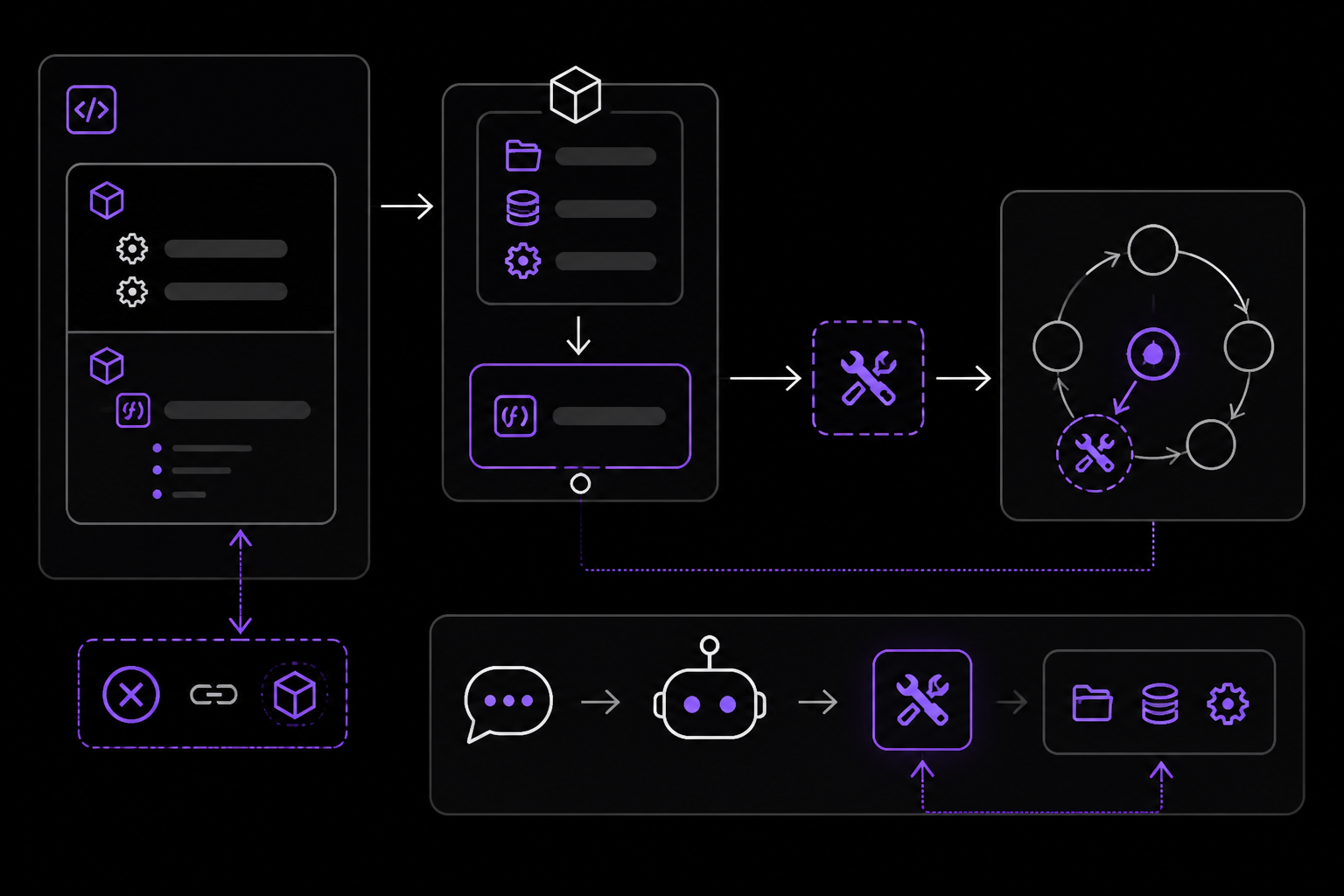
When you build an agent with LangChain and LangGraph, you often want tools that share state. A natural design is to put those tools as methods on a class, so they can access instance attributes like a base directory, a database connection, or a configuration object. The code below shows the pattern that triggers the error.
The Problem: Decorating a Bound Method
Consider this FileInterface class. The intent is to store a local directory path in self.localdir and expose a read_file tool that only reads files inside that directory.
from pathlib import Path
from langchain_core.tools import tool

class FileInterface:
    def __init__(self):
        self.localdir = Path.cwd()

    def get_tools(self):
        return [self.read_file, ...]

    @tool
    def read_file(self, path: str) -> str:
        """tool for reading file at path"""
        # ... check path is inside self.localdir ...
        return path.read()
When you instantiate the class and pass the tools to create_agent, the agent invokes the tool and you get:
TypeError: StructuredTool._run() got multiple values for argument 'self'
The full traceback (from Source 1) shows the error originates in langchain_core/tools/base.py at the _run method. The root cause is explained in Source 2: when you decorate a method with @tool, LangChain wraps it as a StructuredTool. But because the method is already bound to an instance (i.e., self is already attached), the framework passes another self argument at runtime. Python then sees two values for self and raises the error.
The Solution: Closure Wrapping
The accepted solution from Source 2 is to not decorate the method directly. Instead, you create a plain function inside a tools() method (or any method that returns the tool list) and decorate that function with @tool. Inside that function, you call the real instance method via the captured self.
Here is the corrected class:
from pathlib import Path
from langchain_core.tools import tool

class FileInterface:

    def __init__(self, base_dir: str):
        self.base_dir = Path(base_dir)

    def _read_file(self, filename: str) -> str:
        path = self.base_dir / filename
        return path.read_text()

    def tools(self):
        # ---- you must wrap in a closure like this ----
        @tool
        def read_file(filename: str) -> str:
            """Read a file from disk inside base_dir"""
            return self._read_file(filename)

        return [read_file]
Key changes:
- The
@tooldecorator is applied to a local functionread_file, not to the method_read_file. This local function is a plain callable, not a bound method, so LangChain can wrap it without theselfconflict. - The actual work is delegated to
self._read_file(filename), which has full access toself.base_dirand any other instance state. - The method that returns tools is named
tools()(notget_tools()), but any name works. The important thing is that it creates a new closure each time it is called.
Full Working Example
Source 2 provides a complete, tested example using ChatOllama and the create_agent function. Here it is with the original imports and structure:
from pathlib import Path

from langchain_core.tools import tool
from langchain.agents import create_agent
from langchain_ollama.chat_models import ChatOllama

class FileInterface:

    def __init__(self, base_dir: str):
        self.base_dir = Path(base_dir)

    def _read_file(self, filename: str) -> str:
        path = self.base_dir / filename
        return path.read_text()

    def tools(self):
        # ---- you must wrap in a closure like this ----
        @tool
        def read_file(filename: str) -> str:
            """Read a file from disk inside base_dir"""
            return self._read_file(filename)

        return [read_file]

# -------------- usage --------------
# 1) instantiate your class
fs = FileInterface(".")

# 2) define your model
llm = ChatOllama(
    model="llama3.2:latest"
)

# 3) build an agent with your tools
agent = create_agent(llm, tools=fs.tools())

# 4) call it
response = agent.invoke({
    "messages": [
        {"role": "user", "content": "Open the file README.md and summarize it in one bullet point."}
    ]
})
print(response)
When run, the agent produces a tool_calls entry showing that the read_file tool was invoked with {'filename': 'README.md'}. The final AIMessage contains the summary. You can extract the last message with:
print(response["messages"][-1].content)
Output (from Source 2):
Here is a summary of the README.md file in one bullet point:

* The LangChain project provides a set of tools that enable models to interact with external systems such as APIs, databases, or file systems using structured input. These tools extend model capabilities by letting them interface directly with the world through well-defined inputs and outputs.
Why This Works
The closure pattern works because of how Python's scoping rules interact with LangChain's tool wrapping. When you write:
def tools(self):
    @tool
    def read_file(filename: str) -> str:
        return self._read_file(filename)
    return [read_file]
The read_file function is defined inside the tools method. It references self, which is a parameter of the enclosing method. At the time tools() is called, self is bound to the FileInterface instance. The read_file function captures that self reference in its closure. When LangChain later invokes read_file(filename), it calls a plain function with one argument (filename). There is no self parameter in the function signature, so there is no conflict. Inside the function, self._read_file(filename) uses the captured self to access the instance.
This is different from decorating the method directly:
@tool
def read_file(self, path: str) -> str:
    ...
Here, the function signature includes self. When LangChain wraps it, it creates a StructuredTool whose _run method expects the arguments defined in the signature. But because the method is bound, Python already supplies self when the method is called as self.read_file. The framework then tries to pass self again, causing the duplicate argument error.
Alternative Approaches (Not in Sources, but Worth Knowing)
While the sources only present the closure pattern, there are other ways to achieve the same result. These are not covered in the source material but are common in the LangChain community:
- Using
functools.partial: You can bindselfto a method usingfunctools.partialand then wrap the result with@tool. However, this can be fragile becausepartialobjects may not have the right signature for LangChain's schema inference. - Creating a tool from a function that takes a class instance as a parameter: You can define a standalone function that accepts the class instance as a parameter and use
InjectedToolArgorToolRuntimeto pass it. This is more complex and not shown in the sources. - Using
BaseToolsubclass: You can subclassBaseTooland implement_runyourself, storing the class instance as an attribute. This gives you full control but requires more boilerplate.
The closure pattern is the simplest and most maintainable approach, and it is the one confirmed to work by the accepted answer.
Common Pitfalls
Pitfall 1: Forgetting to Call tools() Each Time
If you store the result of fs.tools() and reuse it across multiple agent invocations, the closure still works because the captured self remains valid as long as the FileInterface instance exists. However, if you modify the instance state between invocations (e.g., change base_dir), the tools will reflect the new state because they reference the live instance. This is usually what you want, but be aware that the tools are not snapshots; they are live references.
Pitfall 2: Multiple Tools in the Same Class
The closure pattern scales to multiple tools. You define one inner function per tool inside the tools() method:
def tools(self):
    @tool
    def read_file(filename: str) -> str:
        """Read a file from disk inside base_dir"""
        return self._read_file(filename)

    @tool
    def write_file(filename: str, content: str) -> str:
        """Write content to a file inside base_dir"""
        return self._write_file(filename, content)

    @tool
    def list_files() -> str:
        """List all files in base_dir"""
        return self._list_files()

    return [read_file, write_file, list_files]
Each inner function captures self independently. This is the pattern recommended by Source 2.
Pitfall 3: Type Hints Are Required
LangChain uses type hints to infer the tool's input schema. If you omit the type hint for a parameter, the tool may not work correctly. In the example above, filename: str is required. If you write filename without a type hint, LangChain may not include it in the schema, and the model will not know to pass it.
Pitfall 4: The self Error Can Be Masked by Async Execution
As the traceback in Source 1 shows, the error occurs inside a thread pool executor (concurrent.futures). If you are using async tools or a different executor, the error message may differ, but the root cause is the same: a bound method being wrapped by @tool. Always check that your tool functions are not bound methods.
Pitfall 5: Docstrings Must Be Informative
The @tool decorator uses the function's docstring as the tool's description. This description is passed to the language model to help it decide when to use the tool. A poor docstring can cause the model to ignore the tool or use it incorrectly. Source 2 emphasizes that the docstring should be informative and concise. For example:
@tool
def read_file(filename: str) -> str:
    """Read a file from disk inside base_dir"""
    return self._read_file(filename)
This is acceptable, but you could improve it by adding context about what base_dir is and what kind of files are accessible.
Pitfall 6: Thread Safety
If your LangGraph agent runs tools concurrently (which is the default behavior in ToolNode), and your class instance has mutable state that is not thread-safe, you may encounter race conditions. The closure pattern does not add any thread safety. If you need to share state across concurrent tool calls, consider using thread-local storage or locks. This is not mentioned in the sources but is a practical concern for production systems.
Pitfall 7: The tool Decorator Must Be Imported Correctly
In the source examples, the import is:
from langchain_core.tools import tool
Some older documentation uses from langchain.tools import tool. Both work, but langchain_core.tools is the canonical location. If you get an import error, check your LangChain version. The examples in Source 2 use langchain_core.tools.
Related Questions
Can I use functools.partial to bind self instead of a closure?
Technically yes, but it is not recommended. functools.partial creates a partial object that, when called, prepends the bound arguments. If you do partial(self.read_file, self), the resulting callable has a different signature than the original method. LangChain's schema inference may not work correctly because it inspects the function's signature, and a partial object's signature is the original method's signature minus the bound arguments. This can lead to confusing errors. The closure pattern is simpler and more reliable.
How do I pass additional runtime context to my tools, like user ID or session data?
LangChain provides the ToolRuntime parameter for this purpose. You add a parameter named runtime with type ToolRuntime to your tool function, and LangChain automatically injects it without exposing it to the model. Through runtime.context, you can access immutable configuration like user IDs. Through runtime.state, you can access the current graph state. Through runtime.store, you can access persistent memory. This is documented in the LangChain tools documentation and is independent of whether your tool is a closure or a standalone function.
Can I define tools as methods of a class and still use them with create_agent?
Only if you do not decorate them with @tool directly. You must either use the closure pattern shown above or define your tools as standalone functions that take the class instance as an injected parameter. The @tool decorator on a bound method is not supported and will always produce the multiple values for argument 'self' error.
What if I want to update the class state from within a tool?
You can do this inside the private method that the closure calls. For example, you could add a counter that tracks how many files have been read:
class FileInterface:
    def __init__(self, base_dir: str):
        self.base_dir = Path(base_dir)
        self.read_count = 0

    def _read_file(self, filename: str) -> str:
        self.read_count += 1
        path = self.base_dir / filename
        return path.read_text()

    def tools(self):
        @tool
        def read_file(filename: str) -> str:
            """Read a file from disk inside base_dir"""
            return self._read_file(filename)
        return [read_file]
This works because the closure captures self, and self.read_count is mutable. However, be aware of thread safety if tools run concurrently.
The #1 AI Newsletter
The most important ai updates, guides, and fixes — one weekly email.
No spam, unsubscribe anytime. Privacy policy
Related Answers
Keep exploring
AI resources
Latest error solutions
Skip the manual work
Ready-made AI workflows and automation templates — import and run instead of building from scratch.