AI Workflows
Artificial Intelligence tools and workflows
Chat with Local LLMs Using n8n and Ollama
## Chat with local LLMs using n8n and Ollama This n8n workflow allows you to seamlessly interact with your self-hosted Large Language Models (LLMs) through a user-friendly chat interface. By connecting to Ollama, a powerful tool for managing local LLMs, you can send prompts and receive AI-generated responses directly within n8n. ### Use cases - Private AI Interactions Ideal for scenarios where data privacy and confidentiality are important. - Cost-Effective LLM Usage Avoid ongoing cloud API costs by running models on your own hardware. - Experimentation & Learning A great way to explore and experiment with different LLMs in a local, controlled environment. - Prototyping & Development Build and test AI-powered applications without relying on external services. ### How it works 1. When chat message received: Captures the user's input from the chat interface. 2. Chat LLM Chain: Sends the input to the Ollama server and receives the AI-generated response. 3. Delivers the LLM's response back to the chat interface. ### Set up steps - Make sure Ollama is installed and running on your machine before executing this workflow. - Edit the Ollama address if different from the default.
n8n$4.99RAG Chatbot with Supabase + TogetherAI + OpenRouter
## RUN the FIRST WORKFLOW ONLY ONCE (as it will convert your content into Embedding format and save it in DB and is ready for the RAG Chat) ## Telegram Trigger * **Type:** `telegramTrigger` * **Purpose:** Waits for new Telegram messages to trigger the workflow. * **Note:** Currently disabled. --- ## Content for the Training * **Type:** `googleDocs` * **Purpose:** Fetches document content from Google Docs using its URL. * **Details:** Uses Service Account authentication. --- ## Splitting into Chunks * **Type:** `code` * **Purpose:** Splits the fetched document text into smaller chunks (1000 chars each) for processing. * **Logic:** Loops over text and slices it. --- ## Embedding Uploaded Document * **Type:** `httpRequest` * **Purpose:** Calls Together AI embedding API to get vector embeddings for each text chunk. * **Details:** Sends JSON with model name and chunk as input. --- ## Save the embedding in DB * **Type:** `supabase` * **Purpose:** Saves each text chunk and its embedding vector into the Supabase `embed` table. ## SECOND WORKFLOW EXPLANATION: ## When chat message received * **Type:** `chatTrigger` * **Purpose:** Starts the workflow when a user sends a chat message. * **Details:** Sends an initial greeting message to the user. --- ## Embed User Message * **Type:** `httpRequest` * **Purpose:** Generates embedding for the user's input message. * **Details:** Calls Together AI embeddings API. --- ## Search Embeddings * **Type:** `httpRequest` * **Purpose:** Searches Supabase DB for the top 5 most similar text chunks based on the generated embedding. * **Details:** Calls Supabase RPC function `matchembeddings1`. --- ## Aggregate * **Type:** `aggregate` * **Purpose:** Combines all retrieved text chunks into a single aggregated context for the LLM. --- ## Basic LLM Chain * **Type:** `chainLlm` * **Purpose:** Passes the user's question + aggregated context to the LLM to generate a detailed answer. * **Details:** Contains prompt instructing the LLM to answer only based on context. --- ## OpenRouter Chat Model * **Type:** `lmChatOpenRouter` * **Purpose:** Provides the actual AI language model that processes the prompt. * **Details:** Uses `qwen/qwen3-8b:free` model via OpenRouter and you can use any of your choice.
n8n$9.99Automate AI-Driven Book Creation with GPT-4.1-mini, DALL-E, Google Drive, and AWS S3
Streamline the process of creating AI-generated books by orchestrating multiple AI agents for content creation, design, and storage using n8n, GPT-4.1-mini, DALL-E, Google Drive, and AWS S3.
n8n$14.99Automate Comprehensive Research and Notion Report Creation
This workflow automates the process of conducting detailed research on a given topic and compiling the findings into a structured report stored in Notion. It leverages AI for search query generation, content extraction, and report summarization, ensuring a seamless transition from research initiation to report delivery.
n8n$24.99Automate SEO Content Creation and Publishing on WordPress
This workflow automates the generation of SEO-friendly content using DeepSeek, publishes it on WordPress, and updates a Google Sheets document with post details.
n8n$14.99Automate End-to-End Blog Content Creation with GPT-4, Perplexity, and WordPress
Streamline your blog content creation process from research to publication using GPT-4, Perplexity, and WordPress. Ideal for content creators and marketers, this workflow automates SEO-optimized article generation, publishing, and notifications.
n8n$14.99Enhance AI Chatbot with Long-Term Memory and Dynamic Tool Routing
This n8n workflow empowers your AI chatbot with long-term memory and dynamic tool routing, enabling intelligent, context-aware responses and efficient task management across multiple platforms.
n8n$19.99Automate Web Page Data Extraction with AI-Generated Scrapers
Leverage AI to create dynamic web scrapers that adapt to layout changes, ensuring consistent data extraction from web pages.
n8n$4.99Automate Research-Based Article Generation with OpenAI and Web Search
This workflow automates the creation of research-backed articles by integrating OpenAI and web search capabilities. Ideal for content marketers and SEO teams, it streamlines the process of generating high-quality, SEO-optimized content with minimal manual input.
n8n$24.99Deploy an AI-Powered WhatsApp Chatbot with OpenAI and Qdrant
This n8n workflow sets up an AI-powered chatbot for WhatsApp using OpenAI and Qdrant to enhance customer interactions with retrieval-augmented generation capabilities.
n8n$14.99Automate Email Analysis and Summarization with AI and Google Sheets
This workflow automates the analysis of emails and their attachments using AI models, extracting and summarizing content to Google Sheets and sending a final summary via Telegram.
n8n$19.99Query PDF Content Using Weaviate and OpenAI for Document Q&A
Upload a PDF and ask questions about its content using Weaviate and OpenAI in n8n. This workflow serves as a template for implementing Retrieval-Augmented Generation (RAG) over your documents.
n8n$14.99High-Speed AI Chat with OpenAI's GPT-oss-120B Model via Cerebras Inference
## Overview This n8n workflow provides seamless integration with Cerebras' high-performance inference platform to leverage OpenAI's open-source GP-OSS-120B model. With industry-leading speeds of thousands of tokens per second and ultra-low latency under 0.5 seconds, this template enables developers and businesses to build responsive AI applications without the complexity of managing infrastructure or dealing with slow response times that plague traditional AI integrations. ## How it works This streamlined workflow establishes a direct connection to Cerebras' inference API through four simple nodes. When a chat message is received, the workflow processes it through the configured API key, sends it to the Cerebras endpoint with your specified parameters (temperature, completion tokens, top P, reasoning effort), and returns the AI-generated response. ## Detailed Workflow Explanation **1. When chat message received**: This trigger node initiates the workflow whenever a new chat message is detected. It captures the user's input and passes it to the next node in the chain, supporting various input formats and message sources. **2. Set API Key**: A manual configuration node where you securely store your Cerebras API key. This node handles authentication and ensures your requests are properly authorized when communicating with the Cerebras inference API. **3. Cerebras endpoint**: The core HTTP request node that communicates with Cerebras' chat completions API. This node is pre-configured to work with the GP-OSS-120B model and includes parameter settings for temperature, completion tokens, top P, and reasoning effort that can be customized based on your specific needs. **4. Return Output**: The final node that processes and formats the AI response, delivering the generated text back to your application or user interface in a clean, usable format. ## Who is it for **Developers** building real-time chat applications, conversational AI systems, or interactive web applications who need consistent sub-second response times without managing complex AI infrastructure. **Content creators** and marketing teams who require rapid text generation for blogs, social media content, product descriptions, or marketing copy, enabling faster content production cycles and improved productivity. **Businesses** implementing customer service automation, lead qualification systems, or interactive FAQ solutions where response latency directly impacts user experience and conversion rates. **SaaS companies** looking to integrate AI features into existing products without the overhead of training models or managing inference servers, allowing them to focus on core business logic. **Researchers and data scientists** experimenting with high-performance language models for prototyping, A/B testing different prompting strategies, or conducting performance benchmarks against other AI providers. **Startups and small teams** seeking enterprise-grade AI capabilities without the infrastructure costs or technical complexity typically associated with large language model deployment. ## Comprehensive Setup Instructions **1. Cerebras Account Setup** - Visit Cerebras and create a new account. - Complete email verification and profile setup. - Navigate to the API Keys section in your dashboard. - Generate a new API key and securely store it. - Review the rate limits for free tier accounts and upgrade if needed. **2. N8N Workflow Configuration** - Import the template into your n8n instance. - Click on the Set API Key node and enter your Cerebras API key. - Configure the trigger node based on your input source (webhook, manual, scheduled). - Test the workflow using the built-in execution feature. **3. Parameter Customization** - Open the Cerebras endpoint node to access the parameter configuration. - Adjust temperature, completion tokens, top P, and reasoning effort based on your use case. - Save and test the workflow to ensure proper functionality. ## Customization and Configuration Guide **Model Parameters in the Cerebras Endpoint Node**: - **Temperature** (0.0-2.0): Lower values (0.1-0.3) for factual, consistent responses; higher values (0.7-1.5) for creative, varied content. - **Completion Tokens**: Set based on expected response length - 150 for short answers, 500+ for detailed explanations, 1000+ for long-form content. - **Top P** (0.1-1.0): Controls response diversity; 0.9 works well for most applications, lower values for more focused responses. - **Reasoning Effort**: Adjusts the model's computational effort for complex reasoning tasks; higher values for analytical or problem-solving queries. **Use Case Specific Configurations**: - **Customer Support**: Temperature 0.2, moderate completion tokens, consistent helpful responses. - **Creative Writing**: Temperature 1.0-1.2, higher completion tokens for diverse, imaginative content. - **Technical Documentation**: Temperature 0.3, structured output with examples and code snippets. - **Casual Conversation**:
n8n$4.99AI YouTube Trend Finder Based On Niche
[Youtube Video](https://youtu.be/Eh5OeyrYlK8) This n8n workflow is designed to assist YouTube content creators in identifying trending topics within a specific niche. By leveraging YouTube's search and data APIs, it gathers and analyzes video performance metrics from the past two days to provide insights into what content is gaining traction. Here's how the workflow operates: 1. **Trigger Setup**: The workflow begins when a user sends a query through the `chat_message_received` node. If no niche is provided, the AI prompts the user to select or input one. 2. **AI Agent (Language Model)**: The central node utilizes a GPT-based AI agent to: - Understand the user's niche or content preferences. - Generate tailored search terms related to the niche. - Process YouTube API responses and summarize trends using insights such as common themes, tags, and audience engagement metrics (views, likes, and comments). 3. **YouTube Search**: The `youtube_search` node runs a secondary workflow to query YouTube for relevant videos published within the last two days. It retrieves basic video data such as video IDs, relevance scores, and publication dates. 4. **Video Details Retrieval**: The workflow fetches additional details for each video: - **Video Snippet**: Metadata like title, description, and tags. - **Video Statistics**: Metrics such as views, likes, and comments. - **Content Details**: Video duration, ensuring only content longer than 3 minutes and 30 seconds is analyzed. 5. **Data Processing**: - Video metadata is cleaned, sanitized, and stored in memory. - Tags, titles, and descriptions are analyzed to identify patterns and trends across multiple videos. 6. **Output**: The workflow compiles insights and presents them to the user, highlighting: - The most common themes or patterns within the niche. - URLs to trending videos and their respective channels. - Engagement statistics, helping the user understand the popularity of the content. ### Key Notes for Setup: - **API Keys**: Ensure valid YouTube API credentials are configured in the `get_videos`, `find_video_snippet`, `find_video_statistics`, and `find_video_data` nodes. - **Memory Buffer**: The `window_buffer_memory` node ensures the AI agent retains context during analysis, enhancing the quality of the generated insights. - **Search Term Customization**: The AI agent dynamically creates search terms based on the user's niche to improve search precision. ### Use Case: This workflow is ideal for YouTubers or marketers seeking data-driven inspiration for creating content that aligns with current trends, maximizing the potential to engage their audience. ### Example Output: For the niche digital marketing: - Trending Topic: Videos about mental triggers and psychological marketing. - Tags: SEO, Conversion Rates, Social Proof. - Engagement: Videos with over **200K views** and high likes/comment ratios are leading trends. - Video links: - https://www.youtube.com/watch?v=video_id1 - https://www.youtube.com/watch?v=video_id2
n8n$9.99Build a ServiceNow Knowledge Chatbot with OpenAI and Qdrant RAG
### **1. Data Ingestion Workflow (Left Panel - Pink Section)** This part collects data from the ServiceNow Knowledge Article table, processes it into embeddings, and stores it in Qdrant. #### **Steps:** 1. **Trigger: When clicking "Execute workflow"** - The workflow starts manually when you click *Execute workflow* in n8n. 2. **Get Many Table Records** - Fetches multiple records from the ServiceNow Knowledge Article table. Each record typically contains knowledge article content that needs to be indexed. 3. **Default Data Loader** - Takes the fetched data and structures it into a format suitable for text splitting and embedding generation. 4. **Recursive Character Text Splitter** - Splits large text (e.g., long knowledge articles) into smaller, manageable chunks for embeddings. This step ensures that each text chunk can be properly processed by the embedding model. 5. **Embeddings OpenAI** - Uses OpenAI's Embeddings API to convert each text chunk into a high-dimensional vector representation. These embeddings are essential for semantic search in the vector database. 6. **Qdrant Vector Store** - Stores the generated embeddings along with metadata (e.g., article ID, title) in the Qdrant vector database. This database will later be used for similarity searches during chatbot interactions. --- ### **2. RAG Chatbot Workflow (Right Panel - Green Section)** This section powers the Retrieval-Augmented Generation (RAG) chatbot that retrieves relevant information from Qdrant and responds intelligently. #### **Steps:** 1. **Trigger: When chat message received** - Starts when a user sends a chat message to the system. 2. **AI Agent** - Acts as the orchestrator, combining memory, tools, and LLM reasoning. Connects to the OpenAI Chat Model and Qdrant Vector Store. 3. **OpenAI Chat Model** - Processes user messages and generates responses, enriched with context retrieved from Qdrant. 4. **Simple Memory** - Stores conversational history or context to ensure continuity in multi-turn conversations. 5. **Qdrant Vector Store** - Performs a similarity search on stored embeddings using the user's query. Retrieves the most relevant knowledge article chunks for the chatbot. 6. **Embeddings OpenAI** - Converts user query into embeddings for vector search in Qdrant.
n8n$9.99Build a Company Policy Chatbot Using RAG, Pinecone, and OpenAI
Create a chatbot that answers company policy questions by integrating n8n with Pinecone and OpenAI for context-aware responses.
n8n$14.99Intelligent AI-Powered PostgreSQL Query Assistant with Dual-Agent Architecture
Leverage natural language processing to interact with your PostgreSQL database using a dual-agent AI system. This workflow ensures safe and efficient query execution, ideal for commercial applications.
n8n$14.99Automate Job Application Document Creation from LinkedIn Jobs Using AI
This n8n workflow automates the creation of tailored resumes, cover letters, and interview preparation documents using AI by extracting job details from LinkedIn. It streamlines the job application process by generating and storing documents in Google Drive.
n8n$14.99Create an AI Chatbot with Expert Knowledge Graphs Using InfraNodus
Develop an AI chatbot that leverages InfraNodus GraphRAG knowledge graphs to provide expert-level responses without complex RAG vector stores.
n8n$9.99Automate Blog Content Creation with Notion MCP, DeepSeek AI, and WordPress
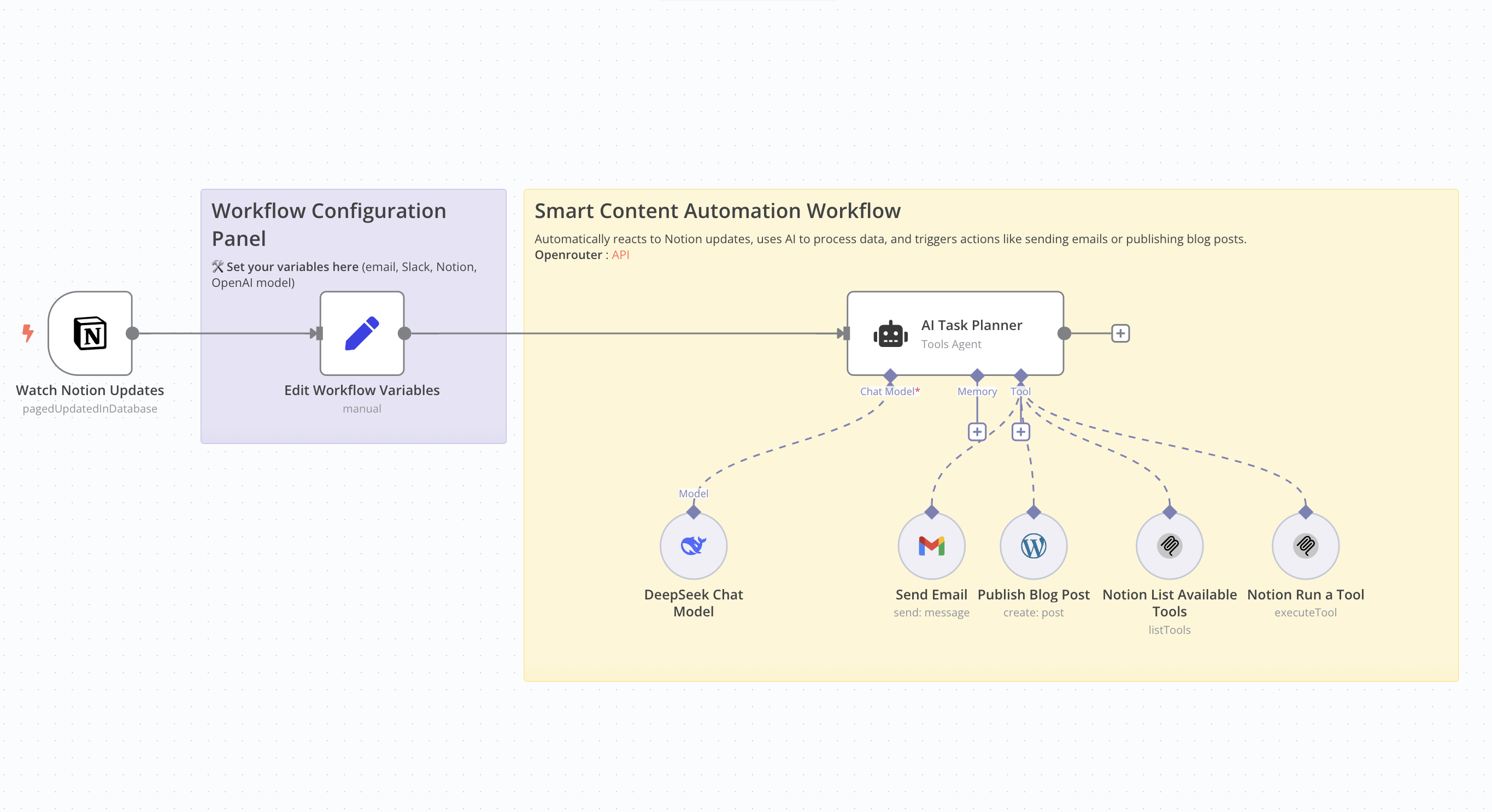 # Who Is This For This workflow is ideal for content creators, bloggers, marketers, and professionals seeking to automate the creation and publication of SEO-optimized articles. It's particularly beneficial for those utilizing Notion for content management and WordPress for publishing. # What Problem Does This Workflow Solve Manually creating SEO-friendly articles is time-consuming and requires consistent effort. This workflow streamlines the entire process—from detecting updates in Notion to publishing on WordPress—by leveraging AI for content generation, thereby reducing the time and effort involved. # What This Workflow Does - Monitor Notion Updates: Detects changes in a specified Notion database. - AI Content Generation: Utilizes an AI model to produce an SEO-optimized article based on Notion data. - Publish to WordPress: Automatically posts the generated article to a WordPress site. - Email Notification: Sends an email containing the article's title and URL. Update Notion Database: Updates the corresponding entry in the Notion database with the article details. # Setup Guide ## Prerequisites - WordPress account with API access. - API key for the AI model used. - Notion integration with the relevant database ID. - Credentials for the email service used (e.g., Gmail). Community Node Requirement: This workflow utilizes the n8n-nodes-mcp community node, which is only compatible with self-hosted instances of n8n. For more information on installing and managing community nodes, refer to the n8n documentation. n8n Docs ## Steps 1. Import the workflow into your self-hosted n8n instance. 2. Install the required community node (n8n-nodes-mcp). 3. Configure API credentials for WordPress, the AI service, Notion, and the email service. 4. Define necessary variables, such as the notification email address and Notion database IDs. 5. Activate the workflow to automate the process. # How to Customize This Workflow - AI Prompt: Adjust the prompt used for content generation to align with your preferred tone and style. - Article Structure: Modify the structure of the generated article by tweaking settings in the content generation node. - Notifications: Customize the content and recipients of the emails sent post-publication. - Notion Updates: Tailor the fields updated in Notion to suit your specific requirements.
n8n$9.99Automate Personalized Startup Idea Generation and Analysis with AI and Gmail
This workflow automates the generation and analysis of personalized startup ideas using AI models and delivers the results via Gmail. Ideal for developers and entrepreneurs seeking innovative business concepts and professional-grade analysis.
n8n$14.99AI Blog Post Journalist: Perplexity for Research, Anthropic Claude for Blog
This workflow contains community nodes that are only compatible with the self-hosted version of n8n. **AI-Powered Blog Post Generator** Category: Content Automation / AI Writing / Marketing Description: This automated workflow helps you generate fresh, SEO-optimized blog posts daily using AI tools—perfect for solo creators, marketers, and content teams looking to stay on top of the latest AI trends without manual research or writing. For more of such builds and step-by-step tutorial guides, check out: https://www.youtube.com/@Automatewithmarc Here's how it works: - Schedule trigger kicks off the workflow daily (or at your preferred interval). - Perplexity AI Node researches the most interesting recent AI news tailored for a non-technical audience. - AI Agent (Claude via Anthropic) turns that news into a full-length blog post based on a structured prompt that includes title, intro, 3+ section headers, takeaway, and meta description—designed for clarity, engagement, and SEO. - Optional Memory & Perplexity Tool Nodes enhance the agent's responses by allowing it to clarify facts or fetch more context. - Google Docs Node automatically saves the final blog post to your selected document—ready for review, scheduling, or publishing. Key Features: - Combines Perplexity AI + Claude AI (Anthropic) for research + writing - Built-in memory and retrieval logic for deeper contextual accuracy - Non-technical, friendly writing style ideal for general audiences - Output saved directly to Google Docs - Fully no-code, customizable, and extendable Use Cases: - Automate weekly blog content for your newsletter or site - Repurpose content into social posts or scripts - Keep your brand relevant in the fast-moving AI landscape Setup Requirements: - Perplexity API Key - Anthropic API Key - Google Docs (OAuth2 connected)
n8n$9.99Automate YouTube Video Analysis for Summaries, Transcripts, and Visual Insights
This workflow automates the extraction of key insights from YouTube videos, providing summaries, transcripts, and visual scene analysis. It's ideal for content creators, managers, and strategists seeking efficient content processing.
n8n$14.99Automate Video Analysis and Text Summarization with Google Gemini
Effortlessly analyze videos and generate detailed text summaries using Google Gemini in n8n. Ideal for content creators, marketers, and AI enthusiasts.
n8n$3.99
Related categories
Custom AI Systems & Services
Our team of experienced AI builders will help build custom AI systems, workflows, and solutions.
Request Custom Work