Productivity Workflows
Task and project management
Automate Todoist Task Management with Natural Language Commands
Transform natural language requests into organized Todoist tasks using OpenAI and n8n, all without writing a single line of code.
n8n$19.99Automate Task Extraction from Gmail to Supabase with ChatGPT-4
This n8n workflow automates the extraction of actionable tasks from unread Gmail messages using ChatGPT-4, storing the task metadata in Supabase, and preventing duplicate processing.
n8n$9.99Automate Article Summarization and Storage from Telegram to Notion using GPT-4
This workflow automates the process of saving and summarizing articles sent via Telegram to a Notion database using GPT-4. Ideal for users who want to enhance their reading lists with AI-generated highlights and topic tags.
n8n$9.99Automate ClickUp Task Management via Telegram and OpenAI
Streamline your task management by using a Telegram bot to create, update, and delete ClickUp tasks through natural language commands interpreted by OpenAI.
n8n$9.99Automate Website Change Detection with Firecrawl, Google Sheets, and Gmail Alerts
Automatically monitor dynamic websites for changes and receive instant email alerts. This workflow uses Firecrawl to scrape JavaScript-rendered content, logs changes in Google Sheets, and sends notifications via Gmail.
n8n$14.99Custom Pomodoro Tracker using Telegram and Google Sheets
**Tags**: Productivity, Pomodoro, Organization ### Context Hey! I'm Samir, a Supply Chain Engineer and Data Scientist from Paris, founder of [LogiGreen Consulting](https://logi-green.com). A significant improvement in my productivity came from following the **Pomodoro Technique**. ### What is the Pomodoro Technique? The Pomodoro Technique is a time management method that breaks your workday into 25-minute focus intervals followed by short breaks. After 4 cycles, you take a longer break to recharge. It helps maintain concentration while preventing burnout. 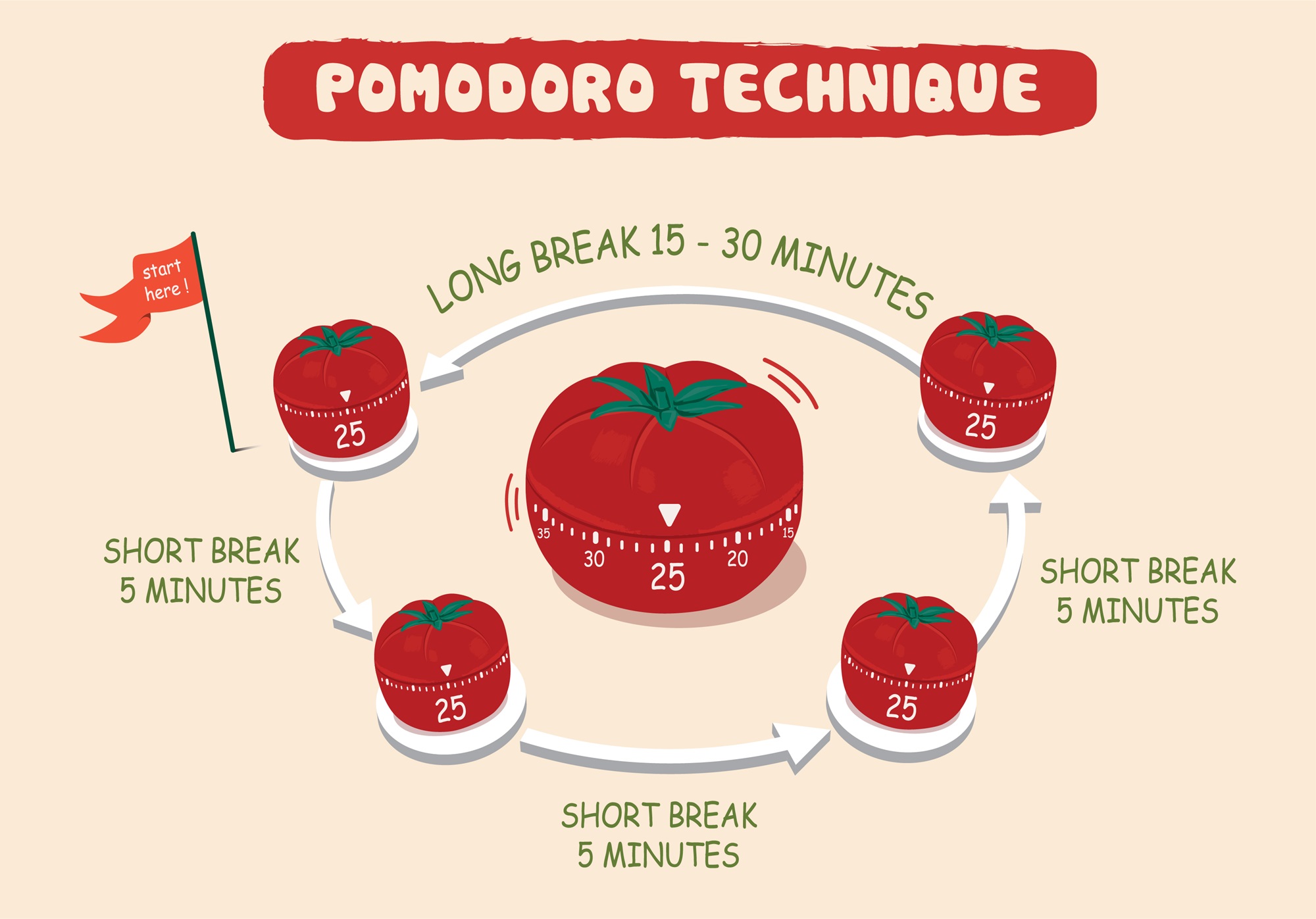 I've used this technique with web apps to receive break/work notifications. But I always wished I had a way to **track my sessions** for self-assessment. > Let's use **n8n** to boost our productivity and log our deep work sessions automatically! For business inquiries, you can add me on [Here](https://www.linkedin.com/in/samir-saci) ### Who Is This Template For? I built this workflow for creators, freelancers, students, and professionals who love the Pomodoro technique but want more than just timers - they want data. This template helps you: - Track every deep work session automatically - Store logs in Google Sheets for later analysis - Stay in control via Telegram commands - There is no need to pay for premium apps. It's all **free** and powered by **n8n**. ### How Does It Work? This Telegram bot tracks your Pomodoro sessions and sends you alerts during the process. **Here's what happens:** 1. A user sends `/start` to the bot. 2. It launches a 25-minute deep work timer. 3. After 25 minutes, the bot sends a break reminder. 4. **After four cycles**, a long break is triggered and the session is logged. 5. The session is **automatically recorded to Google Sheets** with (Date & Time, User ID, Pomodoro count, Session ID, Duration of focus and breaks) 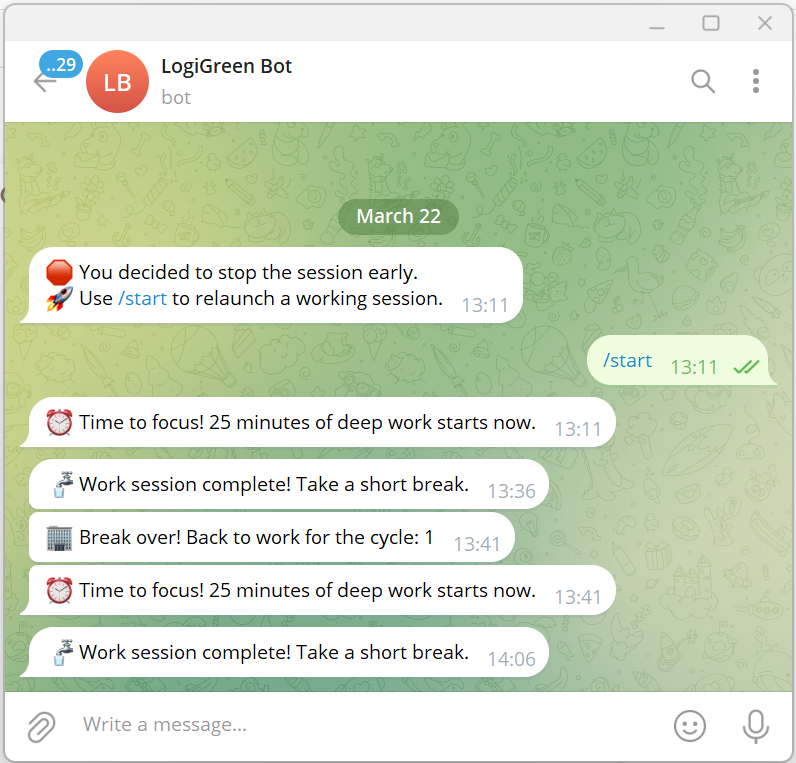 ### What Gets Tracked? | Field | Description | |-------------------|-----------------------------------| | Date & Time | When the session was logged | | User ID | Your Telegram ID | | Block Type | Deep Work or Short Break | | Pomodoro Count | Number of cycles completed | | Working Session ID| Unique ID for each session | | Focus Duration | Length of each deep work session | | Break Duration | Short or long break info | You can use this workflow as a base to bring additional features like: - Connecting with tasks from **Google Tasks** - Send automated productivity reports to monitor your activity - Link a Pomodoro with a task using **Google Calendar** ### What Do I Need to Start? This workflow is beginner-friendly - **no coding required**. - **Google Drive API** and **Google Sheets API** credentials - A Google Sheet set up to log sessions (with the columns of the table above) - API Credentials: - **Google Sheets API** (OAuth2) - **Telegram Bot Token** - Telegram app to chat with the bot > The template is plug-and-play. Just follow the sticky notes in the n8n editor to configure it. ### Next Steps Follow the sticky notes in the n8n workflow editor to: - Set your credentials - Connect your Google Sheet - Initialize the static data - Launch your first `/start` command on Telegram  [**Watch My Tutorial**](https://www.youtube.com/watch?v=ztMMrmbgGEo) Curious how n8n can supercharge **productivity and learning skills?** Let's connect on [**LinkedIn**](https://www.linkedin.com/in/samir-saci) This workflow has been created with N8N 1.82.1 Submitted: March 24th, 2025
n8n$14.99Automate Telegram to Notion with AI Summaries and Transcriptions
Seamlessly integrate Telegram messages into Notion by automatically summarizing text and transcribing audio using AI, enhancing your task management and productivity.
n8n$14.99Realtime Notion Todoist 2-Way Sync with Redis
## Purpose This solution enables you to manage all your Notion and Todoist tasks from different workspaces as well as your calendar events in a single place. All tasks can be managed in Todoist and additionally, Fantastical can be used to manage scheduled tasks & events all together. ## Demo & Explanation [](https://youtu.be/k66j6ZspjCg) ## How it works - The realtime sync consists of two workflows, both triggered by a registered webhook from either Notion or Todoist. - To avoid overwrites by lately arriving webhook calls, every time the current task is retrieved from both sides. - Redis is used to prevent endless loops, since an update in one system triggers another webhook call again. Using the ID of the task, the trigger is being locked down for 15 seconds. - Depending on the detected changes, the other side is updated accordingly. Generally, Notion is treated as the main source. Using an Obsolete Status, it is guaranteed that tasks never get deleted entirely by accident. - The Todoist ID is stored in the Notion task, so they stay linked together. - An additional full sync workflow daily fixes inconsistencies, if any of them occurred, since webhooks cannot be trusted entirely. - Since Todoist requires a more complex setup, a tiny workflow helps with activating the webhook. - Another tiny workflow helps generating a global config, which is used by all workflows for mapping purposes. ## Mapping (Notion >> Todoist) - Name: Task Name - Priority: Priority (1: do first, 2: urgent, 3: important, 4: unset) - Due: Date - Status: Section (Done: completed, Obsolete: deleted) - <page_link>: Description (read-only) - Todoist ID: <task_id> ## Current limitations - Changes on the same task cannot be made simultaneously in both systems within a 15-20 second time frame. - Subtasks are not linked automatically to their parent yet. - Recurring tasks are not supported yet. - Task names do not support URLs yet. ## Prerequisites ### Notion - A database must already exist (get a basic template [here](https://steadfast-banjo-d1f.notion.site/17682b476c848086b002de766879aa71)) with the following properties (case matters!): - Text: Name - Status: Status, containing at least the options Backlog, In progress, Done, Obsolete - Select: Priority, containing the options do first, urgent, important - Date: Due - Checkbox: Focus - Text: Todoist ID ### Todoist - A project must already exist with the same sections like defined as Status in Notion (except Done and Obsolete) ### Redis - Create a [Free Redis Cloud](https://redis.io/try-free/) instance or self-host ## Setup [](https://youtu.be/73jhyU0t4c4) The setup involves quite a lot of steps, yet many of them can be automated for business internal purposes. Just follow the video or do the following steps: - Setup credentials for Notion (access token), Todoist (access token), and Redis - you can also create empty credentials and populate these later during further setup. - Clone this workflow by clicking the Use workflow button and then choosing your n8n instance - otherwise, you need to map the credentials of many nodes. - Follow the instructions described within the bundle of sticky notes on the top left of the workflow. ## How to use - You can apply changes (create, update, delete) to tasks both in Notion and Todoist which then get synced over within a couple of seconds (this is handled by the differential realtime sync). - The daily running full sync resolves possible discrepancies in Todoist and sends a summary via email, if anything needed to be updated. In case that contains an unintended change, you can jump to the task from the email directly to fix it manually.
n8n$24.99Automate Travel Time Blockers in Google Calendar with Google Directions API
This workflow automatically adds travel time blockers to your Google Calendar, ensuring you always arrive on time for appointments by calculating travel durations using the Google Directions API.
n8n$14.99Manually Create a New Trello Card with Custom Details
This workflow allows you to manually trigger the creation of a new card in Trello, complete with a custom name and description.
n8nFreeWorking with Dates and Times
**Ask:** Handle dates and times in your workflow **Why:** Date and time formats can be hard to work with. We have 2 main ways of doing that with n8n that cover all the main needs. **Main use cases:** - Change date format - Set custom dates (including now and today) - Date math
n8n$9.99Automate Google Sheets Duplication and Data Enrichment
This workflow automates the process of duplicating Google Sheets and enriching data by transferring content from a master spreadsheet to a newly created one. It ensures consistent formatting and structure across multiple sheets.
n8n$9.99Automate Bookmarking from Android to Readeck with AI Tagging
Streamline your bookmarking process by automatically saving links from your Android device to a self-hosted Readeck platform. Enhance organization with AI-generated tags and ensure easy access to your bookmarks.
n8n$9.99Location-Based Triggered Reminder via Telegram Bot (iOS)
This workflow integrates iOS Shortcuts with n8n to create a simple, automatic location-based reminder system. When the user arrives at a specified location, an automation in the Shortcuts app sends a webhook trigger to n8n. If the trigger matches predefined date and time conditions, n8n sends a Telegram message reminder to the user. This is perfect for repetitive weekly tasks like taking out the bins, customized with conditions for day and time. ## Key Features - Location-Based Trigger: Uses iOS Shortcuts automation to start the workflow upon arrival at a specific location. - Time and Day Validation: Logic in n8n checks the current weekday and time to ensure reminders are sent only when appropriate. - Telegram Integration: Sends reminders directly to your Telegram account using your bot. - Minimal Setup: Uses native iOS and simple webhook setup in n8n. ## How It Works 1. iOS Shortcut Trigger: When the user arrives at a designated location, the iOS shortcut sends a GET request to the n8n webhook. 2. n8n Webhook Node: Receives the request and triggers the workflow. 3. Conditional Check: An IF node checks if the current time is after 4:00 PM and it's a Wednesday (or any other configured condition). 4. Telegram Node: If the condition passes, n8n sends a message like "Don't forget to take the bins out." to your Telegram bot. ## Setup Instructions 1. Create a Telegram Bot: - Use **@BotFather** to create a bot and obtain your bot token. - Add Telegram API credentials in n8n with your bot token. 2. Setup iOS Shortcut: - Open the Shortcuts app on your iPhone. - Go to the **Automation** tab → Tap **+** → Create Personal Automation. - Choose Arrive → Select a location. - Add action: **Get Contents of URL**. Method: **GET**, URL: your n8n Webhook URL (e.g., https://n8n.yourdomain.com/webhook/your-path). - Save the automation. (You can also test the automation by pressing the Play button) 3. Import Workflow into n8n: - Load the provided workflow JSON. - Set your webhook path and Telegram credentials. - Adjust the logic in the IF node to your use case. In my case, I check if today is Wednesday and after 4 PM until Midnight. 4. Expose n8n Publicly: Ensure your n8n instance is publicly accessible via HTTPS so the shortcut can reach it. ## Customization Guidance - Change Reminder Message: Modify the text inside the Telegram node to suit different reminders. - Add More Conditions: Extend the logic to support more days, hours, or different trigger messages. - Add Multi-Channel Output: Send reminders via email, SMS, or Slack in addition to Telegram. - Use More Triggers: Expand to other types of shortcut triggers (e.g., NFC tag, leaving location, time of day). ## Security and Implementation - Webhook Protection: Avoid using easily guessable webhook URLs. - Secure Telegram Token: Store your bot token securely in n8n credentials, not in plain workflow text. - Limit Shortcut Scope: Only trigger the shortcut at trusted locations or with secure iCloud sync. - Automation Permissions: Ensure your iPhone allows shortcut automations to run without confirmation. ## Benefits - Automates repetitive location-based reminders without user interaction. - Provides a lightweight, native solution using iOS and n8n with no extra apps. - Keeps you on track for routine tasks like garbage days, medicine reminders, or arrival-based tasks. - Easily extendable for multiple locations or trigger conditions.
n8n$4.99Automate URL Screenshot Capture and Email Notifications via Google Sheets
Streamline the process of capturing website screenshots from URLs listed in Google Sheets, saving them to Google Drive, and notifying stakeholders via Gmail.
n8n$9.99Automatically Log New Calendly Bookings to Google Sheets
This workflow captures new bookings from Calendly and logs them into a Google Sheet, ensuring all booking details are accurately recorded without manual input.
n8n$4.99Automate Email to Notion Task Creation with AI and Multi-User Support
This workflow transforms emails into actionable tasks in Notion using AI, supporting multiple users with individual configurations via a custom web portal.
n8n$19.99Seamlessly Sync and Manage Google Calendar Events in Outlook
Automatically synchronize your private Google Calendar events with your work Outlook Calendar, ensuring you never miss important appointments. This workflow also handles event cancellations by removing them from Outlook and notifying you via email.
n8n$4.99Monitor Reddit for Freelance Jobs and Alert via Telegram
This n8n workflow tracks Reddit for freelance job posts, logs them in Google Sheets, and sends alerts through Telegram, ensuring only unique and paid opportunities are recorded.
n8n$9.99Automate Google Calendar Management with AI and MCP Integration
Leverage AI to seamlessly create, update, and manage Google Calendar events using natural language commands through MCP integration.
n8n$4.99Automate Invoice Recognition with Google Drive and n8n
This workflow streamlines the process of recognizing invoices and receipts stored in Google Drive by utilizing n8n automation. By connecting to the OakPDF OCR API, it transforms unstructured documents into structured JSON data, enabling easier dat...
n8n$14.02Automatically Add a Google Books Volume to Your Bookshelf
This workflow retrieves a specific volume from Google Books and adds it to your designated bookshelf, streamlining your digital library management.
n8n$4.99Automate WhatsApp Appointment Scheduling with Google Calendar Integration
Streamline your appointment scheduling process by automating bookings through WhatsApp and integrating them directly into Google Calendar. This workflow eliminates manual coordination, reduces errors, and ensures efficient time management.
n8n$24.99Add Google Sheets rows for Layerise experiences
Make will import your Layerise experiences into your Google sheets worksheet as a row. Heres the [sheet](https://docs.google.com/spreadsheets/d/1Bd3ef6vSgP-rzYHyhAqoXZSKsWzguhRGmsAAODFCtVo/edit?usp=sharing) used in this scenario.
Make$2.99
Related categories
Custom AI Systems & Services
Our team of experienced AI builders will help build custom AI systems, workflows, and solutions.
Request Custom Work