Social Media Workflows
Social media management
Generate & Auto-Post AI Videos to Social Media with Veo3 and Blotato
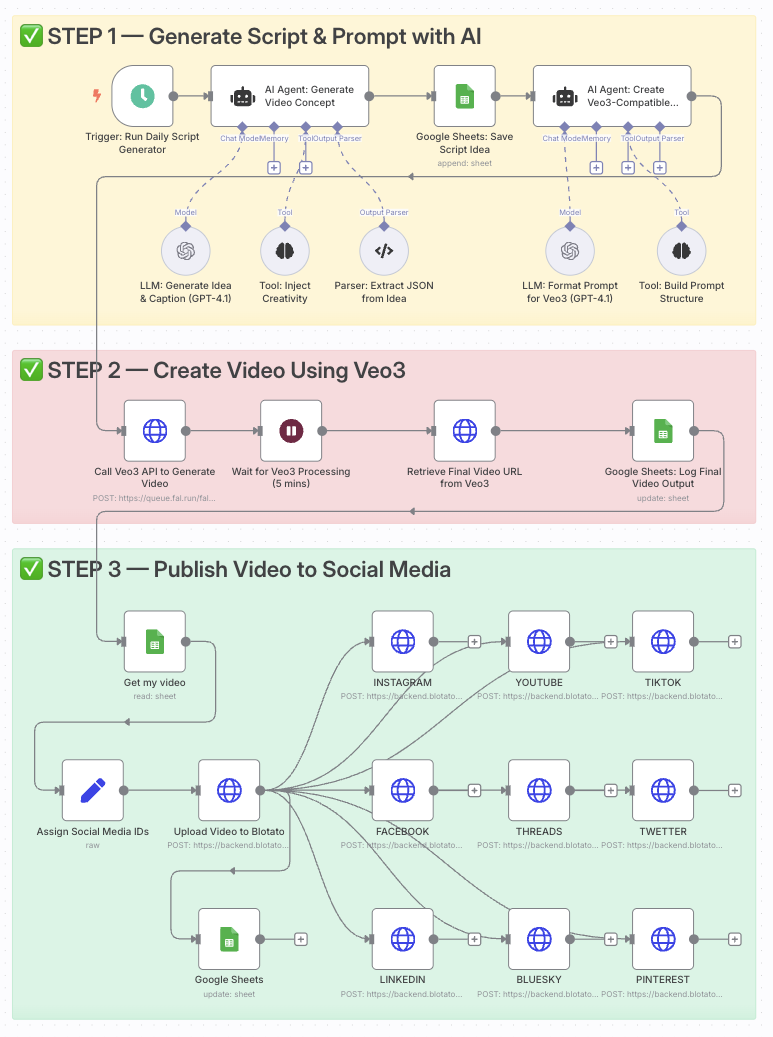 # Automate video creation with Veo3 and auto-post to Instagram, TikTok via Blotato ### Who is this for? This template is ideal for content creators, social media managers, YouTubers, and digital marketers who want to generate high-quality videos daily using AI and distribute them effortlessly across multiple platforms. It's perfect for anyone who wants to scale short-form content creation without video editing tools. ### What problem is this workflow solving? Creating and distributing consistent video content requires: - Generating ideas - Writing scripts and prompts - Rendering videos - Manually posting to platforms This workflow automates all of that. It transforms one prompt into a professional AI-generated video and publishes it automatically - saving time and increasing reach. ### What this workflow does 1. **Triggers daily** to generate a new idea with OpenAI (or your custom prompt). 2. **Creates a video prompt** formatted specifically for Google Veo3. 3. **Generates a cinematic video** using the Veo3 API. 4. **Logs the video data** into a Google Sheet. 5. **Retrieves the final video URL** once Veo3 finishes rendering. 6. **Uploads the video to Blotato** for publishing. 7. **Auto-posts** the video to Instagram, TikTok, YouTube, Facebook, LinkedIn, Threads, Twitter (X), Pinterest, and Bluesky. ### Setup 1. Add your **OpenAI API key** to the GPT-4.1 nodes. 2. Connect your **Veo3 API credentials** in the video generation node. 3. Link your **Google Sheets account** and use a sheet with columns: `Prompt`, `Video URL`, `Status`. 4. Connect your **Blotato API key** and set your platform IDs in the `Assign Social Media IDs` node. 5. Adjust the **Schedule Trigger** to your desired posting frequency. ### How to customize this workflow to your needs - **Edit the AI prompt** to align with your niche (fitness, finance, education, etc.). - **Add your own branding overlays** using JSON2Video or similar tools. - **Change platform selection** by enabling/disabling specific HTTP Request nodes. - **Add a Telegram step** to preview the video before auto-posting. - **Track performance** by adding metrics columns in Google Sheets. ➡️ **Documentation**: [Notion Guide](https://automatisation.notion.site/Automate-video-creation-with-Veo3-and-auto-post-to-Instagram-TikTok-via-Blotato-2163d6550fd980768996f05afb2794ea) --- ### Need help customizing? Contact me for consulting and support: [LinkedIn](https://www.linkedin.com/in/dr-firas/) / [YouTube](https://www.youtube.com/@DRFIRASS)
n8n$14.99Automate AI-Driven Social Media Content Creation and Publishing
Streamline your social media content creation and publishing across multiple platforms using AI. This workflow automates the generation, approval, and deployment of platform-specific content, ensuring brand consistency and reducing manual effort.
n8n$24.99Automate Viral TikTok Cloning and Multi-Platform Posting with AI
Effortlessly clone viral TikTok videos, personalize them with AI avatars, and auto-publish to nine social media platforms using Perplexity and Blotato.
n8n$19.99Automate LinkedIn Content Creation and Publishing via Email with AI
Streamline your LinkedIn content strategy by generating, approving, and publishing posts through email interactions powered by AI. This workflow automates the entire process, from idea generation to final post publication, with seamless tracking in Google Sheets.
n8n$24.99Automate Social Media Posts Using Google Trends and AI
This n8n workflow automates the creation and posting of social media content by leveraging trending topics from Google Trends and AI-driven content generation.
n8n$14.99Automate Video Captioning and Posting to Instagram and TikTok
Streamline your content creation by automatically captioning videos with Submagic and posting them to Instagram and TikTok using Postiz. Enhance captions with OpenAI and track your posts in Google Sheets.
n8n$14.99Automate TikTok Video Creation with AI and Cloud Services
Effortlessly create engaging TikTok videos using AI for scriptwriting, voiceover, and video assembly, integrated with cloud services for seamless production.
n8n$19.99Automate AI Avatar Video Creation and Social Media Publishing
This workflow automates the creation of AI avatar videos and their publication across multiple social media platforms, streamlining content production for creators and marketers.
n8n$19.99Automate Instagram Reels Creation and Posting with AI and Blotato
This workflow automates the creation and posting of Instagram Reels using AI-generated prompts and videos, seamlessly integrating with Blotato for publishing.
n8n$14.99Automate LinkedIn Posts with AI-Generated Text and Images
Streamline your LinkedIn content creation by automatically generating and publishing posts with AI-crafted text and visuals. This workflow captures your post ideas, generates engaging content, and publishes directly to LinkedIn.
n8n$4.99Automate AI-Driven Instagram Content Creation from Google Sheets
This n8n workflow automates the generation and publishing of Instagram content using AI, based on ideas stored in Google Sheets. It transforms your content strategy into reality with minimal manual effort.
n8n$14.99Automate AI Video Creation and TikTok Upload with Google Veo3 Fast
This workflow automates the creation of AI-generated videos using Google Veo3 Fast, optimizes them with SEO titles, and uploads them to TikTok via Postiz, all managed through Google Sheets.
n8n$14.99Automate Instagram Reels Posting with AI-Generated Captions
Streamline the creation and posting of Instagram Reels by integrating Google Drive, AI captioning, Airtable, and the Facebook Graph API. This workflow automates video selection, caption generation, and posting, ensuring compliance with Meta's updated requirements.
n8n$14.99Publish Content to Instagram, TikTok & More from Google Drive using PostPulse
## Description  This automation template enables you to publish content from a Google Drive folder directly to multiple social platforms - TikTok, Instagram, YouTube, LinkedIn, Telegram, Bluesky, X (Twitter), and Threads. By connecting [PostPulse](https://post-pulse.com/) with n8n, you can transform a manual posting routine into a seamless automated workflow, ensuring consistent cross-platform publishing without repetitive tasks. **Disclaimer:** This workflow uses the community node **@postpulse/n8n-nodes-postpulse**. Make sure community nodes are enabled in your n8n instance before importing and using this template. **To install it:** Go to Settings → Community Nodes → Install and enter: @postpulse/n8n-nodes-postpulse. **For more details, see n8n Integration Guide:** [PostPulse Developers - n8n Integration](https://developers.post-pulse.com/n8n-integration). ## Who Is This For? - **Marketers** who want to manage multiple accounts at once. - **Creators** who store media on Google Drive and want to quickly expand it. - **Teams** for whom it is important to centralize the content plan and have a transparent publishing system. ## What Problem Does This Workflow Solve? Instead of manually uploading photos or videos to TikTok, Instagram, YouTube, or other social networks, you get: - **Centralizing uploads:** Add your media once to Google Drive, and the system takes care of publishing it everywhere. - **Multi-platform posting:** Publish simultaneously to TikTok, Instagram, YouTube, LinkedIn, Telegram, Bluesky, X, and Threads. - **Streamlined scheduling:** Schedule future posts with PostPulse directly through n8n. - **Error reduction:** Avoid mistakes caused by copy-pasting across platforms. ## How It Works 1. **File Upload:** Place your media file (image or video) into a designated Google Drive folder. 2. **File Processing:** n8n automatically downloads the file and prepares it for upload. 3. **Account Retrieval:** PostPulse retrieves your connected accounts (TikTok, Instagram, YouTube, etc.). 4. **Media Upload:** The file is uploaded to PostPulse via n8n. 5. **Automation:** PostPulse automatically distributes it to TikTok, Instagram, YouTube, LinkedIn, Telegram, Bluesky, X, and Threads. 6. **Publishing:** PostPulse schedules or directly publishes the post to the selected platforms. ## Setup 1. **Connect PostPulse to n8n** - Request your OAuth client key and secret from support@post-pulse.com. - Add your PostPulse account in n8n Credentials. 2. **Connect Google Drive** - Create a Google Cloud project. - Enable the **Google Drive API**. - Configure OAuth credentials and connect your Google Drive account to n8n. 3. **Configure Google Drive Trigger** - Point it to the folder where you will upload your media. 4. **Upload Media Node** - Add the PostPulse "Upload Media" node to process files from Google Drive. 5. **Schedule Posts** - Add the PostPulse "Schedule Post" node. - Map content, media path, and connected account IDs. 6. **(Optional) Metadata from Google Sheets** - Use Google Sheets as a source of captions, hashtags, or scheduling details. ## Requirements 1. **Connected Accounts at PostPulse** (TikTok, Instagram, YouTube, LinkedIn, Telegram, Bluesky, X, Threads). 2. **OAuth client key and secret requested** from support@post-pulse.com. 3. **Google Cloud Project** with the Google Drive API enabled and valid OAuth credentials. "With this workflow, PostPulse and n8n become your all-in-one automation hub for social publishing."
n8n$9.99Automate LinkedIn Content Creation and Posting with AI
Streamline your LinkedIn content strategy by automating research, creation, and posting using AI. This workflow integrates with Google Sheets and Drive, Perplexity, OpenAI, and LinkedIn to ensure consistent and engaging posts.
n8n$14.99Automate Twitter Posting with AI-Generated Content and Google Sheets Tracking
This n8n workflow automates your Twitter presence by using AI to generate unique content, check for duplicates, and post tweets on a schedule. It integrates with Google Sheets to log and track tweets, ensuring a consistent and engaging social media strategy.
n8n$14.99Automate LinkedIn Posts with AI Content and Image Generation
Streamline your LinkedIn marketing by automatically generating and publishing posts with AI-driven content and images based on user-submitted topics.
n8n$14.99Auto-Create & Post Social Media Reels with Google Veo-3 AI and GPT
**GPT-5 + Veo-3 Instagram Reel Auto-Creator & Auto-Poster** Description: This n8n workflow is a fully automated short-form video content engine that takes your creative idea, turns it into a cinematic video using Google Veo-3 via Wavespeed API, writes an engaging Instagram caption with GPT-5, and instantly posts it to Instagram via Postiz—all without lifting a finger. It's designed for content creators, social media managers, and brands who want to produce high-quality, on-brand reels at scale without manual editing or posting. **Watch Step-by-step build:** www.youtube.com/@automatewithmarc **Key Features:** - Chat-triggered Automation (You can replace this with On Schedule trigger for automated generation) - Start the workflow with a simple message describing your video idea. - GPT-5 Video Prompt Agent - Transforms your concept into a visually rich, cinematic prompt optimized for Veo-3. - Veo-3 AI Video Generation - Creates a polished short-form reel with cinematic motion, effects, and branding. - **GPT-5 Caption Writer** - Crafts an impactful, scroll-stopping caption tailored for Instagram engagement. - **Auto-Posting with Postiz** - Uploads and schedules (or instantly posts) your reel to Instagram without manual steps. - **Automated Progress Checking** - Wait & retry logic ensures posting only happens when the video is fully generated. **Tech Stack:** - GPT-5 via OpenAI API - AI for prompt engineering & caption creation. - Google Veo-3 (via Wavespeed API) - Next-gen text-to-video model for short-form content. - Postiz API - Multi-platform social media posting automation. - n8n - Orchestration & automation engine. **Ideal Use Cases:** - Instagram Reels / TikTok Creators who want to post daily without editing. - Fitness, Fashion, Travel & Lifestyle Brands looking for high-quality, thematic reels. - Social Media Agencies producing client content at scale. - Event Marketers creating same-day recap videos. **Setup Instructions:** - Add your API keys for OpenAI (GPT-5), Wavespeed (Veo-3), and Postiz. - Connect Postiz to your Instagram account. - Trigger the workflow with a chat message describing your desired video. - Watch your idea transform into a reel—fully captioned and posted automatically. **Why This Workflow Stands Out:** - End-to-end automation from idea to video to caption to Instagram post. - AI-driven creative consistency for brand identity. - Scales your content production without hiring editors. - SEO & engagement-ready captions crafted for social virality.
n8n$9.99Automate Video Publishing from Google Drive to Instagram, TikTok, and YouTube with AI Descriptions and Airtable Tracking
Streamline your video publishing workflow by automatically detecting new uploads in Google Drive, generating AI-powered descriptions, and distributing content across Instagram, TikTok, and YouTube, all while tracking in Airtable.
n8n$14.99Automate Instagram Profile Data Collection and Storage in Google Sheets
Streamline the process of gathering Instagram profile data using Apify and store it efficiently in Google Sheets for easy access and analysis.
n8n$4.99Automate Instagram Content Creation with AI from Trending Posts
This workflow automates the discovery of trending Instagram posts and generates AI-driven content, including images and captions, for seamless publishing on Instagram.
n8n$19.99Automate Social Media Posting Across Multiple Platforms
Effortlessly publish images and videos to multiple social media platforms using a unified form and the Upload-Post API. Streamline your social media management by automating content distribution to Instagram, LinkedIn, Facebook, X, TikTok, and Threads.
n8n$9.99Automate AI-Generated Social Video Creation and Multi-Platform Publishing
Streamline the creation and distribution of AI-generated social media videos using Telegram, GPT-4, and Blotato. This workflow automates video rendering, music creation, captioning, and publishing across multiple platforms.
n8n$24.99Automate Personalized Instagram DMs Using Apify, OpenAI, and Google Sheets
Streamline your Instagram outreach by automating the creation of personalized direct messages using Apify, OpenAI, and Google Sheets. Ideal for creator outreach, customer interviews, and partnership prospecting.
n8n$9.99
Related categories
Custom AI Systems & Services
Our team of experienced AI builders will help build custom AI systems, workflows, and solutions.
Request Custom Work