Claude Code Conversation History Invalidated: Cache Breaking on Subsequent Turns
Error message
[BUG] Conversation history invalidated on subsequent turns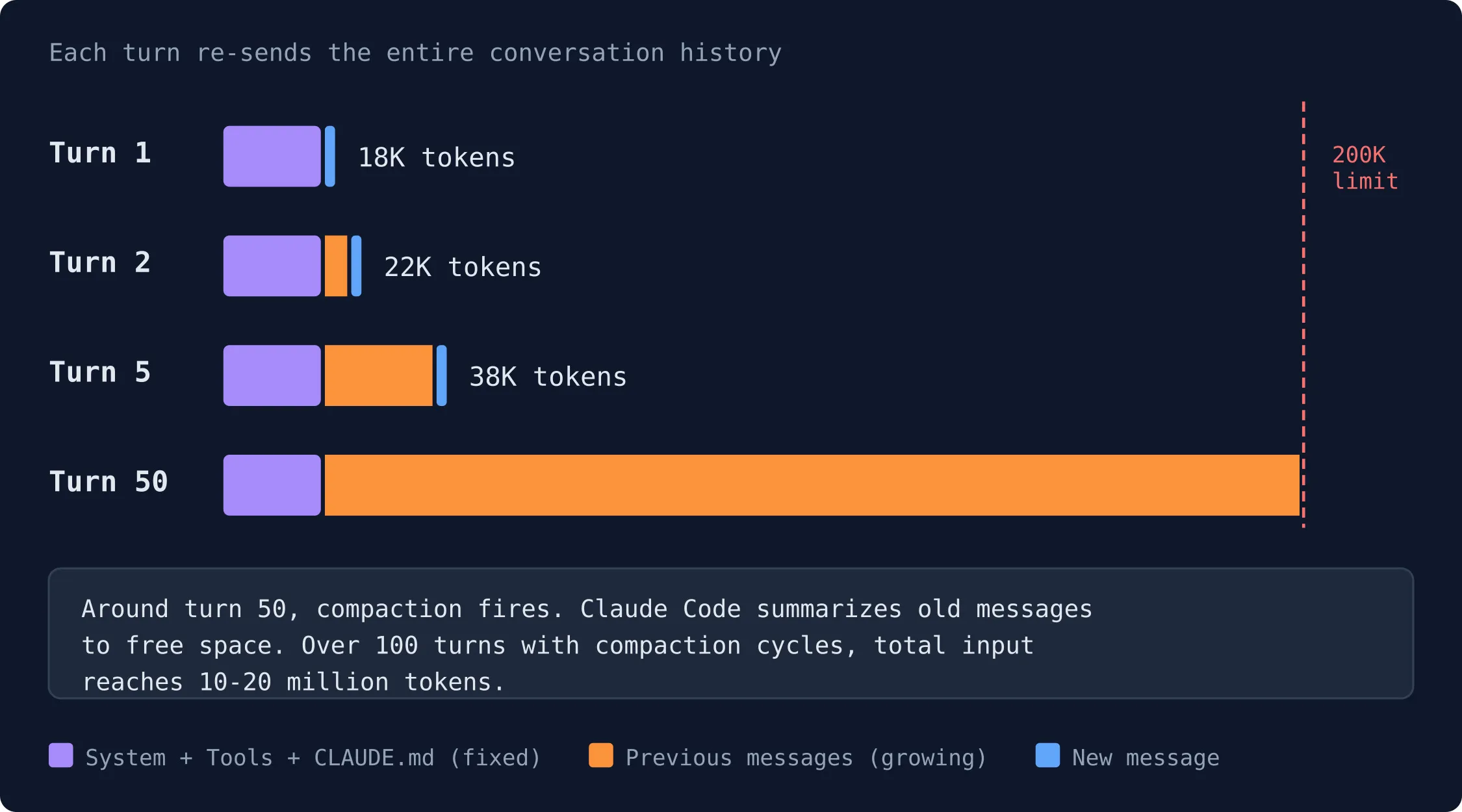
Diagnosis: What This Error Means
When using Claude Code, you may notice that your conversation history gets invalidated on subsequent turns, causing the cache to drop and leading to unexpectedly high token usage. The symptom is that after a few turns, the cache read count drops to zero and cache writes spike, meaning the model is re-processing context it should have remembered. The most common cause is a native-layer sentinel replacement mechanism in Anthropic's custom Bun fork that rewrites the billing attribution header value on every API request, and when conversation content accidentally contains the sentinel string cch=00000, it breaks the cache prefix.
This issue was reported in GitHub issue #40524, where a user investigating huge token usage noticed that "suddenly my conversation history gets invalidated and all subsequent turns revert to only caching system prompt and huge cache writes." The user provided detailed token usage logs showing the pattern: cache reads drop to 0, cache writes spike, and the model switches to a cheaper model (haiku) for a resume attempt before returning to the main model (opus) with full cache regeneration.
What Causes This Error
Cause 1: Sentinel Replacement in the Standalone Binary (Most Common)
According to a full reverse engineering analysis by community member jmarianski (107 reactions on the GitHub issue), the root cause is a native-layer sentinel replacement in Anthropic's custom Bun fork. Located at virtual address 0x0374d610 in the standalone binary (v2.1.87), inside the Zig HTTP header builder function (src/http.zig in Bun's source tree), there is code that rewrites the billing attribution header value on every API request.
The replacement fires when ALL of these conditions are true:
- Request contains
anthropic-versionHTTP header (Wyhash =0x58e54d60e1462681, verified viaBun.hash()) - Request URL path contains
/v1/messages - Request body contains the sentinel string
cch=00000(9 bytes)
What it does:
- Searches the serialized JSON request body for the first occurrence of
cch=00000 - Hashes the entire request body (using a hash function with fixed seeds:
0xcf3c9b5975c738f4,0x310521a7efdb6e6d,0x6e52736ac806831e,0xd01af9b9421ab897) - Converts 5 nibbles of the hash to hex characters using SIMD instructions (
pshufb/pblendvb) - Writes the 5 hex characters in-place into the body buffer, replacing
00000
The decompiled pseudocode (reconstructed from Ghidra) shows:
// Inside HTTP header builder, after iterating request headers
if (has_anthropic_version_header) {
    // Check URL contains "/v1/messages"
    // Built on stack as u64 LE immediates:
    local_c0 = 0x7373656d2f31762f;  // "/v1/mess"
    local_b8 = 0x73656761;          // "ages"
    if (memmem(url_ptr, url_len, &local_c0, 12) != NULL) {

        // Search body for sentinel "cch=00000"
        // Also built on stack:
        local_c0 = 0x303030303d686363;  // "cch=0000" LE
        local_b8 = 0x30;               // "0"
        offset = memmem(body_ptr, body_len, &local_c0, 9);

        if (offset != NULL) {
            // Hash the entire body
            hash_state = init(seeds...);
            hash_update(hash_state, body_ptr, body_len);
            hash_value = hash_finalize(hash_state);

            // Convert 5 nibbles to hex (SIMD)
            hex_chars = simd_nibble_to_hex(hash_value);

            // Write in-place: body[offset+4..offset+9] = hex chars
            *(uint32_t*)(body_ptr + 4 + offset) = hex_chars[0..3];
            *(char*)(body_ptr + 8 + offset) = hex_char_5th;
        }
    }
}
Cause 2: Conversation Content Contains the Sentinel
The billing header cch=00000 is placed in system[0] by the JS function DG$(). On the standalone binary, the native replacement changes 00000 to a body-hash value (e.g., a3f1b) before the request leaves the process.
In normal sessions (no sentinel in conversation content), only system[0] is affected. Since system[0] has cache_control: null (no caching), this doesn't break the cache prefix. The system[2] (main prompt with cache_control: ephemeral) and messages[] remain stable.
When conversation content contains cch=00000, the cache breaks. This happens when:
- CLAUDE.md discusses the billing mechanism (research notes)
- The
ReadorGreptool reads the JS bundle or binary containing the sentinel - The user types the sentinel literally
Since messages[] comes BEFORE system[] in the JSON body, the sentinel in messages is replaced FIRST. The actual billing header in system[0] keeps 00000. But the changed value in messages breaks the cache prefix from that point onward.
Cause 3: deferred_tools_delta Attachment (Related Issue #34629)
According to the same analysis, the deferred_tools_delta attachment introduced in v2.1.69 causes messages[0] to differ between fresh sessions and resumed sessions, independently breaking cache prefix matching. This is a separate but related issue that compounds the problem.
Cause 4: Cache TTL Expiration
Claude Code has a cache TTL of 1 hour. The token usage logs show that after a resume following a long pause (e.g., from 07:59 to 10:08), the cache read drops to 11374 (the system prompt) and cache write spikes to 58355, indicating a costly resume. This is expected behavior for cache expiration, but it compounds with the sentinel issue.
How to Fix It
Solution 1: Use the npm Package Instead of the Standalone Binary (Most Effective)
According to the reverse engineering analysis, only the standalone binary (228MB ELF) performs the sentinel replacement. The npm package does not.
Confirmed experimentally:
| Runtime | Replacement active? |
|---|---|
| Official standalone binary (228MB ELF) | YES |
bun build --compile --bytecode cli.js (homebrew standalone) | NO |
bun cli.js (standard Bun runtime) | NO |
npx @anthropic-ai/claude-code (npm package) | NO |
To switch to the npm package, run:
npx @anthropic-ai/claude-code
This runs the same JavaScript code but without the native sentinel replacement. The user who reported the bug confirmed this works: "Step to temporarily fix: npx @anthropic-ai/claude-code@2.1.34 // you need to fix it on older version to benefit from it."
Important caveat: The user noted that you may need to use an older version (e.g., 2.1.34) to fully benefit from the fix, as the sentinel was introduced in v2.1.36. However, using the npm package at any version avoids the native replacement entirely.
Solution 2: Downgrade to a Version Before the Sentinel Was Introduced
The sentinel cch=00000 was introduced in v2.1.36. Versions 2.1.0 through 2.1.34 have the billing header but no cch field. Versions 1.0.0 through 2.0.0 have no billing header at all.
To downgrade using the standalone binary, you would need to install an older version. The last working version reported by the user is 2.1.67, though the sentinel was present from 2.1.36 onward. The user noted that the issue may have been less noticeable in earlier versions due to other factors.
For Homebrew installations, you can install a specific version:
brew install --cask claude-code@2.1.34
Note that Homebrew offers two casks: claude-code tracks the stable release channel (typically about a week behind and skips releases with major regressions), and claude-code@latest tracks the latest channel. The stable channel may have the fix before the latest channel if Anthropic addresses this.
Solution 3: Avoid Having cch=00000 in Conversation Content
Since the sentinel replacement only breaks the cache when the sentinel appears in messages[] (not just in system[0]), you can prevent the issue by ensuring that cch=00000 never appears in your conversation content.
Specifically:
- Do not include
cch=00000in CLAUDE.md files - Do not ask Claude Code to read or analyze files that contain the sentinel (like the JS bundle or binary)
- Do not type the sentinel literally in your prompts
If you have already triggered the issue, you can clear the conversation history and start fresh:
# Inside Claude Code session
/clear
This resets the conversation and removes any cached context that contains the sentinel.
Solution 4: Use claude -c to Continue the Most Recent Conversation
If you are resuming a session and the cache has been invalidated, you can try using the -c flag to continue the most recent conversation in the current directory:
claude -c
This may help if the cache invalidation is due to a session mismatch rather than the sentinel issue. According to the official documentation, claude -c continues the most recent conversation in the current directory, while claude -r resumes a previous conversation.
Solution 5: Use the Verification Script to Diagnose the Issue
The user who reported the bug created a verification script to detect the sentinel replacement:
# Download and run the verification script
curl -fsSL https://gitlab.com/treetank/cc-diag/-/raw/c126a7890f2ee12f76d91bfb1cc92612ae95284e/test_cache.py -o test_cache.py
python3 test_cache.py
This script checks whether the sentinel replacement is active in your Claude Code installation. The user also created a diagnostic tool:
# Clone the diagnostic tool
git clone https://gitlab.com/treetank/cc-diag
cd cc-diag
# Follow the instructions in the repository
If Nothing Works
Escalation Paths
-
GitHub Issues: File a new bug report at https://github.com/anthropics/claude-code/issues. Make sure to:
- Search existing issues first (the user confirmed they searched before filing)
- Use the bug report template
- Include your Claude Code version (
claude --version) - Include token usage logs if possible
- Specify your platform (OS, terminal, API provider)
-
Anthropic Documentation: Check the troubleshooting section at https://docs.anthropic.com/en/docs/claude-code/troubleshooting for any updates on this issue.
-
Community Support: Join the Anthropic Discord (linked from the documentation) for tips and support from other users.
-
Workaround: Use the Desktop App or Web Interface: If the CLI continues to have cache issues, you can use Claude Code on other surfaces:
- Desktop app: Download from the Anthropic website (macOS Intel and Apple Silicon, Windows x64 and ARM64)
- Web: Start coding at claude.ai/code
- VS Code extension: Search for "Claude Code" in the Extensions view (
Cmd+Shift+Xon Mac,Ctrl+Shift+Xon Windows/Linux) - JetBrains plugin: Install from the JetBrains Marketplace
These surfaces may use different HTTP client code that doesn't have the sentinel replacement.
-
Workaround: Use a Third-Party Provider: If you have access through Amazon Bedrock, Google Cloud's Agent Platform, or Microsoft Foundry, try switching providers. The sentinel replacement may be specific to the Anthropic API path.
Monitoring Token Usage
To monitor whether the cache is being invalidated, you can use the diagnostic tool created by the community:
# Run the diagnostic tool
git clone https://gitlab.com/treetank/cc-diag
cd cc-diag
python3 cc_diag.py
Look for patterns in the output:
- Cache reads dropping to 0 after a few turns
- Cache writes spiking (e.g., from 1000 to 200000)
- The model switching to a cheaper model (haiku) for resume attempts
- The
cache_cr(cache creation) column showing high values
How to Prevent It
Use the npm Package
The most reliable prevention is to use the npm package instead of the standalone binary:
npx @anthropic-ai/claude-code
This avoids the native sentinel replacement entirely. The npm package uses standard Bun runtime, which does not have the injected replacement logic.
Keep Your CLAUDE.md Clean
Do not include cch=00000 or any discussion of the billing mechanism in your CLAUDE.md files. Claude Code reads CLAUDE.md at the start of every session, and if it contains the sentinel, the cache will break on the first turn.
Avoid Reading Files Containing the Sentinel
If you need to analyze the Claude Code binary or JS bundle, do so in a separate session or use a different tool. The Read and Grep tools can introduce the sentinel into the conversation history, triggering the cache invalidation.
Use Session Commands to Manage Context
The official documentation lists several session commands that can help manage conversation history:
/clear- Clear conversation history (use this if you suspect the sentinel has been introduced)/help- Show available commands/exitor Ctrl+D twice - Exit Claude Code
Stay on the Stable Release Channel
If you use Homebrew, install the stable release channel instead of the latest:
brew install --cask claude-code
The stable channel (claude-code) is typically about a week behind and skips releases with major regressions. The latest channel (claude-code@latest) receives new versions as soon as they ship. If Anthropic fixes this issue, the stable channel will get the fix after it has been validated.
Update Regularly
Keep your Claude Code installation up to date. For the standalone binary, native installations automatically update in the background. For Homebrew, run:
brew upgrade claude-code
For WinGet:
winget upgrade Anthropic.ClaudeCode
For npm:
npx @anthropic-ai/claude-code@latest
Use the Verification Script Before Long Sessions
Before starting a long coding session, run the verification script to check if the sentinel replacement is active:
curl -fsSL https://gitlab.com/treetank/cc-diag/-/raw/c126a7890f2ee12f76d91bfb1cc92612ae95284e/test_cache.py -o test_cache.py
python3 test_cache.py
If the script detects the replacement, switch to the npm package before proceeding.
Monitor Token Usage Proactively
Keep an eye on your token usage during sessions. The user who reported the bug noticed the issue because of "huge token usage." If you see cache reads dropping to 0 and cache writes spiking, clear the conversation and start fresh, or switch to the npm package.
For Enterprise Users
If you are using Claude Code through an enterprise cloud provider (Amazon Bedrock, Google Cloud's Agent Platform, or Microsoft Foundry), the sentinel replacement may not apply, as the HTTP client code may be different. Check with your provider for specific guidance.
For Self-Hosted Deployments
If your organization runs a self-hosted Claude apps gateway, the sentinel replacement is in the client binary, not the server. Using the npm package or a different surface (web, desktop app) should avoid the issue regardless of the gateway configuration.
The #1 Claude Newsletter
The most important claude updates, guides, and fixes — one weekly email.
No spam, unsubscribe anytime. Privacy policy
Related Error Solutions
Keep exploring Claude
Claude resources
Latest AI answers
Skip the manual work
Ready-made AI workflows and automation templates — import and run instead of building from scratch.