Fix 'Cannot read properties of undefined (reading message)' in LangGraphJS interrupt/resume
Error message
When using 'interrupt' followed by 'new Command({ resume: ...})', get an undefined message error from LangChain + LangGraph
When using interrupt followed by new Command({ resume: ... }) in a LangGraphJS graph, you may encounter a TypeError: Cannot read properties of undefined (reading 'message') error. This error originates from the LangChain core chat model invocation and indicates that the graph has entered an invalid state where the LLM response is missing or malformed. The most common cause is failing to insert a ToolMessage into the state when a tool call is rejected by the human-in-the-loop approval process.
What Causes This Error
The error occurs because the LangGraph runtime expects a well-formed AIMessage with tool calls to be present in the state when the agent node runs. When a human rejects a tool call in the approveNode and the graph proceeds to END without providing feedback to the LLM about the rejection, the next invocation of the agent node receives an incomplete or unexpected state. Specifically, the ChatOpenAI.invoke method tries to read chatGeneration.message from an undefined object, as shown in the stack trace:
file:///Users/user/code/lgdemo/node_modules/@langchain/core/dist/language_models/chat_models.js:64
return chatGeneration.message;
^

TypeError: Cannot read properties of undefined (reading 'message')
According to the accepted solution from a LangChain engineer, the root cause is that on refusal you are not inserting a ToolMessage into the messages state. The LLM needs to know that its proposed tool call was rejected so it can adjust its response. Without this feedback, the graph state becomes inconsistent, leading to the undefined error on subsequent invocations.
Another contributing factor is the graph structure itself. The original code defines the approveNode with ends: ['tools', END], but when the human rejects the tool call and the graph routes to END, the state is not properly updated. The next time the graph is invoked with a new human message, the agent node tries to process the previous state (which may still contain the rejected tool call) and fails.
How to Fix It
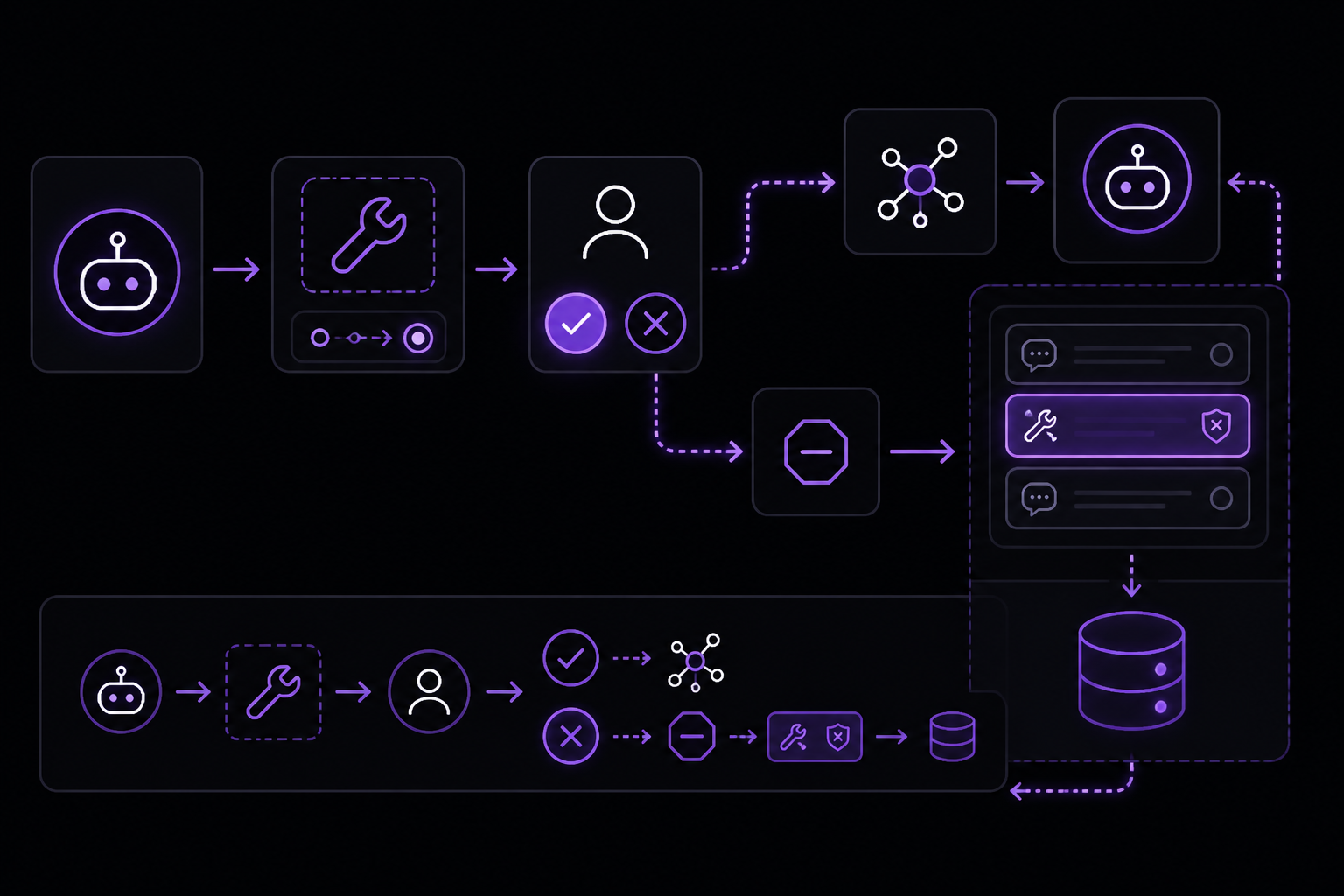
Solution 1: Return a ToolMessage on Rejection (Recommended)
This is the official fix from the LangChain team. When the human rejects a tool call, instead of simply returning new Command({ goto: END }), you must also update the state with a ToolMessage that indicates the rejection. This gives the LLM the feedback it needs to continue correctly.
Modify your approveNode function as follows:
async function approveNode (state) {
  console.log('===APPROVE NODE===');
  const lastMsg = state.messages.at(-1);
  const toolCall = lastMsg.tool_calls.at(-1);

  const interruptMessage = `Please review the following tool invocation:
${toolCall.name} with inputs ${JSON.stringify(toolCall.args, undefined, 2)}
Do you approve (y/N)`;

  console.log('=INTERRUPT PRE=');
  const interruptResponse = interrupt(interruptMessage);
  console.log('=INTERRUPT POST=');

  const isApproved = (interruptResponse.trim().charAt(0).toLowerCase() === 'y');
  if (isApproved) {
    return new Command({ goto: 'tools' });
  }

  // rejection case: return a ToolMessage with status 'error'
  return new Command({
    goto: END,
    update: {
      messages: [
        new ToolMessage({
          status: "error",
          content: `The user declined your request to execute the ${toolCall.name} tool, with arguments ${JSON.stringify(toolCall.args)}`,
          tool_call_id: toolCall.id
        })
      ]
    }
  });
}
What this does: When the human responds with anything other than 'y', the function returns a Command that routes to END but also updates the state's messages array with a ToolMessage. This message tells the LLM that its tool call was rejected. The LLM can then generate a new response (e.g., apologizing or asking for clarification) instead of crashing.
Expected outcome after the fix:
- The graph will proceed to
ENDafter rejection. - The next human prompt will invoke the agent node successfully.
- The agent will see the rejection
ToolMessagein the message history and respond appropriately.
Solution 2: Handle Parallel Tool Calls
If your graph uses parallel tool calls (multiple tool calls in a single AIMessage), the above solution needs to be extended. The LangChain engineer outlines two approaches:
Option A: Decline all tool calls if any is rejected.
- Add one rejection
ToolMessageper tool call. - Call
interruptonly once for the whole batch. - Return a
Commandthat routes toENDif any call is rejected, or totoolsif all are approved.
Example for multiple tool calls:
async function approveNode (state) {
  const lastMsg = state.messages.at(-1);
  const toolCalls = lastMsg.tool_calls;

  // Build a single interrupt message summarizing all calls
  const descriptions = toolCalls.map(tc => `${tc.name}(${JSON.stringify(tc.args)})`).join(', ');
  const interruptMessage = `Please review the following tool invocations:\n${descriptions}\nDo you approve all? (y/N)`;

  const interruptResponse = interrupt(interruptMessage);
  const isApproved = (interruptResponse.trim().charAt(0).toLowerCase() === 'y');

  if (isApproved) {
    return new Command({ goto: 'tools' });
  }

  // Reject all: create one ToolMessage per call
  const rejectionMessages = toolCalls.map(tc => new ToolMessage({
    status: "error",
    content: `The user declined your request to execute the ${tc.name} tool, with arguments ${JSON.stringify(tc.args)}`,
    tool_call_id: tc.id
  }));

  return new Command({
    goto: END,
    update: { messages: rejectionMessages }
  });
}
Option B: Allow approved calls to proceed, reject only denied ones.
- Use a loop to process each tool call's approval individually.
- For approved calls, use a
Sendobject in thegotofield to send a filtered copy of theAIMessage(with only approved tool calls) to thetoolsnode. - For rejected calls, add a
ToolMessageto theupdatefield. - This approach requires modifying the graph's conditional edges to handle
Sendobjects.
Option C: Interrupt inside the tool handler.
- Use a wrapper function that calls
interruptinside each tool handler. - If the human rejects, throw an error or return a rejection message.
- This avoids the need for a separate approval node but requires changes to how tools are defined.
Here is the wrapper example from the LangChain engineer:
function requiresApproval(toolHandler) {
  return (...args) => {
    const interruptMessage = `Please review the following tool invocation: ${toolHandler.name}(${args.map(JSON.stringify).join(', ')})`;
    const interruptResponse = interrupt(interruptMessage);
    const isApproved = (interruptResponse.trim().charAt(0).toLowerCase() === 'y');
    if (isApproved) {
      return toolHandler(...args);
    }
    throw new Error(`The user declined your request to execute the ${toolHandler.name} tool, with arguments ${JSON.stringify(args)}`);
  };
}
Solution 3: Restructure the Graph to Avoid the Invalid State
If the above solutions do not resolve the issue, consider restructuring your graph. The original graph has the approveNode as a separate node with ends: ['tools', END]. An alternative is to move the approval logic into the conditional edge itself or into the agentRouter. However, this is less straightforward because interrupt is typically called inside a node, not an edge.
Another approach is to ensure that after a rejection, the graph always returns to the agentNode instead of END. This way, the agent can process the rejection and generate a new response. Modify the approveNode to route back to agentNode on rejection:
async function approveNode (state) {
  // ... interrupt logic ...
  const isApproved = (interruptResponse.trim().charAt(0).toLowerCase() === 'y');
  const goto = isApproved ? 'tools' : 'agent';  // route back to agent on rejection
  return new Command({
    goto,
    update: {
      messages: isApproved ? [] : [new ToolMessage({ status: "error", content: `Rejected: ${toolCall.name}`, tool_call_id: toolCall.id })]
    }
  });
}
Then update the graph edges accordingly:
const workflow = new StateGraph(MessagesAnnotation)
  .addNode('agent', agentNode)
  .addNode('tools', toolsNode)
  .addNode('approve', approveNode, {
    ends: ['tools', 'agent'],  // allow routing back to agent
  })
  .addEdge(START, 'agent')
  .addEdge('tools', 'agent')
  .addConditionalEdges('agent', agentRouter, ['approve', END]);
This ensures the agent always gets a chance to respond to the rejection.
If Nothing Works
If you have tried all the above solutions and the error persists, consider the following escalation paths:
- Open a GitHub issue on the LangGraphJS repository. The LangChain engineer who provided the accepted solution monitors the repository and can help diagnose specific graph configurations.
- Check the official documentation for human-in-the-loop patterns:
- Simplify your graph to the minimum reproducible example and test each step. The original poster found that the error occurred after the second
interruptwhen routing toEND, or after the firstinterruptwhen routing back toagentNode. Isolating the exact trigger can help identify the root cause. - Check your LangChain and LangGraph versions. The error may be related to a specific version. Try updating to the latest versions:
npm install @langchain/core@latest @langchain/langgraph@latest - As a workaround, avoid using
interruptin the approval node altogether. Instead, implement approval outside the graph (e.g., via an external API call or a separate process) and pass the result as a parameter to the graph invocation.
How to Prevent It
To prevent this error from occurring in future projects:
-
Always provide feedback to the LLM. Whenever you interrupt a graph for human approval, ensure that the state is updated with a
ToolMessage(or equivalent) that informs the LLM of the outcome. This is the single most important practice. -
Test rejection paths early. When building a graph with human-in-the-loop, test both the approval and rejection paths before adding complexity. The original poster's code worked for the first approval but failed on the first rejection. Testing rejection first would have caught the issue sooner.
-
Use the official patterns from the LangGraph documentation. The documentation provides examples for approve/reject patterns. Follow them closely, especially the part about returning
ToolMessageon rejection. -
Handle parallel tool calls explicitly. If your graph uses multiple tool calls, decide upfront how you want to handle partial approval. The LangChain engineer's options provide clear guidance.
-
Keep your graph structure simple. Avoid complex routing logic in the approval node. The simpler the graph, the easier it is to debug state issues.
-
Use TypeScript for type safety. The original code is JavaScript, but using TypeScript can catch missing properties (like
tool_call_id) at compile time rather than at runtime.
By following these practices, you can avoid the Cannot read properties of undefined (reading 'message') error and build robust human-in-the-loop workflows with LangGraphJS.
The #1 Chatgpt Newsletter
The most important chatgpt updates, guides, and fixes — one weekly email.
No spam, unsubscribe anytime. Privacy policy
Related Error Solutions
Keep exploring ChatGPT
ChatGPT resources
Latest AI answers
Skip the manual work
Ready-made AI workflows and automation templates — import and run instead of building from scratch.