Fix Claude Code /compact Error: Conversation Too Long During Compaction
Error message
[BUG] Error during compaction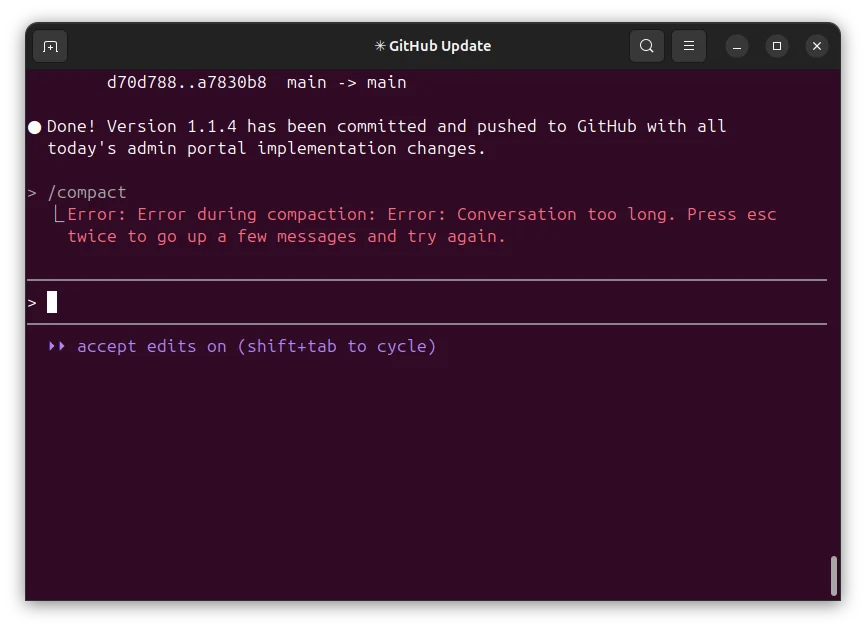
Diagnosis: What the Compaction Error Means
The /compact command in Claude Code is designed to compress lengthy conversation histories by summarizing previous messages while preserving important context, helping you manage token usage and maintain conversation continuity. When compaction fails, you see the error message: "Error during compaction:Error: Conversation too long. Press esc twice to go up a few messages and try again." This error appears even when your current session's context window is well within limits, as confirmed by the /context command showing fewer than 70,000 tokens used. According to a community investigation on the official GitHub issue tracker, the root cause is likely a bug where Claude Code attempts to compact all JSONL data for that particular session ID across multiple actual sessions, not just the current session's context. This means the compaction process can fail on a session that has accumulated data from 2, 3, or even 10 full sessions of context, even though the current session appears short.
What Causes This Error
1. Accumulated Session Data Across Multiple Sessions (Most Common)
The primary cause, identified by community member acidtech in the GitHub issue discussion, is that Claude Code's compaction logic appears to be aggregating all JSONL data associated with a single session ID. When you resume a session multiple times, each resumption adds to the total data stored under that session ID. The /compact command then tries to process this entire accumulated dataset, which can be far larger than the current session's context window. This is why the error can occur even when /context shows a low token count. The compaction process itself may have a limit on how much data it can handle at once, and the accumulated data exceeds that limit.
2. Regression in Claude Code Version 1.0.111
The bug reporter on GitHub explicitly marked this as a regression, stating "this worked in a previous version." The issue was reported against Claude Code version 1.0.111 on macOS using the Terminal.app shell with the Anthropic API. This suggests that a change in the compaction logic between versions introduced the error. The exact nature of the regression is not documented in the sources, but it likely involves a change in how session data is loaded or processed during compaction.
3. Not a Current Context Window Issue
Both the bug reporter and the community commenter agree that this error is not about the current session's context being too long. The bug reporter had an extended conversation with 50+ messages before encountering the error, but the community member explicitly tested this by running /compact with fewer than 70,000 tokens used in the current session (as shown by /context). The error still appeared, confirming the bug is unrelated to the current context window size.
4. Possible Compaction Algorithm Limit
While not explicitly stated in the sources, the error message "Conversation too long" suggests that the compaction algorithm itself has a hard limit on the amount of data it can process in a single operation. When the accumulated session data exceeds this limit, the compaction fails with the generic "too long" message, which is misleading because it implies the current conversation is too long when it is actually the historical session data.
How to Fix It
Solution 1: Start a Fresh Session (Most Reliable)
Source: Community recommendation inferred from the bug analysis (GitHub issue #7530).
Since the compaction error is caused by accumulated data across multiple sessions sharing the same session ID, the most reliable fix is to start a completely fresh session. This clears the accumulated JSONL data and gives you a clean slate.
Steps:
- Exit your current Claude Code session by typing
/exitor pressingCtrl+C. - Start a new session by running
claudein your project directory. - If you need to preserve context from the previous session, manually copy any important information (e.g., file paths, decisions, configuration) into the new session. Claude Code's auto memory feature may have already saved some learnings, but you should verify by checking your CLAUDE.md file or asking Claude "What do you know about this project?"
- Continue working in the new session. When you need to compact, run
/compactagain. It should work because the new session has no accumulated historical data.
What to expect: The /compact command should succeed on the first attempt in a fresh session. If it fails again, you may be dealing with a different issue (see Solution 3).
Caveat: Starting a fresh session means you lose the conversation history. If you need to keep a record, consider exporting the session log before exiting. Claude Code stores session data in JSONL files, typically located in ~/.claude/sessions/ or a similar directory depending on your platform. You can back up these files before deleting them.
Solution 2: Navigate Back and Compact from a Shorter Point
Source: The error message itself suggests this workaround: "Press esc twice to go up a few messages and try again."
This is the officially suggested workaround embedded in the error message. It works by reducing the amount of context the compaction algorithm needs to process.
Steps:
- Press
Esctwice to navigate up a few messages in the conversation history. Each press ofEscmoves you back one message. - After pressing
Esctwice, you should be at a point where the conversation is shorter. - Run
/compactagain. - If it still fails, press
Esctwice more and try again. Repeat until compaction succeeds or you reach the beginning of the conversation.
What to expect: This may work if the error is caused by the current session's context being genuinely too long (though the bug analysis suggests this is unlikely). It is less likely to work if the error is caused by accumulated session data, because navigating back does not reduce the historical JSONL data.
Caveat: This is a workaround, not a fix. It may require multiple attempts and can be frustrating if you have a very long conversation. It also does not address the underlying bug.
Solution 3: Update Claude Code to the Latest Version
Source: The bug reporter confirmed they were using version 1.0.111 and marked the issue as a regression. The official documentation recommends keeping Claude Code up to date.
Since this is a regression, it is possible that a newer version of Claude Code has fixed the bug. Updating ensures you have the latest fixes and improvements.
Steps:
-
Check your current version by running
claude --versionin your terminal. -
Update Claude Code using the appropriate method for your installation:
Native Install (Recommended): Native installations automatically update in the background. To force an update, run the install script again:
curl -fsSL https://claude.ai/install.sh | bashOn Windows PowerShell:
irm https://claude.ai/install.ps1 | iexOn Windows CMD:
curl -fsSL https://claude.ai/install.cmd -o install.cmd && install.cmd && del install.cmdHomebrew:
brew upgrade claude-code
# Or if you installed the latest channel:
brew upgrade claude-code@latest
WinGet:
winget upgrade Anthropic.ClaudeCode -
After updating, restart your Claude Code session and try
/compactagain.
What to expect: If the bug was fixed in a later version, compaction should work after the update. If not, you will need to use one of the other solutions.
Caveat: The GitHub issue does not indicate which version, if any, fixed this bug. Updating is a good practice but may not resolve this specific issue.
Solution 4: Manually Clear Session Data (Advanced)
Source: Inferred from the community analysis that the bug involves accumulated JSONL data for a session ID.
This is an advanced solution that involves manually deleting the accumulated session data. Use this only if you are comfortable working with configuration files and understand the risks.
Steps:
- Exit Claude Code completely.
- Locate the session data directory. The exact path depends on your platform and installation:
- On macOS/Linux:
~/.claude/sessions/ - On Windows:
%USERPROFILE%\.claude\sessions\
- On macOS/Linux:
- List the files in this directory. You will see JSONL files named after session IDs, for example
session_abc123.jsonl. - Identify the session file corresponding to the problematic session. You can check the file's modification time to find the most recent one.
- Back up the file by copying it to another location before making any changes.
- Delete or rename the session file. For example:
mv ~/.claude/sessions/session_abc123.jsonl ~/.claude/sessions/session_abc123.jsonl.bak - Start a new Claude Code session. It will create a new session file.
- Run
/compactto verify the fix.
What to expect: This should completely resolve the accumulated data issue because you are starting with a clean session file. The /compact command should work immediately.
Caveat: Deleting session data means you lose all conversation history for that session. You also lose any auto memory that was stored in that session file. Make sure you have a backup before proceeding. This is not an officially supported solution and may have unintended consequences.
Solution 5: Use the CLI to Pipe Context Instead of Compacting
Source: Official Claude Code documentation on CLI usage (docs.anthropic.com).
If compaction continues to fail, you can work around the issue by using Claude Code's CLI capabilities to manage context without relying on /compact. This is not a direct fix for the compaction error, but it allows you to continue working effectively.
Steps:
- Instead of compacting, use the
-pflag to pipe specific context into a new session:echo "Continue working on the auth module. We decided to use JWT tokens. The current implementation is in src/auth/jwt.ts." | claude -p "Review the auth module and check for any issues" - For more complex context transfer, use a file:
claude -p "Read the file context.txt and continue the task described there" - You can also use the
--resumeflag to resume a previous session, but this may trigger the same compaction bug. Instead, start fresh and provide context manually.
What to expect: This approach avoids the compaction error entirely by not using the /compact command. It requires you to manually summarize and transfer context, which is less convenient but reliable.
Caveat: This is a workaround, not a fix. It does not address the underlying bug and may be impractical for very complex tasks.
If Nothing Works
Escalate to Anthropic Support
If none of the above solutions resolve the compaction error, the next step is to report the issue to Anthropic directly. The official documentation provides several channels:
-
GitHub Issues: The primary bug tracking channel is the Claude Code GitHub repository. Search for existing issues related to compaction to see if a fix has been released or if there is a known workaround. If not, file a new issue with the following information:
- Claude Code version (
claude --version) - Operating system and terminal/shell
- Steps to reproduce the error
- The exact error message
- Output of
/contextcommand showing token usage - Whether this is a regression (it was working before)
- Claude Code version (
-
Anthropic Documentation: The Troubleshooting page may have updated information about this issue. Check it periodically for new solutions.
-
Community Forums: While not explicitly mentioned in the sources, the Claude Code community on platforms like Reddit or Discord may have additional workarounds. Search for "Claude Code compaction error" to see if others have found solutions.
Workaround: Avoid Compaction Altogether
If you cannot fix the compaction error, you can adapt your workflow to avoid needing it:
- Use shorter sessions: End sessions before they become too long. Start a new session for each major task.
- Use CLAUDE.md for persistent instructions: Store important context in your project's CLAUDE.md file so Claude remembers it across sessions without needing compaction.
- Use auto memory: Let Claude Code build auto memory as it works. This saves learnings like build commands and debugging insights across sessions without manual compaction.
- Use the
/contextcommand to monitor token usage: Run/contextperiodically to see how many tokens you are using. If you are approaching limits, start a new session instead of trying to compact. - Use background agents for long-running tasks: Instead of keeping a single session open for hours, use background agents that can run independently and report results.
How to Prevent It
1. Start Fresh Sessions Regularly
The most effective prevention is to avoid accumulating too much data under a single session ID. Start a new session for each major task or at regular intervals. This prevents the JSONL data from growing large enough to trigger the compaction bug.
2. Update Claude Code Promptly
Keep Claude Code updated to the latest version. The official documentation states that native installations "automatically update in the background to keep you on the latest version." If you installed via Homebrew or WinGet, run the update commands periodically:
# Homebrew
brew upgrade claude-code

# WinGet
winget upgrade Anthropic.ClaudeCode
3. Monitor Session Health with /context
Run /context regularly to check your token usage. While the bug can occur even with low token counts, keeping sessions short reduces the likelihood of hitting the accumulated data limit. If you see token usage growing quickly, consider starting a new session.
4. Use Hooks to Automate Context Management
The official documentation describes hooks that can run at specific points in Claude Code's lifecycle. While hooks are not a direct prevention for the compaction error, you can use them to automate context management. For example, you could create a PreCompact hook that checks the session data size and warns you before compaction runs. The PreCompact event fires before context compaction and can be matched on what triggered compaction (manual or auto). A hook could inspect the session data and take action if it is too large.
Example hook configuration in .claude/settings.json:
{
  "hooks": {
    "PreCompact": [
      {
        "matcher": "manual",
        "hooks": [
          {
            "type": "command",
            "command": "/path/to/check-session-size.sh"
          }
        ]
      }
    ]
  }
}
This hook would run a script before every manual compaction, allowing you to check the session data size and abort if it is too large.
5. Avoid Resuming Sessions Multiple Times
Since the bug appears to be related to accumulated data across multiple sessions sharing the same session ID, avoid resuming the same session repeatedly. Instead, start a new session for each work session. If you need to continue work from a previous session, manually transfer the essential context rather than resuming the session.
6. Use the Web or Desktop App for Long Sessions
The official documentation notes that Claude Code runs on multiple surfaces: terminal, VS Code, desktop app, and web. If you are experiencing compaction issues in the terminal, try using the desktop app or web version for long-running tasks. These surfaces may handle session data differently and might not exhibit the same bug. The desktop app allows you to "review diffs visually, run multiple sessions side by side, schedule recurring tasks, and kick off cloud sessions." The web version lets you "kick off long-running tasks and check back when they're done." Both may provide a better experience for extended work sessions.
7. Use Routines Instead of Long Sessions
For tasks that repeat regularly, use Claude Code's Routines feature instead of keeping a single session running. Routines run on Anthropic-managed infrastructure and can be scheduled to run at specific times. This avoids the need for compaction entirely because each routine execution starts fresh. You can create routines from the web, the desktop app, or by running /schedule in the CLI.
Summary
The "Error during compaction" in Claude Code is a known bug, reported as a regression in version 1.0.111, where the /compact command fails with the message "Conversation too long. Press esc twice to go up a few messages and try again." The root cause is likely that Claude Code attempts to compact all JSONL data accumulated across multiple sessions under the same session ID, not just the current session's context. The most reliable fix is to start a fresh session. Other solutions include navigating back in the conversation, updating Claude Code, manually clearing session data, or using CLI workarounds. To prevent the issue, start fresh sessions regularly, keep Claude Code updated, monitor session health with /context, and consider using alternative surfaces like the desktop app or web version for long-running tasks.
The #1 Claude Newsletter
The most important claude updates, guides, and fixes — one weekly email.
No spam, unsubscribe anytime. Privacy policy
Related Error Solutions
Keep exploring Claude
Claude resources
Latest AI answers
Skip the manual work
Ready-made AI workflows and automation templates — import and run instead of building from scratch.