Google Sheets Automation Workflows
3,636 ready-made Google Sheets workflows for n8n, Make, Zapier, Activepieces, and Pipedream. Spreadsheet-driven automations: logging, reporting, syncing rows to and from every tool in your stack.
Automate Invoice Follow-ups with Google Sheets and Email
This workflow automates the process of following up on unpaid invoices by checking a Google Sheets database daily, calculating overdue days, and sending tailored email reminders.
n8n$4.99Seamlessly Sync Google Sheets Contacts to MailChimp
Effortlessly transfer contacts from Google Sheets to MailChimp, ensuring your subscriber lists are always up-to-date.
n8n$4.99Analyze Browsing History and Generate Automation Suggestions with OpenRouter AI and Google Sheets
# Browsing History Automation Analyzer - Automation Toolkit (Google Sheets + AI) This **n8n workflow** analyzes your browsing history to identify opportunities for automation. It reads history from a Google Sheet, groups visits by domain, filters out irrelevant entries, and uses AI to recommend what can be automated - including how and why. --- ## What It Does - **Reads** your browsing history from Google Sheets - **Groups** history by domain - **Filters out** common non-actionable domains (e.g., YouTube, Google) - **Uses AI** to analyze whether your activity on each site is automatable - **Provides suggestions** including what to automate, how to do it, and which tools to use - **Saves results** into a new tab in the same Google Sheet - **Searches for n8n workflow templates** related to the suggested automation --- ## Demo Sheet Input + output are handled via the following Google Sheet: **Spreadsheet**: [View on Google Sheets](https://docs.google.com/spreadsheets/d/1V26KDJLBZno6e_VxaBqhsK_JOOOn_5N6uww2apcAeoc/edit?usp=drivesdk) - **Sheet: `history`** - Input browsing history - **Sheet: `automations`** - Output AI automation suggestions --- ## AI Analysis Logic The AI agent receives each domain's browsing history and responds with: - `domain`: The website domain - `automatable`: true/false - `what_to_automate`: Specific actions that can be automated - `reason`: Why it's suitable (or not) for automation - `tool`: Suggested automation tool (e.g., n8n, Apify) - `automation_rating`: High, Medium, Low, or Not Automatable - `n8n_template`: Relevant automation template (if found) --- ## Technologies Used | Tool | Purpose | |------------------------|--------------------------------| | **n8n** | Workflow automation | | **LangChain AI Agent** | AI-based analysis | | **Google Sheets Node** | Input/output data handling | | **OpenRouter (LLM)** | Language model for intelligent reasoning | | **JavaScript Code Node** | Grouping and formatting logic | | **Filter Node** | Remove unwanted domains | | **HTTP Request Node** | Search n8n.io templates | --- ## Chrome History Export You can use this Chrome extension to export your browsing history in a format compatible with the workflow: [Export Chrome History Extension](https://chromewebstore.google.com/detail/export-chrome-history/dihloblpkeiddiaojbagoecedbfpifdj?pli=1) --- ## Want Personalized Automation Advice? If you'd like **personalized automation recommendations** based on your browsing history - just like what this workflow provides - feel free to contact me directly: > **msaidwolfltd@gmail.com** I'll help you discover what tasks you can automate to save time and boost productivity. --- ## Example Use Cases - Automate daily logins to dashboards - Auto-fill forms on repetitive websites - Schedule data exports from web portals - Trigger reminders based on recurring visits - Discover opportunities for scraping and integration --- ## License This workflow is provided as-is for educational and personal use. For commercial or customized use, contact the author. ---
n8n$9.99Automate Website Tool Analysis with Telegram, Apify, AI & Google Sheets
#### Description This powerful workflow automates the evaluation of new digital tools, websites, or platforms with the goal of assessing their potential impact on your business. By leveraging Telegram for user input, Apify for deep content extraction, advanced AI for contextual analysis, and Google Sheets for personalized data integration and record-keeping, this tool delivers clear, actionable verdicts that help you determine whether a tool is worth adopting or exploring further. #### Key Features and Workflow User-Friendly Input: Submit URLs of tools or websites directly through Telegram for quick and easy evaluation requests. - Dynamic Content Extraction: The workflow retrieves detailed content from the submitted URLs using the Apify web crawler, capturing rich data for analysis. - AI-Powered Cleaning & Analysis: Sophisticated AI models filter out noise, distill meaningful insights, and contextualize findings based on your business profile and goals stored in Google Sheets. - Personalized Business Context: Integration with Google Sheets brings in your company's specialization, current focus, and strategic objectives to tailor the analysis specifically to your needs. - Structured Analysis Output: Receive a thorough, structured report including concise summaries, key considerations, business impact, benefits, risks, actionable insights, and an easy-to-understand final verdict on the tool's relevance. - Decision Support: The tool estimates effort, time to value, urgency, and confidence levels, enabling informed prioritization and strategic decision-making. - Seamless Communication: Results are sent back via Telegram, ensuring you get timely and direct feedback without needing to leave your messaging app. - Record Keeping & Tracking: All analyses and decisions are logged automatically into Google Sheets, creating a searchable knowledge base for ongoing reference and reporting. #### Setup Instructions for Key Nodes Telegram Trigger Node: 1. Configure your Telegram bot API credentials here. 2. Link the bot to your Telegram account to receive messages for URL submissions. URL Extraction Node: No credentials needed. This node extracts URLs from incoming messages for processing. Apify Web Crawler Node Setup Guide: Go to Apify's website, sign up for an account if you don't have one, and get your API token from your profile's API tokens section. Then, paste this token into the Apify Node's API Key field in n8n. AI Cleaning and Analysis Nodes: 1. Configure OpenAI or compatible AI service API keys for content processing. 2. Customize prompts or models if desired to align analysis style. Google Sheets Nodes: 1. Connect using your Google account and provide access to the specified Google Sheet. 2. Ensure sheets for Company Details and Analysis Results exist with proper columns as per this workflow. Telegram Reply Node: Use the Telegram bot API credentials to send analysis summaries and verdicts back to users. ###### Access and Edit the Google Sheet You can access the Google Sheet used by this workflow here: [Access the Google Sheet here](https://docs.google.com/spreadsheets/d/1RCMapKv9IPdwNz4Rp-Ma2iKzdWDEbxggYrq9K2_pU-w/edit?usp=sharing) Please make a copy of the sheet to your own Google Drive before connecting it with this workflow. This allows you to customize the sheets, update company information, and manage analysis results securely without affecting the original template. #### Extendibility Beyond manual URL submissions, you can enhance this workflow by scheduling automated daily checks of new product launches from platforms like Product Hunt. The system can proactively analyze emerging tools and deliver timely updates via Telegram, email, or other channels, helping you stay ahead of innovation effortlessly.
n8n$14.99Automate SEO Analysis and Data Logging with RapidAPI and Google Sheets
Streamline your SEO analysis by automating data collection and logging using RapidAPI and Google Sheets. This workflow captures website data, performs various SEO analyses, and logs the results into structured Google Sheets.
n8n$24.99Automate PDF Data Extraction and Storage in Google Sheets
Streamline your workflow by automatically extracting data from PDFs and storing it in Google Sheets. This process is ideal for managing invoices, orders, and reports efficiently.
Make$4.99Automate Document Summarization from Google Drive to Google Sheets
Efficiently manage new Google Docs by automatically summarizing their content and storing the summaries in Google Sheets. This workflow enhances productivity by streamlining document processing and organization.
n8n$9.99Automate SSL Certificate Monitoring with Google Sheets and Email Alerts
This n8n workflow automatically checks SSL certificates for websites listed in a Google Sheet and sends email alerts if any are expiring within 14 days. This helps prevent downtime and security issues caused by expired certificates.
n8n$14.99Automate Tracking of Website Visibility in Google AI Overviews with SerpAPI and Google Sheets
This workflow automates the process of tracking your website's visibility in Google's AI Overviews using SerpAPI and Google Sheets. It helps SEO professionals and digital marketers identify if their site appears in AI-generated search results.
n8n$4.99"Blog Image SEO & Size Auditor with Ghost and Google Sheets"
**Tags**: Ghost CMS, SEO Audit, Image Optimization, Alt Text, Google Sheets, Automation ### Context Hi! I'm Samir - a Supply Chain Engineer and Data Scientist based in Paris, and founder of [LogiGreen Consulting](https://logi-green.com). I help companies and content creators use automation and analytics to **improve visibility**, **enhance performance**, and **reduce manual work**. > Let's use n8n to automate SEO audits to increase your traffic! For business inquiries, feel free to connect on [LinkedIn](https://www.linkedin.com/in/samir-saci) ### Who is this template for? This workflow is perfect for **bloggers, marketers, or content teams** using **Ghost CMS** who want to: - Extract and review **all images** from articles - Detect missing or short **alt texts** - Check image **file size** and **filename SEO compliance** - Push the audit results into a **Google Sheet** 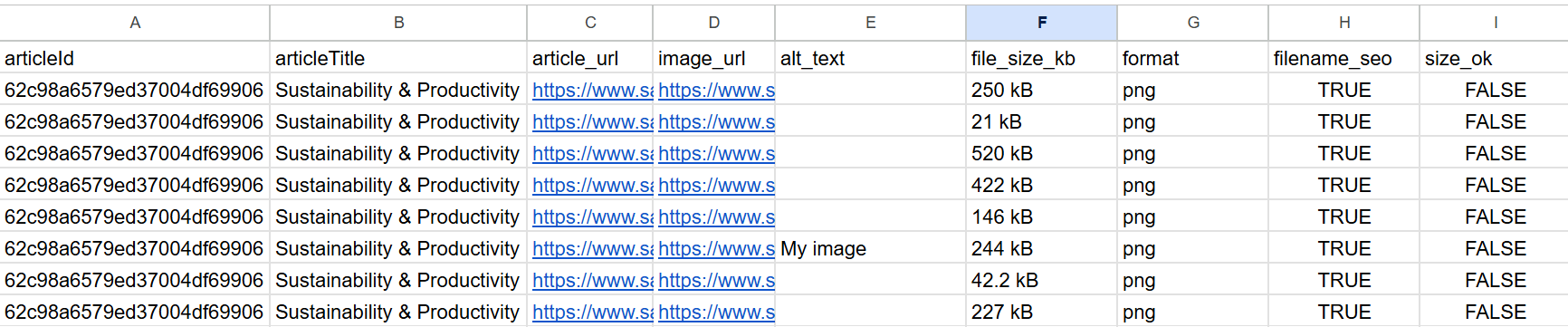 ### How does it work? This n8n workflow extracts all blog posts from Ghost CMS, scans the HTML to collect all embedded images, then evaluates each image for: - Presence and length of `alt text` - File size in kilobytes - Filename SEO quality (e.g., lowercase, hyphenated, no special chars) All findings are written to Google Sheets for **further analysis** or **manual cleanup**. ### Workflow Steps: 1. Trigger the workflow manually or on schedule 2. Extract blog post content from Ghost CMS 3. Parse all `<img>` tags with `src` and `alt` attributes 4. Store image metadata in a Google Sheet (step 1) 5. Download each image using HTTP request 6. Extract file size, extension, and filename SEO flag 7. Update the audit sheet with size and format insights 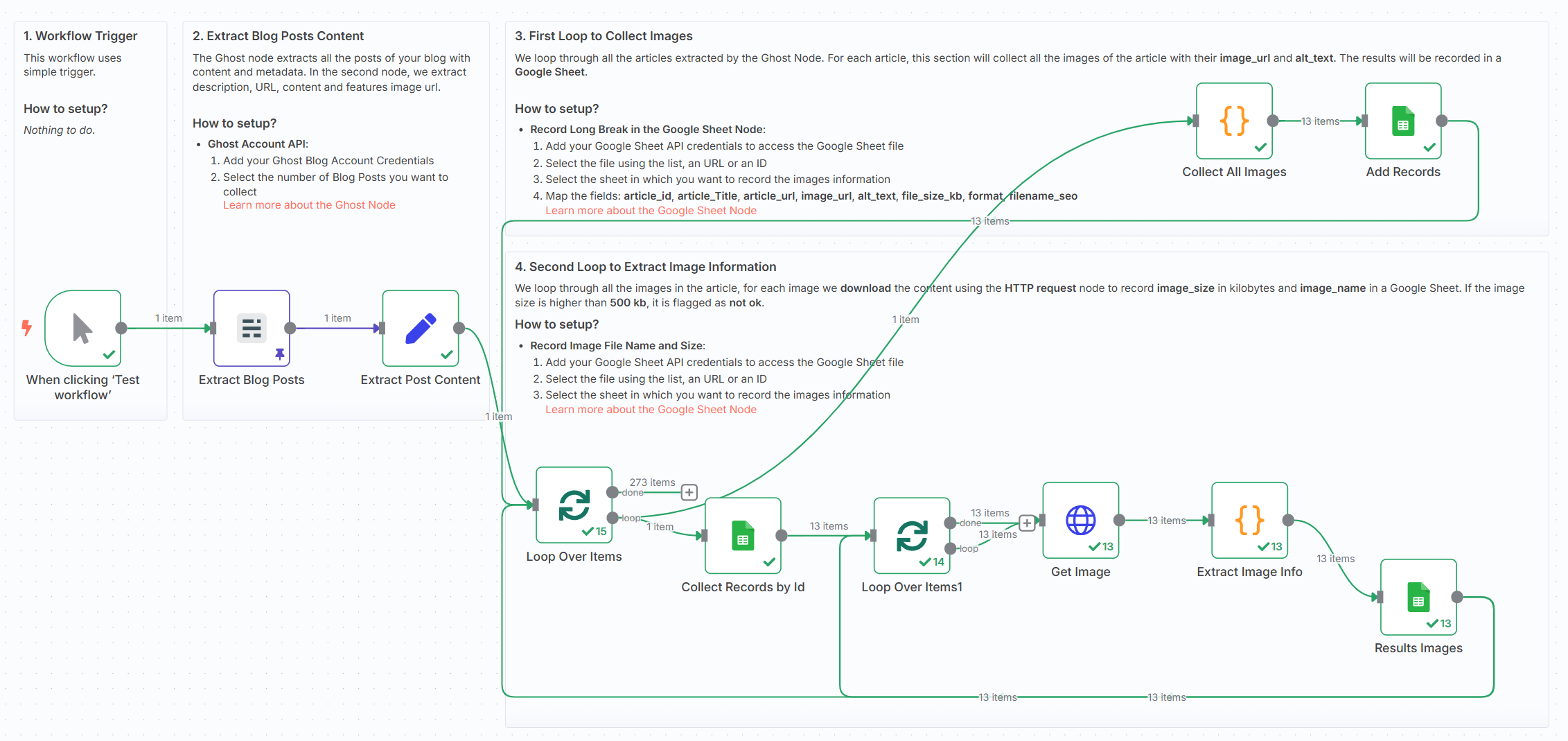 ### What do I need to get started? This workflow requires: - A **Ghost Content API key** - A **Google Sheet** (to log audit results) - No AI or external APIs required - works fully with built-in nodes ### Next Steps Follow the sticky notes inside the workflow to: - Plug in your Ghost blog credentials - Select or create a Google Sheet - Run the audit and start improving your SEO! This template was built using n8n v1.93.0 Submitted: June 8, 2025
n8n$9.99Automate Patient Vitals Monitoring and Alerts with Philips IntelliVue and Google Sheets
This workflow automates the monitoring of patient vitals using Philips IntelliVue devices, categorizes conditions based on severity, and sends alerts to healthcare staff. It also logs data to Google Sheets for record-keeping and analysis, ensuring timely updates every 30 seconds.
n8n$4.99Send WhatsApp template messages based on Google Sheets content
Automatically send personalized WhatsApp messages using Google Sheets data. Streamline communication by integrating Google Sheets with WhatsApp Business Cloud for efficient messaging.
Make$2.99Automated AI-Driven WhatsApp Support Bot with Google Sheets Ticketing
This n8n workflow creates an intelligent, multi-channel support bot that leverages AI to provide customer service via WhatsApp and a website widget, while automatically generating support tickets in Google Sheets.
n8n$24.99Automate Weekly Business Reports with AI and Google Sheets
This workflow automates the creation of weekly business reports by pulling data from Google Sheets, analyzing it with AI, and generating a formatted Google Document. The report is then sent to Slack for team review and approval, ensuring consistent recognition of team progress.
Activepieces$2.99Automate Meta Ads Insights Collection to Google Sheets
Automatically retrieve Meta Ads insights daily using the Facebook Graph API and store them in Google Sheets for seamless analysis.
n8n$14.99Automate Support Ticket Categorization and Reporting with AI and Google Sheets
Streamline your support process by automatically categorizing tickets using AI, storing data in Google Sheets, and generating insightful reports.
n8n$14.99Automate Invoice and Receipt OCR from Google Drive to Google Sheets
This workflow automates the process of recognizing invoices and receipts from a specified Google Drive folder and logging the extracted data into Google Sheets. It supports PDF, PNG, and JPG formats and triggers on new file uploads or manually.
n8n$9.99Automate Invoice Data Extraction from Gmail to Google Sheets
Streamline your invoice processing by automatically extracting data from PDF attachments in Gmail and storing it in Google Sheets using LlamaParse and Gemini LLM.
n8n$14.99Create a new WordPress post for every new row in Google Sheets with a message from Claude
Generate blog posts on WordPress for each new row in Google Sheets, featuring a message generated by Claude. Streamline content creation with this integration.
Make$3.99Real-time Sales Pipeline Analytics with Bright Data, OpenAI, and Google Sheets
This workflow contains community nodes that are only compatible with the self-hosted version of n8n. This workflow automatically tracks key sales pipeline metrics—new leads, deal stages, win rates—and sends actionable insights to your team. Eliminate manual CRM exports and stay on top of revenue health. ## Overview The automation queries your CRM API (HubSpot, Salesforce, or Pipedrive) on a schedule, pulls pipeline data, and feeds it into OpenAI for anomaly detection (e.g., stalled deals). Summaries and alerts appear in Slack, while daily snapshots are archived in Google Sheets for trend analysis. ## Tools Used - **n8n** - Pipeline orchestration - **CRM API** - Connects to your chosen CRM - **OpenAI** - Detects anomalies and highlights risks - **Slack** - Notifies reps and managers in real time - **Google Sheets** - Stores historical pipeline data ## How to Install 1. **Import the Workflow** into n8n. 2. **Connect Your CRM**: Provide API credentials in the HTTP Request node. 3. **Set Up OpenAI**: Add your API key. 4. **Authorize Slack & Google Sheets**. 5. **Customize Thresholds**: Adjust what constitutes a stalled deal or low conversion. ## Use Cases - **Sales Management**: Monitor pipeline health without dashboards. - **Revenue Operations**: Detect bottlenecks early. - **Forecasting**: Use historical snapshots to improve predictions. - **Rep Coaching**: Alert reps when deals stagnate. ## Connect with Me - **Website**: https://www.nofluff.online - **YouTube**: https://www.youtube.com/@YaronBeen/videos - **LinkedIn**: https://www.linkedin.com/in/yaronbeen/ - **Get Bright Data**: https://get.brightdata.com/1tndi4600b25 (Using this link supports my free workflows with a small commission) #n8n #automation #salespipeline #crm #openai #slackalerts #n8nworkflow #nocode #revenueops
n8n$14.99Automate Multilingual YouTube Metadata Translation with AI and Google Sheets
Streamline the process of translating YouTube video metadata into multiple languages using AI, and manage it all through Google Sheets. This workflow automates the detection of new videos, translates their metadata, and updates it directly on YouTube, saving time and expanding your global reach.
n8n$14.99Automate Social Media Content Posting Using Google Sheets and Slack
Streamline your social media content distribution by automatically posting updates from Google Sheets to Facebook, Twitter, and LinkedIn, with notifications sent to Slack.
n8n$9.99Automate Lead Email Verification with Google Sheets and Hunter.io
Automatically validate lead email addresses stored in Google Sheets using Hunter.io, ensuring your outreach lists remain accurate and up-to-date.
n8n$9.99Automate Yelp Business Data Extraction and Storage in Google Sheets
This n8n workflow automates the extraction of detailed business information from Yelp using Bright Data API and stores it in Google Sheets for easy access and analysis.
n8n$9.99
More integrations
Custom AI Systems & Services
Our team of experienced AI builders will help build custom AI systems, workflows, and solutions.
Request Custom Work