Cache updates in chatbot when adding new documents: two approaches
Original question: Cache updates in chatbot when adding new documents
To keep cached chatbot responses up to date after adding new documents, you have two main options: a lazy update that checks document count on each cached query and regenerates only when needed, or an eager update that triggers a batch cache refresh as soon as new files are added. The right choice depends on how often documents are added and how critical freshness is for your users. Below are full implementations and guidance for both approaches.
The Full Answer
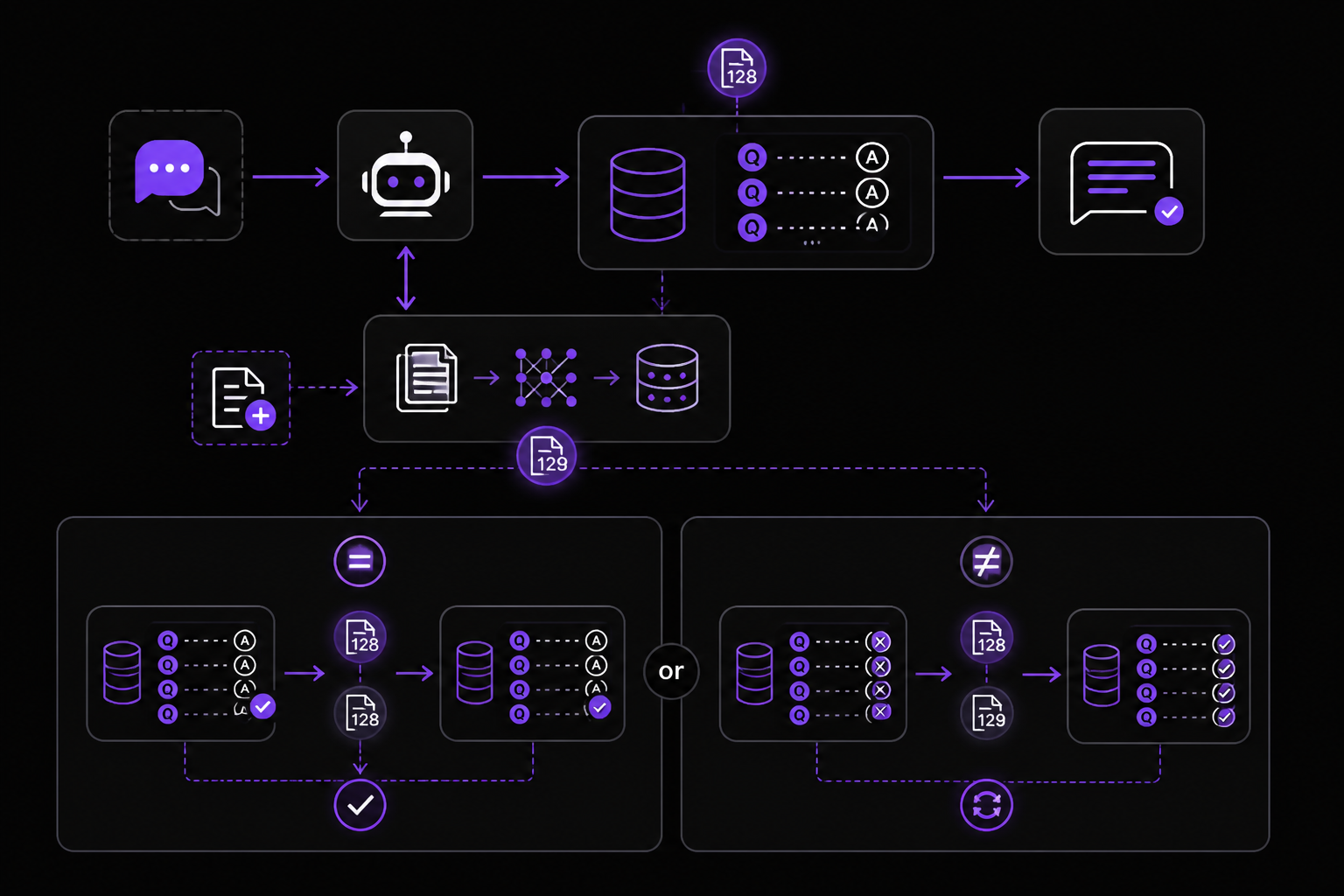
When you add new documents to a chatbot's knowledge base, previously cached question-answer pairs become stale because they were generated without the new information. This is a common problem in retrieval-augmented generation (RAG) systems where the vector store or document index is updated independently of the cache. The core challenge is to detect when the underlying document set has changed and then refresh only the affected cache entries, without rebuilding the entire cache from scratch on every update.
Both approaches rely on tracking the document count as a proxy for change. When the count increases, the cache knows something new is available. The two solutions differ in when and how the regeneration happens.
Approach 1: Lazy cache invalidation with document count check (recommended for infrequent updates)
This approach, provided in the accepted Stack Overflow answer, uses a custom cache class that stores a reference document count. Every time a cached query is looked up, the system checks whether the document count has changed. If it has, the cached response is regenerated on the fly. This avoids regenerating entries that are never queried again.
Here is the full implementation from the source:
from langchain_core.caches import BaseCache, RETURN_VAL_TYPE
from typing import Any, Dict, Optional

class MetadataAwareCache(BaseCache):
    def __init__(self, doc_count: int):
        super().__init__()
        self._cache = {}
        self._doc_count = doc_count

    # Initially set a document count for reference
    def update_document_count(self, doc_count: int):
        if self._doc_count == doc_count:
            return
        self._doc_count = doc_count
        for args, _old_response in self._cache.items():
            prompt, llm_string = args[0], args[1]
            response, metadata = self.regenerate_cache(prompt, llm_string)
            self.update(prompt, llm_string, response, metadata)

    def regenerate_cache(self, prompt: str, llm_input: str):
        # Regenerate response with new information
        response = "New LLM Response"
        metadata = {}
        return response, metadata

    # Cache lookup
    def lookup(self, prompt: str, llm_string: str) -> Optional[RETURN_VAL_TYPE]:
        cache_entry = self._cache.get((prompt, llm_string))
        if cache_entry:
            return cache_entry["value"]
        return None

    # Update cache
    def update(
        self,
        prompt: str,
        llm_string: str,
        value: RETURN_VAL_TYPE,
        metadata: Dict[str, Any] = None,
    ) -> None:
        self._cache[(prompt, llm_string)] = {
            "value": value,
            "metadata": metadata or {},
        }
To use this cache with LangChain, set it globally:
from langchain.globals import set_llm_cache

cache = MetadataAwareCache()
set_llm_cache(cache)
How it works step by step:
- When you initialize the cache, you pass the current document count (e.g., the number of files in your vector store).
- Whenever you add new documents, you call
cache.update_document_count(new_count). - The
update_document_countmethod compares the new count with the stored count. If they match, nothing happens. If they differ, it iterates over every cached entry and callsregenerate_cachefor each one. - The
regenerate_cachemethod is a placeholder you must fill with your actual LLM call and retrieval logic. In a real system, it would query the vector store (now including the new documents) and generate a fresh response. - The
lookupmethod returns the cached value if it exists. Theupdatemethod stores a new entry.
When to use this approach:
The source explicitly recommends this for scenarios where new documents are added infrequently. If documents are added rarely (e.g., once a day or less), the cost of regenerating all cached entries is acceptable because it happens only a few times. The alternative of checking on every query would add latency to every request, which is wasteful when most queries see no change.
Approach 2: Eager batch refresh triggered by document addition (recommended for frequent updates)
The second approach, described in the question itself, triggers a separate process to update cached responses as soon as new files are added. This is an eager strategy: instead of waiting for a user to ask a stale question, you proactively regenerate all cache entries when the document count changes.
How to implement it:
- After adding new documents to your vector store, call a function that iterates over all cached prompts and regenerates responses using the updated knowledge base.
- This can be done asynchronously (e.g., in a background task or a scheduled job) to avoid blocking the main chatbot thread.
- The regeneration logic is identical to the
regenerate_cachemethod from Approach 1: for each cached prompt, retrieve relevant context from the vector store (now including new documents) and generate a new LLM response.
When to use this approach:
The source suggests this for cases where updates are more frequent. If new documents are added multiple times per hour, the lazy approach would cause repeated regeneration on every query, which could be expensive. Instead, you can make the cache refresh a scheduled process that runs periodically (e.g., every 5 minutes) or trigger it immediately after each document addition.
Hybrid strategy: metadata-based selective regeneration
Both sources mention a refinement: instead of regenerating the entire cache, you can add metadata to each document (e.g., document ID, category, or topic tags) and only regenerate cache entries that are relevant to the new documents. For example, if you add a new legal precedent about contract law, you only need to refresh cached questions that relate to contract law. This reduces the number of regenerations and improves performance.
To implement this, you would store metadata alongside each cached entry (the metadata field in the update method already supports this). When new documents arrive, you check which cached prompts have overlapping metadata and regenerate only those.
Common Pitfalls
Performance cost of full cache regeneration. Both sources warn that regenerating all cached entries can be expensive, both in terms of LLM API costs and processing time. If you have thousands of cached queries, regenerating them all at once could take minutes and incur significant charges. The community advice is to consider the frequency of document additions: if it's rare, full regeneration is fine; if it's frequent, use selective regeneration or scheduled batch updates.
Stale cache during regeneration. If you use the eager approach and regeneration takes time, there is a window where users might still receive old responses. The community suggests either invalidating the entire cache immediately (so queries fall through to the LLM) or using a two-phase approach where the old cache remains available until the new one is ready.
Document count as a change detector is naive. The accepted answer explicitly calls this a "very naive approach." Counting documents only tells you that something changed, not what changed. If you delete a document and add a different one, the count stays the same but the knowledge base is different. The cache would not be refreshed. A more robust approach would use a hash of document IDs or a version number.
Thread safety. The provided MetadataAwareCache implementation is not thread-safe. If multiple users query the chatbot while update_document_count is iterating over the cache, you could get race conditions. In production, you would need to add locks or use an atomic data structure.
Memory growth. The cache stores all responses indefinitely. Without an eviction policy (e.g., LRU, TTL), memory usage will grow unbounded. The sources do not address this, but for a production system you should add a maximum cache size or expiration time.
Related Questions
How do I detect that new documents have been added to my vector store?
You can track the document count by querying your vector store's metadata (e.g., len(vectorstore.index) in FAISS, or collection.count() in Chroma). Alternatively, maintain a separate counter that you increment each time you add documents. The cache's update_document_count method should be called with this count after every addition.
Can I use LangChain's built-in cache with document-aware invalidation?
LangChain's built-in caches (like InMemoryCache or SQLiteCache) do not support document-aware invalidation out of the box. You need to subclass BaseCache as shown in the accepted answer to add custom logic. The MetadataAwareCache class can be adapted to work with any LangChain LLM by setting it via set_llm_cache.
What if I only want to regenerate cache for questions that are actually affected by the new documents? You can store metadata (e.g., document IDs or topic tags) alongside each cached response. When new documents arrive, compare their metadata with the metadata of each cached entry. Only regenerate entries that share overlapping metadata. This is mentioned in both sources as a performance optimization for frequent updates.
Should I invalidate the entire cache or regenerate it in place? Invalidating the entire cache (i.e., clearing it) is simpler but causes all subsequent queries to miss the cache and hit the LLM, which increases latency and cost. Regenerating in place (as both approaches do) keeps the cache warm but requires careful handling of stale data during regeneration. The community recommends regeneration over invalidation when document additions are infrequent and the cache size is manageable.
The #1 AI Newsletter
The most important ai updates, guides, and fixes — one weekly email.
No spam, unsubscribe anytime. Privacy policy
Related Answers
Keep exploring
AI resources
Latest error solutions
Skip the manual work
Ready-made AI workflows and automation templates — import and run instead of building from scratch.