What is actually sent to the LLM when invoke is called on messages?
When you call invoke on a list of messages that includes an AIMessage with tool_calls, the tool_calls field is sent to the LLM on every subsequent call. This includes the full arguments of each tool call, such as file contents in a write_file tool. However, if the AIMessage also has a tool_use block in its content list, that block is not sent again because LangChain deduplicates it. The result is that large tool call arguments can balloon token usage on every call unless you manually trim or summarize them.
The Full Answer
What gets sent to the LLM
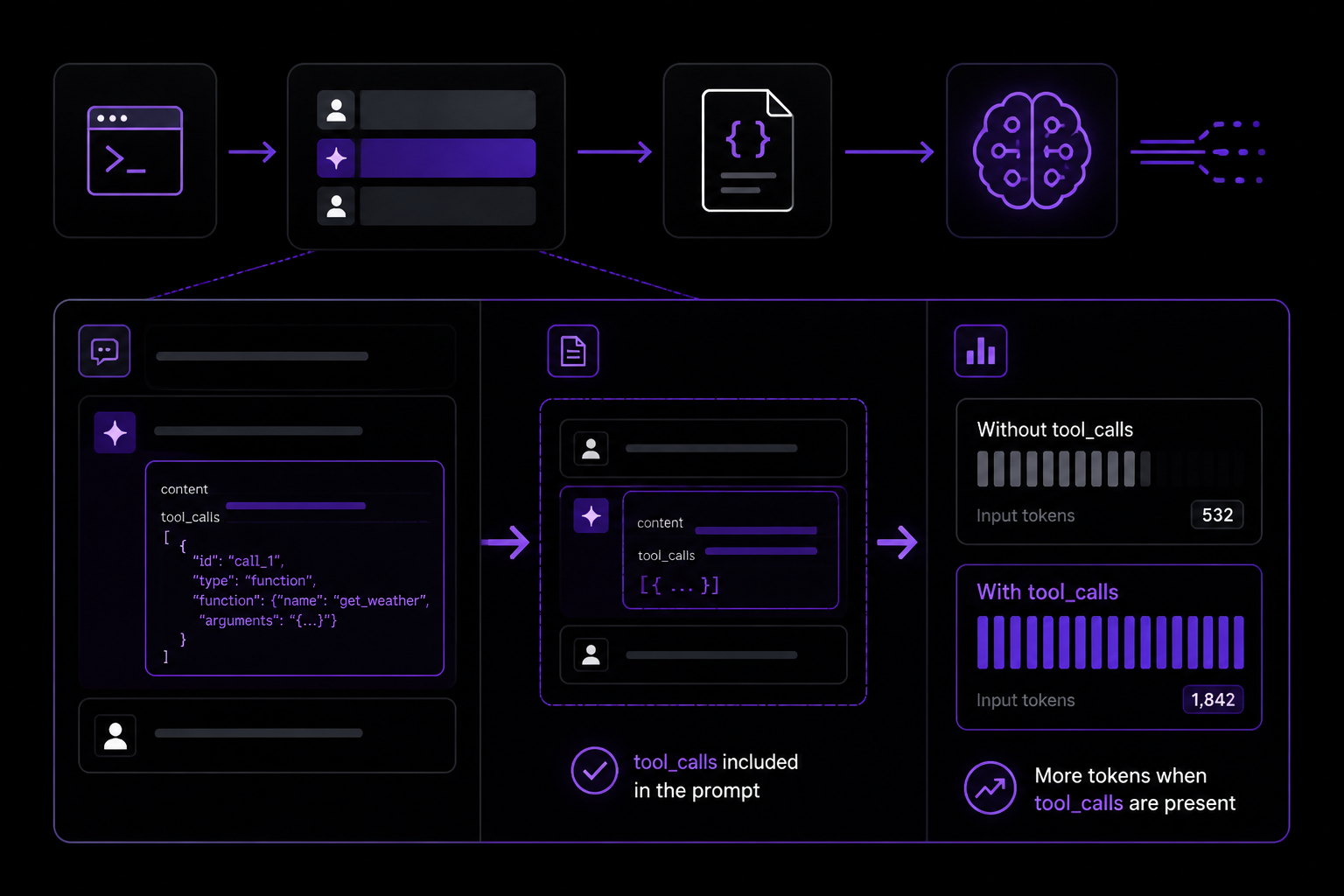
When you invoke an LLM with a list of messages, the tool_calls field of any AIMessage is included in the prompt sent to the model. This is confirmed by both the question and the accepted answer on Stack Overflow. The user who asked the question tested this by comparing the input_tokens count before and after adding messages with tool calls versus without them. The token count jumped when tool calls were present, proving that the LLM receives that data.
An AIMessage object in LangChain has two key fields:
content: a string or list of content blocks (e.g., text, tool_use blocks)tool_calls: a list of tool call objects, each containing anid,type, andargs(the arguments passed to the tool)
The tool_calls field is sent to the LLM so that the model has context about which tools were invoked and with what arguments. This is necessary for the LLM to understand the conversation history and make informed decisions about subsequent tool calls or responses.
The tool_use block behavior
The user noticed a confusing behavior: when the content list of an AIMessage contains a block of type tool_use, the inputs in that block are not sent to the LLM again. The accepted answer explains that this is LangChain being smart about avoiding duplication. The tool_use block in the content list is essentially a duplicate of the information already present in the tool_calls field. LangChain recognizes this and does not send the tool_use block content again, because the same data is already being sent via tool_calls. This prevents redundant token usage, but it can be confusing if you are inspecting the raw message structure and expecting both fields to be transmitted.
Impact on token usage
For a use case like a write_file tool call that may have a very long argument (e.g., the entire content of a file to be written), this behavior can cause token usage to balloon quickly. Every time you invoke the LLM with the same message history, the full tool_calls arguments are sent again. If you have a conversation that involves multiple tool calls with large arguments, the token count can become very high, leading to increased costs and slower responses.
How to manage token usage
The accepted answer provides two practical approaches to manage this:
-
Strip old tool calls before calling the LLM. You can manually remove
tool_callsfromAIMessageobjects that are no longer needed for context. For example, if you only need the last few tool calls for the LLM to understand the current state, you can filter out older ones. -
Keep your message history short or replace bulky tool calls with summaries. Instead of sending the full file content in every tool call, you can replace the arguments with a summary or a reference (e.g., a file path or a short description). This reduces the token count while still providing enough context for the LLM.
Step-by-step: Trimming tool_calls manually
Here is a practical example of how to strip old tool calls from an AIMessage before invoking the LLM. This assumes you are using LangChain in Python.
from langchain_core.messages import AIMessage, HumanMessage

def trim_tool_calls(messages, keep_last_n=2):
    """
    Remove tool_calls from AIMessages older than the last N.
    """
    trimmed = []
    tool_call_count = 0
    for msg in reversed(messages):
        if isinstance(msg, AIMessage) and msg.tool_calls:
            if tool_call_count < keep_last_n:
                tool_call_count += 1
                trimmed.insert(0, msg)
            else:
                # Remove tool_calls but keep the message content
                trimmed.insert(0, AIMessage(content=msg.content, tool_calls=[]))
        else:
            trimmed.insert(0, msg)
    return trimmed

# Example usage
messages = [
    HumanMessage(content="Write a file with a long content"),
    AIMessage(content="", tool_calls=[{"id": "call1", "type": "function", "args": {"filename": "test.txt", "content": "A" * 10000}}]),
    HumanMessage(content="Now write another file"),
    AIMessage(content="", tool_calls=[{"id": "call2", "type": "function", "args": {"filename": "test2.txt", "content": "B" * 10000}}]),
]

trimmed_messages = trim_tool_calls(messages, keep_last_n=1)
# The first AIMessage's tool_calls are removed, but the second is kept
Step-by-step: Replacing bulky tool calls with summaries
Instead of sending the full file content, you can replace the args with a summary. For example:
from langchain_core.messages import AIMessage

def summarize_tool_call(tool_call):
    """
    Replace large arguments with a summary.
    """
    if "content" in tool_call["args"] and len(tool_call["args"]["content"]) > 100:
        original_length = len(tool_call["args"]["content"])
        tool_call["args"]["content"] = f"[File content truncated: {original_length} characters]"
    return tool_call

# Example
original_call = {"id": "call1", "type": "function", "args": {"filename": "test.txt", "content": "A" * 10000}}
summarized_call = summarize_tool_call(original_call)
# summarized_call["args"]["content"] is now "[File content truncated: 10000 characters]"
Common Pitfalls
Pitfall 1: Assuming LangChain automatically trims tool_calls
A common mistake is to assume that LangChain automatically manages token usage by trimming old tool calls. The accepted answer explicitly states: "LangChain doesn't automatically trim tool_calls for you; it includes them so the LLM has context about what tools were used previously." You must implement your own trimming logic if you want to reduce token usage.
Pitfall 2: Confusion between tool_use blocks and tool_calls
As noted by the user who asked the question, it is confusing that tool_use blocks in the content list are not sent to the LLM, while tool_calls are. This is because LangChain deduplicates the information. If you are debugging token usage and see that the content list contains large tool_use blocks, you might think they are being sent. In reality, only the tool_calls field is transmitted. Always check the tool_calls field to understand what is actually being sent.
Pitfall 3: Not accounting for tool call arguments in token counting
When estimating token usage, you must include the tool_calls arguments. The user verified this by comparing input_tokens before and after adding messages with tool calls. If you are using a token counting library, ensure it accounts for the tool_calls field, not just the content field.
Pitfall 4: Over-trimming context
If you strip too many tool calls, the LLM may lose context about what tools were used and why. This can lead to incorrect or nonsensical responses. The accepted answer suggests keeping the message history short, but you must balance token savings with the need for sufficient context. A good rule of thumb is to keep the last 2-3 tool calls and summarize older ones.
Related Questions
Does the LLM see the tool call results (ToolMessage) in the same way?
Yes, ToolMessage objects (which contain the results of tool calls) are also sent to the LLM on subsequent invocations. They are part of the message history and provide the model with the output of each tool. If the tool result is large (e.g., the contents of a file read), it can also balloon token usage. You can apply the same trimming and summarization techniques to ToolMessage objects.
Can I prevent tool_calls from being sent at all?
Yes, you can remove the tool_calls field from an AIMessage before adding it to the message list. However, this means the LLM will lose context about which tools were called. If you only need the LLM to respond to the most recent user message without any tool history, you can strip all tool calls. But for most conversational workflows, some tool call history is necessary for the LLM to understand the state of the conversation.
How do I check how many tokens are being used by tool_calls?
You can use LangChain's token counting utilities or a model-specific tokenizer. For example, with OpenAI models, you can use tiktoken to count tokens in the tool_calls arguments. Alternatively, you can inspect the response_metadata of an LLM response, which often includes input_tokens and output_tokens counts. By comparing counts with and without tool calls, you can isolate the token usage attributable to tool_calls.
Is there a built-in LangChain method to trim tool calls?
As of the current version, LangChain does not provide a built-in method to automatically trim tool_calls from AIMessage objects. You must implement custom logic as shown in the examples above. Some third-party libraries or community solutions may offer trimming utilities, but they are not part of the core LangChain framework.
The #1 AI Newsletter
The most important ai updates, guides, and fixes — one weekly email.
No spam, unsubscribe anytime. Privacy policy
Related Answers
Keep exploring
AI resources
Latest error solutions
Skip the manual work
Ready-made AI workflows and automation templates — import and run instead of building from scratch.