AI Workflows
Artificial Intelligence tools and workflows
Automate Advanced Messaging with ChatGPT and Webhook Responses
Streamline communication by sending advanced messages to ChatGPT and handling responses via webhooks. This workflow integrates a custom webhook, ChatGPT, JSON creation, and webhook response for efficient and dynamic interaction.
Make$4.99"ideoGener8r - Complete Ideogram AI Image Generator UI with Google Integration"
 # ideoGener8r - Self-Hosted Ideogram AI Interface in n8n **[March Sale - n8n Community Members Get ideoGener8r for Just $27!](#) (Reg. $47)** **Use Coupon Code:** `ILoven8n` (Valid until 3/31/2025 for n8n community members) --- 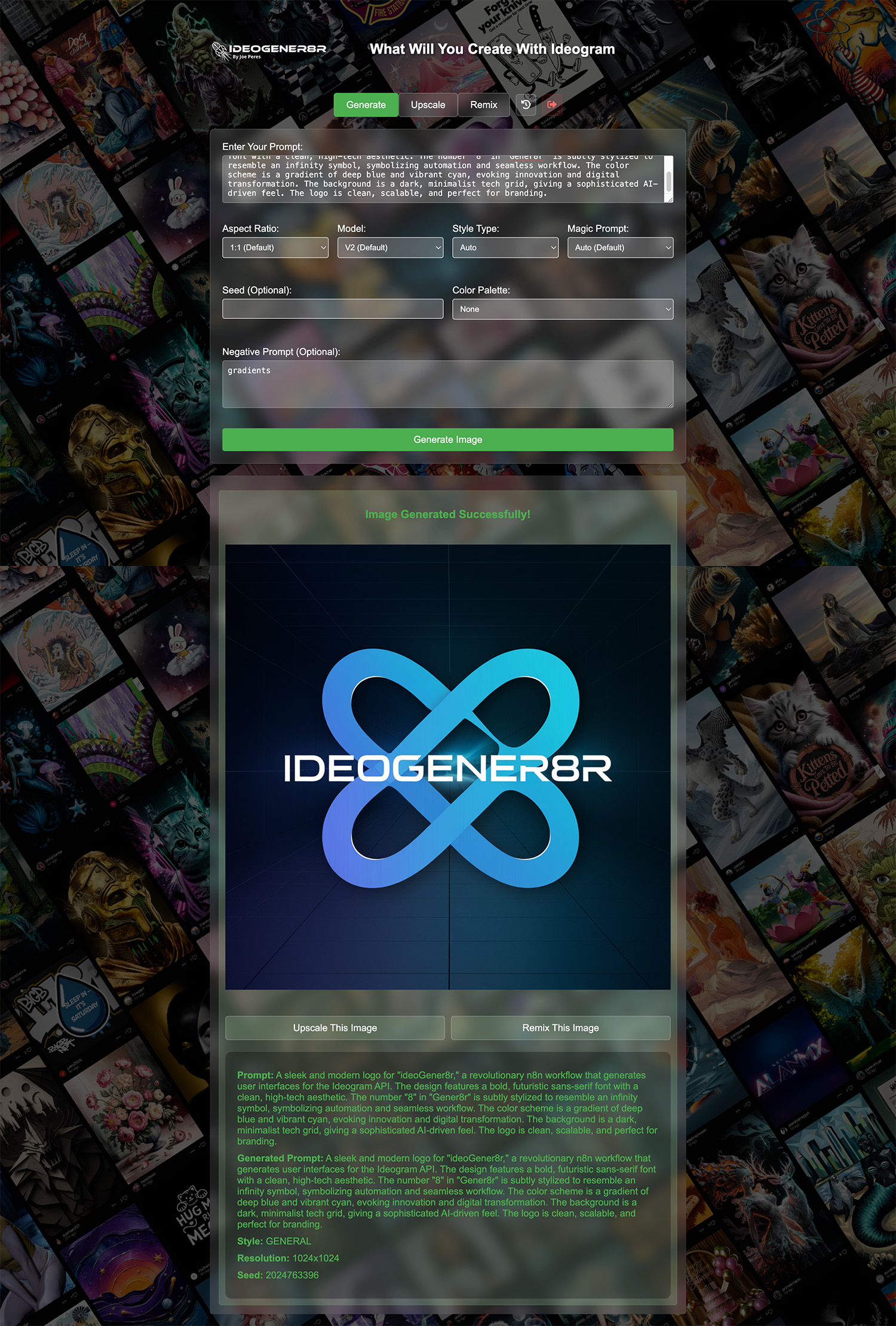 **ideoGener8r** is an n8n template that sets up a self-contained, front-end interface for **Ideogram AI** image generation. It offers a complete workflow to generate, upscale, remix, and store images—entirely on your self-hosted n8n instance. --- ## **Key Benefits & Limited-Time Offer** - **Fully Self-Hosted**: Avoid monthly fees and keep your data private. - **All-in-One**: Generate, remix, and upscale images without third-party tools. - **Streamlined Automation**: Integrates directly with Google Sheets & Drive. - **Sale**: **Save $20** - Get ideoGener8r for just **$27** with coupon code `ILoven8n` (valid until **3/31/2025**). --- ## **Requirements & Overview** 1. **Ideogram AI API Key** - Sign up at [Ideogram AI](https://developer.ideogram.ai/ideogram-api/api-setup) and create an API key. 2. **Google Sheets & Drive** - A Google Sheet for storing metadata. - A Google Drive folder for saving generated images. 3. **n8n Auth Credentials** - **Basic Auth** for the login webhook. - **Header Auth** (Bearer token) for the generation/remix webhooks. With ideoGener8r, you can instantly create a private user interface within n8n to produce AI images on demand, trigger image generation through webhooks, and automatically log data to Google Sheets. --- ## **Required Google Sheet Columns** Your Google Sheet must contain (at minimum) the following columns for proper logging: Check Setup note in workflow for CSV template --- ## **Step-by-Step Setup Instructions** 1. **Import the Template** - Download the JSON file you received upon purchase. - In your n8n instance, go to *Workflows* → *Import*, then upload the JSON file. 2. **Configure Ideogram API** - In n8n, create an HTTP Header Auth credential. - For the “Authorization” header, use `Bearer YOUR_IDEOGRAM_API_KEY`. - Attach this credential to the Ideogram-related nodes (e.g., *IDEOGRAM Image generator*, *Ideogram Upscale*). 3. **Google Sheets Setup** - Copy or create a Google Sheet with the columns listed above. - In the template, locate the Google Sheets “Append” nodes. - Select the correct Sheet, tab, and map each column accordingly. 4. **Google Drive Folder** - Create a Drive folder to store images (sharing permissions are up to you). - In the Google Drive nodes, enter the folder ID to save new images there. 5. **Basic Auth for Login** - Open the *Login Webhook-ideoGener8r* node. - Set it to use Basic Auth and create credentials for a username/password. - This will secure the login route (e.g., `/ideogener8r-login`). 6. **Bearer Token for Generation & History** - Open the “Generation Webhook” (e.g., `/ideogen`) and “History Webhook” (e.g., `/ideogener8r-history`). - Set them to Header Auth and use `Authorization: Bearer <YOUR_SECRET_TOKEN>`. - Any requests to these endpoints must include that token in the header. 7. **Publish & Test** - Activate or publish your workflow. - Go to `/ideogener8r-login`, enter your Basic Auth credentials, and test by generating images. - Verify that images appear in your Google Drive folder, and the metadata is logged in the Google Sheet. --- ## **Ideogram API Details** - **Endpoint**: The template uses Ideogram's `/generate`, `/upscale`, and `/remix` endpoints. - **Headers**: You must provide your API key as a `Bearer` token in the request header. - **Rate Limits**: Check your Ideogram AI account for any usage or rate-limiting policies. --- More info at **[ideoGener8r.com](https://ideoGener8r.com)**
n8n$24.99Auto-translate Incoming Gmail Emails to English with OpenAI GPT-3.5
# Auto-Translate Incoming Emails to English This workflow automatically detects the language of every **new Gmail email** and translates non-English messages into English. The translated email is forwarded to your inbox with a clear [TRANSLATED] subject tag, and a label is added for easy filtering. --- ## How It Works 1. **Gmail New Email Trigger** - Listens for **new unread emails** in your Gmail inbox. - Captures subject, sender, body text, and metadata. 2. **Normalize Email Data** - A **Code node** extracts the raw content from the email. - Strips HTML, normalizes plain text, and prepares data for language detection. 3. **Detect Language (OpenAI)** - Uses **OpenAI GPT-3.5-turbo** to detect the email's language. - If the language is English, the workflow ends. - If not, continues to translation. 4. **Translate to English** - OpenAI translates the email body into clear English. 5. **Prepare Translated Email** - Builds a forwarded email containing: - Original sender & subject - Received date - Message ID - Translated content (with formatting) 6. **Send Translated Email** - A **Gmail node** sends the translated message to your inbox. - Subject is prefixed with `[TRANSLATED]` for easy recognition. 7. **Add Translated Emails Label** - Automatically tags the original message in Gmail with **Translated Emails**. - Helps you filter all auto-translated emails later. --- ## Setup Steps ### 1. Gmail Label - In Gmail, create a new label: Translated Emails - Or update the label in the final Gmail node. ### 2. OpenAI API Key - Get your key from [platform.openai.com](https://platform.openai.com). - Add credentials in n8n. - Uses **GPT-3.5-turbo** (low cost, reliable). ### 3. Gmail OAuth - In n8n, connect your Gmail account. - Requires **read/modify** permissions. --- ## Example Output **Subject:** `[TRANSLATED] Meeting Proposal` **Body:** AUTO-TRANSLATED EMAIL (Original Language: ES) From: juan@example.com Received: 2025-08-29 Message ID: 123456abcdef TRANSLATED CONTENT: Hello, I wanted to ask if we can schedule the meeting for next week. “This email was automatically translated by n8n workflow. With this workflow, every foreign-language email is instantly translated and delivered to you in English - no manual copy-pasting into Google Translate again.
n8n$9.99Automate Email Verification with Icypeas Webhook Integration
This workflow is designed to facilitate the bulk verification of email addresses using the Icypeas API. By automating the process, users can save time and reduce the risk of human error when managing large lists of email addresses. The integration...
n8n$13.82AI-Powered OAuth2 Configuration Discovery with Confidence Scoring
Utilize AI to automatically discover OAuth2 settings such as Authorization URI, Token URI, and Audience, with confidence scoring for reliability assessment.
n8n$9.99Deploy an MCP Server for IPQualityScore API Integration
Set up an MCP server to expose IPQualityScore API operations for AI agents, enabling email, phone, and URL validation.
n8n$9.99Automatically Overlay Text on Images via Webhook Requests
This workflow processes incoming webhook requests to overlay custom text on an image retrieved from the internet, returning the modified image.
n8n$3.99Automated Public Record Email Update Workflow
This workflow automates the process of updating public records via email notifications, enhancing efficiency.
n8n$6.82Bulk Create HeyGen Videos from Google Sheets Entries
Automatically generate HeyGen videos in bulk using new rows from a Google Sheets spreadsheet. This workflow streamlines video creation by leveraging data directly from your spreadsheet.
Make$3.99Automate WordPress Blog Post Creation with ChatGPT
Effortlessly generate and publish engaging blog posts on WordPress using AI-driven completions from ChatGPT. Streamline your content creation process with this automated workflow.
Make$3.99Automated Telegram Chatbot with Memory Storage
This workflow automates interactions on Telegram, integrating AI capabilities for long-term memory and note storage.
n8n$12.99Automate WordPress Post Creation from RSS Feeds with AI-Powered Enhancements
Leverage RSS feeds and AI to automatically generate and publish engaging WordPress posts. This workflow uses ChatGPT to enhance content creation, ensuring seamless integration with WordPress.
Make$4.99Automate Brand Strategy Creation with Anthropic Claude and Google Docs
Leverage Anthropic Claude's AI and Google Docs to automate the creation of a comprehensive brand strategy. This workflow streamlines the process, ensuring your branding efforts are well-documented and easily accessible.
Make$9.99Automate GitHub Issue Management with AI and Pinecone Integration
Enhance your GitHub workflows by automating issue triage and management using AI and Pinecone. This workflow sorts issues by severity, auto-comments, flags spam, and pings teams on Discord or Slack.
n8n$9.99Automate Notion Page Creation from RSS Articles with OpenAI GPT-3 Summaries
Automatically generate Notion pages for new articles from an RSS feed, using OpenAI GPT-3 to create concise summaries.
Make$3.99Transform Books into Social Media Content with AI and Google Drive
Automatically convert books or long documents into over 100 social media post ideas using AI, stored conveniently in Google Drive.
n8n$14.99Automate Content Generation with ChatGPT and HTTP Integration
Streamline your workflow by automatically sending data to ChatGPT for content generation and receiving responses via HTTP, ensuring efficient data exchange.
Make$3.99AI Resume Analysis & Candidate Evaluation with Slack & Sheets
Automates candidate resume evaluation via Slack chatbot using AI agents and Google Sheets. Extracts resume data, matches jobs, scores candidates, and logs results for HR teams.
n8n$22.99Automate Anomaly Detection in Crop Images Using Qdrant and Voyage AI
This workflow automates the detection of anomalous crop images by leveraging Qdrant's vector database and Voyage AI's embedding capabilities. It identifies images that do not match known crop types, enhancing data accuracy and anomaly management.
n8n$14.99Automate Google Sheets Row Updates with ChatGPT Text and Image Generation
This workflow filters Google Sheets rows, generates text and images using ChatGPT, and updates the rows, streamlining dynamic content management.
Make$4.99Automate Scheduled Multi-Photo Posts to Facebook with Cloudinary Integration
This workflow allows users to automate the process of scheduling multi-photo posts on Facebook by leveraging images stored in a Windows directory and utilizing Cloudinary for media management. Users can easily select images, captions, and descript...
n8n$19.99Automate YouTube Comment Responses with AI
The YouTube Comment Responder workflow is designed to streamline the management of YouTube comments by automating the response process. This workflow integrates with Google Drive to handle comment data, evaluates comments for sentiment, and ensure...
n8n$19.99Automate Response Generation with ChatGPT and Webhook Delivery
Leverage OpenAI's GPT-3 to generate responses from two prompts and deliver them through a custom webhook. This workflow is perfect for enhancing customer support or streamlining content delivery.
Make$4.99HubSpot Chat AI Assistant with OpenAI & Airtable
Automates AI-powered responses in HubSpot chats using OpenAI Assistant API and Airtable for thread management, enabling seamless customer interactions.
n8n$24.99
Related categories
Custom AI Systems & Services
Our team of experienced AI builders will help build custom AI systems, workflows, and solutions.
Request Custom Work