Business Operations & ERPs Workflows
Enterprise resource planning and operations
Manage Personal Expenses with Webhooks and Google Sheets Automated Tracker
- How it works: This system functions by receiving expenses via webhook POS. It validates the data, stores it in Google Sheets, and, daily at 8 PM, generates and sends financial summaries. Automatic categorization simplifies the organization of expenses. - Set up steps: Setup involves creating the Google Sheet, configuring the webhook, and defining the categorization rules. The process is quick and intuitive, taking about 10-15 minutes for the system to be ready to receive your expenses.
n8n$9.99Automate ClickUp Time Tracking Sync to HubSpot Projects
This workflow automates the synchronization of time tracked on ClickUp tasks with HubSpot projects, ensuring accurate and up-to-date project metrics without manual effort.
n8n$9.99Streamline Quote Requests with Tally, Airtable, Slack, and Gmail Automation
Automate your quote request process by capturing form submissions, notifying your sales team, storing leads in Airtable, and sending email confirmations—all seamlessly integrated in one n8n workflow.
n8n$9.99Automate Trello Card Deletion for Specific Labels
Streamline your Trello board management by automatically deleting cards labeled 'Mark for Deletion'. This workflow efficiently identifies and removes these cards, ensuring your boards remain organized without manual intervention.
n8n$9.99Automate Daily Task Reminders from Airtable to Slack
Streamline your team's workflow by automatically sending daily task reminders from Airtable to Slack at 9 a.m. This automation ensures that no task is overlooked and keeps your team informed without manual intervention.
n8n$14.99Automate Upwork Job Aggregation and Notification with AI Summaries
This workflow automates the aggregation of Upwork job postings based on your criteria, logs them in Google Sheets, generates AI-based summaries, and sends notifications via email.
n8n$9.99Automate Email Inquiry Handling with AI and Gmail
This n8n workflow automates the processing of inquiry emails using AI to determine customer intent and respond accordingly. It streamlines email handling by analyzing content, checking availability, or processing bookings, and sending personalized responses.
n8n$9.99Create Notes and Comments on Any Odoo Model Record
## Introduction This workflow is designed to create and attach notes or comments to any record in your Odoo instance. It acts as a sub-workflow that can be triggered by a main workflow to log messages or comments in a centralized manner. By leveraging the powerful Odoo API, this template ensures that updates to records are handled efficiently, providing an organized way to document important information related to your business processes. ## Setup Instructions Import the Workflow: Import the provided JSON file into your n8n instance. ## Odoo Credentials: Ensure you have valid Odoo API credentials (e.g., Odoo's Odoo Automation Account) configured in n8n. ## Node Configuration: Verify that the Odoo node (consider renaming it to Odoo Record Manager for clarity) is set up with your server details and authentication parameters. Check that the workflow trigger (When Executed by Another Workflow) is configured to receive input parameters from the parent workflow. ## Execution Trigger: This workflow is designed to be initiated by another workflow. Make sure the main workflow supplies the required inputs. ### Workflow Details Trigger Node: The workflow begins with the When Executed by Another Workflow node, which accepts three inputs: - rec_id: A numeric identifier for the Odoo record. - message: The text of the comment or note. - model: The specific Odoo model (e.g., rs.deployment.action.log) where the note should be attached. ### Odoo Node: The second node in the workflow calls the Odoo API to create a new log message. It maps the inputs as follows: - message_type is set to comment. - model is assigned the provided model name. - res_id is assigned the record ID (rec_id). - body is assigned the message content. ## Additional Information: A sticky note node is included to provide a brief overview of the workflow's purpose directly within the interface. ### Input Parameters Record ID (rec_id): The unique identifier of the record in Odoo where the note will be added. ### Message (message): The content of the comment or note that is to be logged. ### Model (model): The Odoo model name indicating the context in which the note should be created (e.g., rs.deployment.action.log). ## Usage Examples ### Internal Logging: Use the workflow to attach internal comments or logs to specific records, such as customer profiles, orders, or deployment logs. ### Audit Trails: Create a comprehensive audit trail by documenting changes or important events in Odoo records. ### Integration with Other Workflows: Link this workflow with other automation processes in n8n (like email notifications, data synchronization, or reporting) to create a seamless integration across your systems. ### Pre-conditions The Odoo instance must be accessible and correctly configured. API permissions and user roles should be validated to ensure that the workflow has the necessary access rights. The workflow expects inputs from an external trigger or parent workflow. ## Customization & Integration This template offers several customization options to tailor it to your needs: - Field Customization: Modify or add new fields to match your logging or commenting requirements. - Node Renaming: Rename nodes for better clarity and consistency within your workflow ecosystem. - **Integration Possibilities**: Easily integrate this workflow with other processes in n8n, such as triggering notifications or synchronizing data across different systems. This sub-workflow receives data from a main workflow (for example, a record ID, a message, and the Odoo model) and creates a new note (or comment) in the corresponding Odoo record. Essentially, it acts as a centralized point for logging comments or notes in a specific Odoo model, ensuring that the information remains organized and easy to track. Your model must inherit from _inherit = ['portal.mixin', 'mail.thread', 'mail.activity.mixin']
n8n$3.99Edit ClickUp tasks with custom fields using a webhook integration
Automatically update ClickUp tasks with custom fields using a webhook. Trigger updates via CustomWebHook and edit tasks with ClickUps advanced features.
Make$2.99AI Multi-Stop Planner for Circular Logistics with GPT-4o & Open Route API
**Tags**: AI Agent, Supply Chain, Logistics, Circular Economy, Route Planning, Transportation, GPS API ### Context Hi! I'm Samir, a Supply Chain Engineer and Data Scientist based in Paris, and founder of [LogiGreen Consulting](https://logi-green.com). I help logistics teams reduce operational workload and errors by combining **AI automation**, **route optimization APIs**, and **workflow automation**. This workflow is part of a **circular economy project**, where stores return **reusable packaging** (bins, crates, containers) to a central warehouse. > Let's support circular economies with AI-powered automation using n8n! For business inquiries, you can find me on [LinkedIn](https://www.linkedin.com/in/samir-saci) ### Who is this template for? This workflow is designed for logistics teams participating in **circular economy loops**. Let us imagine your transportation company receives this **pickup request**: 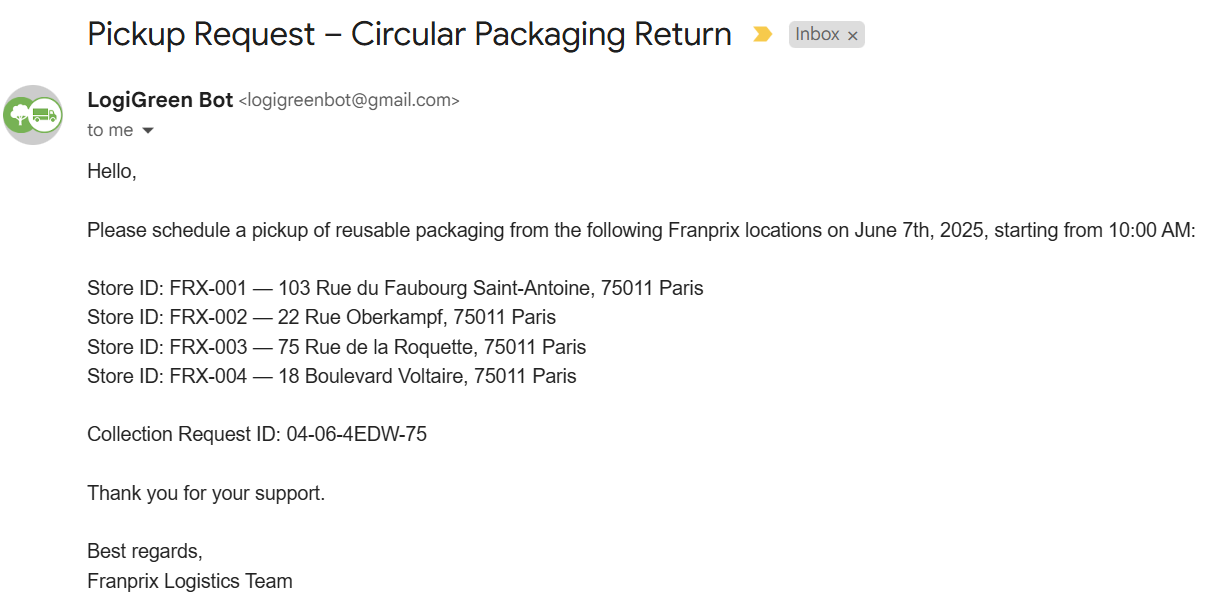 The two **AI Agent nodes** connected to **Openroute Service API** will process the information and reply with the **detailed route plan**. 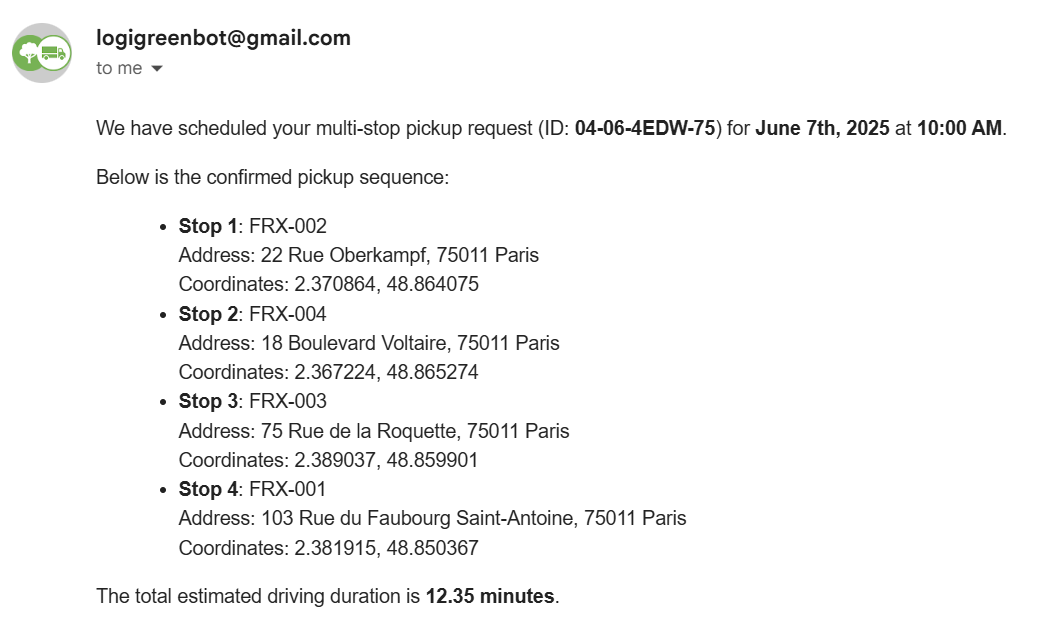 The results include **driving time** and the **optimal sequence** of stops generated by the multi-stop optimization endpoint of the API. ### How does it work? This workflow automates the end-to-end processing of **multi-stop pickup requests for reusable packaging**: - A Gmail trigger listens for collection request emails - AI Agent parses the email into structured data (store ID, address, date) - Each stop is geocoded into GPS coordinates - OpenRouteService **optimizes the stop sequence** using truck-specific routing - A second AI Agent formats a **confirmation email in HTML** with the ordered pickup plan - The reply is sent back with all details including duration and route ### Steps: 1. Trigger on a new Gmail message 2. Extract data using AI Agent (e.g., stores, addresses, times) 3. Store raw and processed data in Google Sheets 4. Enrich with GPS coordinates 5. Optimize route using OpenRouteService (truck profile) 6. Format the confirmation using an AI Agent 7. Send reply to requester with route and timing 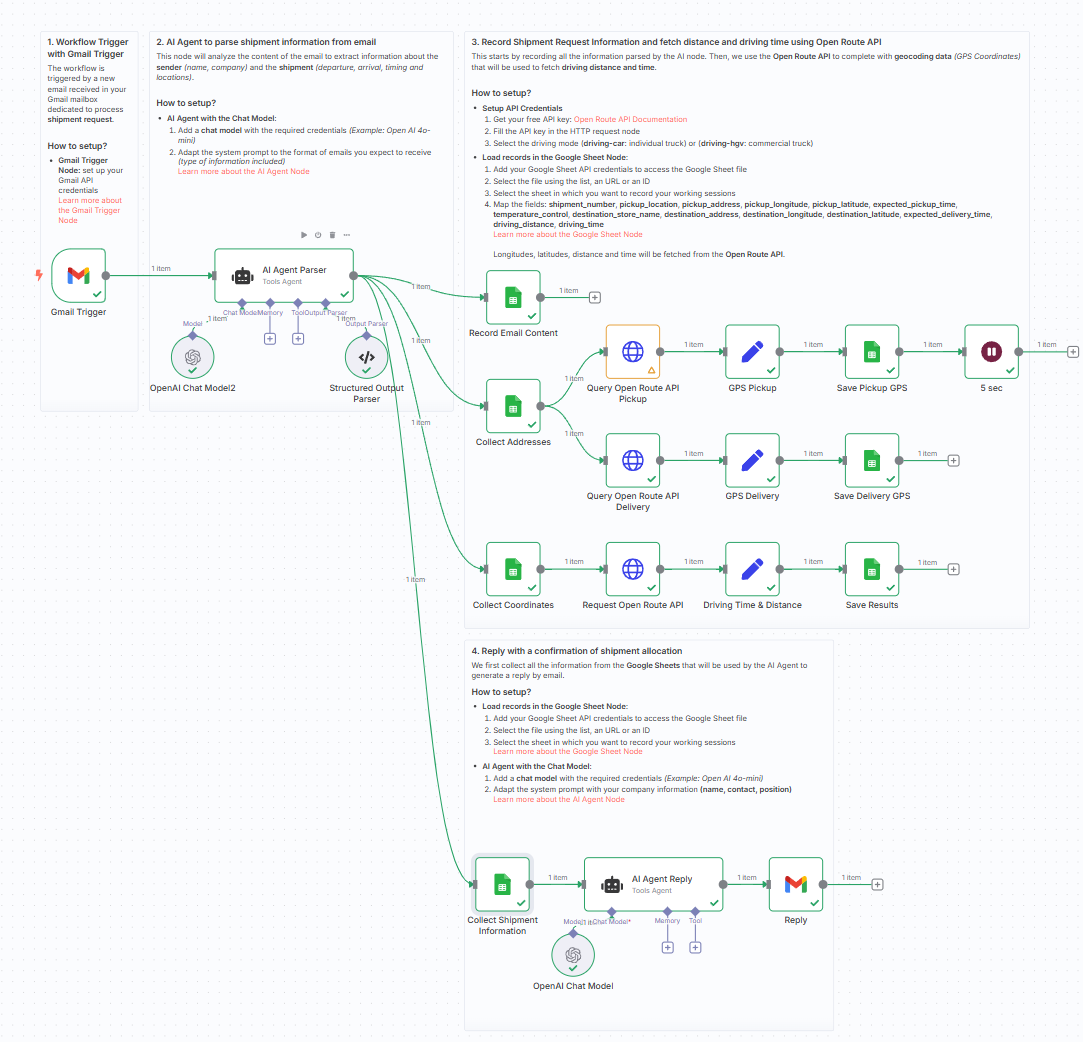 ### What do I need to get started? You'll need: - A **Gmail account** to receive collection requests - A **Google Sheet** to store and review data - A free [OpenRouteService API key](https://openrouteservice.org/dev/#/signup) - Access to OpenAI for using AI Agent nodes - Sample pickup request emails to test ### Next Steps - Use the sticky notes inside the n8n canvas to: - Plug in your Gmail and OpenRouteService credentials - Try with a sample store collection email - Validate the confirmation format and route accuracy *This template was built using n8n v1.93.0* *Submitted: June 7, 2025*
n8n$14.99Extract Data from Trip Receipts with GPT-4.1-mini, Google Sheets & Email Notifications
# Automated Expense Reporting Workflow With GPT-4.1-mini ## ☀ Who's it for This workflow is designed for employees who need to submit expense claims for business trips. It automates the process of extracting data from receipts/invoices, logging it to a Google Sheet, and notifying the finance team via email. Ideal users: - Employees submitting business trip expense claims - HR or Admins reviewing travel-related reimbursements - Finance teams responsible for processing claims ## ℹ How it works / What it does 1. **Employee submits a form** with trip information (name, department, purpose, dates) and uploads one or more receipts/invoices (PDF). 2. **Uploaded files are saved to Google Drive** for record-keeping. 3. Each PDF is passed to a **DocClaim Assistant agent**, which uses GPT-4.0 and a structured parser to extract structured invoice data. 4. The data is **transformed and formatted** into a standard JSON structure. 5. Two parallel paths are followed: - Invoice records are appended to a **Google Sheet** for centralized tracking. - A detailed **HTML email** summarizing the trip and expenses is generated and sent to the **finance department** for claim processing. ## ✅ How to set up 1. **Create a form** to capture: - Employee Name - Department - Trip Purpose - From Date / To Date - Receipt/Invoice File Upload (multiple PDFs) 2. **Configure file upload node** to store files in a specific Google Drive folder. 3. **Set up DocClaim Agent** using: - GPT-4.0 or any LLM with document analysis capability - Output parser for standardizing extracted receipt data (e.g., vendor, total, tax, date) 4. **Transform extracted data** into a structured claim record (Code Node). 5. **Path 1**: Save records to a Google Sheet (one row per expense). 6. **Path 2**: - Format the employee + claim data into a dynamic **HTML email** - Use `Send Email` node to notify the finance department (e.g., `finance@yourcompany.com`) ## 📋 Requirements - n8n running with access to: - Google Drive API (for file uploads) - Google Sheets API (for logging expenses) - Email node (SMTP or Gmail for sending) - GPT-4.0 or equivalent LLM with document parsing ability - PDF invoices with clear formatting - Shared Google Sheet for claim tracking - Optional: Shared inbox for finance team ## © How to customize the workflow - **Add approval steps**: route the email to a manager before finance - **Attach original PDFs**: include uploaded files in the email as attachments - **Localize for other languages**: adapt form labels, email content, or parser prompts - **Sync to ERP or accounting system**: replace Google Sheet with QuickBooks, Xero, etc. - **Set limits/validation**: enforce max claim per trip or required fields before submission - **Auto-tag expenses**: add categories (e.g., travel, accommodation) for better reporting
n8n$14.99Automate Contact Form Submission On Company Website
This automation starts when a new company is added in HubSpot. It then uses AI to draft a contact message and requests human approval via Slack. Once approved, it runs a task to submit the companys contact form. After an eight-minute delay, it checks if the task is completed and updates the Sales Properties: Lead Status field in HubSpot to Attempted to Contact.
Activepieces$2.99Create new Colligso TextIn customers from Typeform responses
Every time a new Typeform response is submitted, Make will automatically create a new Colligso TextIn customer.
MakeFreeAutomate Client Email Logging with AI and Google Sheets
Streamline your client communication management by automatically logging emails into Google Sheets. This workflow identifies client names using AI and organizes email data for easy access and analysis.
Activepieces$2.99Ultimate AI Chatbot for YouTube Summarization & Analysis
AI-powered n8n workflow that fetches YouTube video transcripts and details, enabling conversational analysis and summarization via an intelligent agent.
n8n$22.99AI Knowledge Assistant: Sheets, OpenAI, Supabase Vector Search
Conversational AI system using Google Sheets for chat input, Supabase vector search for knowledge retrieval, OpenAI for responses, and SerpAPI for web search with memory.
n8n$24.99AI-Powered WordPress Content Generator with DeepSeek R1 & Images
Automates SEO-optimized article generation using DeepSeek AI, publishes to WordPress with featured images from OpenAI, and updates Google Sheets. Ideal for content marketers saving hours on blogging.
n8n$24.99Daily Israeli Economic Newsletter via RSS & GPT-4o
Automates daily Hebrew economic news summary from Calcalist and Mako RSS feeds using GPT-4o, generating RTL HTML emails for Israeli market professionals.
n8n$22.99Extract Driver License Data from Google Drive Uploads to Sheets
Monitors Google Drive for driver license image uploads, extracts key data like name, DOB, and license number using VLM Run AI OCR, then saves to Google Sheets for easy access.
n8n$14.99Automated Customer Service Tickets with Asana & WhatsApp
Automates customer support by creating Asana tasks from form submissions and sending instant WhatsApp confirmations.
n8n$12.99Academic Research Search Across 5 DBs with PDF Vector & Exports
Searches PubMed, ArXiv, Google Scholar, Semantic Scholar, and ERIC simultaneously, deduplicates results, and exports formatted bibliographies via PDF Vector.
n8n$24.99Add Google Calendar events to Redtail CRM as activities
Make will watch for new events in your specified Google Calendar and create activities in Redtail CRM using information received.
Make$4.99Multilingual YouTube Metadata Translator with Gemini AI & Sheets
Automates translating YouTube video titles, descriptions, and tags into multiple languages using Gemini AI, publishes directly to YouTube, and tracks everything in Google Sheets for efficient global expansion.
n8n$24.99Extract & Enrich LinkedIn Comments to Leads with Apify → Sheets/CSV
Automates scraping LinkedIn post comments via Apify (no login needed), enriches profiles with detailed data, and exports leads to Google Sheets or CSV for easy CRM integration.
n8n$24.99
Related categories
Custom AI Systems & Services
Our team of experienced AI builders will help build custom AI systems, workflows, and solutions.
Request Custom Work