Fix Jupyter Notebook Rendering Error: 'state' key missing from 'metadata.widgets'
Error message
Jupyter Notebook Rendering Error: 'state' key missing from 'metadata.widgets' despite no widgets used (Kaggle & GitHub)
Diagnosis
When you push a Jupyter notebook (.ipynb file) to GitHub and see the error message "There was an error rendering your Notebook: the 'state' key is missing from 'metadata.widgets'. Add 'state' to each, or remove 'metadata.widgets'", it means GitHub's built-in notebook renderer has encountered a malformed or incomplete metadata.widgets section in your notebook's JSON structure. This error occurs even when you have never used interactive widgets like ipywidgets. The most common cause is that a library or tool you used (e.g., Hugging Face transformers, Plotly, or even a recent version of nbformat) has automatically inserted a widgets key into the notebook metadata without populating the required state sub-key. This guide synthesizes solutions from the Stack Overflow community and the official GitHub issue tracker to help you fix the rendering and prevent it from recurring.
What Causes This Error
According to the accepted answer on Stack Overflow (Wayne, score 1, accepted) and the original questioner's description, the error has several distinct causes:
-
Automatic metadata injection by libraries: Even if you never explicitly use
ipywidgets, some libraries (especially those related to LLMs like Hugging Face transformers, or visualization libraries like Plotly) may write awidgetskey into the notebook metadata during execution. Themetadata.widgetsobject is expected to contain astatekey, but if the library only writes an empty or partial structure, GitHub's renderer fails. -
Transient GitHub rendering issues: The accepted answer notes that "this seems to be a transient issue that does resolve itself over time." The GitHub issue thread jupyter/notebook#3555 documents multiple occurrences where the same error appeared and then disappeared without any user action. This suggests that GitHub's rendering infrastructure sometimes has intermittent bugs.
-
Incomplete metadata cleanup: The original questioner tried clearing all outputs (Kernel -> Restart & Clear Output) before pushing, but the error persisted. This indicates that the problematic metadata is not always removed by clearing outputs alone. The metadata may be embedded in the notebook's JSON at the cell level or the notebook level, and clearing outputs only removes cell outputs, not metadata.
-
Version-specific behavior: The original questioner reports using
nbformat v5.10.4andnbconvert v7.16.6. These versions may have introduced changes in how metadata is written or read, potentially causing thewidgetskey to appear even when no widgets are used.
How to Fix It
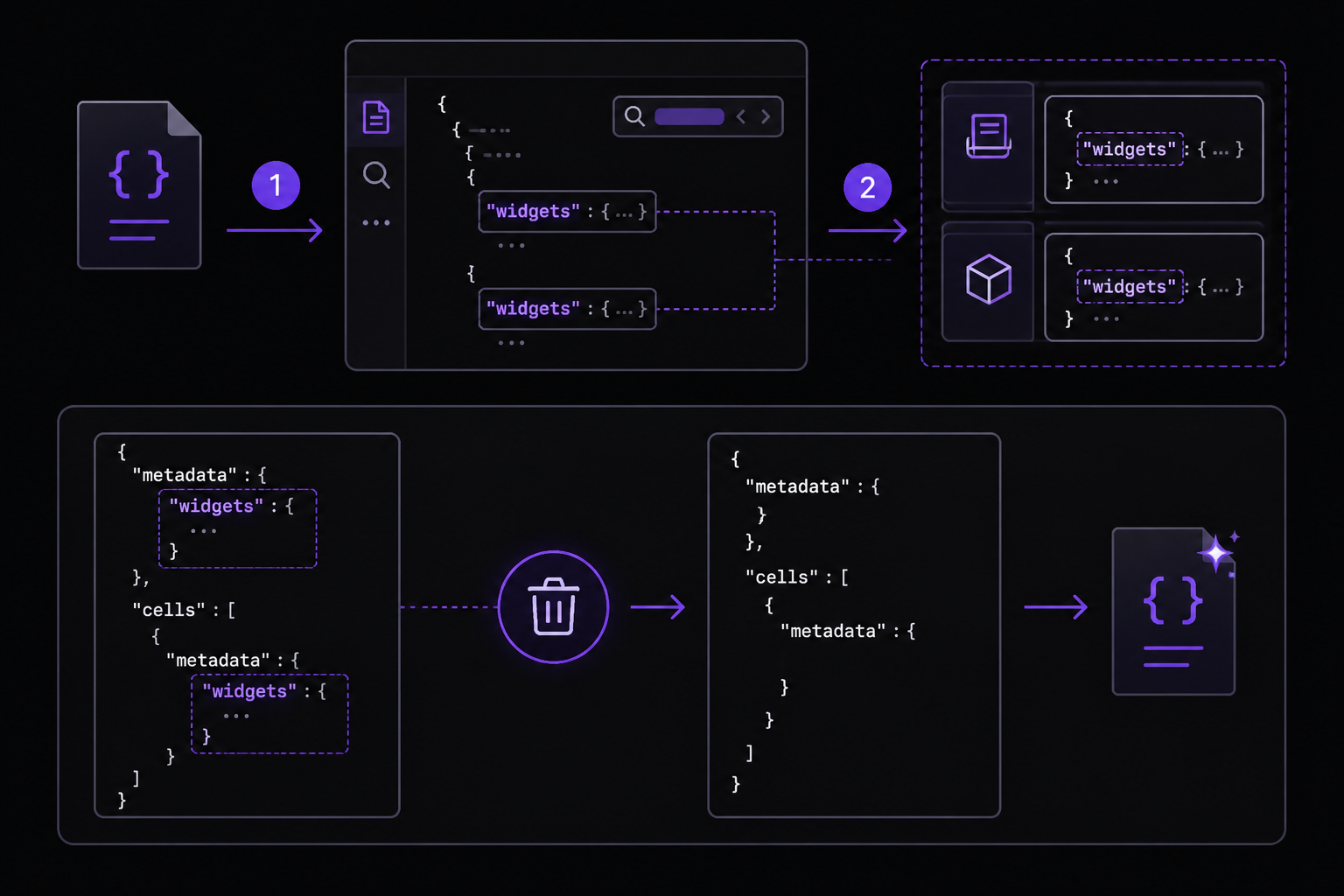
Solution 1: Manually remove the widgets key from the notebook JSON (Most reliable)
This is the most direct fix, confirmed by multiple community members in the GitHub issue discussion. You edit the raw .ipynb file to remove the problematic key.
Steps:
- Open your notebook in a text editor (VS Code, Notepad++, or any plain text editor). Do not open it in Jupyter for this step.
- Search for
"widgets"in the file. You will likely find it in two places:- At the notebook level:
"metadata": { "widgets": { ... } } - Possibly at individual cell levels:
"metadata": { "widgets": { ... } }
- At the notebook level:
- Delete the entire
"widgets"key-value pair from each location. For example, change:
to:"metadata": { "widgets": { "application/vnd.jupyter.widget-state+json": {} }, "kernelspec": { ... } }"metadata": { "kernelspec": { ... } } - Save the file and push it to GitHub again. The notebook should now render correctly.
Why this works: By removing the widgets key entirely, you eliminate the source of the error. GitHub's renderer only checks for the state key if the widgets key exists. If the key is absent, the renderer skips the check entirely.
Solution 2: Use nbviewer as an alternative renderer (Community-recommended workaround)
The accepted answer strongly recommends using nbviewer instead of GitHub's built-in renderer. nbviewer is the official Jupyter community tool for sharing static notebooks. It handles many features that GitHub's renderer does not, including interactive Plotly plots, scrolling code cells, and K3D 3D plots.
Steps:
- Push your notebook to a public GitHub repository.
- Copy the URL of the notebook file on GitHub (e.g.,
https://github.com/username/repo/blob/main/notebook.ipynb). - Paste that URL into nbviewer's input field at https://nbviewer.jupyter.org/.
- nbviewer will render the notebook and give you a shareable link. Share that link instead of the GitHub page.
Why this works: nbviewer is designed specifically for rendering notebooks and is more tolerant of metadata quirks. It does not require the state key to be present. As the accepted answer notes, "The view at GitHub is nothing more than a quick-preview meant for developers. It doesn't support a lot of features of notebooks, such as interactive Plotly plots, and has faulty rendering in a number of ways."
Solution 3: Use nbsanity for better rendering (Community-reported alternative)
A newer tool called nbsanity (source code at https://github.com/hamelsmu/nbsanity) was created by Hamel Husain specifically to address GitHub's poor notebook rendering. It uses Quarto as the renderer, which provides a more consistent viewing experience across platforms, including mobile.
Steps:
- Go to https://nbsanity.com.
- Paste the URL of your GitHub-hosted notebook.
- nbsanity will render it and provide a shareable link.
Why this works: nbsanity is built to handle the exact metadata issues that cause GitHub's renderer to fail. It also respects Quarto directives if your notebook contains them.
Solution 4: Wait for the transient issue to resolve (If time permits)
If you are not in a hurry, the accepted answer notes that this error is sometimes transient. The GitHub issue jupyter/notebook#3555 contains reports from users who saw the error disappear after a few hours or days without any action.
Steps:
- Push your notebook to GitHub.
- Wait 24-48 hours.
- Check the rendering again. If it works, no further action is needed.
Why this works: GitHub's rendering infrastructure may have intermittent bugs that get resolved on their end. This is not a reliable fix but is worth trying if you cannot modify the notebook.
If Nothing Works
If none of the above solutions resolve the issue, consider these escalation paths:
-
File a GitHub issue: The official issue tracker for this problem is jupyter/notebook#3555. Add your experience to the thread. Include your
nbformatandnbconvertversions, the exact error message, and whether you are using any libraries that might inject metadata. -
Use a different platform: If you need to share notebooks with non-developers, the accepted answer strongly advises using nbviewer exclusively. For internal sharing, consider using Google Colab or a local Jupyter server with
ngrokfor temporary public access. -
Strip all metadata programmatically: As a last resort, you can write a script to remove all metadata from your notebook before pushing. This is aggressive but effective. Example Python script:
import json

with open('notebook.ipynb', 'r') as f:
    nb = json.load(f)

# Remove notebook-level metadata
nb['metadata'] = {}

# Remove cell-level metadata
for cell in nb['cells']:
    cell['metadata'] = {}

with open('notebook_clean.ipynb', 'w') as f:
    json.dump(nb, f, indent=2)
Warning: This removes all metadata, including kernel information and language info. The notebook will still render, but you may need to re-select the kernel when opening it in Jupyter.
How to Prevent It
-
Use nbviewer for sharing from the start: The accepted answer notes that "Up until a few years ago, GitHub didn't even try rendering the notebook if it had more than a few cells of code. That was better in the long run because Jupyter users realized more quickly they needed to point nbviewer at the GitHub page to see the notebook reliably." Adopt nbviewer as your primary sharing method to avoid GitHub's rendering issues entirely.
-
Inspect notebook metadata before pushing: Before committing a notebook to GitHub, open it in a text editor and check for the
widgetskey. If it exists and is empty or incomplete, remove it manually. -
Keep libraries updated: The original questioner used
nbformat v5.10.4andnbconvert v7.16.6. Check for newer versions of these libraries, as later releases may fix the automatic metadata injection issue. Run:
pip install --upgrade nbformat nbconvert
-
Avoid unnecessary cell metadata: Some libraries add metadata to individual cells. If you notice this happening, consider using a clean kernel or a fresh environment for final notebook preparation.
-
Use nbsanity as a proactive alternative: If you frequently share notebooks on GitHub, consider using nbsanity as your default viewer. It is designed to handle the exact metadata issues that cause GitHub's renderer to fail.
The #1 AI Newsletter
The most important ai updates, guides, and fixes — one weekly email.
No spam, unsubscribe anytime. Privacy policy
Related Error Solutions
Keep exploring
AI resources
Latest AI answers
Skip the manual work
Ready-made AI workflows and automation templates — import and run instead of building from scratch.